🌌 Elevate your game with cosmic precision and style!
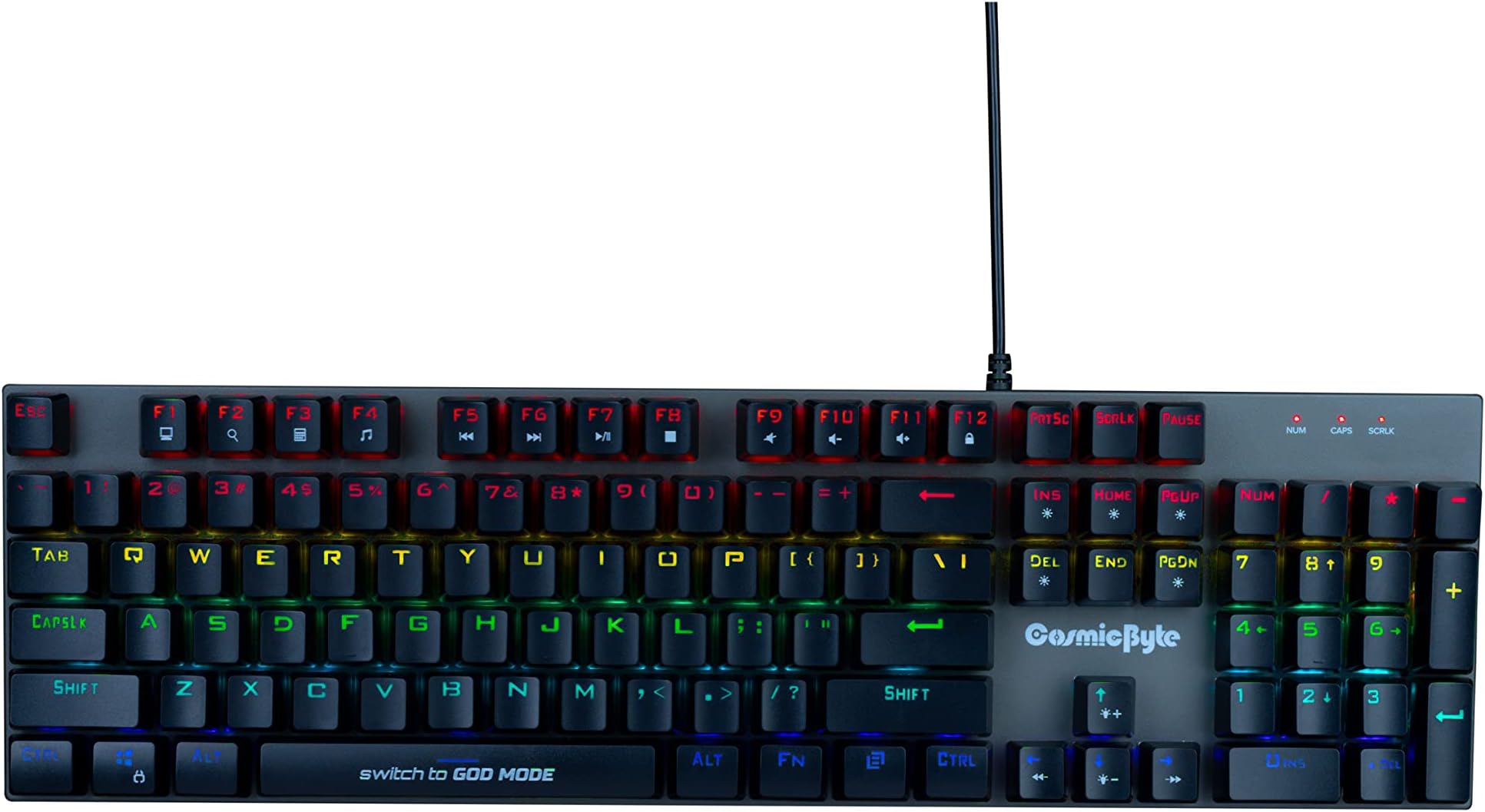
The Cosmic Byte CB-GK-28 Vanth is a full-size mechanical gaming keyboard featuring 104 keys with durable Red Outemu switches rated for over 50 million keystrokes. It offers 20 adjustable RGB backlight effects and 8 dedicated game modes, housed in a sturdy metal body. Designed for gamers and professionals alike, it supports anti-ghosting for seamless multi-key input and customizable lighting profiles, all powered via USB for Windows and Mac compatibility.
| ASIN | B09MR2D475 |
| Are Batteries Included | No |
| Brand | Cosmic Byte |
| Color | Black |
| Customer Reviews | 4.1 4.1 out of 5 stars (754) |
| Date First Available | 30 December 2021 |
| Hardware Platform | PC |
| Item Weight | 670 g |
| Item model number | CB-GK-28 |
| Manufacturer | Cosmic Byte |
| Operating System | Windows 10 |
| Power Source | USB power |
| Product Dimensions | 10 x 10 x 10 cm; 670 g |
| Series | Vanth |
S**Y
• Performance- Performance will be the same irrespective of what keyboard you have, but the thing matters is the responsiveness, sound, feedback etc. • Keys and personal experience- keys are good at this price range and are pretty responsive. You will get 1000hz of polling rate. This is my first mechanical keyboard, before I was using a membrane keyboard. It is much satisfying to type than membrane keyboard. Sound is as expected. Initially, while typing there is a high chance of getting some random keys being triggered as the keys are quite raised but you will get adjusted after somedays. So I would recommend to use a keyboard wrist rest for mechanical keyboards. But after all it is upto you. • Lighting-Lighting is ok, but is it not TRUE RGB, you can't assign specific colour to the keys, there is a specific light for every row, but there are 20 light modes. Brightness is noticeably low in daylight but at night it's good. • Sound-If you are confused about the sound then don't worry, it doesn't make much sound if you type lightly. But if you type by pressing hardly then the red keys also make noise, but blue keys create more sound than red keys, if you want sound and best typing experience, then go for blue keys. But if you want less sound then opt for red keys. • But which keys for gaming? Blue switches have good tactile feedback than red, which gives more satisfaction. So bcz of the tactile feedback and the sound, blue switches feels more satisfying. Red switches are smooth, which requires less effort to press and is good for fast movements like esports. Hence red switches are more responsive than blue switches. Now it is upto you.. • Weight- It's heavier than membrane keyboards because you get a metal body which is absolutely fantastic. I have not weighted it but it feels much heavy. • Some TIPS- If you need to change the keys then don't pull the keys with the keypuller, as the keys are soldered on the pcb(i had checked it), it could damage your keyboard. so if your keys stopped working and you need to change the keys then you need to open the keyboard, desolder the keys and then you can change the keys. though it is mentioned that is it hot swappable but it is actually not. Maybe my unit was faulty but it maynot happen with your unit. Like one of my friend has blue switch variant and his keys arent soldered, it can be pulled. So make sure to check that out before changing. • Disadvantages- One thing I would like to mention that I am not satisfied with the grip, the right side of the keyboard slips sometimes, and the grip also becomes less when the keyboard is raised. But this may not happens with your ones. Another major disadvantage is that when you turn on the windows windows lock, there is no indicator. A very low light glows at the numlock, caps and scroll lock section, but its almost impossible to spot that unless you look very minutely. And also there is no indicator of the all keyboard lock. And there is no FN lock key. I think instead of whole keyboard lock, they should give FN lock key. It is uncomfortable using the media keys like volume up volume down. Everytime you have to press and hold the FN key. • My suggestions- Definitely this keyboard is good at its price range and you cannot expect everything to be included. If you get this keyboard within 1800, then definitely buy it. But if it is of 2k or above then I would recommend that to slightly increase the budget and buy keyboards of 2.5k range and the redgear shadow blade. If you can afford that then definitely buy the redgear instead of this one. But if you are tight on your budget then buy this one. Edit: 1.5 years passed still working fine.. no issues..
A**Y
People with 5 stars have probably not used this keyboard much long. Don't believe youtubers also. I have used 2 of this same keyboard one I bought in 2022 (same keyboard with non swappable switches) and stopped working after warranty was out. This is second one bought in 2023 Dec and already had problems so once I got it repaired under warranty. But now again causing problems and is out of warranty. Changing switches doesn't help and keyboard will stop functioning before switches can be even changed so that is a complete useless gimmick feature. First time I thought its is a problem with my unit, but I have used 2 of these now and both not even lasting 2 years. Youtubers hyping this are not actually using the keyboard and reviewing only based on first impressions. Rather spend some more and get a better keyboard that lasts long or spend lesser and get cheap or non mechanical. Complete waste of money. Typing experience is also not that great and single click will give you multiple inputs many times (this is when the keyboard is fine)
H**A
As I sit down to write this review, my fingers dance across the keys of my trusty mechanical keyboard, each press accompanied by a satisfying click that resonates through the room. Three months into my journey with this keyboard, it's time to share my thoughts on what has become an integral part of my typing experience. Red Key Caps: A Symphony of Sound One of the standout features of this mechanical keyboard is its red key caps. Not only do they add a splash of color to the design, but they also produce a sound that I find particularly delightful. Each keystroke emits a crisp, satisfying click, providing auditory feedback that enhances the typing experience. Whether I'm typing up a document or engaging in an intense gaming session, the sound of the keys adds an extra layer of immersion that I truly appreciate. Comfortable Typing Experience Beyond the auditory pleasure of the red key caps, typing on this keyboard feels incredibly smooth and comfortable. The keys are responsive without being overly sensitive, allowing for precise input with minimal effort. The tactile feedback provided by the mechanical switches makes each keystroke feel deliberate and satisfying, resulting in a typing experience that is both efficient and enjoyable. Sturdy Design In addition to its excellent performance, this mechanical keyboard boasts a sturdy design that exudes durability and reliability. Constructed from high-quality materials, it feels solid and well-built, capable of withstanding the rigors of daily use without showing any signs of wear or tear. Whether I'm typing at my desk or transporting the keyboard to a different location, I have confidence in its ability to withstand whatever challenges come its way. Cool Lighting Effects For those who enjoy a bit of flair in their setup, this mechanical keyboard offers customizable lighting effects that add a touch of personality to any workspace. With a variety of preset patterns and the ability to create custom lighting profiles, users can tailor the aesthetics of their keyboard to suit their individual preferences. Whether you prefer a subtle glow or a pulsating rainbow display, the lighting options are sure to impress. Final Thoughts Overall, my experience with this mechanical keyboard has been overwhelmingly positive. From the satisfying sound of the red key caps to the comfortable typing experience and sturdy design, it ticks all the boxes for what I look for in a keyboard. Whether you're a writer, gamer, or casual user, this keyboard offers a premium typing experience that is sure to enhance your productivity and enjoyment. And if you're someone who appreciates a bit of visual flair, the customizable lighting effects are the cherry on top of an already exceptional package.
K**2
model : cb-gk-28 (otemu red hotswappable upgraded) aka vanth There is a lot to talk about this keyboard so I would try to keep sentences short and to the point. TLDR - Basic Overview of my review : I like the Keyboard very much considering the feature set it is offering vs the price it is available at. So overall a highly recommended keyboard for beginners or even intermediates. Just don't expect any brand support as they clearly dont acknowledge any QA. And keep the price in mind. More in detail below. pros :- 1. Price - Absolute Value for money. This is cheapest mechanical keyboard with all the features enlisted compared to any other brand. My order was 1749₹ for referene. 2. Backlight - Easy to type in low light or night time without a room light , in short night time usage without disturbing people around. 3. Sound - The otemu red switches (claimed in product description) are very nice low sounding more towards Thock sound pattern which will not disturb anyone around. 4. Size - Full size keyboard , no compromise in numpad, or the home keys. The arrow keys are also full sized. 5. N key rollover - by default this does not function out of the box. But it exists. Use any keyboard tester website of your choice to check if your keyboard has 6 key limit. if so press Fn+ScrLk (function and scroll lock) to toggle n key rollover on or off based on your preference and use case if needed. 6. Win Key Lock - Although windows can still spoil your gaming experience or any other experience by slappign you popups anytime (those system popups about update or any other things), but still Win key being close to Ctrl and Shift is usually accidentally pressed and thus loosing focus of your active game/application window resulting in missing that perfect headshot. Any ways you can lock Win key to prevent this using Fn+Win combination. 7. Full keyboard Lock - can be used when cleaning your keyabord or when trying to grab your keybaord and move or reposition or from any other accidental keypresses. 8. Hot Swappable - yes the keys are hot swappable and are 3 pin configuration so if you are plannign to use 5 pin ones you need to chop the extras but still be able to use or swap keys. 9. Media keys and other utils like calculator, search, explorer(my computer), msuic player and play/pause stop rewind and forward along with volume mute, increase and decrease shortcuts are mapped in F keys row to be used with Fn key. Now lets talk about the devil's side : cons :- 1. RGB back lighting - the lights as marketed are not RGB lighting, god knows when manufacturers will stop misleading usign such marketing terms. The lights are fixed and mixed for each row. From top starting from red moving to yellow and then green towards blue at the end rows as seen in the images. This is not, I repeat NOT an RGB keyboard. Its just misleading. With this comment I would like to also point this to the manufacturer to stop misleading people. Your product is already good in its own respect, don't spoil it with such cheap marketing. yes it does have some effects built in and you need to choose from them only. Thats a bummer. 2. user manual - The user manual is a piece of paper folded in to sides with some information but mostly inaccurate and with mistakes. We confirmed this from the customer care over email communication as well as telephonic conversation that yes they are mistakes and misprints in user manual. discussed about error in explanations below as we reach that point about indicator led, locking keyboard, customer care etc experience below. 3. no software control - at this price you should not expect this but still there is no control over the keyboard using any software or any GUI based method. no per key rgbgb since its not an RGB keyboard, its fixed led pattern keyboard. 4. indicator led - we contacted customer care to report that manual says windows lock indicator light however there was none and said it was mistake in user manual, okay but then you post the mistaken data in product catalog and everywhere else. The same data is everywhere in the product details section. Here comes a TWIST. Actually when you do a windows lock , there is a slight change in light, it bleeds through other indicator lights as shown in the video posted along this review. They just forgot to put a hole in the shell to let that led poke through is my assumption since I have not dis assembled the keyboard yet to verify. However the customer care response after reporting this acknowledges that this is normal behavious and is in all of their models(they emailed reply saying in reposnse to our complaint confirming this) thus they know this is a faulty behavior and irony is they say it is meant to be like this and is not a defect in the product. 5. lock keys - there are two different type of lock. One is to lock the complete keyboard and other is to lock Win key only. but there is no mention on how to use them. Salt to injury is there are two separate lock keys syymbol. One is on win key and other is on F12. F12 will lock whoel keyboard while win wil lock win. Issue is that this infomration is not clearly mentioned anywhere. just that this win key lock exists is mentioned. we got this info from customer care. 6. privacy (sujective choice) - while contacting customer care they were asking about your phoen number and other details. In case you are not comfortable giving it, they never considered that option to offer unless you mnetion such which should be a default practise and unless a direct one to one communication is needed only then phone number or any other personal details shoule be sought otherwise mere email or website responses should be enough. Above all they created a new account when they simply asked us to send email about the complaints we had about product. They used our email and created an account on their website on their own without our consent and never mentioned this while giving us their email. 7. N key rollover - its not on by default. it is only 6 key rolloevr out of the box and also no mention on how to activate this feature. Also even after disabling the keybaord fully(Fn+F12), although the keyboard does not input anything to system but the lighting goes haywire on the keyboard. it randomly changes to some other mode or sometimes still works with pattern changing shortcuts. It messes us our set pattern and then you need to set that again. 8. Build Quality - the build quality looks fine unless you start lookign closely. The keys are not at even heights even in the same row. The keys on the same rows are at diffferent height. Just worth mentioning the keyboard profile is defaulted to contoured and yes even considering that I mention same row keys being at different heights. bugs : 1. in case you lock your keyboard using Fn+F12 which is a complete keyboard lock, and post unlock your if windows key does not unlock then try pressing windows key unlock shortcut (Fn+WIN) again. Yeah its a bug where your complete keyboard lock key also locks windows implicitly but does not unlock it. We first thought that it remembers last state of the windows key lock status but it is not so. Also this is not stable, it sometimes occurs while other times it behaves normal(remembers lock state and unlocks same state). 2. led patterns shortcut keys works even after full keyboard lock. 3. the windows lock key indicator does light up under the shell and peeks from other indicator light holes but does not have its own thus making it a waste as well as raises questions on quality assurance or quality checks being next to none. also the manual mentions no num lock key indicator led but it is present while mentions win lock key indicator led while it does not exist or exist but is not visible because of mismatching shell. 4. random backlight pattern reset or change without any human interaction(ghosting). 5. No visual indicator of keyboard lock or windows lock or unlock status.
A**H
Good product for long time but RGB stop working after 5 to 6 months keyboard response is good the sound of keys is also decent although a little bulky but good for professional work Typing feel is awesome
Trustpilot
4 days ago
1 week ago