🎮 Own the game with lightning-fast precision and featherlight freedom!
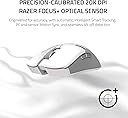
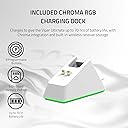
The Razer Viper Ultimate is a cutting-edge wireless gaming mouse featuring Hyperspeed Wireless Technology for ultra-low latency, a 20,000 DPI optical sensor for exceptional accuracy, and an ultra-lightweight 74g design for maximum agility. Its ambidextrous form factor with programmable buttons suits all gamers, while the 70-hour battery life and RGB charging dock ensure uninterrupted, stylish performance.


| ASIN | B09TG6KG2T |
| Additional Features | Lightweight, Programmable Buttons, Wireless |
| Antenna Location | Gaming |
| Are Batteries Included | Yes |
| Are Batteries Required | Yes |
| Battery Average Life | 70 Hours |
| Best Sellers Rank | #1,430 in Video Games ( See Top 100 in Video Games ) #84 in PC Gaming Mice |
| Brand | Razer |
| Built-In Media | Razer optical mouse switches & RGB Charging Dock |
| Button Quantity | 8 |
| Color | Mercury White |
| Compatible Devices | Personal Computer |
| Connectivity Technology | Wireless |
| Customer Reviews | 4.5 out of 5 stars 17,035 Reviews |
| Embellishment Feature | LED |
| Enclosure Material | Plastic |
| Hand Orientation | Right |
| Hardware Platform | PC |
| Item Dimensions L x W | 5"L x 2.6"W |
| Item Weight | 2.72 ounces |
| Manufacturer | Razer |
| Model Name | Viper Ultimate |
| Model Number | RZ01-03050400-R3U1 |
| Mouse Maximum Sensitivity | 20000 Dots per Inch |
| Movement Detection | Optical |
| Movement Detection Technology | Optical |
| Number of Batteries | 1 Lithium Ion batteries required. (included) |
| Number of Buttons | 8 |
| Operating System | Windows |
| Power Source | Battery Powered |
| Range | 10.0 meters |
| Special Feature | Lightweight, Programmable Buttons, Wireless |
| Style Name | Mouse + Dock |
| Theme | Gaming |
| UPC | 810056145279 |
| Unit Count | 1.0 Count |
| Warranty Description | 2 year manufacturer |
Y**S
Viper Ultimate WINS vs. Logitech G903
I've owned both, and wanted to share some insights that I would have liked to have known before laying down this kind of cash for a mouse: Right off the bat, I need to say that the G903 is an excellent mouse but has a massive, fatal flaw: Logitech refuses to source an alternative to the frequently defective switches in its primary buttons. If you google 'G903 double click issues,' you will find that these switches fail at an alarming rate. This happened to me, after around 14mos for the original, 10mos. for the replacement under warranty. Logitech refused to replace the replacement. I consider this failure rate completely unacceptable for a "premium" mouse. My last mouse is 5+ years old and still going strong; I'm only switching because I wanted to go wireless. Personally, I will likely not trust Logitech for some time. If you're willing to take the risk, see below for a comparison. Performance Both of these mice are incredibly responsive. I would be hard pressed to tell the difference between wired and wireless modes on either mouse. Both sensors are excellent and perform well on all surfaces. Both of the mice have 5 steps of mouse sensitivity that can be individually modified by the user in the mouse software. I love this. The G903 has two dedicated buttons on the top of the mouse to move up and down between these sensitivity steps, which is much more convenient than the Viper's single button located on the underside of the mouse. I assigned one of the Viper's side buttons for this, but it's not as convenient. Ergonomics: Both of these mice are ambidextrous. (I'm left handed.) The G903's larger size and rounder shape is probably best suited for a palm grip, but I use a claw grip and was totally fine. The main thing is the G903 is a large mouse. People with smaller hands will likely find this mouse cumbersome. I slightly prefer the G903's side buttons, which protrude further than the Viper's which makes them a little easier to click, but this will be very subjective. The Viper is a little flatter, a little narrower, and a little shorter, and the form factor a little better for my medium sized hands. It's also a lot lighter. The G903 does have customizable weights, although I don't really see the necessity of this. Battery Life: The Viper is rated to have a much longer battery life than the G903, but I found myself charging both of these mice every 3-5 days or so, depending on computer use. The Viper does have the option to come with a dock, which I find convenient. However, the USB connection, though standard, is hidden in an extremely narrow cutout that most generic cables will not fit in. The G903 has a mousepad that lets you charge as you play, which is a cool idea, but it's expensive and really, as long as a mouse lasts a full day it's not that hard to charge at night. Wow, that was a long review. Never done one that long before. I just spent a ton of time researching and a ton of money buying these two mice, so thought I'd try to share some of that.
K**N
Razer is really stepping up their mouse game
I wanted to try different mice after using a Logitech G502 lightspeed for a long time. While my G502 lightspeed is by no means a terrible mouse, I wanted something that weighed less and I wanted to try out different mice shapes. After hearing many praises for the Viper Ultimate, I decided to try it out myself to see if the hype was worth it or if it was all marketing nonsense. First off this is an ambidextrous mouse. I am a right handed user and I mainly play with palm/claw grip sometimes transitioning to full palm and full claw grip. The rubber texturing on the sides and its shape makes it super comfortable to use and I have medium sized hands. On top of that, it is really lightweight. The charging dock is an absolute genius idea I wish other big companies would start adopting. You simply plug the dock into your PC, then plug the receiver on the spare usb port on the dock, and when you need to charge your mouse just put it on the dock. If you need to charge it in a pinch, take the usb cable out of the dock and plug it directly into the mouse. Next let's talk about build quality. And boy did Razer deliver. No signs of creaks, has a really solid feel, materials don't feel cheap, and the left/right clicks have really nice texturing on them. Left and right clicks may feel a little off at first if you are coming from mice that have extremely tactile and distinct clicks. That's because they are using optical switches and you may or may not like how they feel but I got used to them pretty quickly. The side buttons however have a really nice tactile feel and despite being an ambidextrous mouse, as a right handed user I never accidently bumped into the side buttons on the right hand side of the mouse. Razer really nailed the side button positioning such that they can't be accidently activated (at least in my opinion). Wireless performance is on par with my G502 lightspeed. No noticeable delays, weird connectivity issues, or any funny business. Battery life is also really good. I usually disable RGB and that really helps with battery life. Sadly I've only had my mouse for a few days so I can't fully test battery life claims. TLDR: An awesome mouse that won't disappoint. I recommend getting the dock combo to get the full experience. I mean, might as well if you're going to drop big money on a wireless mice anyways. I see no reason not to.
A**D
Lighter and nicer to use than expected
I've been using Razer products for a number of years, in particular mice. This is hands down the best Razer mouse I've used so far and possibly the best mouse I've used as well. I haven't been on the bandwagon for lighter and lighter weight mice. Now I might have to jump on that train because the Viper Ultimate is so shockingly light I have a hard time believing that it still works. Previously I had the Razer Taipan and perceptually it's about 2.5 times heavier. The transition over has taken a bit of time to get used to but I do like it. It does feel like you can rapidly change the direction the mouse is moving without much effort and it could lead to better performance playing shooters in particular. Both the Taipan and the Viper Ultimate have rubber grips on the sides of the mouse, and I think It's a really nice feature of both. I've used wireless mice in the past, a Microsoft one that failed me several times in the heat of battle that used AAA batteries. I was really unsure about using a wireless mouse again but I figured it was about time to try one again, possibly the technology has improved over the years and certainly it has. I was tempted by the Razer Orochi v2 but I didn't want to be buying batteries over and over. I think the Viper Ultimate is a bit better for my personal preferences and I really do like it. I was watching some YouTube videos analyzing the latency differences between current wireless mice and wired mice. For the first time I think wireless mice are so competitive with wired mice its there is no major reason to be using a wired mouse outside of cost. The Razer Viper Ultimate is a great example of this. There may be a valid argument that the Viper 8k has superior performance over the Viper Ultimate Wireless but the mice refresh rate is so far above what most monitors can display at 1000Hz pooling rate It doesn't feel like there is a major reason to be concerned about it. Not only that but I've heard the processing required to keep track of the cursor at 8000Hz actually drops your in game frame rate by about 3-4 frames per second (depending on your hardware configuration of course). I don't see the benefit of a 8000Hz pooling rate right now. In the end I think it's a great time to transition to a wireless mouse if your interested in it and are able to afford it. I purchased the version of the Viper Ultimate which included the dock and I'm glad I did. The dock has a magnet on it which makes far easier to rest the mouse on the dock in the correct position for it to charge and you really just don't have to think about dropping the mouse on the dock, the convenience is great. My only complaint about the dock is that it's so light that sometimes I pull up on the mouse and the dock actually lifts off my desk because the magnet is strong enough to carry the weight of the dock for a few seconds before it drops. I guess the engineers of the mouse decided to add a sticky pad on the bottom of the dock to help with this but I think this is a lame solution. A weighted dock design would be far superior in my opinion and hopefully it will be included in a future release. I don't like the thought of a sticky pad on my desk, it might make a gross sticky mess (which thankfully it hasn't) and possibly will become a hard dusty mass in a few years time anyway. That's really my biggest complaint with the mouse/dock combo. A minor issue I have with the mouse itself is the Teflon feet. I wish there was a larger Teflon pad at the back end of the mouse, or maybe two separate feet that are larger that covers that back end area a bit better. In the past I've used mice for years and years on end before replacing them and the back end of the mouse get's the most feet pad wear (at least for me). I feel like the Viper Ultimate may not last as long just because the back end feet are not significant enough and they are positioned far to the sides of the mouse, to the point I'll be lifting the mouse up off the mousepad surface and then setting it down, back down back end first and dragging the plastic of the mouse on the plastic mousepad surface for a few moments before the Teflon feet make contact with the mousepad. This is not ideal in my opinion. Razer synapse, I personally don't mind running software in the background for peripherals as long as it doesn't take up too many system resources and Synapse doesn't. I HATE the way one has to log into an account to make use of some of the features. No mouse should require one to create an account to make full use of a mouse, that is a garbage idea for user convenience. I personally think convenience should be prioritized over most aspects of a products design and this causes me anger every time the synapse software asks me for the password that I usually have forgotten in the weeks that go by where I don't have to enter the password. Even if I tell it to remember my password the Synapse software still asks me for my password from time to time (I think when it does an update). It's difficult for me to put into words how rage inducing this is, mostly because it feels so unnecessary. The software should remember your password no matter what, #1 and #2 you should not need to create an account to make use of mouse software, It's trash on two fronts. Okay, Razer is a business and they feel like they require minor tracking of their customer base so they can make better business decisions and satisfy customers. I don't like it at all but hypothetically I can understand. Message to Razer: Make the Synapse software remember your log in info no matter what. This software design is just as important as your hardware design work. For over half of the use of my Razer Taipan I didn't use Synapse at all because it was such a pain in the rear end to make sure I'm logged in all the time. This may indeed only be an issue with the older version of Synapse, so far I haven't had this issue since purchasing the Viper Ultimate. I really hope Razer has resolved this and I no longer will be plagued with login requests. In the end very few products are perfect and it is hard to fault the Viper Ultimate Wireless with very much. I think it's a product worth buying and I'm glad I purchased it, I hope it will last me a few years and be a valuable part of my gaming hardware arsenal. If you are at all on the fence about purchasing this mouse, I wouldn't hesitate too much, its pretty awesome overall. It is a bit more pricy compared to some wired options but I do prefer wireless over a corded mouse even with a cord bungie (which are really great by the way). Definitely consider the Viper Ultimate Wireless mouse if your in the market for a mouse, It's a great option in my opinion, despite my complaints.
A**R
Incredible mouse
I've been through a lot of gaming mice in my day and this easily my favorite mouse ever. I was a wired purist until I discovered this mouse. Performance and glide is incredible. It's incredibly light. I used to opt for heavy mice but now after trying this, the lightest mouse I've ever used, it's a different feeling. I feel like I'm hovering over my mouse pad. The matte black look is always classic with razer and the textured feel is also great. It will not "peal" like razer mice of old. The battery life is good but not as great as I'd expected. However, it's not that big of a deal because you can switch it to wired as it charges and it acts as wired mouse while it charges, so overall not a big deal just would like more battery life is all. My only other grievance with it is the mouse 1 and mouse 2 buttons have a noticeable "creakyness" when you just slightly push them slightly, not enough to register a click but just pushing the buttons down enough will cause it to creak. It'll only happen when you actually do it so regular mouse clicks don't give off a creak. I don't know what causes this but I hope they fix it in the next version as the activation doesn't feel good. You can try this on your own mouse to see if it creeks. Slightly push the mouse one button without activating it - does it creek? If it's a quality mouse it shouldn't. Razer, please improve this on the next iteration. All things considered an expensive but incredible gaming mouse. The cost is a lot to justify for a lot of people so if your current gaming mouse is fine I wouldn't say you need to upgrade. But if you're looking to splurge and finally try out a wireless mouse I'd say this is it. Hands down best wireless mouse ever.
S**.
Great mouse, one caveat! - Updated
I’ve purchased many Razer products, and from my experience with Razer, every single product I had had some sort of fatal problem eventually, with normal use. I decided to give them one last chance because I do love their Synapse program where you have control over everything, and they are actually stylish and relatively good quality products. This Wireless Viper Ultimate is lightweight, very responsive, and has very low delay. It feels good in the hand, and the left and right clicks need just the perfect force to click. Some of their other mice give you the option to change the force needed to click, so given that this one doesn’t, they have it set in a sweets spot. One thing I love about the mouse is that the USB receiver can be plugged directly into the charging dock, so you don’t need 2 USB slots on your computer I/O for the charging dock, and the USB receiver. The mouse is white, so I’m not sure if it will get discolored and rub off with time. It feels good in the hand, but I have one (avoidable) issue, and that is this mouse is made for both hands, it’s symmetrical, meaning that the side buttons are on the left, and the right side. I noticed that specially while gaming, it’s so easy to click one of the 2 side buttons by mistake with your pinky or ring finger. My solution was to disable them from Razer Synapse, but it would have been nice to still have those extra buttons put in a way where both left handed and right handed people can use them without making unintentional clicks. The other minor thing is that the sensitivity adjustment button is located under the mouse, and no longer behind the scroll wheel like all their other mice, meaning you can not control the sensitivity on the go while playing an FPS game for example, you’d have to flip it around and cycle through them one by one. It does have an LED indicator to let you know which sensitivity you’re on though. They are determined in Razer Synapse. Battery life is OK, holds a charge for a couple of days with heavy use. Overall, good mouse right out the box. I will be happy if this one holds better than the previous ones. Still rooting for Razer! UPDATE: Dropped to 4 stars. Months into using this mouse, and as expected, an issue magically appears as with most Razer products! The mouse will not charge when placed on the dock if the mouse goes below 5%. If it's not low in battery and you attempt to charge it it works just fine. I'm not sure if that's a software bug, but it's definitely annoying having to go back and forth between wired and wireless. You naturally charge the mouse when you get prompted that it's low in battery, but by that time it's too late.
S**!
A solid wireless gaming mouse
I have owned Razer mice in the past and always liked the hardware but not so much on the software. I tried an Asus Pugio and was sadly disappointed so I was a little nervous with another chance on a wireless gaming mouse. This time around I knew I wanted a charging dock to make it more convenient to keep it charged. Likes: It advertises as a very lightweight mouse, I thought, 'how light can it be?' - it is very light! I almost wasn't sure I could get used to how light it was as I was overshooting and used to having a little 'heft' to move around. I got used to it quickly, the weight is very nice. The shape fits my hand nicely. Plugging it in right out of the box and before any software was installed it tracked very nicely and moved smoothly. Having the dock also be able to house the dongle is a well thought out touch - however I use it on a laptop and keep it in the machine so I can just grab the laptop and mouse and go without transferring it. Dislikes: I still gave it a 5 star but there are a couple little things I wish it had - a battery percentage for the system tray would be nice, or at least let you set the mouse logo color to show a percentage. The side buttons were a little too flush for me. I like them to have a slightly move raised feel so I get a more positive position feeling and don't feel as though I have to be exactly on the center to depress it, but they still worked well... just a personal preference. Lastly, the dock felt a little more designed to show off your mouse more than for ease of use. I find I have to fiddle with it a little to set it on right and make sure the pins contact. Button press - maybe it's just me but it felt like the pressure/travel was a little high. I really only noticed when trying to click very rapidly and it seemed like I had to lift off more than other mice. Synapse software has come a long way and has been working well. It has improved a lot since I have last used it and feel much more confident using it. Bottom line - I was pleasantly surprised and would buy another.
S**N
Solid mouse, but battery life can struggle
Upfront, I would just like to say I'm not being compensated in any way for this review, I'm just bored. If you shop as I do, you'll understand why I put that... The mouse is SUPER light - almost feels cheaply made because of it. Despite that, as far as I can tell it's rock solid. I'm a claw grip coming from a Logitech G502 and the weight difference is astounding. I find I'm more accurate because of it, however, I do sometimes miss throwing the weight around on top-down strategy games. Two negatives I have are the lack of an easily accessible DPI switch and the battery life. A couple of notes: - I use this as my primary mouse for this machine but use an MX Master as my daily. - When I game I play a bit of everything but primarily FPS, strategy, and RPG. -This mouse is used roughly 5-10 hours a week depending on my schedule. I am good about turning it on/off prior to use out of habit. Since I switch between FPS, strategy, and RPG rather regularly the lack of an easily accessible DPI switch can be annoying. While it's possible to set custom DPI settings on via Razer Synapse and toggle between them on the mouse itself, the switch to do so is on the underside. Nice from an aesthetic point of view, but I wish it was more easily accessible and located on the top of the mouse, as most are. As for the batter life, let's just say I leave the micro USB on stand-by. It's quite possible I received a lemon, or that I'm spoiled by the fact that I charge my MX Master (that I use ~60 hours a week) 1-2 times a quarter. To be fair, that mouse is *significantly* heavier for it, but I feel like this thing is constantly flashing red at me. Even still, this mouse is solid and I don't regret the purchase, whatsoever. Scooped it up during a sale for ~$80 and, I feel like I've gotten every penny back. A quick tidbit on Razer Synapse: the interface and application as a whole are great. I've previously used Logitech's, Corsair's, and HyperX's counterparts and it is by far the most user-friendly. The RBG on the mouse is also decently subtle and can be customized to fit almost anyone's preference, even if you're
A**R
Excellenf gaming Mouse
Very lightweight and excellent gaming mouse. I am using it with fortnite and repose is top notch. The USB charger is micro USB and not Typr C
Trustpilot
5 days ago
2 weeks ago