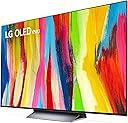
🔥 Elevate your entertainment game with LG C2 – where cinema, gaming, and style collide!
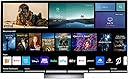
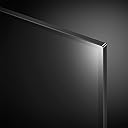
The LG C2 Series 65-Inch OLED evo Smart TV (2022) features a stunning 4K OLED evo display with infinite contrast and over a billion colors, powered by the advanced α9 Gen 5 AI Processor for optimized picture and sound. Designed for gamers and cinephiles alike, it supports 120Hz refresh rate, NVIDIA G-SYNC, FreeSync Premium, and Dolby Vision IQ with Dolby Atmos sound. With built-in Alexa, Google Assistant, and Apple HomeKit, plus four HDMI 2.1 ports, it offers seamless smart home integration and connectivity. Its sleek, gallery-style design fits flush on your wall, making it a centerpiece for any modern living space.


| ASIN | B09RMRNSBF |
| Additional Features | Amd freesync, Browser, Intelligent Voice Recognition, Nvidia G Sync |
| Annual Energy Consumption | 213 Kilowatt Hours |
| Aspect Ratio | 16:9 |
| Audio Input | HDMI |
| Audio Output Mode | Surround |
| Best Sellers Rank | #61,111 in Electronics ( See Top 100 in Electronics ) #29 in OLED TVs |
| Bluetooth Version | 5 |
| Brand | LG |
| Built-In Media | Magic Remote, Power Cable, Quick Start Guide, Remote Control Battery (AA), Television |
| Connectivity Technology | HDMI |
| Content Sharing Direction | Mobile to TV |
| Contrast Ratio | Infinite contrast |
| Controller Type | Amazon Alexa,Google Assistant,Apple HomeKit |
| Customer Reviews | 4.4 out of 5 stars 3,271 Reviews |
| Display Backlight Technology | Self-Luminous |
| Display Language Options | English, Spanish, French |
| Display Size Class | 65 Inches |
| Display Technology | OLED |
| HDR Format Supported | Dolby Vision |
| Hardware Interface | HDMI |
| Has Color Screen | Yes |
| Integrated Surround Sound Format | Dolby Atmos |
| Internet Applications | Prime Video, Netflix, HBO Max, Apple TV, Disney+ |
| Is Electric | Yes |
| Item Dimensions D x W x H | 9.1"D x 56.7"W x 34.6"H |
| Item Height | 34.6 inches |
| Item Width | 56.7 Inches |
| Line Voltage | 100-240 VAC 50-60 Hz |
| Manufacturer | OLED65C2PUA |
| Model Name | OLED65C2PUA |
| Model Number | E1LGOLED65C2PUARB |
| Model Series | C2 Series |
| Model Year | 2022 |
| Motion Enhancement Technology | Yes |
| Mounting Type | Wall Mount |
| Number of Audio Channels | 2.1 (expandable) |
| Number of Component Outputs | 4 |
| Operating System | WebOS |
| Picture Quality Enhancement Technology | 4K Cinema HDR |
| Portable | No |
| Refresh Rate | 120 Hz |
| Remote Control Technology | Magic, Voice control |
| Remote Required Battery Quantity | 2 |
| Remote Required Battery Size | AA |
| Resolution | 4K |
| Screen Finish | Flat |
| Screen Size | 65 Inches |
| Signal Format | HDR10, Dolby Vision, HLG |
| Speaker Description | Surround sound with Dolby Atmos integration |
| Speaker Maximum Output Power | 40 Watts |
| Total Number of HDMI Ports | 4 |
| Total USB 2.0 Ports | 3 |
| Total USB 3.0 Ports | 3 |
| Total Usb Ports | 3 |
| UPC | 195174028087 |
| VESA Mount Standard | 300 x 200 mm |
| Video Encoding | HDR10+ |
| Voltage | 120 Volts |
| Warranty Description | 1 Year Parts and Labor |
| Warranty Type | Limited |
| Water Resistance Level | Not Water Resistant |
| Wattage | 22 watts |
M**M
Exceptional TV and Impeccable Service!
I recently purchased a TV from this seller on Amazon, and I must say that the experience has been nothing short of outstanding. From the moment I placed the order to the prompt delivery, everything went incredibly smoothly. First and foremost, the TV itself is a gem. The picture quality is absolutely breathtaking, with vibrant colors and crisp details that bring every scene to life. The sound quality is equally impressive, delivering a rich and immersive audio experience. I find myself completely immersed in my favorite movies and TV shows, thanks to this remarkable television. What truly sets this seller apart, though, is their exceptional customer service. Throughout the entire process, they were attentive, responsive, and went above and beyond to ensure my satisfaction. They promptly answered all my pre-purchase questions, providing detailed information and expert advice to help me make an informed decision. Their dedication to customer satisfaction was evident from start to finish. Furthermore, the packaging was done with utmost care and attention to detail. The TV arrived in perfect condition, securely protected against any potential damage during transit. It was evident that the seller takes great pride in their products and values the customer's experience. I also appreciated the easy setup process. The instructions provided were clear and concise, allowing me to have the TV up and running in no time. It's always a pleasure when a product lives up to its promises, and this TV certainly exceeded my expectations. Overall, I couldn't be happier with my purchase from this seller on Amazon. They have proven themselves to be reliable, trustworthy, and committed to delivering an exceptional customer experience. If you're in the market for a new TV, I highly recommend considering their offerings. I will undoubtedly turn to them for any future electronic needs. Kudos to the seller for their outstanding product and impeccable service!
R**N
After the replacement it works like a dream.
*Edit again after a year. All i can say is its phenominal. While it never had issues with ps5 the issues it used to have with xbox series x back in early 2023 where it would randomly changed the resolution every so often have been fixed for a long time and everything works perfect. Its to the point where i probably wont be ordering a new tv for the next 3-5 years. To get a better tv you would have to pay 2000+ dollars and even then im not sure the trade off for a tiny bit better picture quality would be worth it for 400 to 800 plus dollars. There aren't really any tvs ive seen with better picture quality for the price and really for any substantial video game quality change at the moment, i would need the ps5 pro when it comes out rather than a new tv. Theres no permanent burn in, and what little happens during use fades away fairly quickly. I had been going through other tvs for a bit because video quality wasnt up to par but after getting a 55 inch c2 I loved it so much i upgraded to this 65inch. So far, for a decent price, the c2 is something i would recommend. I havent looked into the c3, but if there are no problems with the new model i would recommend it if its the same price. *Edit to 5 star review after directly contacting Amazon and getting a very fast replacement within 2 days and them picking up the non working tv within 2 days. 5-star Review- The replacement works like a dream. The video quality is amazing and everything I had hoped. While it was a bit tough figuring out turning off certain features and enhancing others to get the exact picture i wanted thats more to the fact there are so many options, sometimes even depending on the device you hook up. A must is to turn off is energy saver mode. Makes everything look too dim. With xbox series x, if you want the tv to stop randomly switching the video settings (like when hooking up headphones it switches to cinema picture settings), the only thing that stopped it for me is turning off dolby picture on the xbox itself. For whatever reason that was giving me a hard time with automatically switching my settings as it pleased. The audio is amazing too but before getting into that Ill give a more thorough review when i get more time with the tv. *Old 1 star Review for my non-working first tv- The tv had no visible external damage but as soon as i set it up, it only had audio. After hard resetting it multiple times i got the screen working for a few minutes for it to just start flickering really fast until it turned itself off. Amazon when trying to replace it on the app only gave the refund option not the replace option. The deal i got and the pay in 5 option might be gone if i return it and try rebuying it. I was waiting to review since i contacted lg directly. They were helpful and they set up a free repair and they would replace it if they couldn't fix it..........but the repair man didn't show up. Ill keep this review until they fix my brand new tv that i cant even use or they send me a new one. Either lg or Amazon. I dont care which. I just want a working tv. Its been a terrible last 30 days and this is just icing on the cake. I understand its probably a shipping issue of it not getting handled well, some small thing inside getting knocked loose, but it wouldn't be as annoying if the way of getting a replacement wasn't so convoluted.
M**M
get product protection! great tv, naughty 3-year old!
Alright, fellow moms—here’s my brutally honest review of the LG C2 Series 65-Inch Class OLED evo Smart TV (OLED65C2PUA, 2022). I was head-over-heels for its stunning 4K picture, sleek dark silver finish, and all the fancy AI-powered, Alexa-integrated goodness it promised for our family movie nights. It truly was a centerpiece that made our living room look like a high-tech haven...until toddler chaos struck. Enter my three-year-old tornado. One minute we’re enjoying our favorite cartoon, and the next—BAM!—the remote (or "changer," as I lovingly call it now) takes flight and shatters the screen. Yes, you read that right: my little one literally turned our prized TV into a pile of broken glass. Apparently, the LG C2 isn’t exactly built with toddler-proofing in mind. After just two years of what I thought would be many years of cinematic bliss, our gorgeous TV succumbed to the unrelenting energy of toddler play. While it delivered a fantastic viewing experience when it worked, the reality is that in a household where tiny hands wield unpredictable force, durability is key—and this TV just didn’t cut it. So, if you’re considering this TV and you have a little one who might channel their inner NFL quarterback, be warned: it might not be the best fit for your home. It’s a perfect example of high-tech glam clashing with the real world of toddler antics. Save your money or invest in some serious screen protectors if you’re in the same boat as me! Stay strong, mama—tech may break, but our resilience (and our ability to laugh about it) remains unshattered.
R**D
Ohhhhhhhhhhhhhhhhhhhhhhhhhhh yeah
I've learned that buying $1500 TV's can actually make you insane. A few years ago I bought a Samsung Q8FN. Very nice TV--but a few problems. The colors were classic Samsung. Incredibly "vibrant" and "popping", but over-saturated. You could dial this back in settings, but not completely. Also this thing was INSANELY bright. A dark scene switching to an outdoor scene made me want to grab my sunglasses. Or the glare from open windows especially in HDR was painful. Again, not completely fixable in settings. You could severely dim the screen but then anything other than super bright scenes looked bad. So last year I got my first OLED: the Sony A80j. At first I thought it was the solution to all of my problems. Colors were WAY more realistic without even having to adjust anything. (And please shoot me if I ever get my TV calibrated). The TV had great sharpness with Sony's awesome picture processing. And the decrease in brightness was a welcome change. Until it wasn't. The TV is just dim and this began to bother me more and more. Even with the lights off at night it seemed a bit dim. Now you CAN set it to look bright and beautiful--for maybe five minutes. Then the TV gets super aggressive in auto-dimming. It won't let you keep the brightness level you want! This is to protect the OLED panel from burn in, but I feel Sony takes an OVERLY cautious, conservative approach. With such a cloudy image, I almost wanted my TV to die. It was especially bad trying to watch sports. Those static images would cause auto-dimming like you can't believe. Every game starts to look like its being played in a foggy dungeon. So I considered retreating back to LCD. The Sony x90k looked enticing. I wouldn't need to worry about brightness and it was cheaper. But I was afraid that all the things that never bothered me about LCD before would suddenly seem unbearable after a year of watching an OLED TV. So................... I bought this. My wallet hates me SOOOO much. But after a few days I think I might have finally found the TV of my dreams. I knew on paper this was brighter than A80j but I wasn't sure how noticeable that would be in the real world. Online comments seemed conflicting. But it's definitely noticeably brighter I did have to enable Peak Luminance and disable Eco and slightly lower the contrast. But now it's plenty bright and the atuto-dimming seems far less aggressive than on the Sony. Stop reading and hit Buy Now!
S**N
Excellant TV, works great as a gaming monitor for PC
I absolutely love this TV! I bought it intending to use it as a large computer monitor, and to have an OLED at half the price of a "gaming monitor". It works extremly well, no issues with quality. Brightness is satisfatory, although you may want to use this with window shades as it is a bit dim in full sunlight. I did have to tweak the settings to get it to behave as a monitor, since the energy saving and auto-dimming features are annoying when using this as a static display. No issues with image distortion (near the edges often times TV's have a lense effect) even with the massive 42". I was a bit worried this wouldn't look good close up but at 4K (or even 1440p) there is no visable pixles or image distortion. Text even looks good despite what may people report I have had no issues that. I absolutly love the gaming mode, G-Sync works flawlessly with my nVidia card, absolutly no image tearing any more and games look georgous!
V**O
Amazing TV - So Glad I moved to OLED
First off, Amazon has this description wrong, this is not a GALLERY EDITION, that is an G2, not a C2 - this is a C2, but I know that so I got it at a great price (was 2498 when I bought it). I already have 2 48" Gaming Gear LG OLED monitors (very similar panel as the C2 seriers, but without TV processiong). and they are stunning. After alot of thinking, I chose the C2 over the SONY x95K (mini led) when I watched comparison videos, and, looked for myself at best buy (they let me adjst settings, etc). I also looked at the Sony A80, which uses the EXACT same panel as the C2 (made by LG) - and I must say, the C2 impressed me the most. Picture is breathtaking, brightness is blinding during Star Trek shows where there is a brighly lit space battle, and also other films where the sun is out, etc. I had not weird tint, dead pixels, etc - no clue if I got the WBE panel, and I don't care - it's the best TV I've owned so far. It took alot for me to chose the C2, I am titally a SONY fanboy, but, when my 2019 - 950G (FALD) Sony died and was not reparable (panel went out) I got a refund from my square trade warranty and I was dissapointed over my SONY only lasting short of 3 years. SO GLAD I PICKED THE C2 ! :)
J**P
A phenomenal TV absolutely ruined by software!
Let me preface this by saying I spent months researching this TV before I bought it and I'm surprised I never came across anyone who pointed out this major flaw. Does this TV have absolutely phenomenal picture quality for the price? Yes. Is it good for gaming? Yes. It did take some adjusting out of the box to really fine to the picture quality and turn off all the nonsense features that almost every TV comes with but that's to be excepted. However, the problem is with LG and the way they designed the software for this television and choose to run their company. It's not a great UI but that's not my complaint. LG sends out notifications to all these TV's which are essentially just ads. You're buying a TV with a built in ad feature that will display on top of whatever you're watching and no I'm not making this up. The photo I attached is when you go deep into the settings (and I mean deep, it's like 8 clicks). There is a notification log that shows everything they're sending you. They send about 8-10 a day. 99% of them are just ads. When you turn your TV on these appear one at a time in the bottom center of the screen approximately where the closed captions would appear during a movie and they cycle through to the next one after one has displayed for a couple seconds. This means you're getting rapid fire ad blasted every time you turn your TV on. If you look closely at my photo you'll see oh at least one of those in there is for a software/firmware update... No, that's not actually what that is. That's actually a notification letting me know that there will be firmware updates in the future... again I'm not making this up. This is a real company that thinks this is a good idea. I have reached out to customer support 3 times about this issue and they have confirmed each time that there is literally no way to turn this off. I realize that this can simply be fixed by a software update but think about it for a second. Companies don't send out ads for free. Where is the incentive for them to remove this? I don't think there is one. I have to assume must be intentionally designed this way. Maybe you don't care about this problem but for me if I sit down and pop a disc into my PS1 and turn my tv on do you think I want to get blasted with relentless ads while I'm in the boot up cinematic of some game? Take into consideration that if you don't use your TV for a week or month these build up and are all shown to you at once and you have to go in and manually remove them. It's insanity. This was my first LG TV and having done so much research felt it was justified since I heard this was slightly better for gaming and it really does have a great picture quality but this will be the last LG product I ever buy. Stick to Sony or Samsung and you won't regret it.
R**S
Best Picture Quality in the Biz, software is ok
This really is the best picture quality in the biz. Anything better is only by a small margin in very technical ways that very few users will notice, or need very specific types of scenes in order to display their upper hand. I have a few Samsung QLED displays of varying quality and this blows them away (although Neo QLEDs are closer in match, still not that close). I was sick of inconsistent blacks, backlighting blooming, and other typical LED issues and this TV does not have any of those issues. But I left a little wanting on the software. Here's the breakdown. Picture Quality 5/5: It's simply the best. Viewing angles are great, contrast is great, HDR and Dolby Vision content is looks spectacular, backlighting is perfect. I had issues with all of these items on my Samsung QLEDs - the blacks and backlighting just completely drove me nuts with those, especially in dark scenes. Practically no viewing angle on a QLED, this you can look at it from 178 degrees with no color degradation. New OLEDs are pretty bright - I live near Phoenix AZ so it's bright everyday, and this is in a North facing living room with big windows. I leave my blinds open all day in there and there are no issues with brightness. So don't listen to people who say it's not bright enough, unless maybe you plan on using this outside in the sun. I will say that the front is more of a reflective glossy surface, so keep in mind lights behind you that may reflect on the tv. I also thought I damaged the panel mounting it to the wall because there were a lot of vertical lines when I turned it on, especially on the left, but after running the Pixel Cleaning cycle on the OLED Panel Care menu the lines completely went away so that's kinda cool. Software 4/5: I do like the software on Samsung better. This isn't BAD per-say... it just isn't great. Menus are as clean and easy as the Samsung home screen, or the mini menu that pops over the current content (I don't think LG even has that, just goes to the main home screen). I have a Samsung frame, and that gallery software blows the LG gallery software out of the water. Also not sure you can really compare because a true gallery option isn't really an option due to OLED burn in - you really don't want it displaying one image all day. Alexa kinda doesn't work as well as my Samsung as well. However, I do like that it shows as always on so that I can beam some Airplay content from my phone while the tv is off and it just turns on and goes to my selection. Remote 4/5: Eh it's fine. I like the pointer feature, it's better than a wii remote, but if you accidentally scroll the center button instead of click when not using the pointer it switches to pointer and that's annoying. It's also huge! Well, by modern standards. Apple TV remotes are small and maybe too sparse on buttons, but I like the new Samsung remotes that are slim and have the solar charger on the back. They are also bluetooth so you don't need an IR line-of-sight to work. There are a ton of unnecessary buttons on the LG remote. They need to sexy it up and simplify the button layout and switch to BT instead of IR and that would get them back into the modern day remote. Sound 3/5: It's fine - all modern tvs are bad cause they are so slim but this is actually ok. I use their S90QY soundbar/subwoofer so not an issue for me (separate review for that). But why would you buy this tv and go for sub-par sound? Go treat yourself to a nice hometheater, you won't regret the addition. Aesthetics 5/5: It's pretty sexy. People who come over always comment on how thin it is. I have it mounted to the wall with a 0.6" thick wall mount so that's about as close to the wall as you can get. The bezels are smaller than any other display I've seen. The stand it comes with is unnecessarily big and bulky in my opinion but yeah it looks better on the wall anyways. It's definitely a statement piece in the living room. Dolby Atmos/Dolby Vision 5/5: Whenever I stream content that supports this format, it shows a little popover in the top right for a few seconds telling me that it's using that format and my soundbar switches to the right audio profile setting over the e-Arc connection, and the content looks and sounds perfect. Feels like I have the best home theater around. You have to try hard to find it's flaws. Best viewing experience I have ever had. Summary: Best in class viewing experience for the money. They could improve the software and remote a bit, but they aren't unusable and just take a bit of adjusting. Definitely need a good Dolby Atmos capable sound system to really maximize the experience. LG may have finally gotten me off Samsung displays, but now Samsung is hot on their heels with new OLED panels coming out. In 2023, I'd say buy LG C2 OLED (C3 only has marginal improvements for a higher price). We'll see who comes out on top in 2024.
Trustpilot
1 month ago
3 days ago