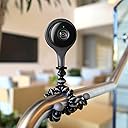
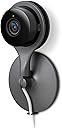
🔒 Stay ahead of the unexpected with Nest’s smart security eye!
The Google Nest Indoor Security Camera delivers 1080p HD video with a 130° wide-angle lens and infrared night vision, ensuring crystal-clear monitoring day and night. With effortless plug-and-play setup and seamless smartphone integration, it provides real-time motion and noise alerts directly to your phone, empowering you to keep your home secure and connected 24/7.


| ASIN | B00ZC5FNFU |
| Alert Type | Motion Only |
| Antenna Location | Indoor Security, home, security |
| Batteries are Required | No |
| Brand | |
| Colour | Black |
| Compatible Devices | Smartphone |
| Connectivity Protocol | Wi-Fi |
| Connectivity technology | Wireless |
| Control Method | Voice |
| Controller Type | Android, iOS |
| Customer Reviews | 4.5 out of 5 stars 1,761 Reviews |
| Effective Still Resolution | 3 MP |
| Effective Video Resolution | 1080 Pixels |
| Field Of View | 130 Degrees |
| Form Factor | Dome |
| Global Trade Identification Number | 00854448003907 |
| Included Components | Nest Cam Indoor security camera |
| Indoor Outdoor Usage | Indoor |
| Indoor/Outdoor usage | Indoor |
| Item Dimensions | 7.3 x 7.3 x 11.4 centimetres |
| Item Type Name | Security Camera |
| Item Weight | 213 Grams |
| Light Source | LED |
| Manufacturer | Nest |
| Manufacturer Warranty Description | 2 years limited warranty. |
| Model Name | Google Nest |
| Model Number | NC1102GB |
| Model name | Google Nest |
| Mount Type | Stick Up |
| Network Connectivity Technology | Wireless |
| Night Vision | Night Color |
| Number of Channels | 2 |
| Number of Items | 1 |
| Other Special Features of the Product | video_sensor;nightvision_sensor; |
| Photo Sensor Technology | CMOS |
| Power source | mains_operated |
| Recommended uses for product | Indoor Security, home, security |
| Room Type | Office |
| Special feature | video_sensor;nightvision_sensor; |
| UPC | 854448003655 854448003907 |
| Unit Count | 1.0 count |
| Video Capture Format | AVI |
| Video Capture Resolution | 1080p |
| Viewing Angle | 130 Degrees |
| Waterproof Rating | IP54 |
| Wattage | 10 watts |
| Wireless Technology Type | Wi-Fi |
A**.
Nest. Simple, effective and worth it!
I've spent a long time researching and looking at various options for home security and a camera to monitor my cats. As an Nest thermostat owner their camera seemed an obvious choice, especially as I also bought a Nest Protect! Others may have other features or work out cheaper but the reviews and experience of other Nest products made it an easy choice. Premium price for a premium product but a very impressive piece of kit that is very simple to use and set up. Helps that I bought as a Prime Day deal for £100 as the cost was the only thing that had stoped me previously. My wife is less keen on my IoT house and technology so spendingbis careful and spaced out!! Set up took 15 minutes (really) and that includes the beautiful unboxing. Quality of image and sound is excellent and despite my woeful home internet connection (rural) the camera streams with a slight 5second lag. Interesting the medium quality stream claims to use 130Gb of upload per month! I've set mine at a poorer quality but it's still really good and only uses 30Gb. Once set up you have lots of choice over when the camera is active and whether you want a light on it all the time. The white lead is really long (10ft?) which is useful. Camera is surprisingly small and after two days I've already forgotten about it on the bookcase. Did try it above the kitchen units but it's too small to see over the cornice! It does come with a wall mounting bracket but my wife was definitely not keen on having it installed on the wall. Overall I'm delighted with my purchase and it maybe quite geeky and not essential but it's nice to be able to check on the cats. App does alert me if it spots them but this can be disabled. Haven't set up zones etc yet that form part of Nest Aware and might see how good the camera is after the free trial before I subscribe for the 10 day version. £80 a year seems a lot but if I had a burglar alarm that I was getting serviced? I use IFTTT for other elements of my smart home so will see what this might offer. Slightly disappointed that Nest doesn't talk to my SmartThings but might have to invest in Google Home if I can convince my wife. At the moment it's not a battle I'm winning! Hope this helps. Feel free to ask any questions!
G**E
High quality and simple to use
Firstly I should say up front I have various ip cameras and have tried various ones (I have izon view, withings babycam, dropcam, withings home). This one stands about above the rest. Setup - this was very simple, download the app, plug in the camera, scan the qr code when prompted and it was up and running 5 minutes max and totally fool proof. Even my father in law could manage this! The quality itself is excellent in both 1080p and 720p, if you buy before the 3 edition August it also comes with a 60 day trial for the nest 10 day. This has caused some confusion and conflicting information in the reviews. This allows you to review all video feed (at full fps) for the last 10 days. If you access via a pc/laptop you can create MP4 video clips from it. The video has a very wide view angle and is only beaten by the withings home because the withings has de-warp. Otherwise this comes out on top. Our daughter is ill so we wanted something we can review footage and this fits the bill perfectly. Good points 1. Great picture quality 2. Wide angle of view 3. Ties in to nest Eco system 4. Saves all video footage to the cloud for later review (with subscription) 5. No app crashes or cut outs (unlike all my other ip cameras) 6. Night vision is great Negative points 1. Subscription model is more expensive than others but is far superior to my withings home or izon 2. The two way audio is not great, there is some lag and it's more like a cb radio, talk, wait and listen 3. The LEDs cannot be disabled on the front 4. No local storage / nas storage In summary this is the best ip camera I have tried, it depends on what you want to use it for, our use case is something that constantly records and we can go back and review old footage in 30fps 1080p. As a baby cam the withings baby cam is better as it runs in the background and Alerts work better but has no recording. The withings home is just riddled with bugs and clips are recorded at 1fps and the izon is limited to 25 clips per day! I would highly recommend this.
M**O
Absolutely fantastic! Rock solid performance
Absolutely fantastic! Rock solid performance! Over the years have tried 2 other makes and what has let them down is their "App crashing"! Being Google, like Apple, they make it just WORK. It's the easiest ever set up. Slick simple and great packaging. Ok, no Ethernet/ micro SD but this would take away the Google up-sell of the monthly charge which they want. I bought one a few days ago from PC Worl to give it a whirl, was so impressed I ordered another 2 nest cams and a net protect from Amazon. 10'day record is a no brainier. Have no moaning to be done here re having to pay the monthly charge. If the app and featured did not work like a Slickster then they would all go back for a refund but all really is fab and works solidly well. So far this has to be the most robust set up and viewing/slick user friendly option out there. Also bought a drop cam outdoor case which will be setting up too. Once again, in an ideal world, Ethernet and SD option but really is not a deal breaker. Phoned up Nest and wanted to have my 2nd monitor to view my cameras and here is nothing out there that will pick them up due to their bank encryption software, so you have to individually opens each Nestcam and move it, resize so you have have multiple windows open permanent. Same as having a app which would make it smoother looking but hope they can look into that. Simple, no fuss and works.
A**R
Nest system
We have lots of Nest cameras, the thermostat and the smoke detectors linked up into one app, controlled by iPad, Mac or iPhone and mostly working perfectly. However, everything depends on WiFi and, if there is a glitch in supply or a conflicting signal from a neighbouring property, an issue with broadband supply or just a plain power cut, everything goes down - including the thermostat, making heating your home a little bit more challenging. Okay, if you have a power cut then you know any camera will go offline, but the Nest system seems particularly sensitive to these and often takes a while to come back online and settle down again (I often have to switch the power supply off and on again, which means going to the camera socket - the outdoor ones are in the attic, which isn’t possible if you are at a distance and on holiday, for example). The indoor cameras are great and usually work well as WiFi inside the house tends to be reliable. I have signed up to the cloud recording system and save down clips most days. I can save clips on my iPad or iPhone just by pressing on a link, but the clip I get may not always be what I want, so I have to go to my Mac for better access and control, saving longer clips of exactly what I want in terms of start and finish times and also time lapses if I want those (although note you are limited to a 2 minute timelapse duration and Nest often reduces these down to a much shorter period for no obvious reason (maybe related to storage capacity?) - I have yet to find a way to overcome this limitation). Installation of the indoor cameras is very easy and not much more than plug in and play - you just need to scan the code and link to your account. If your signal is strong, the video quality is superb, but you won’t recognise faces from a distance if the WiFi signal is at all weak, unless someone comes very close. Even then, quality may not be good enough and Nest has enough outages that I often find the signal cuts out just when I want to watch something. With a subscription of £100pa (currently), I can store 3 hours of saved footage from all of my cameras and have cloud backup of a month’s continuous footage from all of my cameras, plus clips of activities that triggered an alert for another 2 months. You can overcome the limitations of 3 hours in the cloud by saving down and then deleting clips to free up space. You need to keep space free to save down clips as, once you hit 3 hours, the system prevents any more clips from being saved, although the continuous feed continues to be stored, so you can go back in time to get something once you have freed capacity. For all of the limitations, I would not be without my Nest cameras.
D**S
That's cam is awesome. The definition is great even at only 720p ...
That's cam is awesome. The definition is great even at only 720p where the maximum is 1020p. I did not try the highest resolution as i am already happy with a medium one. The price is dear at around £150 but it's worth it with a high quality. You can listen to what is going on and also zoom in if needed. Got some other features that are also useful like night vision and motion sensor not to mention a few. I went abroad and still kept an eye on the house or an ear ehehehe. And also if you are busy doing something else like enjoying your holiday or having a meeting, it will alert you by notice on your smartphone. The only problem is that after 30 days of free history review of your cam, you will have to subscribe to a monthly or yearly subscription. I personally do it on a monthly basis and it's at £24 where the year one is £240. I will subscribe when going away on holiday only. You can access your cam using your PC or your smartphone (iphone or ipad in this case) by entering a log-in password. The camera cannot be turned off completely apart from taking off the cam from the network, as there is no battery to put it on standby but it will not stream on the network when it is 'off' and as i said you cannot access your cam unless you have a password. You have two options 'Home' and 'Away'. The 'Home' option will turn off the cam and sensors when you are obviously Home and the 'Away' option will put your cam on with all the sensors on, vision and sounds. By the way, the cam is so sensitive that it will sense a flash by your window as movement but you can change that by targeting a certain area of the house. This is a great tool, I do not regret for buying it at all. Check also the cover there is available to hide the cam. The cam can also be mounted on a wall if needed with the parts provided. Also i've compared some other cams about their design, and this one is really good looking. But nonetheless I was looking mostly about how practical it was to hide or stand the cam in the house.
K**S
Flexible and easy to set up.
This is a really neat little camera. I've used a couple of standard IP cameras with a NAS in the past, and was looking for something a little more stand-alone. The Nest Cam certainly fits the bill. Setting up is easy - scan a QR code and plug it in and you're pretty much up and running. The Nest app shows the cameras along with the thermostat and smoke alarms (if you have them). The settings are pretty flexible - if you don't want to run them all the time, you can use the other Nest device's 'auto-away' setting to switch your cameras on and off, or use a schedule. It can use a couple of settings up to 1080 video to let you trade off data transfer against video quality. It has a very wide angle lens - so it can cover a wide area. You can set particular zones to monitor, and zoom in to an area of interest. All in all, really good. You can see the video in real time or (with a subscription to Nest Aware) see history for a period. To be honest, without the subscription it will be of limited use - but the price isn't too unreasonable (£8 per month for the first camera, and £4 per month for subsequent ones). It can give you notifications of motion and/or sound but currently can't send you an email. Since the original Dropcam could do this, I'm hoping that Nest restore this functionality. You can also talk to someone using the camera - which could be useful. I really like the Nest Cam. It removes a lot of the awkward configuration needed for IP cameras at the cost of tying you to Nest for full functionality. Some won't like that trade-off, but for me it works well and gives a very quick and easy way to monitor our house when we are away.
M**T
Works well but needs good broadband and WiFi infrastructure
I have updated the no of stars and I am adding this additional information. Despite the issue with payment which I mentioned before, these cameras are excellent. I have a number of indoor and outdoor cameras and the paid cloud service. Last year the facility to have an unlimited number of cameras for a fixed fee was great. Other reviewers have mentioned poor quality and signal dropping etc. To get these to work at their best you need a good broadband provider with excellent uploading capacity. You also need good WiFi in the house. I use a BT mesh system to give coverage throughout the house and since this was installed the cameras have worked flawlessly. The alerts are excellent and when combined with the smoke alarms you gave a great system. Works well with google assistant to stream cameras on google devices with a voice command. PREVIOUS POST BELOW. These are great cameras and the cloud recording feature is a paid service, it really adds to the functionality of the device. However I had an issue where a payment bounced because a card had expired. It would not let me add a new card due to some sort of bug. I contacted support and following a lengthly chat I have to remove all teh cameras and smoke alarms from the account and reinstall them. I have a number of devices and need to access the bar codes on each of them. The support personnel are powerless to change the system from their end. So works well but if a payment does not go through expect a pile of trouble. I was also given technically incorrect advice where it was suggested to set up the cameras to a different structure to the smoke alarms. This significantly impacts on the functionality and safety of the system. The only option was to escalate to engineering and a fix time of 3-5 days.
R**D
Excellent product, poor value for money
I own all of the current Nest product range and was keen to add the Nest cam to operate as a security camera, alerting me of any problems while I was away from home. As expected, based on my experience of the Nest protect and thermostat, this is a well designed, elegant product. Set up and operation is easy, the app a pleasure to use, and improvements in the software are relatively frequent e.g. In my first 30 days an update arrived allowing the camera to automatically stop sending notifications if someone was at home. Nest may not be churning out new hardware at a great pace, but they are improving the performance of their existing hardware through good software updates. Why the average review score then? Actually, in the first 30 days I'd give the Nest cam 5 stars. During that period you're in the nest aware free trial period. When the camera notices movement or sound a short video is saved in the cloud. Upon receiving the notification you can jump into the app and see what happened by viewing the video. Over our trial period we had builders and cleaners in our home while we were away and the camera's pick up and recording of events works very well. Upon receiving a notification you can quickly view the associated event in the app to reassure yourself that everything is ok. It is an excellent experience. Perfect to be used as a home monitoring camera. The problem is what happens on the first day after the trial. I was aware of the subscription element before buying, so was to a certain extent expecting a drop off in quality. However, unfortunately the functionality of the camera is significantly reduced outside of nest aware. At least if you are using it as a home monitoring camera. The problem is the camera isn't brilliant at picking up movement, so you will get a few false alarms. The notifications sent by email come with a photo, but 9 times out of ten the photo misses whatever movement there was. I wouldn't count on it taking a good picture of someone who had broken in. If you sign up for nest aware that's not a problem, you can quickly jump into the app, review a 10 sec video clip to make sure everything is ok. Without it you're reliant on the photo sent with the notification and jumping into the app to view in real time (not so great if you had it by the door and someone's already walked past it). I would be happy to subscribe to nest aware. It seems fair enough that there is an ongoing charge to keep the video stored on servers etc. The problem is the currently limited options. The cheapest is £8 a month or £80 for a full year to record 10 days of footage. I can only imagine needing 10 days of coverage if I were going to be without Internet access for a prolonged period. To operate as a home monitoring camera I'd only need 2 or 3 days 95% of the time. So £80 for something I don't really need is too much for me. If there was an option at £5 a month, or £50 a year, I might be tempted. However I assume it's unlikely, as Nest are trying to push people towards the longer coverage plans. I expect a lot of people on the £80 coverage would drop down a tier if they could. The revenue Nest are getting from those people must be offseting the lack of revenue they are getting from people like me who refuse to pay for an excessive coverage plan. So overall, an excellent product, but the ongoing cost to get the most out of the camera makes it feel like poor value for money to me. I'll keep my fingers crossed that take up of nest aware is slow and the company introduces a lower tier option at some point in future, or even better gives free recordings for 24 hours. If that were the case id probably add a couple more.
Trustpilot
5 days ago
1 month ago