🖨️ Print smarter, save bigger — your home office MVP is here!
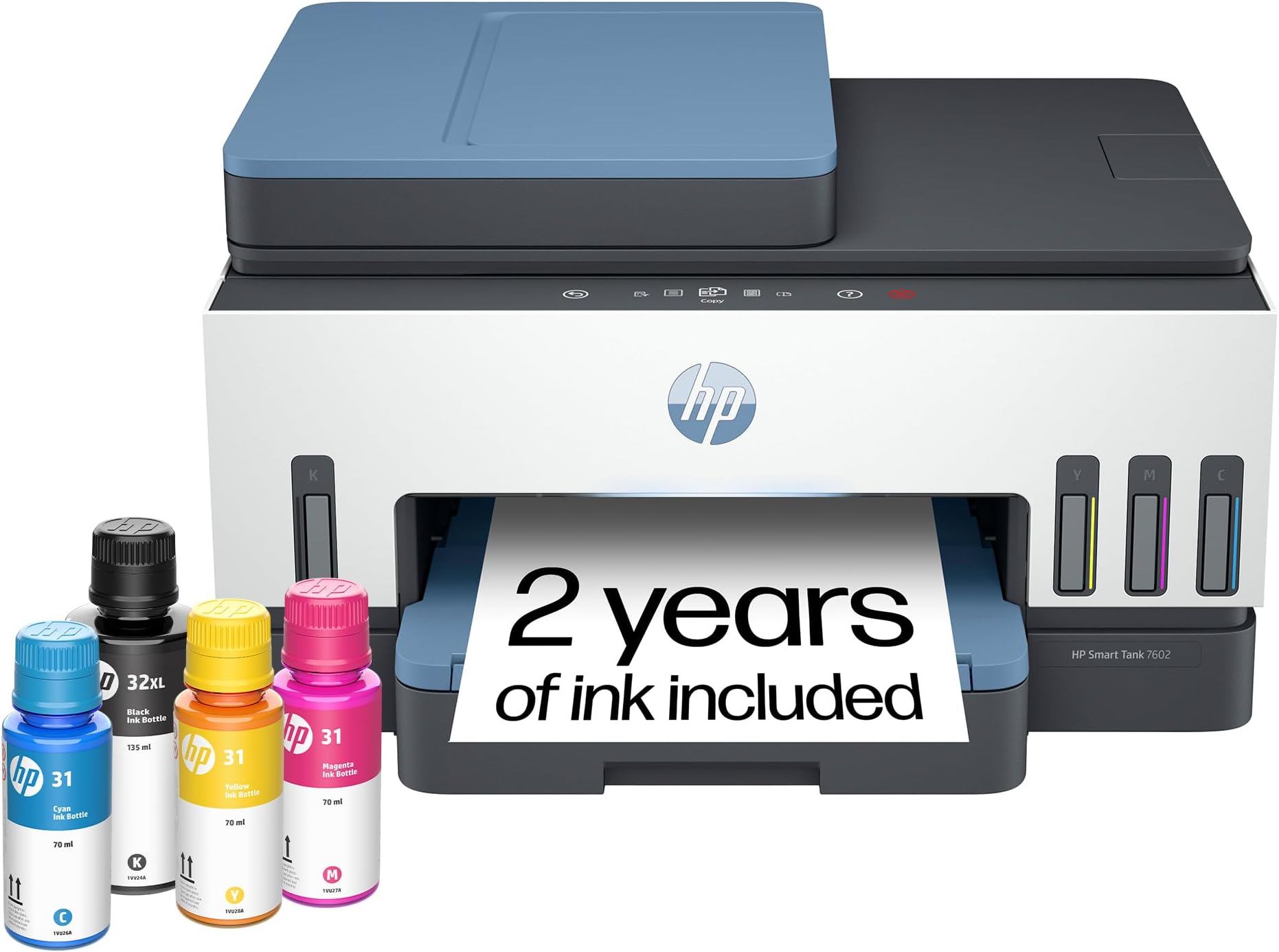
The HP Smart Tank 7602 is a wireless all-in-one ink tank printer designed for home offices and small businesses. It offers high-quality, fast printing with up to 15 ppm black and 9 ppm color speeds, cartridge-free refillable tanks with 2 years of ink included, and advanced AI features for optimized printing. Equipped with dual-band Wi-Fi, Ethernet, duplex printing, and a 35-page auto document feeder, it delivers versatile, cost-effective, and mess-free printing with seamless smartphone app control.


| ASIN | B09CJCNJBL |
| Additional Printer functions | All In One |
| Best Sellers Rank | #6,807 in Office Products ( See Top 100 in Office Products ) #18 in Ink Tank Printers |
| Color Depth | 24 Bits |
| Compatible Cartridge | HP 32XL 135-ml Black bottle (~6000 pages), HP 31 70-ml Cyan bottle (~8000 pages), HP 31 70-ml Magenta bottle (~8000 pages), HP 31 70-ml Yellow bottle (~8000 pages) |
| Compatible Devices | Laptops, PC, Smartphones, Tablets |
| Control Method | App, Touch |
| Controller Type | Amazon Alexa, Android, Hand Control, iOS |
| Customer Reviews | 3.9 3.9 out of 5 stars (1,812) |
| Date First Available | April 18, 2022 |
| Dual-sided printing | Yes |
| Duplex | Automatic |
| Hardware Interface | USB 2.0 |
| Included Components | 28B98A HP Smart Tank 7602 All-in-One Printer; HP 32XL Black Original Ink Bottle; HP 31 Cyan Original Ink Bottle; HP 31 Magenta Original Ink Bottle; HP 31 Yellow Original Ink Bottle; HP Black Printhead; HP Tri-color Printhead; Power cord; Ink caution flyer; Setup guide; Reference guide; Regulatory flyer; Warranty flyer |
| Initial page print time | A4 Black 14 sec; A4 Color 16 sec Seconds |
| Ink Color | Black, Cyan, Magenta, Yellow |
| Item Weight | 16.98 pounds |
| Item model number | 7602 |
| Manufacturer | HP, Inc. |
| Max Copy Speed (Black & White) | 13 ppm |
| Max Input Sheet Capacity | 250 |
| Max copy resolution black-white | 600 dpi |
| Max copy resolution color | Up to 600 x 600 dpi |
| Maximum Black and White Print Resolution | 1200 x 1200 Dots Per Inch |
| Maximum Color Print Resolution | 4800 x 1200 Dots Per Inch |
| Maximum Media Size | 8.5 x 14 inch |
| Maximum copies per run | 99 |
| Memory Storage Capacity | 256 MB |
| Model Series | Smart Tank 7602 |
| Number of Trays | 1 |
| Number of USB 2 Ports | 1 |
| Output sheet capacity | 250 |
| Power Consumption | 1.1 Watts |
| Print media | Envelopes, Glossy photo paper, High-resolution paper, Labels, Paper (plain) |
| Printer Ink Type | Pigment-based (black); Dye-based (color) |
| Processor Count | 1 |
| Product Dimensions | 16.83"D x 9.46"W x 14.33"H |
| Scanner Type | ADF, Flatbed |
| Series Number | 7602 |
| Sheet Size | 3.5" x 5", 4" x 6", 5" x 7", 8" x 10", 8.5" x 11", 8.5" x 14", A4, A6, half letter, legal, executive) Inches |
| Specific Uses For Product | Home and small business |
| Supported Media Sizes | 11 x 14 inches, A4, A6 |
| Total Ethernet Ports | 1 |
| Total USB Ports | 1 |
| UPC | 195908302605 195908302599 |
| Warranty Type | Limited |
| Wattage | 1.1 watts |
R**D
Great Printer at a Reduced Price
Hey. Like most people who order from Amazon, on most products you have to do research, with some items falling under extensive research. This HP printer is the best by far of printers I've ever owned. I've been printing documents and especially reprinting old photos since I purchased it in November and the ink tanks still read full! Setting it up should be quite easy. Photos and documents print out great. This printer is at a reduced price. Don't waste time. Imagine not having to buy ink every few months! What a relief.
J**.
I started my own photo printing shop
Having a printer that performs this well has been great. Setting it up was easy to do with the included instructions. I already have a color laser printer which I use all the time, and you may be wondering why I would go buy an inkjet printer. Photos. You can't print on glossy paper with a laser printer very well. All the photo paper I've purchased clearly says it's for inkjet printers. While this hasn't stopped me from trying. The results have been very poor. Especially if you want to cut the photos to specific sizes. Little bits of toner get everywhere. I've been putting off getting an inkjet because the cartridge system is too expensive and messy. I got more ink on my hands pulling the stickers off the refills than filling every tank on the HP 7602. This printer has all the features you would expect such as Wi-Fi, flatbed scanner, automatic document feeder, 2-sided printing, and even an ID card copy function. If your business provides financing this is something that would really make things easy for you. My wife and I print photos from our phone using the HP Smart app or the phone's default printing app and both produce excellent results. The photos are where you would expect them to be, and the quality is as good as getting them from the pharmacy. Like I said I have a laser printer, but I was curious how this would work just printing some regular documents. It’s not quite as fast obviously but the results are just as good. I love the user interface that is so seamlessly placed into the front bezel. Unless it’s telling you something you would never know it was there. This Printer checks a lot of boxes for me and was 100% worth the investment.
D**G
HP Warranty: Know this before buying; Unit malfunction in less than 5 months
UPDATE: Not even 5 months using this printer and there are problems. 1 - the printer's black ink is not working. A blank paper comes out for documents printed in black ink only. The problem: the black ink is not running through the tube that connects the blank ink tank to the ink cartridge. The tube is totally clear. 2 - The ink cartridge does not move to the center when opening the printer cover, preventing access and removal of the ink cartridge. HP Tech Support: Spent about an hour with tech support for them to tell me what I already knew - the printer is defective. HP Warranty: HP is not abiding by the terms of the warranty. According to the standard warranty, HP is to first ship a replacement. To ship the defected unit back, the customer is to use the prepaid shipping label provided by HP and use the box of the replacement unit to ship the defective unit back. Without any advance notification to the customers, HP has indicated to me that this policy does not apply to Smart Tank printers. Smart Tank purchasers are responsible to bear the cost of shipping the defective unit and providing the box. Once HP receives the defective unit, they will then ship the replacement. This policy obviously extends the period the customer is without a working printer. I tried pushing back, but to no avail. Replaced a HP Officejet Pro 8600 printer. The HP 7602 takes up less space, is well made, looks nice and the printing quality is better. The printing speed is slower, which will be much more noticeable when printing multiple, double sided pages. The paper tray does not have a slider from the top to ensure that the paper stays level and in place. It only has sliders on the side. I would have liked to see an Officejet Pro 8600 equivalent tank printer. The cost of ink cartridges for regular inkjet printers can not be justified for someone that does not print much.
R**N
Very Happy with My New Printer - Features Important to You are Worth the Cost
My HP Photosmart 7520 purchased in Dec 2014 finally died. It was inexpensive, but was a faithful servant! I could not resolve a new "printhead not detected" error and although I may still be able to fix, I thought it time to replace. I grew tired of the print cartridge change outs. I just spent a day using this new (my third HP) printer and all is well. I like everything about it. Ease of set up, the paper tray, document feeder, the look/design, and especially the ink. The ink will last a long time given my use and replacements will not be $$. I even like the panel light which duration can be user selected. I could have spent less, but the additional features are worth the cost to me. The set up via my MacBook was easy. Yes, I could have done this with my phone, but I enjoy using my Mac. Registration was seamless. I did have a hiccup. Initially color printing was not available from my Mac OS. HP test pages were fine, but no color via any apps using my Mac OS. I Googled the issue and within 2 minutes I found that a reinstall of the Mac driver from the HP site was needed. That took another 2 minutes and color options appeared in the print settings! Strange, I know, and I don't care why ... just glad that a fix was that easy. So, I examined Canon, Brother, and all the HP models, chose this one and glad I did. I have been messing with this tech since the late '80s and I like how HP has evolved its printers. My laser printer experience was limited to the workplace ... I am an inkjet guy at home so I limited my search to that format. I don't think you will be disappointed. Purchased via Amazon. Delivery within 2 days.
T**T
Works great Wifi setup was easy. Following easy instructions and everything was setup in 20 minutes.
N**R
The setup was very difficult but once it was the printer works very well. Reasonable print speed and excellent print quality. One minor drawback is that it doesn't print borderless photos.
S**Y
Tried for hours to set up printer. Went thru every step with hp rep. Software would not set up had to return!
D**I
Overall a good printer. Even tough from a tech point of view it is only an incremental inovation ... the printer is still using cartriges that are filled as it needs from the tank. Some of us remember the day when we were re-filling the cartriges with ink using a syringe to cut ink cost .... so I'm not sure how the smart tank solution is that innovative. Remain to be seen how often these cartriges have to be changed. From an environmental point of view, I have doubts that this is the best solution. I think HP can and should do better! Then the firmware that the printer comes with seems to be buggy. The WebService & firmware upgrade did not worked from the HP Smart. That forced me to do an upgrade from the PC and I got the dreaded 8AF300001 firmware error. Kudos to 'Ryan S' that wrote in his review how to recover the printer. It did worked - I had to try several times until I got the maitenance screen, since the red 'X' button did not react well. Afterwards, the WedService worked & the firmware tool from the HP Smart showed the latest firmware version, etc ... I did not get dirty with ink when I purred in the tanks but I did got dirty when I put the cartriges in. Otherwise the printer seems of good quality. A bit noisy at startup/shutdown.
B**N
This printer was actually a breeze to install - just make sure you read instructions and have a block of time uninterrupted. Crisp, clear printing in both colour and black & white - at least on printer paper. The scan features are fabulous too - simple. Absolutely recommend!
Trustpilot
1 month ago
2 weeks ago