Buy anything from 5,000+ international stores. One checkout price. No surprise fees. Join 2M+ shoppers on Desertcart.
Desertcart purchases this item on your behalf and handles shipping, customs, and support to KUWAIT.
🔥 Elevate your binge game with 4K brilliance and hands-free control!
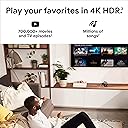
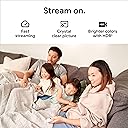
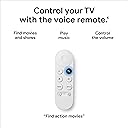
Google Chromecast with Google TV (4K) is a compact streaming stick delivering ultra HD 4K HDR visuals and vibrant colors. It features a voice-enabled remote powered by Google Assistant for effortless content search and smart home control. Compatible with major streaming services, it consolidates your entertainment into one personalized home screen. Easy to install via HDMI, it supports dual-band Wi-Fi and offers family-friendly profiles with parental controls, making it the ultimate upgrade for modern living rooms.


| ASIN | B08KRV7S22 |
| Best Sellers Rank | #9,517 in Electronics ( See Top 100 in Electronics ) #58 in Streaming Media Players |
| Brand | |
| Built-In Media | 2 AAA Batteries, Chromecast, Power Adapter, Power Cable, Voice Remote |
| Color | Snow |
| Compatible Devices | Television |
| Connectivity Technology | Bluetooth, Wi-Fi |
| Connector Type | HDMI |
| Controller Type | Remote Control, Voice enabled remote |
| Customer Reviews | 4.6 out of 5 stars 16,636 Reviews |
| Form Factor | TV Stick |
| Item Dimensions L x W x H | 2.4"L x 0.67"W x 6.39"H |
| Item Weight | 116 Grams |
| Manufacturer | |
| Memory Storage Capacity | 32 GB |
| Mfr Part Number | G9N9N; GZRNL |
| Model Name | P10NC12690A |
| Model Number | G9N9N; GZRNL |
| Other Special Features of the Product | Flat |
| Resolution | 4k |
| Special Feature | Flat |
| Supported Internet Services | Amazon Instant Video, Google TV, Hulu, Netflix, YouTube |
| UPC | 193575007229 |
| Unit Count | 1.0 Count |
| Video Codec | H.264, H.265/HEVC |
| Video Output Resolution | 3840 pixels |
| Warranty Description | 1 year manufacturer |
M**O
One of the Best Devices for Streaming
I do recommend this device. I was using my Xbox for TV viewing for years. There were a few issues, but the Xbox is very much overbuilt for just watching TV, so things went generally smoothly. Previously, quite a few years ago, I used an Amazon fire device. That device just got slower and slower until I got so frustrated I threw it away. Had about four Rokus, same deal - just like the Fire cube, the Rokus seem to get their brains full and they start to act like they're reacting to everything in slow motion. You get what you pay for, I guess, and the Xbox was the greatest solution for a long time. I do recommend using an Xbox, except setup is typical Microsoft, very confusing and management is aggravating, as you have to decide on "plans" to pay Microsoft in various ways. Now I have this. I got it because I had one in the bedroom. The NUMBER ONE best thing about this device, after confirming it is NOT a piece of junk (in the bedroom there have been no slowing down over time issues at all), the thing my Xbox did TERRIBLY, was the content and design of the home page. I'm currently watching a free movie I had NO IDEA was available. It was easy to find on the Chromecast home page, which shows you lots of great content (UNLIKE the Xbox, which is NOT helpful in ANY way with it's after-thought-inspired home page. The other thing, the actual motivation for me to ditch the Xbox for the Chromecast, is that you can not get the Roku Channel on Microsoft devices. I'm glad to be off the Xbox, and might end up selling it. The remote control is great - it's sensitive and every button press works, even with obstructions. I highly recommend this device, as well as setting up the Roku Channel (TRC) when you get it. You may find you can cancel three or four other channels and watch even better stuff on the Roku channel for free. The content is quite excellent, and you can find shows like "Pawn Stars" that are simply not otherwise available, or cost money ... but on TRC they are free. Best wishes and happy TVing!
B**R
Good for my tv
Small, fast response, and Easy to use plug and play with out issues and I do recommend this one for best choice
C**Y
Fantastic Streaming Experience in 4K
The Google Chromecast with Google TV (4K) is a game-changer for my home entertainment setup! The streaming quality in 4K HDR is absolutely stunning, offering vivid colors and sharp details. Setup was super easy, and I love the voice search feature – it’s incredibly convenient to just ask for shows or movies without having to scroll through menus. The interface is smooth, and the ability to access a variety of streaming apps makes it versatile. The remote is easy to use, and I appreciate the minimalist design. Whether I'm watching movies, shows, or live TV, this device delivers a seamless and high-quality viewing experience. Highly recommend for anyone looking to enhance their TV watching with a smart, simple, and powerful streaming device.
A**N
Review of Chromecast on Google TV
Chromecast 2020 is the 5th generation of devices today. Google TV has some differences compared to Android TV that come with some benefits. The entire body is streamlined, made of matte plastic. It is pleasant to the touch and does not accumulate fingerprints. Available on the market in 3 colors: white, blue and pink. It has a monolithic HDMI cable, the length of which is 5 cm, excluding the input. The power connector is in USB Type-C format. There is also an LED on the case and a button to reset the set-top box to the state from the factory. Chromecast does not support Ethernet connection. Only Wi-Fi (with excellent parameters). Optionally, you can buy a power supply unit with a LAN connector for cable connection. Remote controller The remote control is very compact with a small number of keys on the front panel. Only 9 main buttons + joystick. What's interesting are the shortcut keys for YouTube and Netflix, as well as the Google Assistant. The rest of the keys are already familiar and do not need to be presented. To change the volume level, there is a knob on the side panel, similar to smartphones. Accessories The most important thing that is in this model: Chipset - Amlogic S905D3G. It is known for good stability and relatively low thermal output. At the same time, it has 4 Cortex-A55 cores with a frequency of 1.9 GHz and a Mali-G31 MP2 graphics core at 850 MHz. For 4k processing, this is enough. Memory. RAM 2 GB, a little, but the device is enough. Built-in memory is 8 GB, but the Google TV system takes up half of it. Software Google TV is practically no different from the familiar to many Android. The only difference is the use of the new launcher. To be honest, this is even good, because on the new console you can put almost any application that you can imagine. Notable differences between Google TV and Android TV: More featured content. It occupies a significant part of the main screen, taking away some of the space from the list of pre-installed applications. Google Play is on a separate menu tab. There is no need to enter the application itself, since the main services and catalog search are available from the main menu. Advanced search. Under it, a whole tab was allocated. Popular queries are immediately displayed here, and it is also possible to sort everything by genre. Library. In addition to purchased content, you can store movies here, as in favorites. Setting. It happens extremely simply and quickly through the Google Home smart home application. You need to scan a QR code, the rest of the procedure is almost completely automated. Content broadcast. One of the main reasons for buying a device. There is nothing special here, the function works and does not raise additional questions. Supports streaming from a smartphone, tablet, etc. through various applications. You can use Android TV Remote Control to set up the media player. Allows you to almost completely replace the standard remote control. It's just convenient, and in case of loss or breakage is very useful. Excellent image quality. 4k at 60 fps is a excellent result for such a small device. The player also supports Dolby Vision and modern versions of HDR: HDR10, HDR10+. Deep sound. Support for Dolby Digital, DD + and Dolby Atmos affected the sound quality for the better. Movies are fun to watch. Performance. Even large films from the Internet or a local network pull perfectly, without hitches and long buffering. True, for this you need a good video player (for example, Vimu). The interface itself is nimble, responsive and smooth. Working with streaming platforms Video from YouTube and Netflix pulls and does not create a feeling of thoughtfulness of the set-top box at any resolution. The launch of the application itself takes 2-3 seconds. Application installation. They can be quickly installed from the Play Market, but there is also support for apk applications. This requires only the presence of an apk file and a file manager (for example, X plore).
D**R
Adapter US style, but 100v to 240v
I can verify that the plug for this is a USA style plug but you can put an adapter on it because it is 100 volt to 240 volt capable. I've also found that you can run this off of a 5 volt phone charger, so long is the amperage is enough. Most phone chargers these days have more than enough amperage. I upgraded from the HD model (used on an older TV) after buying a new LG TV that has really poor smart features implementation. I tried the HD model on my new 4k TV for a while, and it still looked excellent on everything that wasn't in HDR10 or other newer black level format. Honestly not a huge difference between resolution of the HD and 4k devices, because most content we still watch is HD. You need larger than a 50" TV to notice, at 7 feet or further away. But there was a big difference when HDR formats were part of the image (HD model didn't have as many pixels to work with and the image was then darker). My new TV is a 4k TV and the Chromecast 4k runs at 10 bit 4:2:0. It was capable of 10 bit 4:4:4 on the HD model in 1080p. Oddly, this meant the 1080p image color in 10 bit 4:4:4 was very slightly deeper with the HD model over the 4K in 10 bit 4:2:0, with the tradeoff that it was too dark on the HD model using 12 bit settings. Both do have other 12-bit capabilities though, if your screen is capable of that. On my TV the HD model will accept the 12-bit connection but then certain apps like Disney get wonky and my Bluetooth doesn't work or the Disney+ app won't open. I found that to be the case on the HD model, but not on the 4K. I also learned that audio settings can affect whether Disney+ will open. I switched to 2 channel audio and now it opens (probably an issue with my TV's capabilities). Most every bit of content these days and probably for quite a while (even 4k Bluray) is 10-bit anyway, so although running in 12 bit on the 4k model provided ever so slightly deeper colors, it also makes the overall image darker in the brighter areas. If you find HDR content too dark, you can adjust the bitrate under the Settings cog/Display & Sound/Dynamic Range & Color format. You can also dump HDR entirely, which is a godsend if you find it too dark. My Chromecasts both have their minor bugs related to apps. For some reason I also lost the ability to purchase or rent movies from Google TV due to something that happened with my Google account. I seem to break something, but I don't know what, because it also affects my phone as well. I've contacted Google about this message error I get, but they've been of no help at all. One of the Google techs flat told me that they have no idea how to fix it. And I know I'm not the only one who receives this same message. The workaround for me is to purchase and rent movies through YouTube, which is all the same list anyway I think. I can also purchase them from Apple and any other app. It's just so odd to me that I can't get movies from Google TV to rent or buy anymore on the one device made specifically for the purpose. When I try to purchase I get an "Error Retrieving Information from Server. DF-DFREH-01". This seems to be a Google problem and not a Chromecast problem, because it also affects my phone. But this problem highlights the issue that I have with pretty much all of my Google products. They're sort of half-baked and full of bugs, and those bugs rarely get fixed before they move on to the next product. To be honest, I think it would be well worth it to buy an Apple TV instead (although I read YouTube is buggy on it) if you can afford it, but the reason I purchased Google because it allows me to use a VPN and access overseas video content from the device. I'm not sure the Apple TV can do that. So overall, I'm generally happy with this device as the video quality is generally very excellent, and much better than the video quality coming from my Smart TV's own internal functions. And I find HDR content to be a bit of a mess, so the Chromecast allows me to change color format or shut off HDR entirely for a brighter picture, which my LG TV will not do by itself. This Chromecast 4k is Dolby Vision capable, which might solve these HDR problems on TVs capable of it (or on some, creates others). But the best my TV can do is HDR10. The entire implementation of these HDR formats is a complete mess on Disney+, for example. So disappointed that many of their titles are fake HDR that is simply SDR encapsulated and not really HDR, which causes dark video on TVs that cannot turn off HDR. Many of the Star Wars shows appear to be like this. Happy with the overall value of this device. Buy the 1080p for an older TV. But get the 4k for a newer 4k one. Simple as that.
K**D
Easy to use, easy to connect, great user interface and great voice recognition.
The chrome cast works well, it is easy to use and it has a great user interface. The device basically works with Monitor or tv as long as it has an HDMI port as long as its screen and HDMI port. The user interface is really easy to use and navigate which is even great for beginners where even my 5-year-old cousin can operate it. Next voice recognition is great for someone that has a deep voice with a heavy accent it's still able to recognize what I'm saying. Next, the resolution is great as the device can definitely play 4k videos and if u have a 1080p screen it can still upscale those 1080p videos to 4k. The overall best thing about this device is that it still updates with new features always being introduced, bugs being fixed, and quality of life changes which doesn't really with other devices like this.
B**S
A necessity for all who have a TV
Having all streaming services plus other Google Play apps all in one area, with voice command that can easily understand your voice and immediately open where to watch the movie or TV show you said is so nice. It's incredibly convenient and is high quality in terms of its image quality. Had it for months now and the only issue I had sometimes is lag when clicking around which doesn't happen often at all, and it's no big deal either. If you're considering buying it, just know that the Chromecast will need a wall socket and HDMI port to connect to. Installation is very easy, and updating it before use didn't take long either.
T**I
Chomecast wins
We cut the cable cord about 2-3 years ago and went 100% to streaming. I am a 60 year old man who loved his cable and DVR for years, and my wife cannot live without her DVR shows. After being abused by the cable company for years and seeing our bill go from $65 to $250 a month, we decided to go with Roku Systems and Google TV as a replacement for $65/month. Since we already had the streaming service for the family, Netflix, Disney+, MAX, etc., the savings were significant to discontinue cable. It took some time for us to get the services working to our liking, and Roku made it nice. When we recently added a new TV to the house, I decided to buy a Google Chromecast system instead of Roku to try it out. Both are good, but the Google system user interface and options are far superior. We love it, and as our Roku has gone AWAL on the other TV, which is another issue, we replaced it with Google systems. You can't go wrong with either if you're looking to cut the cord, but the Chromecast has had fewer issues after setup and works well. We have had issues with the remotes with Roku and do not see this issue with Chromecast. Google is a bit more complex to set up than Roku, but it is fine today as Google has made that effortless with your smartphone. Scan the barcode and follow the instructions. Both worked right out of the box.
N**F
Buen producto
Excelente, sigue trabajando tan bien, como la primera vez que se uso
W**W
Great
Great item for a rather low price for a product from Google. It does lag a bit sometimes, but its not too noticable.
G**L
Smart and fast
Bought the Chromecast tv dongle to replace an older Android box. It is user friendly but some WIFI connection glitches could frustrate some users. I had to temporarily pause my VPN. The voice command is fantastic for senior eyes but bear in mind it doesn't work in all apps. My IPTV app isn't available but another app worked with some assistance from my provider. It is very easy to navigate. The compact remote is efficient. I have just received it and have more to discover. Loads fast and so far no buffering...we'll see.
I**A
Excellent Quality
The packaging and the quality of the product is excellent
@**T
googletv
very fantastic and useful product it's functioning very smoothly and faster
Trustpilot
1 week ago
1 week ago