🚀 Elevate your home network to warp speed and never miss a beat!
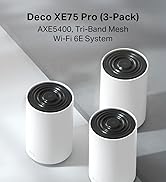
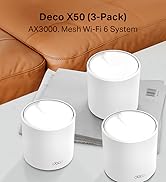
The TP-Link Deco XE75 (3-pack) is a cutting-edge WiFi 6E mesh system designed to deliver tri-band speeds up to 5400 Mbps, covering up to 7,200 ft² and supporting 200 devices. Featuring a powerful 1.7 GHz quad-core CPU, 3 gigabit ports per unit, and AI-driven mesh technology, it ensures seamless, interference-free connectivity throughout your home. With advanced security via TP-Link HomeShield and easy app-based setup, it’s the ultimate upgrade for modern smart homes.


| ASIN | B0B12WYSLD |
| Antenna Location | Home |
| Antenna Type | Fixed |
| Best Sellers Rank | 983 in Computers & Accessories ( See Top 100 in Computers & Accessories ) 5 in Whole Home & Mesh Wi-Fi Systems |
| Box Contents | Deco XE75(3-pack) |
| Brand | TP-Link |
| Brand Name | TP-Link |
| Colour | White |
| Compatible Devices | Laptop, Personal Computer, Smart Television, Tablet |
| Compatible devices | Laptop, Personal Computer, Smart Television, Tablet |
| Connectivity Technology | Wi-Fi |
| Control Method | App |
| Controller Type | Switch |
| Country of Origin | China |
| Coverage | 200 m² |
| Customer Reviews | 4.3 out of 5 stars 11,596 Reviews |
| Data Transfer Rate | 5400 Megabits Per Second |
| Frequency | 6 GHz |
| Frequency Band Class | Tri-Band |
| Frequency band class | Tri-Band |
| Is Modem Compatible | Yes |
| Item Dimensions L x W x H | 10.4L x 10.4W x 17H centimetres |
| Item height | 16.9 centimetres |
| LAN Port Bandwidth | 1000 Mbps |
| Manufacturer | TP-Link |
| Maximum Upstream Data Transfer Rate | 574 Megabits Per Second |
| Model Name | Deco XE75(3-pack) |
| Model Number | Deco XE75(3-pack) |
| Model name | Deco XE75(3-pack) |
| Number of Antennas | 3 |
| Number of Ports | 3 |
| Operating System | Linux |
| Other Special Features of the Product | Parental Control, QoS |
| Product Warranty | 3 Years |
| RAM Memory Installed | 128 MB |
| Security Protocol | WPA3 |
| Special feature | Parental Control, QoS |
| Wireless Compability | 2.4 GHz Radio Frequency |
| Wireless communication standard | 2.4 GHz Radio Frequency |
P**Y
Great upgrade for the cost with good Coverage and Performance across the board
Replaced an ageing Asus Wifi 5 mesh setup that was about 5 years old and hadnt been bad at all. I just noticed a few niggles, needed restarting on occasion and just generally felt an upgrade was due. Did a bit of research and usually I tend to run near the top end of tech but went closer to the middle range I feel with these and they have been faultless. Really easy to setup, great performance and also really good coverage in an old 16th century house. We use 3 to cover the main areas and I then went and purchased a couple of the smaller x10s to give some coverage in the Garden in summer. Not had any dropouts, no need to restart them, really good performance across the board. Ive had a fair few devices connected when friends and family round and never gave any issue. I like the guest network seperate from my office one that was easily setup, for said friends and family as well! The mobile app (Ive only used on iOS) is really well done, gives a good little map of how the meshes are connected which I liked to ensure the setup was working as I thought. I get notifications if other devices connect (thinking about it, I think this is only when Im out and about rather than at the home which is probably a good thing!). Updates have been smooth and pain free as well. Overall really pleased and would look to get other TP-Link products in future and have recommended to others!
R**N
Brilliant for extended WiFi networks
Great items, a bit pricey but does a fantastic job. Always struggled with WiFi signal around the house but now get consistent speeds everywhere, doesn’t drop out like my old decos used to. Set up on the app is really easy tells you exactly what to do. The units are quite large but don’t look bad.
D**G
Pretty fly for a WiFi
Great mesh solution, works as expected and the connectivity is good - range is clearly much better than using the Wifi provided by your ISP. Wife didn't even mind the aesthetics - looks like a small speaker (or the big Amazon Echo Studio speaker, but white) or an air freshener. Easy to set up with the app, also easy to maintain and view connected devices, bandwidth etc.etc. on the app as well. It has Wi-Fi tri-band - so 2.4GHz, 5GHz and 6GHz - but unless you're sat on the device, 6hz is pointless - very very fast - but doesn't travel at all though anything. I don't think this is the products problem but a 6GHz one, but it should be mentioned. Also the 6GHz signal has it's own name "YOURWIFINAME_6Ghz" that you need to add to your devices if you want to use it. Mesh is seemless, you can't tell when you're going from one of the routers to the other. Yes, they're pricy - but so are all the competition so what can you do? I've had wifi extenders before - much cheaper and you can tell why, you have to have them on different WIFI names and your devices will stick to one or the other until it loses range, regardless of the quality of the connection, so I would avoid and stump up the cash for a mesh solution like this and never worry about it ever again.
P**R
Good signal, but with a big caveat.
I was suffering from blackspots in Wi-Fi coverage in my house, and wanted to improve the coverage of by EE/BT TV. I supply the TV via the internet rather than from an ariel. The setup of the system is very simple from the downloaded app, and it is very simple to create a mesh system that I can get throughout my house. I do not have any blackspots at all. I have 500Mb fibre broadband, and following the setup of these deco's, I get rock solid 450Mb Wi-Fi connections everywhere. The reason for marking the XE75 down to 4 stars, is that it cant handle the EE TV signal. There is no configuration to allow Multicast or configure IMPG Snooping. Both of which are required for EE/BT TV. As an FYI if you are interested, I ended up having to put them into AP mode and use the EE hub to provide the signal to the EE/BT TV box. Unfortuantely, this hub was what I wanted to remove from the system. In summary, I would recommend, but only if you have another way to stream EE TV
S**D
Fantastic product
This is amazing. My house has 3 floors, and Wi-Fi used to be a nightmare with dead spots everywhere. After setting up this 3-pack, the whole place now has strong, stable coverage, even in the attic and the backyard. The setup took less than 15 minutes, and the Deco app makes it really easy to control and monitor devices. Speeds are consistently fast, even with my family streaming, gaming, and working online at the same time. This system has completely solved our Wi-Fi issues. Worth every penny
K**E
Deco X50
We have a modern build 3 storey 6 bed town house, the internal walls are all stud and plasterboard. I was using a powerline system to get broadband to the harder to reach places in our house, but it was constantly dropping the signal and having issues. The deco system is much better, solid connection throughout the house. I have replaced the router from our ISP with one of the units and the others are placed one on each floor. It was very easy to set up and all the little dark patches where we used to struggle for signal are gone. The mesh is stable and seamless. I was a bit concerned I would spend £250 and still have issues, but those concerns were completely unfounded. Very happy.
D**S
Wifi 6e was a huge let-down/disappointment - and beware Mac users
TL;DR These were a huge disappointment - very slow performance as a mesh network! Why I bought these/background: I bought the new TP-Link Deco XE75 AXE5400 3-node system to replace 5x of the old/first Google wifi nodes We live in a 2 storey, 3 bedroom, Edwardian house with Brick internal walls and with the old Google system, I'd often see no more that 6-8MB/s when transferring files between my MacBook and a Raspberry Pi-based music server (which is connected to a wifi node using ethernet). I've read and watched loads of reviews about these and seen some truly blistering performance, even when using these in wireless backhaul mode (some people seeing close to gigabit performance). Unpacking and setup: Box, packaging etc all good, units themselves were smaller and lighter than I'd assumed and seemed well built. The mains adapters were bigger than I thought though (although they fit in a multi-socket extension strip with no issues Setup was simple enough, although you have to download the app and register an account. It was also easy to add the extra nodes (one in the kitchen at the back of the house, and one in an upstairs office room), and update firmware etc Initial impressions: The first issue was that I couldn't connect to the music server from my MacBook (it was fine from my Windows laptop though) - looks like there's a well documented DNS issue with these devices! The workaround was to add .local to the name of the device (ie. <devicename>.local:<port number> This was the first thing that grated as in 2022 I wasn't expecting to run into such things Performance: Incredibly slow - worse even than the old Google wifi kit I've been using for years I can't really say any more than that - I was often getting <1MB/s transferring music files onto the server! This is a consumer product and as such should "just work" - but even after trying various things, the performance was still worse than the kit I was hoping to replace Maybe it's because we have all brick walls and the reviewers all live in flimsy new-builds, I don't know, but I have no clue why my results were so poor, but there we go Will be sending this back ASAP...
M**N
As expected Cost effective for WIFI 7
Easy to set up and and works well (speed, range and responsiveness); but given that it is a WIFI 7 system it is not cheap, despite being one of the more cost effective WIFI options.
Trustpilot
3 days ago
1 week ago