We remain fully operational. Our teams are working around the clock to ensure your deliveries continue safely.

DOWNLOAD THE APP


Copyright © 2025 Desertcart Holdings Limited
DOWNLOAD THE APP
Buy anything from 5,000+ international stores. One checkout price. No surprise fees. Join 2M+ shoppers on Desertcart.
Desertcart purchases this item on your behalf and handles shipping, customs, and support to KUWAIT.
🔐 Unlock the future of secure living—smart, sleek, and always one step ahead.
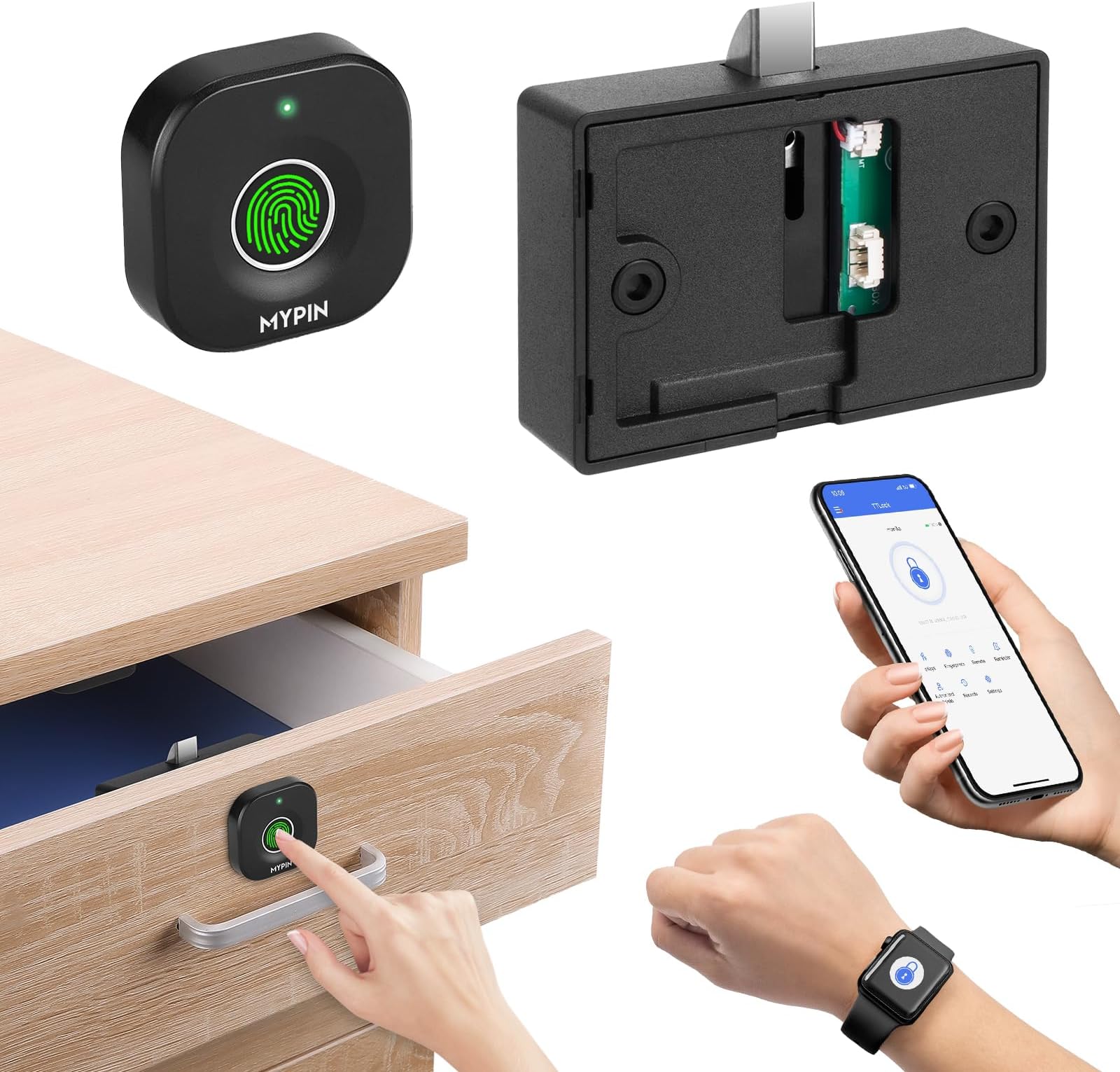
This Bluetooth Fingerprint Cabinet Lock offers cutting-edge keyless security with three unlocking methods: fingerprint, smartphone app, and Apple Watch. Designed for wooden cabinets, it supports up to 10 fingerprints, records access logs, and features a durable metal locking mechanism. Powered by 3 AAA batteries lasting up to a year, it includes an emergency USB power option. Ideal for professionals seeking smart, child-safe, and discreet protection for valuables and important documents.




| ASIN | B09YTT3GJG |
| Batteries Included? | No |
| Batteries Required? | No |
| Best Sellers Rank | #79,243 in Tools & Home Improvement ( See Top 100 in Tools & Home Improvement ) #133 in Cabinet & Furniture Locks |
| Brand | MYPIN |
| Color | Black |
| Connectivity Protocol | Bluetooth |
| Control Method | App |
| Controller Type | Android, Hand Control, Mechanical knob |
| Customer Reviews | 4.2 4.2 out of 5 stars (191) |
| Date First Available | April 26, 2022 |
| Finish | Painted |
| Finish Type | Painted |
| Included Components | 1x Back up key, 1x Charging cable, 1x Manual |
| Item Weight | 4.2 ounces |
| Item dimensions L x W x H | 1.5 x 1.5 x 0.5 inches |
| Item model number | HS0358+HS0394 |
| Lock Type | Biometric |
| Manufacturer | MYPIN |
| Material | Plastic |
| Model Name | Bluetooth Fingerprint Cabinet Lock |
| Number of Pieces | 1 |
| Product Dimensions | 1.5 x 1.5 x 0.5 inches |
| Recommended Uses For Product | Securing valuable items, important documents, and weapons in homes, offices, or wooden furniture |
| Shape | Rectangular |
| Smart Home Compatibility | Smart Home Compatible |
| Special Feature | APP Unlock, Apple Watch Unlock, Fingerprint |
| Special Features | APP Unlock, Apple Watch Unlock, Fingerprint |
| Style | Bluetooth Fingerprint Cabinet Lock |
A**.
WORKS...but... (See Instructions here)
Physical installation is simple. However, learning to program in fingerprints and set up the Tuya Smart app isn't so simple. Instructions are crappy. However...once you figure it out, it all works as advertised. 1. When you're starting, any fingerprint will unlock it because none is saved. Press and hold the fingerprint you want to become master. Hold the finger there for a several seconds until the green light is solid. Then once you get the full green, lift the fingerprint off the scanner. Note: if you keep holding your finger there for longer than this (with a 'master' fingerprint), you'll reset all saved fingerprints. 2. When you lift fingerprint from the reader, the light will turn to blue. You then touch the reader with your finger for half second and then lift the finger. A green light will flash once quickly to indicate a successful read. Tap a few more times just like this until a solid green comes on. Your print is now saved. This process is similar to setting up fingerprint unlocking for a smartphone. 3. The first fingerprint is now your master. If you've followed the steps correctly, ONLY the saved fingerprint should open the lock. Check using other fingers that weren't saved to be sure. You should get red light. If not, start over until you figure it all out. 4. If only the saved/master fingerprints work, then you're successful. Repeat this process using the master fingerprint to get the solid green, then entering additional fingerprints (on blue light) following the same steps. Save one fingerprint at a time. Note: only the first three prints are master prints that can authorize adding new users. Others are only regular users who can unlock only.
J**Y
Secure and Convenient Smart Cabinet Lock
This Bluetooth fingerprint lock has been a great upgrade for securing drawers and cabinets. Setup was easy with the app, and the fingerprint sensor works quickly and accurately. I also like that I can unlock it with my phone or watch. It’s discreet, fits well in wooden furniture, and adds a nice layer of safety—especially for keeping kids out of certain drawers. A smart and easy DIY solution.
M**K
Very cool and not hard to install.
*IMPORTANT – If you are not comfortable drilling, this is not the item for you. If you don’t mind and have the ability to drill a small hole to install the fingerprint reader then the instillation is very quick and easy. This fingerprint/Bluetooth cabinet lock is very cool. You can install it to add some privacy to any drawer or cabinet and can open it using your fingerprint or using your phone.
E**.
Like it. Ordered another
Needed to keep a drawer locked for safety. Didn't want to keep track of another key or have someone find the key. Didn't want to memorize a combination. CONS: have to push the drawer in while reading the finger print or it will make a funny noise and not unlock. Also the Bluetooth errors often when adding or resetting finger prints. We make it work. Its a good lock for the money. we really like the low battery indicator and the back up key. I bought another lock.
B**R
Easy to install and works without a hitch!
Turns any drawer into secure storage. The unlocking mechanism works great, just make sure to install both parts accurately. It helps to temporarily secure the parts with adhesive before screwing it in.
A**S
Works But
Pretty much made to last until the return date passes, the refuses and there is no discernible way to reset it. Save your money.. Adding after messing around I finally got it to reset, not sure what did it. Also no app under "Mypin" for this item.
M**H
Horrible Lock
This lock has a terrible time holding the fingerprint. Sometimes I can unlock and sometimes I cannot unlock with my fingerprint. The directions are terrible. Now, after only six months, it seems that the battery has died and there are no directions how to recharge the battery. This is utterly useless after six months and I have a hole drilled in my drawer. There are no phone numbers to call for assistance. It is a waste of money and time.
I**F
Easy install and registration!
Amazing medicine cabinet lock. Easy to use Bluetooth function. Has an app and you can see who opened and what time.
P**P
Used it for wardrobe. Works well. Easy finger print setup. Could set up on app with some help from the manufacturer. Straight forward installation (done by a carpenter). We are planning to order more.
N**S
I’m really impressed with this compact smart and small fingerprint cabinet lock! Setup was simple and the Bluetooth connection to my phone is seamless. It recognizes my fingerprint instantly and adds a strong layer of security to my cabinet. I also like being able to manage access through the app. It's a smart, keyless solution that’s perfect for home or office use. Very happy with this modern tech upgrade! Not sure about battery it's depends on your choice. Rest all is good...
V**D
Great lock, works perfectly after more then a year of every day multiple use, batteries lasts in forever - I didn't have to change them yet. Only downside is if I have dirty, damaged, wet fingers, it will not open on 1st try or at all, but that's normal, not a defect. There is emergency usb stick included with it, to open it in this cases (or mobile app, which i don't use)
A**R
its easy to configure. but the mentioned App is not working.... so bluetooth mode is not working.
J**E
This little lock was easier to set up than I expected. The app connected quickly, and both fingerprint and phone unlocking worked smoothly. The drawer I installed it in has been reliable so far. The build feels solid, and I love that it doesn’t require a key or leave a visible lock on the outside. Great for childproofing or discreetly securing personal items in an office, closet, or bedroom. Just make sure to measure your space for proper fit—it works best in flat wood. But if you're a DIY build person, you could probably finagle it anywhere. When I use it, it makes me feel like a spy in the movies! 😄
Trustpilot
2 months ago
1 month ago