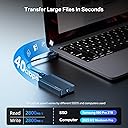
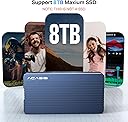
⚡ Unlock Thunderbolt Power: Carry Speed, Stability & Style Everywhere!
The ACASIS TBU405 is a compact, tool-less M.2 NVMe SSD enclosure engineered for professionals demanding ultra-fast external storage. Featuring a certified JHL7440 Thunderbolt 3/4 chipset, it delivers up to 40Gbps transfer speeds (around 2800MB/s real-world), supports multiple SSD sizes (2230 to 2280), and offers broad compatibility with Mac M1/M2 Pro/Max, iPad Pro, Windows, macOS, and Linux. Its aluminum alloy body ensures efficient heat dissipation during heavy workloads, making it ideal for on-the-go creatives and managers who need reliable, high-speed data access and backup solutions.


| ASIN | B0BBZT42HC |
| Best Sellers Rank | #41 in Enclosures |
| Compatible Devices | Laptop |
| Customer Reviews | 4.3 4.3 out of 5 stars (1,078) |
| Data Transfer Rate | 600 Megabytes Per Second |
| Date First Available | August 26, 2022 |
| Hard Disk Form Factor | 2.5 Inches |
| Item Weight | 5.6 ounces |
| Item model number | TBU405 |
| Manufacturer | FREEGENE |
| Max Number of Supported Devices | 1 |
| Memory Storage Capacity | 8 TB |
| Product Dimensions | 3.96 x 1.92 x 0.6 inches |
A**B
A Thorough Testing Reveals that This Is A Thunderbolt 3/4 Drive with 3,000 MB/s Speeds - WHAM!
Wow! What a few weeks it has been. For some, my initial review was blunt and critical. I had a unit arrive that initially worked, albeit slowly and not as expected. Soon after, the unit stopped responding and wouldn't mount a drive. I thought this product was garbage. However, I did some very thorough research. The product I received had been used before, and I unknowingly thought it was a new product. To summarize a very long story, the prior user did not insert the SSD in correctly, damaging the connector component and cracking (a few at least) solder joints that was making it work initially, but then as heat was applied the cracks became more apparent through thermal expansion, and BAM! The unit was dead. I initially thought this was a product malfunction, but this turns out to be on Amazon's side by returning used products and placing them as new. I had a lengthy conversation with the seller, and they are working with Amazon to ensure these things don't happen again. I agreed with them, that when you buy a new product, you should expect a new product, and not something that has been used before only for Amazon to throw it back on the shelf. This has apparently increased in frequency with Amazon, and thus this places blame squarely on them. Therefore, my review is below as I returned the defective unit, and bought a brand new one that I was able to test out. Like many of you, NVMe Enclosures are not a completely new idea, but they have remarkably increased in performance in the last year or two. This is because NVMe rely on the PCIe bus which typically is attached to a motherboard, offering the very best and top speeds that the motherboard is capable of handling. When you start moving toward enclosures, they are not "directly" attached to the motherboard, and thus are limited by the cable, receiver technology, and enclosure itself. Whereas USB (and Thunderbolt, for that matter) have promised to simplify this technology, it instead has increased its complexity to confuse all of us! First, you are looking for an enclosure. No surprise you already have a 2280 (think size, 22cm by 80cm SSD "stick", and NOT a SATA stick, don't bother with those anymore) SSD that you want to use, but either don't want to put it into a computer or you have a spare one on hand. That's where these enclosures come in handy; they can utilize the SSD attached to the computer as a "mega USB thumb stick" to increase storage and a whole benefit of other factors. Now, as we discuss speeds, USB sticks are actually surprisingly slow. Even some of the best, expensive ones are only able to pump out 100-200 MB/s write speeds (reading is almost always faster and easier than write). Since you are looking for an enclosure, you should have at least a 3,500 MB/s NVMe SSD that can benefit from a fast enclosure. Simply hook this up to a computer, and you'll get fast read/write speeds. This benefits from large file transfers such as videos, or a database of something like music (I myself have about 300 GB of personal music collection, not streamed). So the usefulness of a 1TB to 2TB SSD attached to the computer helps out your storage, while also performing well for the computer to carry out tasks that is within the extra storage space you are using. Enter ACASIS Thunderbolt enclosure. You'll see that it has the (not latest, but best) Intel JHL 7440 Chipset. You want this chipset because it is capable of Thunderbolt 3 (and Thunderbolt 4 for a Mac, a bit more about that difference in a second). This chipset gives you the capability to read and translate that data on the SSD to be sent to the computer. Next, you need the proper cable. Not just any cable with USB-C connections on each end. You need a cable that is capable of transferring that data from the enclosure to the computer. Any old "charging USB-C" cable won't do, they are for charging and NOT necessarily for data transfer. The cable that comes with this unit is meant for Thunderbolt 3/4, so this cable is good (and spendy). If you need a longer one, they don't make super long ones simply because the longer cable that you use, more interference is introduced and drastically reduces the speeds. Best to keep your cables short! Once you have the SSD, the enclosure, and the cable, you can now connect it to your computer or your laptop. The best benefits will be realized by a laptop as this enclosure is easy to carry around, does not weigh much, and performs WAY BETTER than any kind of mechanical drive that you plug into a laptop. This gives you the extra storage space you are looking for. Maybe for video editing, carrying around your music or photo collection, or even a backup that will be quick to backup any files that you need. This enclosure gives you that flexibility to use at your will, and giving performance similar to another SSD that is plugged into your motherboard. I installed both a 2TB WD SN850X and a 2TB Samsung 980 PRO (both are very good SSD's with fast read/write speeds) to test out the capability of these enclosures. I used a new Mac Mini M2 Pro and used a hard drive speed test software. Speeds were about the same between both SSD's, so the enclosure is pulling the best that it can from each SSD's. Even though these SSD's are capable of over 7,000 MB/s, the limiting factor is what Thunderbolt can do, and that is a theoretical rate of 40Gbps. But I'm going to clarify some negative reviews here with some technical know-how: First, remember that speeds are theoretical bandwidth speeds, and almost never reach those speeds. Think USB 2.0 and how everyone thought it was mega-fast at 480 Mbps, but it never got close to that. Know why? Because everyone kept trying to use mechanical drives, and they simply just can't perform like an SSD could back in the day, so speeds were still seemingly slow (still way better than USB 1.1!). Second, Thunderbolt (and USB 4.0) still have to have bandwidth reserved for display output. That means that the 40Gbps capable speeds still has about 16Gbps of reserved bandwidth for display carry-through. So yes, 40Gbps would yield over 5,000 MB/s, but you're not going to get that no matter what you do. So the best you can get is about 24Gbps, which is about 3,000 MB/s and that's exactly what this unit can do. I have not seen any other enclosure that can beat the performance of this one, simply as the best chipset right now is the JHL 7440 which will cap out data transfers at about 24Gbps (surprise!). Still, 3,000 MB/s is still VERY good, and you HAVE to remember that this is not directly connected to the motherboard, so you're not going to see 7,500 MB/s transfer speeds simply because you are not directly connected to the fastest bus on the computer. External connections are never really going to be faster than internal circuitry, so stop believing that somehow, magically, you can. Just isn't reality. So with that in mind, the enclosure can get warm with TONS of data transfers (how often are you going to transfer TB's of information back and forth? Yea, not much), so the heat dissipation is good. I found out that the hottest my unit could get was about 110 degrees F after moving 4TB of data back and forth, which is not bad at all. I also keep the heat down because it sits on top of the aluminum body of the Mac Mini, which helps pull heat out of the unit. The enclosure is a well machined block of aluminum alloy, so it is capable of heat transfer if you give it a medium to do that. Air is not exactly the best conductor, so sitting on top of a towel will not dissipate as much heat as you would if you placed it on a thick, solid metal surface, or even a cold, flat desk that can help pull some heat from the unit. To be fair though, it will only get hot with a LOT of work, and even then I noticed that it cools down fairly quickly, so heat is not really an issue with this unit. Lastly, I went beyond and wired up two of these units to give a real-world demonstration of a RAID setup (Google RAID if you need to learn about it, you'll want to if you haven't heard of it, RAID can be awesome). Using the same Mac Mini, I took two SSD's and two of these ACASIS enclosures, and set them up as a RAID 0 drive using Stripe. Now, I've taken two 2TB drives and created one single 4TB drive. As one transmits info, the other is getting ready to transmit, so they both work in harmony that essentially doubles your bandwidth. Behold, my 3,000 MB/s speed tests now turned into 6,000 MB/s speeds! That's the WOW factor that is needed. Overall, for about $100, this enclosure will beat the socks off of any of those "other" $20 or $40 enclosures. The JHL 7440 chip itself is expensive, not to mention the cable that is actually capable of full data transfer is not cheap either. Hence, the price is getting something worth paying for. You think USB 3.0 speeds are fast at 5Gbps? Try transferring a 30GB file and see the difference. Personally, I used a 30GB Photos library, which is a good test because it has hundreds of thousands of files, plus a large 30GB data chunk size, that is perfect to test a transfer rate. I moved 30GB in less than 30 seconds. Yes, half a minute. You read that right. How? Because I used my internal Mac Mini SSD with speeds of 3,500 MB/s and my RAID drive capable of 6,000 MB/s, and it transferred a large 30GB file that quickly. Just. Screamin'. Fast. So, to realize the full potential of this, you need to ensure that you have the right SSD, the right enclosure (this one), and the right cable (comes included). Now you are ready to play with power! Pic 1: Speeds of the enclosure using Samsung 980 PRO Pic 2: Detailed breakdown of Thunderbolt connection, 40 Gbps Pic 3: Box unit arrived it Pic 4: Internal Mac SSD, notice the speeds of ACASIS enclosure is near internal SSD speeds! Pic 5: Buy two of these, use RAID to combine the SSD's together for a whopping 6,000 MB/s!!!!
M**E
Great TB4 enclosure!
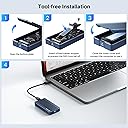
This enclosure is great for both PC and Mac. The installation was super easy and tool less function make it easy to change out the NVME. The speed was excellent when paired with a WD Black 850X NVME.
L**Y
Watch the video on YouTube if you haven't used an SSD case before
Product was very easy to use, but the instructions are incomplete. There are parts included for which there is no instruction, so I'm guessing they assume only experienced techs would be using this. They're wrong. I'm just a user who needed access to data on my hard drive after my laptop stopped working. Initially, bought the wrong type of external drive case, as I hadn't actually opened the laptop. After opening and realizing the drive bay was empty, knew I was looking for an SSD, which was hidden, so took a bit of fiddling. Found it, looked up the chip and landed on this case after carefully reading the reviews. Other reviewers note this feels solid and quality. They are correct. They also note the fan is very quiet. Even holding it up to my ear, I cannot hear it, but I can definitely feel it. I installed the drive, closed it up, plugged it in, it was immediately available. Perfect functionality. Things there was no instruction for IN THE BOOKLET: the plastic adapter. Initially did not use, because I didn't turn the paper sheath over to see instruction for that part. Also the heat shield. Initially did not user because there are no instructions for that at all. Ultimately looked up this device on YouTube and there's a short that does show the heat shield just sits on top of the chip/SSD. Despite my inexperience and need to go back to make these adjustments, the drive worked perfectly without using those two items (my size was the shortest version, so plenty of airflow in there without the shield.)
J**W
Ideal for Mac M2 Studio Max external boot drive.
Product worked as advertised for a Mac M2 Studio Max achieving 3600 MB per second thunderbolt 4 speeds using Samsung - 990 PRO 4TB Internal SSD PCle Gen 4x4 NVMe. Allowed full installation of macOS on external drive and full boot support. Initially tried using lower cost Crucial - P310 4TB Internal SSD PCIe Gen 4 x4 NVMe M.2 drive but for some reason that is not compatible with the ACASIS device. Failed a copy after about one terabyte it would time out by slowing down to 100 MB per second and then eventually 0 MB and then the Mac would eject the drive and remount and you’d have to start over again. Thought maybe it was a thermal issue but as soon as it failed I open the unit and checked and it was still cool to the touch so it was more of a compatibility issue than a thermal issue. The ACASIS device has a LED light and I noticed with the P310 the LED light would blink on and off twice a second which I thought was normal but when using the Samsung you get rapid fire LED blinking so there might be some type of timing or syncing issue. Using the Samsung I haven’t noticed any thermal problems either, it seems cool to the touch even after transferring terabytes of data. Built-in super quiet fan probably helps. Using thunderbolt 4 the speeds are still not as fast as the internal storage which achieve speeds nearly 6000 MB a second, when I used to beat up with that before the monitor would turn on it was already at the login prompt but now with the ACASIS device you can still see a little bit of the Apple screen and the login screen when turning on the computer. The devices achieving the maximum speed of thunderbolt 4 so there’s nothing wrong with the device that’s just the limitation of Apple technology. I know there was some firmware issues with the newer thunderbolt 5 version but that’s not compatible with my Mac and I don’t always like using the bleeding edge technology. This year-old version is solid and works well. Product is well built aluminum enclosure with built-in fan and included thunderbolt for cable with backwards compatibility with USBC 3.2 And older devices. Includes two different thickness thermal pads in which I used both of them to make sure SSD was getting complete coverage and thermal cooling onto aluminum cover which snapped in tightly. No tools needed to secure the SSD, included spacers and pins secure it well enough for desktop usage, maybe not ideal for mobile users unless secured with some type of elastic band to keep the door from opening if it’s dropped. Transferred over 2 terabytes of data to new external drive using migration assistant from previous Apple internal and external Samsung T7 rugged drive. Wanted to move off that T7 drive because of Mac compatibility issues with USB-C 3.2 non-trim support. Also was running home on external drive with the main OS on the internal which made it really fast but had weird issues like non-permissions full data access and Time Machine quirks because of data residing into locations, much better now that everything resides on one ssd me and Time Machine is backing up just one drive now. Already performed several da Vinci resolve projects and had no issues of disconnects or 4K slow speeds and performed several Time Machine backups and offsite data copies using CCC.
A**ー
「MP600 PRO XT CSSD-F8000GBMP600PXT」を内蔵して使っています。8TB と正常に認識されています。このNVMEは両面実装なので、その配慮もあると、もっと良かったです。
A**R
Works great speeds nearly 4,000Gbps great value
R**A
I’m thoroughly impressed with the ACASIS 40Gbps M.2 NVMe SSD Enclosure. The speed is outstanding—file transfers are incredibly fast and efficient, exactly what you’d expect from a 40Gbps-capable device. I’ve used it with several SSDs, and performance has been consistently smooth and reliable. The aluminum build is solid and professional, keeping the drive cool even during extended use. Setup was truly plug-and-play, and it worked seamlessly across my Mac and Windows devices. After 6 months of regular use, I can confidently say that I haven’t encountered a single issue. Whether for backups, large file transfers, or portable storage, this enclosure delivers top-tier performance and durability. Highly recommended for anyone who wants reliable, high-speed external SSD access.
U**N
Excelente carcasa. La he utilizado aproximadamente durante medio año y ninguna falla. La uso con un WD_ BLACK Sn7100 de 2TB y todo excelente. En aspecto estético y de construcción le doy un 10/10
D**X
I bought this ACASIS TBU405 PRO enclosure along with the UGreen 40 GBS (ASIN: B0CLV3D3H6). Curiosity got the better of me as I never had used one of these before, I wanted to know if there is a difference in performance and quality. I really wanted the OWC model with the giant heatsink only but the cost was ridiculously in my opinion. Anyways, the ACASIS performs fine. I have to say better than the UGreen 40GBPS model because of how it manages heat. The ACASIS does a really good job of keeping the housing cool with the fan engaged. The UGreen also has a fan (which can’t be shut off) but gets extremely hot anyways. I mean stupid hot. I’m guessing that’s why they include the silicone wrap with it. It’s so you can pick it up and it’s for heat dissipation. It has nothing to do with drop protection. This is likely why this Ugreen model isn’t even offered on their website any longer. It must be some design flaw. I find that unusual, as over the past few years, Ugreen has come to the top of the mountain beside Anker in most items they make. I have allot of Ugreen and although some of their products have flaws, in most cases they make better stuff than their competitors. Both the Acasis and Ugreen are equally fast using Samsung 990 Pro memory sticks. This is overkill of a memory stick for almost anyone, but Samsung have a strong reliability history. And the performance with both the Acasis and Ugreen enclosures that run at 40 GPS is stupid fast. Unreal and I’m loving it. As I edit amateur videos, transferring 50 to 100GB files using either of these enclosures is super fast. Once you experience it after using for example a Samsung T7, you’ll never want to go back. PROVIDING YOU HAVE THUNDERBOLT 4 on your computer. The Acasis brand is new to me. But this NMVE ssd case is a nice product. Feels good and strong in hand, easy to install the memory and with its built in cooling fan, plus the chassis having micro fins I suppose for heatsink purposes, it keeps the device at reasonable heat levels. At no time have I had trouble picking it up and holding it as it’s working under heavy load. The Acasis comes with a Thunderbolt 4 cable, the Ugreen only includes USB C which is really dumb. It is like getting a race car and getting all season tires for the track. No. Why? In light of the above, I certainly recommend the Acasis TBU405 PRO enclosure. It seems like a sensibly well made product and this idea of putting nvme ssd’s in to cool looking enclosures is very innovative and useful. Getting the speed these things provide to transfer files, especially video, is just wonderful.
Trustpilot
1 month ago
5 days ago