

Buy anything from 5,000+ international stores. One checkout price. No surprise fees. Join 2M+ shoppers on Desertcart.
Desertcart purchases this item on your behalf and handles shipping, customs, and support to KUWAIT.
🚀 Boost your WiFi, banish dead zones, and stay effortlessly connected!
The TP-Link RE700X WiFi 6 AX3000 Extender delivers next-generation dual-band speeds up to 3000 Mbps, ensuring smooth 4K streaming and gaming. Compatible with EasyMesh routers, it creates seamless whole-home coverage by eliminating dead zones. Featuring a Gigabit Ethernet port, it doubles as an access point to extend wired networks wirelessly. Smart Adaptive Path Selection optimizes connection routes automatically, while the TP-Link Tether app offers easy setup and management. Ideal for professionals seeking reliable, high-speed internet throughout their home or office.
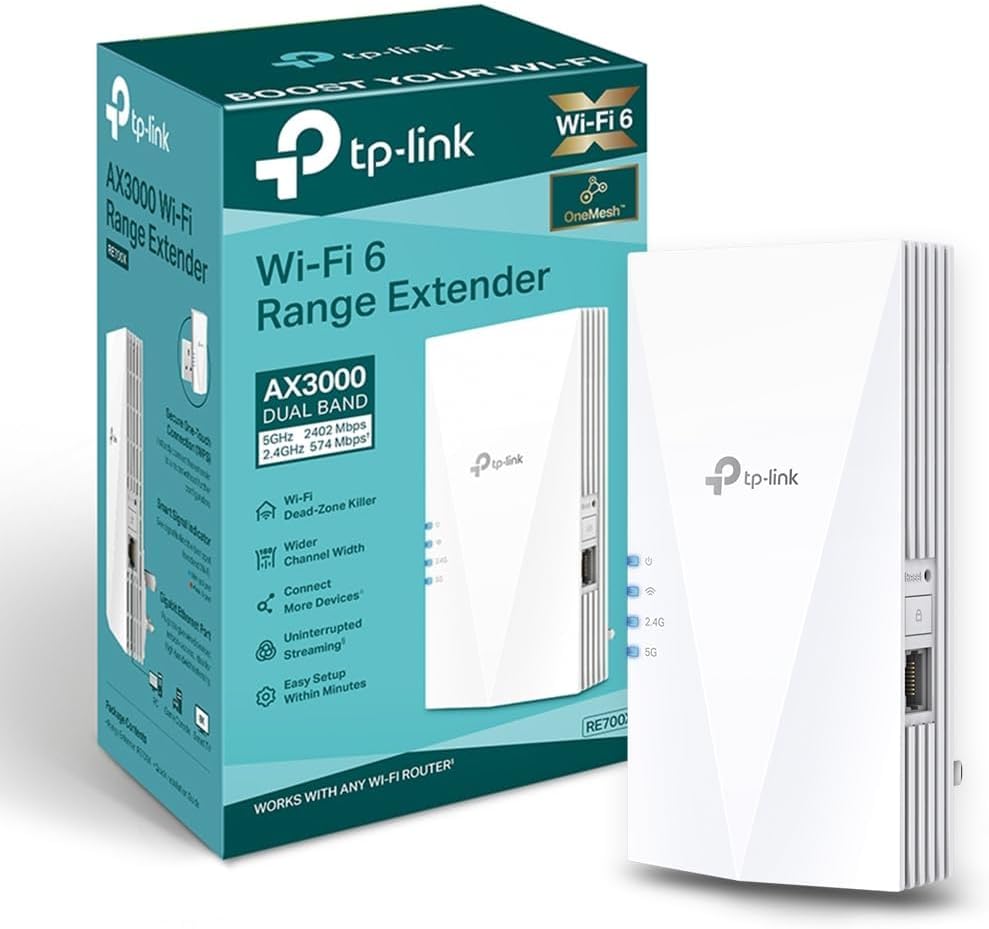


| ASIN | B0B649T4TZ |
| Best Sellers Rank | 225 in Computers & Accessories ( See Top 100 in Computers & Accessories ) 4 in Network Repeaters |
| Box Contents | Quick Installation Guide, Wi-Fi Range Extender RE700X |
| Brand Name | TP-Link |
| Colour | black |
| Compatible Devices | TP-Link OneMesh routers, WiFi-enabled smartphones, tablets, wired devices, various router brands and models |
| Connector Type | RJ45 |
| Country of Origin | China |
| Customer Reviews | 4.3 4.3 out of 5 stars (24,054) |
| Data Transfer Rate | 574 Megabits Per Second |
| Frequency Band Class | Dual-Band |
| Frequency Bands Supported | 2.4 GHz, 5 GHz |
| Item Dimensions D x W x H | 7.3D x 7.8W x 15.9H centimetres |
| Item Weight | 400 Grams |
| Manufacturer | TP-Link |
| Manufacturer Part Number | RE700X |
| Model Number | RE700X |
| Range | Varia, dependiendo del estándar inalámbrico y la frecuencia específicos utilizados, típicamente en el orden de decenas a cientos de metros meters |
| Smart Home Compatibility | Smart Home Compatible |
| Special Features | Built-in access point mode |
| Unit Count | 1.0 count |
| Wireless Compability | 2.4 GHz Radio Frequency, 5 GHz Radio Frequency |
J**S
No WiFi? Problem solved!
Does exactly what it says. Brilliant bit of kit. Very old Victorian cottage with double skinned brick walls throughout. No WiFi between rooms. Plugged the TP-Link RE700X into the wall and followed instructions and now we have WiFi in the dining room and upstairs in bedrooms above that. Really strong signal strength with stable fast connection. Pages load instantly and videos now play without losing connection or timing out. Brilliant bit of kit for the house!
A**C
No more dead zones
This WiFi extender has been brilliant — no more dead zones in the house or garden. Setup was really easy, and the app makes managing it straightforward. Connection is stable and fast, even at longer ranges. Highly recommend for anyone struggling with WiFi coverage.
_**I
⭐️⭐️⭐️⭐️ Decent WiFi Booster – Mostly Works Well
The TP-Link Mesh WiFi Booster has improved the coverage in my home significantly, especially in areas where the signal used to be weak. Setup was pretty straightforward, and once it was up and running, I noticed a definite increase in speed and reliability. It’s great for streaming and working in rooms where I used to get spotty coverage. That said, it’s not perfect—there are occasional drops in the connection, and the signal doesn’t always extend as far as I had hoped. It’s still much better than before, but not quite flawless. Overall, it’s a good solution for improving WiFi coverage, just not a perfect one. 3.5 stars if I could, but I’ll settle for 4.
B**T
Does the job brilliantly, set up was a bit vague, but we got there
Perfect. Set up was a little hit and miss, wouldn't do it at first, then it was working. Not entirely sure what I did right, or was doing wrong. Anyhow, its been working flawlessly ever since and after a power cut, it just restarted and connected without any intervention. I have good strong internet at the back bedroom now, exactly where I wanted it. Vodafone provided a satellite, but that was worse than useless.
M**S
A WiFi extender well worth the money
Seriously great product. Quick and easy to set up and impressively extends the WiFi! Good value for money too. The app is very user friendly.
S**E
Not perfect but have their advantages
I have 5 of these over two homes. These are not perfect but compared to other extenders I've used, less problematic. The good points, pretty simple to set using the 'Tether' app (more on that later). Separating the 2.4 & 5 bands was also no issue as was allocating the SSID to be extended. The app is better than the utterly awful Netgear/Nighthawk one. Tether does have issues seeing 5ghz networks - my holiday home has a Teltonika RUTX50 5G router and despite every other device seeing the 5Ghz band, the Tether app just stopped seeing it. This means these can't extend the 5GHz band - extremely frustrating. At my main home the 5GHz on my ASUS RT-BE92 (WiFi 7 - 1Gb FTTP) router is seen, no problem. The next issue is the random drop outs of the signal. No rhyme or reason, it just drops out, sometimes momentarily, but less often for a minute or so. It seems to just lose its handshake with the router. Transmit speeds are decent enough - 5GHz average 300 - 400 Mbps & 2.4GHz up to 100 -150Mbps. Both measured about 10ft away from the extender, in another room. I initially set these up as mesh but found it easier to manage/monitor as separate extenders with their own IDs. With the app, these can be managed remotely via the cloud which is really great. I have a few wireless cameras that use the extenders so if there is a connectivity issue I can sort via my phone.
R**B
Problems solved.
Excellent quality solid build. Worked straight away using WPS, Great range. Existing repeaters would not work with new Sky box.
A**T
Extends signal very well.
Excellent extender. Very easy to set up using Tether app. Highly recommended.
N**N
Es un aparato muy potente y de gran calidad, no hay más que mirar las especificaciones. Se puede usar como "repetidor", es decir que coge una señal floja del router principal y te la extiende allí donde la del router no llega bien, o bien como yo lo he configurado: como un "punto de acceso" (AP) mediante un cable Ethernet de categoría 8 (de lo mejor) y 15 metros desde el router en mi casa. De esta forma es como si tuviera otro router en realidad, con las mismos nombres de Wifi que el router principal (sistema Mesh) o bien otras dos Wifis independientes, con el mismo nombre y clave (o diferentes, como se quiera) pero añadiendo -Ext al nombre para distinguirlas. Trabaja en WiFi 6 (encriptación WPA3, el WPA2 tiene ya 15 años y está obsoleto y es facilmente hackeable en Wifi) un nuevo estándar de seguridad muy sólido pero que no todos los aparatos antiguos de tu casa pueden ser compatibles. No hay problema porque en lugar de establecer encriptación "WPA 3 personal" de forma exclusiva, te da la opción : WPA2/WPA3, un mix, los aparatos antiguos irán con WPA2 y los modernos que admiten WPA3 trabajaran con esta otra. Tengo un Ipad 4 de hace 10 años que no se entiende con esta opción (los de Apple siempre tan exclusivos con sus cosas), el resto de las cosas marchan sin problema y lo más importante: A CAÑON. El router del ISP (proveedor de Internet) por lo general es bastante inferior (nada que ver con el Tp-Link) de calidad y no suelen ser WPA3 (Wifi 6), suelen tener anomalías con bastante frecuencia, por lo que si el operador te lo cambia tienes la gran ventaja de que toda tu configuración y control está en tu router y repetidor TP-link. El router del ISP solo lo uso para la señal de internet que viene de la calle, de éste por cable directo al Router TP-Link es el que uso router de servicio, split de cables Ethernet al resto de la casa y señal WiFi. Tengo una larga experiencia con esta marca y son productos muy fiables, de gran calidad y muy fáciles de configurar, que puedes hacer a través del navegador o mejor aun con la App Tether. Si vives en un núcleo de población de gran densidad (torres de pisos, como en mi caso) tu señal Wifi puede llegar hasta 300 y 500 metros a la redonda, a través de ventanas principalmente y nunca sabes quien puede captar tu señal y como hackearla. Te conviene pasar en Router y Extensor a WiFi 6 (WPA3) un nuevo estándar de encriptación muy dificil de hackear tras 15 años con la WPA2. Piensatelo, no es tanto dinero y te quitas de sustos. Mi combination es: TP-Link Archer AX53 - Router WiFi 6 AX3000, Doble Banda y Extensor RE700X WiFi 6 AX3000 de doble banda.
M**L
Wzmacniacz działa poprawnie. Ma czuły odbiornik. Długo wstaje, szczególnie przy pierwszym uruchomieniu.
S**A
Il TP-Link RE700X è un ripetitore Wi-Fi che ha dimostrato di essere una soluzione tecnologicamente avanzata per estendere la copertura della rete domestica. Durante il mio utilizzo, ho notato diversi aspetti che ritengo degni di nota. Innanzitutto, l'installazione è stata estremamente agevole grazie all'interfaccia utente intuitiva e alle chiare istruzioni fornite dal produttore. Il dispositivo supporta le più recenti tecnologie Wi-Fi, incluso lo standard Wi-Fi 6 (802.11ax), garantendo così una connessione veloce e affidabile. Dal punto di vista delle specifiche tecniche, il RE700X opera su banda duale a 2,4 GHz e 5 GHz, offrendo una flessibilità notevole nella gestione del traffico. La tecnologia Beamforming contribuisce a ottimizzare la direzione del segnale, migliorando l'efficienza della trasmissione dati. Inoltre, la presenza di antenne ad alta potenza aumenta la portata del segnale, estendendo la copertura anche nelle aree precedentemente problematiche. Una caratteristica apprezzabile è la compatibilità con OneMesh di TP-Link, che consente l'integrazione senza soluzione di continuità con altri dispositivi OneMesh per creare una rete domestica coesa e efficiente. In termini di sicurezza, il ripetitore offre supporto per le più recenti tecnologie di crittografia, contribuendo a garantire la protezione delle informazioni trasmesse sulla rete. Il design fisico del RE700X è elegante e discreto, facilitando la collocazione in diversi ambienti domestici senza compromettere l'estetica. La qualità costruttiva è solida, riflettendo l'affidabilità del marchio TP-Link. In conclusione, il TP-Link RE700X si distingue come un ripetitore Wi-Fi all'avanguardia, offrendo prestazioni elevate, una configurazione agevole e una serie di funzionalità tecniche avanzate che lo rendono ideale per chi cerca una soluzione di estensione della rete altamente performante.
A**R
Very easy to pair with the router Wi-Fi. Excellent speed and signal strength. No dead spots in the apartment now! Supports dual 2.5g and 5g.
K**R
I live in a fairly small 3 floor (duplex) house, with a small front and back yard. My wifi router from my provider is in the basement. This left me with great reception in the basement, which I rarely spent time in. Medicore reception on the main floor and basically abysmal reception upstairs, where the bedrooms are. That means anytime I would try to use the wifi for anything upstairs I would get kicked to data. Which is immensely annoying and costly as compared to using my wifi, which I already pay for. Then when I got security cameras just outside my front and back door, the wifi is so trash that I would lose connection and be unable to view live feeds. I asked my provider how to improve this, and they sent me two eero wifi boosters, which I would rent from them at an additional $12/month. These boosters can be bought on Amazon for $100 each, but with a rental from a provider I would have paid infinite amounts for them in my lifetime. Anyway, those expensive boosters did not do one thing at all, and I had the provider take them back. When I got this booster, my whole life changed. With one unit, I paid $61 with tax to own. No forever rental fee... I immediately had amazing wifi connection. I had full bars wifi downstairs, main floor, upstairs, outside and I still had access to my wifi from 4 houses away! It was so simple to set up, I am totally unskilled in this tech but I did it in about 10 minutes. It walks you through it so easily and clearly anyone could set one up. It also seems the download speeds are much faster, although I cannot entirely confirm, this is just what I have noticed from Xbox downloads and personal opinion. The app shows you how many devices are connected to the booster, how the quality of the connection is, it has the ability to block devices from the booster and scans for safety and anti-virus. I was thinking you had to have it connected by that special cord but you don't. You can have everything connected and working properly just by plugging the machine into any outlet so long as it is close enough to pull a connection to your wifi. I put mine on the main floor when my router is in the basement and it connects everything dang near to Nantucket. Best sixty bucks spent recently, really thrilled with it. I would recommend this to anyone, especially people tricked into renting a booster from their providers. Do not spent a million dollars over your life, just spend sixty bucks and have something you own and that works. Before I couldn't get wifi upstairs or even if I stepped one foot outside. Now I can get wifi from places so far I won't even be. Buy it!
Trustpilot
2 weeks ago
3 weeks ago