Buy anything from 5,000+ international stores. One checkout price. No surprise fees. Join 2M+ shoppers on Desertcart.
Desertcart purchases this item on your behalf and handles shipping, customs, and support to KUWAIT.
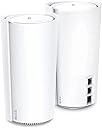
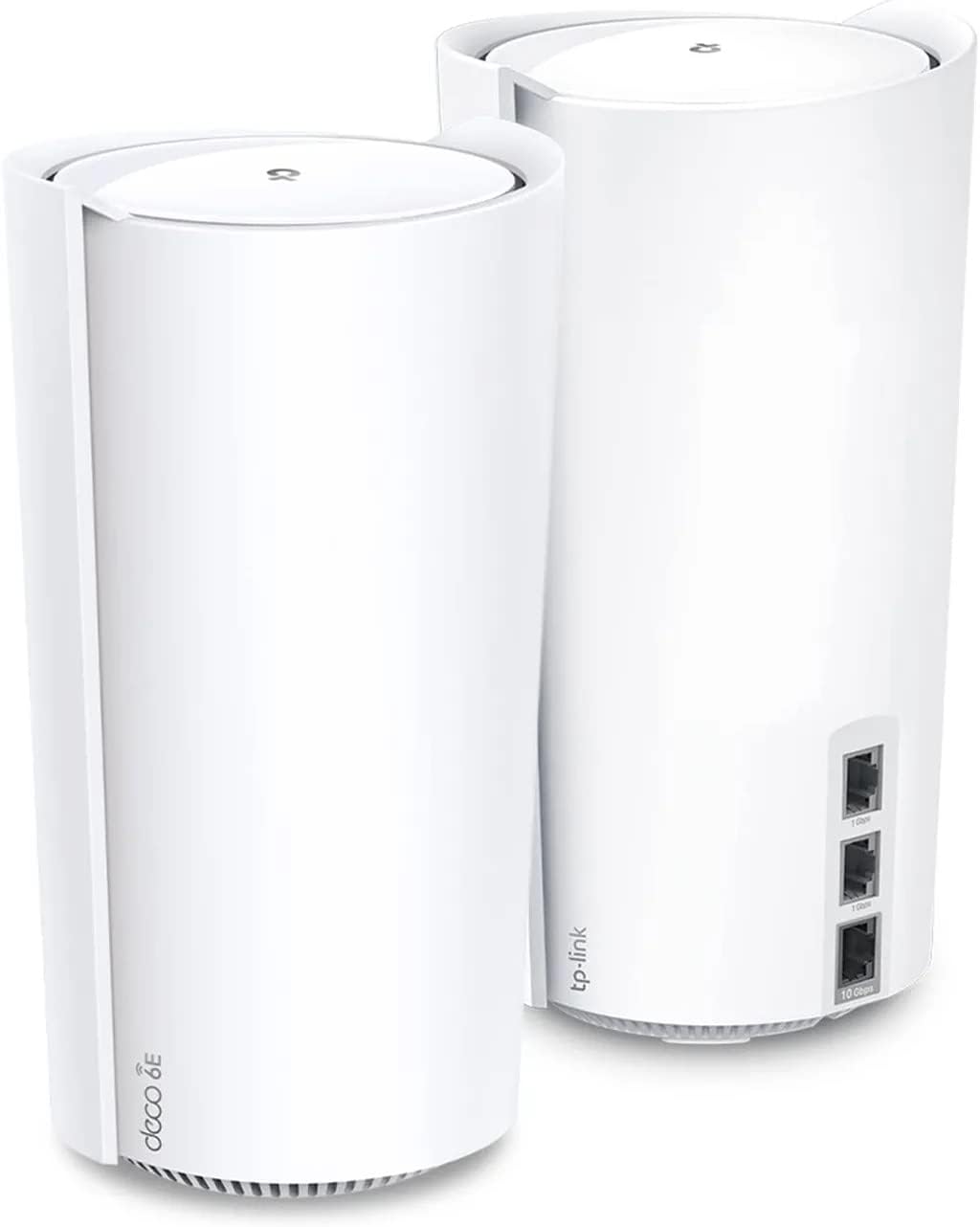
⚡ Future-Proof Your Home Network with TP-Link Deco XE200 – Speed, Stability, and Security in One!
The TP-Link Deco XE200 is a cutting-edge WiFi 6E tri-band mesh system designed to replace traditional routers and extenders. Featuring blazing wireless speeds up to 11,000 Mbps, a powerful 10 Gbps Ethernet port, and 16 internal antennas, it delivers expansive coverage up to 6,500 sq ft. With AI-driven mesh technology, advanced security protocols, and seamless Alexa integration, it ensures a fast, stable, and secure network for all your smart home and professional needs.


| ASIN | B0BCWDKKCV |
| Antenna Location | Business, Home |
| Antenna Type | Internal |
| Best Sellers Rank | #5,897 in Electronics ( See Top 100 in Electronics ) #32 in Whole Home & Mesh Wi-Fi Systems |
| Brand | TP-Link |
| Built-In Media | 1 x Quick Installation Guide, 1 x RJ45 Ethernet cable, 2 x Deco XE200 units, 2 x Power adapters |
| Color | White |
| Compatible Devices | Gaming Console, Personal Computer, Security Camera, Smart Television, Smart Thermostat, Smartphone, Tablet Compatible Devices Gaming Console, Personal Computer, Security Camera, Smart Television, Smart Thermostat, Smartphone, Tablet See more |
| Connectivity Protocol | Wi-Fi, Ethernet |
| Connectivity Range | 6500 Square Feet |
| Connectivity Technology | Ethernet, Wi-Fi |
| Control Method | App |
| Controller Type | App Control |
| Coverage | 6,500 sq ft (2-pack), 3,300 sq ft (1-pack) |
| Customer Reviews | 3.8 out of 5 stars 102 Reviews |
| Data Transfer Rate | 11000 Megabits Per Second |
| Frequency | 6 GHz |
| Frequency Band Class | Tri-Band |
| Global Trade Identification Number | 00840030707698 |
| Has Internet Connectivity | Yes |
| Has Security Updates | Yes |
| Is Modem Compatible | No |
| Item Dimensions L x W x H | 5.12"L x 4.86"W x 9.49"H |
| Item Weight | 4.08 Pounds |
| LAN Port Bandwidth | 10/100/1000 Mbps |
| Manufacturer | TP-Link |
| Maximum Upstream Data Transfer Rate | 10000 Megabits Per Second |
| Mfr Part Number | Deco XE200(2-pack) |
| Model Name | Deco XE200(2-pack) |
| Model Number | Deco XE200(2-pack) |
| Number of Antennas | 16 |
| Number of Ports | 6 |
| Operating System | Proprietary router operating system |
| Other Special Features of the Product | Access Point Mode, Guest Mode, QoS, Remote Access |
| Router Firewall Security Level | Medium |
| Router Network Type | Mesh |
| Security Protocol | WPA, WPA2, WPA3 |
| Smart Home Compatibility | Smart Home Compatible |
| Special Feature | Access Point Mode, Guest Mode , QoS , Remote Access |
| UPC | 840030707698 |
| Unit Count | 2.0 Count |
| Warranty Description | 2 year manufacturer |
| Wi-Fi Generation | Wi-Fi 6E |
| Wireless Communication Standard | 802.11ac, 802.11ax, 802.11b, 802.11g, 802.11n |
| Wireless Compability | 802.11ac, 802.11ax, 802.11b, 802.11g, 802.11n |
F**O
An expensive, but excellent WiFi 6E Mesh system
After testing the Deco XE75 and the ASUS ROG Rapture GT-AXE11000, I finally found my long(ish) term WiFi solution in the Deco XE200. I was looking for something to cover a 1600sqft timber framed house, with the main aim to solve low connectivity to our myQ Chamberlain garage opener, which couldn't get a stable connection with my old standalone router, and some outdoor Ring cameras. We have a 1gbps Google Fiber connection, and I started with the XE75 because I wasn't convinced I needed the bandwidth of the XE200, but it's range and speed left a lot to be desired. Even close to the main unit, I struggled to even get 300mbps through. With the Mesh system, I at least got good stability, but I felt I was short changing myself by paying for high speed fiber and not having the router to use it well. For a lower speed connection, worth a look. I gave the ASUS ROG standalone unit a try; it was a bit of a disaster. I regularly failed to get stable connections to my office only 30ft or so away from the access point; speeds would fail to even pass 10mbps. Honestly, I think I had a busted unit, it was such a huge disappointment, so I returned that one pretty quick. Finally I landed on the XE200; it's expense put me off initially, but boy does it perform! Even with a single unit, the range provides a comfortable connection to the whole house and outdoors, and with the 2 unit Mesh, I get 750mbps throughput at my office, finally I seem to have found something that gets the best out of my internet connection. Do I need that speed? Almost never, but for the occasional big download, it's killer. I find most WiFi units tend to overstate their range; even in our timber framed run of the mill house, the cheaper options struggled to maintain decent speed across 1600 sqft, and I think I could get away with the single unit without the mesh element, but I'm glad I have it for whatever the future brings. The app is solid; it's not the most featured, ASUS does have that nailed down, but it's easy to navigate and manage the basics. For those who like to fine tune their WiFi, this probably isn't the system for you, but it's default settings and plenty good enough for me. I use the 6Ghz range as dedicated backhaul and it works perfectly, with roughly 30ft and a wall between units. Overall, well worth it for the long haul in my book. Decent value against the upcoming WiFi 7 units, whilst getting the best out of the speed and range of current internet infra.
P**T
Finally... my network is stable!
I've been running the standard AT&T U-verse router and gateway for several years and have been just "living with" the constant drops (where devices would go offline, the 2.4 or 5 GHz bands would drop or the entire gateway would reboot). There was nothing more frustrating that trying to watch a movie and then having to wait for the network to come back online! I knew with all the smart devices in my home (switches, lights, etc) I was overloading my 2.4GHz band, but I didn't have many options, they all had to remain no 2.4GHz. I recently read a review for the XE200 that said it solved his IoT headaches and I decided to dig into this product some more. So, I purchased the XE200 two pack and waited for them to arrive. Setup was a breeze! The key is to remember to shut-off your existing router's Wi-Fi before unplugging the router. After that, it was literally just plugging one of the XE200's into the router, plugging back in the router and following the steps in the TP-Link app. The second XE200 was even easier, just plugged it in and clicked the + in the app to add another one. All in all, this part took me about 30 minutes (keep in mind, it takes the AT&T Gateway about 15 minutes to restart). Setting up the networks was a bit more work for me. I purposely kept the main SSID and password the same to make it a little bit easier, but I disconnected a 2.4 and a 5GHz extender that were also on my network. So, anything connected to those had to be reconnected. Now for one of the greatest features of the XE200.... the IoT network! This mesh network system comes with a separate network for all your smart devices that are required to run on a 2.4GHz band. So, I started the journey of reconnecting those devices to the IoT network, freeing up my devices on my main network (that runs 2.4 AND 5GHz). After everything was setup, I decided to run a few speed tests around my house. My phone usually did not connect to my Wi-Fi on the other side of the house and I was forced to go on cellular. I'm now getting full strength throughout my house. My AT&T Uverse internet speeds are supposed to be between 24.1 Mbps - 45 Mbps. Let's just say if I got 24Mbps on Wi-Fi, I would be EXTREMELY happy! With this new mesh network setup, my entire house is getting 45-50Mbps and things are working great! The only negative I've noticed is when I'm outside and about 10-15' away from my house (in the driveway), the Wi-Fi strength diminishes. I'll test the backyard once all the snow melts, but if needed I'll add the outdoor Deco to my yard. The most important thing to me, in the past couple days I have not had a single device drop offline and my gateway has not restarted at all! I will definitely provide an update if anything changes, but I'm hopeful this will resolve many of the issues I was encountering.
G**F
🗑️🗑️🗑️ ** GARBAGE GARBAGE GARBAGE ** Terrible network stability, what am I paying $700 for?
STAY FAR FAR FAR AWAY FROM THIS GARBAGE! I would not ever install this in my home again even if TP-Link gave it to me for free! Update Feb 2025 - Still complete TRASH. I reached out to TP-Link support to ask for a refund because the reception for a $700 pair of routers is just not cutting it. They kept asking me to run a whole bunch of network tests and at one point wanted to remotely access my computer to diagnose the issue. RED. FLAG. Absolutely NOT!! I work with computers for a living. I know a thing or two about network issues. What's sad is that the cheap crappy router that CenturyLink leases me for $10 a month has had ZERO connectivity issues, and gets me twice the speed of these newfangled pieces of garbage. At this point they work better as space heaters with a dim green light than anything else. ----- For $700 you better get the best WiFi signal on the planet. Yet with this router, I can't even play games without constant lag spikes. My internet service is 100 Mbps up and down, the router has a direct line of sight to my PC which is top spec and within 10 feet of the router. You'd think that would get you amazing performance but look at the report from packetstats.com. Lag spikes nearly every single second. How can I justify shelling out $700 for the same performance I could get from a cheap Chinese knockoff router? Imagine this - being out in my front yard which is no more than 30 feet from the main router and 10 feet from a satellite unit - Google Maps takes 15 seconds to load. Even in my own house the network constantly times out. Rebooting does not help. And I know it's a Wi-Fi issue as my wired computer and wireless iPhone act like they're in two different countries. No reason to buy this unit. Save yourself and don't spend more than $100 on a router. Please.
R**N
Blazing fast, also for Wifi 6!
I bought these to replace for my Asus ZenWifi XT8 mesh system, and I'm glad I did. This is a Wifi 6E system, as opposed to my old Wifi 6 Asus system. Most of my devices are Wifi 6, with a couple also supporting Wifi 6E. I use three of these for my house: two in the main house and one in the office in the back yard, all using wireless backhaul. I have a CenturyLink gigabit Internet connection at home, and I connect directly using PPPoe (not through their "modem"). I'm very impressed with the speeds I'm getting with the TP-Link XE200s. My old Asus ZenWifi XT8 system would give me about 300-450 Mbps, depending on device and location, but now I easily get 500-600+ Mbps for Wifi 6 and 800+ Mbps for my Wifi 6E devices. You set up and manage your TP-Link mesh network through the Deco iOS or Android mobile app, which is user-friendly and intuitive. There's also a web UI, but that just shows you the current configuration; you can't really change anything. That's fine with me, as the mobile app provides all I need. The TP-Link system is definitely not as configurable as Asus ZenWifi or Netgear Orbi, which offer highly granular customization settings in both the mobile app and web UI, but that doesn't really matter to me. The Deco mobile app offers all the main configuration options, including various connection types (including PPPoe), viewing and managing connected devices, block lists, network optimization, connection alerts, guest networks, etc. One thing to be aware of is that some enhanced security features (web protection, intrusion prevention, and IoT protection) and parental controls are behind annual subscriptions ($34.99 and $17.99, respectively). It would have been nice to not have to pay for that separately, but that's not a deal breaker for me. I had originally bought a TP-Link X95 system, but this X200 (only marginally more expensive) blows that out of the water, with much better performance and faster speeds. Overall, my network is much faster now, both wifi performance and copying to and from my NAS. This is a great mesh wifi system that's easy to set up, offers great speeds, and doesn't break the bank, particularly when on sale. Highly recommended.
G**O
Works great...if you don't run into issues during setup
I bought this to replace the Plume pods that my fiber internet provider includes with their service. The setup process itself is easy. Just download the Deco app, and follow the prompts. However, this is where I got stuck, on both this system, and a Deco XE75 system that I bought and returned. The main Deco unit refused to pull an IP address from my provider's ONT (fiber modem). The tech support guy could see the Deco attached, but would not pull a WAN IP address. I spent an hour on the phone with 3rd level tech support. They see this issue occasionally. I had to redo the setup 3 times, and reboot the Deco a couple extra times, and it finally decided to start working and play nice with my ONT. Once I got that far, it did a firmware update, and everything has been great. I installed a second Deco XE200 unit in my office, and connected the two via wired backhaul. That worked perfectly. The second unit auto-configured itself, and did a firmware update. Performance has been very good. All of my IoT devices reconnected except for my Shark robot vac. I just redid the WiFi setup on that, and all is good. My advice to you is that if you run into setup issues where the Deco app says you have no internet connection, try unplugging your ethernet cable to your modem, reboot the Deco, and plug the cable back in. It may have just been an issue with the ONT/modem my internet provider issues.
J**R
Very limited options for such an expensive router!
I am on a journey trying to upgrade my mesh Wi-Fi network. Was getting bad speed with old velop system. I tried the Asus XT8 system and had serious connection stability issues so had to return it. Figured the system was one of the top rated systems around with a hefty price tag, must work better right? I guess that’s a big ol fat depends. Setup was relatively painless but it started to become evident that there were no advanced options. I had read about this but figured hey if this thing works well who cares. Initial setup was pretty quick. I loved that I could plug this directly into my ONT box and it could be the main router. My Linksys can’t do this so had to keep the router provided by my ISP. After initial setup it seemed like signal strength was pretty good. Speeds were great near the parent 500-600 Mbps. I have to use the wireless backhaul and this is where I had issues. I will say I have an older home and there are 2-3 walls between the parent and child node but they are 10-15 feet away from each other at the most. The child node would go often to 2.4ghz backhaul so speeds were not good there. My old velop does a 5ghz backhaul and very reliably too. Speeds were just bad with my velop, was getting 20-60 Mbps average from the child node. I don’t understand why a new expensive mesh can’t do the same. From my understanding the 6ghz backhaul won’t work unless nodes are only 20-30 feet from each other with absolutely no obstructions between. Who lives in a house like that? Not me but still can’t understand why this thing wasn’t consistently connecting via the 5ghz backhaul. Other issue was some older laptops couldn’t see the WiFi network at all and from research this is the case with newer Wi-Fi6 routers. In many cases you can find updated drivers however my LG OLED TV which isn’t that old had this issue and there were no firmware updates to fix this so be aware of this issue. Other annoying thing is you can’t separate bands into different WiFi networks which is just silly. The cheapest and even oldest mesh routers can do this. The client steering kept sending my wife’s laptop to the slow 2.4 ghz and I don’t understand why. It connects fine to 5ghz with my velop. For the price paid the lack of features in the app is a real deal killer. Overal I wouldn’t recommend this. Maybe if you have a wired backhaul and are ok with the lack of customization but there are cheaper and better options I think if you do have a wired backhaul. Had to return this and am still on the hunt for a wifi mesh solution that will actually work for my home which is crazy because I just want better speeds in a couple of rooms we hang out in which are very close to where the parent node is. Wirelessly it might work ok if you are willing to spend a lot and get a bunch of these units to string together. But with the price on these that would be an expensive venture.
C**.
Solved my IoT headaches!
I previously had Google WiFi and then upgraded to the Nest WiFi when they came out.....then we moved into a larger home (about 4000 sq ft) and I started adding light switches, outlets, light bulbs, smart appliances, you name it, it was being added to my network. Soon we were up to about 100-110 devices on the network at any one time. The Nest WiFi started to struggle mightily, kicking devices off the network left and right. I "upgraded" to the Deco X90 units about 1 year ago and used them for my network this past 12 months. It was light years better than the Nest WiFi units. However, this didn't last. The X90 units started to suffer from the same plight of the Nest WiFi, overrun with devices on the 2.4 GHz frequency. I limped the X90 along the best that I could for the last year since they were expensive. There were no firmware updates issued for the X90 for the entire year. When the XE200 was finally listed after being previewed at CES 2022, I quickly bought these units hoping for the hail mary to would fix my IoT woes. My other option was going with the 670 EAP Omada line or the like, but I didn't want routers and APs hanging from my ceiling, it's a house, not an office. After an initial couple of hiccups in my setup (had a bad ethernet backhaul cable I had to replace) the XE200 units have been doing an amazing job. I only have the 2x XE200 units deployed in my house and they are wired together with Cat6 ethernet. I was able to add the XE200 units to my X90 network first, then change the main deco to the XE200, then decommission the X90 units altogether. I may end up putting them back on my network to extend some range, but for now, there is no need to do that. The XE200 units have the ability to add a third SSID and it's already called the IoT network. This network has by default the 2.4 G enabled only, but you can add the 5 GHz if you want to use it for other purposes. The 6 GHz networks are a separate SSID than your main network. So main network 2.4/5 and main network 6. Same is true for a Guest Network, 2 different SSIDs. I've reconfigured all my IoT devices to the IoT network and also anything that is 2.4G. My main network now only supports the 5 G and 6 G devices and everything has been running very, very smooth. The expanded 2.4 G and 5 G bands on the XE200 make this possible. With double for 2.4G than the X90, 1000 vs 500, makes a large difference. I have 9 chromecasts and 20 different Google speakers....I can make them all play something at the same time and there is no buffering or choppiness. Originally, I was having an issue with getting my full ISP speeds through the routers, but I realized (with the help of the TP-Link tech support) that my QoS setting was on and it was throttled to half my ISP speeds. So if you are having any issues with speed, go and turn off the QoS in the Deco App. Overall, it's been a full week with the units and I'm very pleased. I highly recommend the XE200 for anyone having issues with device saturation like I was. I may even add a few more smart outlets! lol.
A**3
Wow, Wow, Wow, amazing service from Amazon, super fast delivery, almost as fast as the new Deco's
Firstly, I can't believe how fast Amazon delivered our order of the TP-Link Deco XE200 today, must have been picked packed and put on a jet the same day! It took TP-Link a long time to release the Deco XE200, the competition had their top-end models out months before. I waited impatiently for the TP-Link as we have Kasa sockets, cameras etc. This is the 3rd set we have ordered and are using for our house, business and now rental. Had the Deco P7 and the ASUS Lyra systems and kept losing internet every few days. Sometimes only solution was to turn it off and on again. With the Deco XE200 we have never lost connection and still have not had to switch it off and on again, super reliable and speeds way faster than anything we have used before, including the router hub that comes with our internet service provider. I have removed the router hub completely and plugged our service provider fibre directly into the Deco XE200 and it self configured, just added user and password from our service provider. We don't use the TP-Link HomeShield which requires a subscription but will look into this later. Have been so happy with the reliability and the speeds, that the high cost becomes insignificant. We have more than 120 things on the Wi-Fi, most through the guest network, there is a separate IoT Wi-Fi. I will explore some wall mounts as well.
R**E
Excellent produit
Enfin de la stabilité dans mon réseau. J'ai remplacé mon Google Wifi par ce produit. Je n'ai plus de "down", les appareils sont toujours en ligne, la force du signal est impressionnante. L'application est facile et intuitive. Nous avons ajouté l'option contrôle parental et c'est très efficace. Je recommande ce produit.
D**I
Pure Happiness😍 Averaging 1.5Gbps wireless speeds consistently!
A few weeks ago I upgraded to Bell Fibe 3Gb (because I can't leave good enough alone) and obviously began the quest for data speed perfection. My existing Deco XE75 Pro was serving my family well. I had 4 setup and with Rogers Ignite 1.5Gbps, was averaging 1Gbps wireless speeds from approximately 15 feet away. I did a significant amount of online research to ensure my Quest was not going to be fruitless and frustrating. The research was conclusive...typically a well setup household mesh wireless network should run at least a minimum of 50% of your ISP's service speed as long as the backhaul is ethernet hardwired. The Deco XE75 Pro setup was setup with all 2.5 Gbps backhaul. I was getting close to over 1.5Gbps when hardwired. When switched to the Bell Fibe 3Gbps service, I decided to future-proof my network and upgraded my network switches to 10 Gbps switches and network card on my desktop. Why? As any man in a healthy marriage would know...we just love to give our wives another reason to nag about how we waste money on frivolous things and why can't we just leave well enough alone! I digress...I first purchased the DECO BE22000 Wifi 7 units to see if I could get close to 3Gbps. I could not and for some unknown reason was only averaging 1.2Gbps wireless speed. To avoid any further aggravation from the love of my life, I returned the units. At this point I was falling into a depressive state thinking that my quest was futile. To avoid giving my wife any reason to pour salt on my already open wounds, I bit the bullet and bought the DECO AXE 11000 wifi 6E units (at less than half the price of the BE 22000) and set them up. As you can see from the image above, I am hitting 1.6 Gbps consistently sitting 15 feet away and close to 2Gbps right at the unit.
P**F
One SSID for 2.4 and 5 GHz Can't use separate SSID
After ordering, tried to cancel. Now going to try refusing at door ( recommended by Amazon). I Downloaded the app ( needed to install no gui on web or seem to have read a very plain one), the manual, etc. Then discovered a glaring problem. Much more search into this mesh wifi to quote the description connect up to 200 devices. (Was the selling point) but without 2.5 and 5 GHz separate SSID's its useless. You can turn either on or off but what's the use when smart things like echo/Cameras/ light bulbs/doorbells/switches etc and a few other things use only 2.4 GHz. I use 5 GHz for tablets, cells and computers for the speed. Lots of reports on the TP-LINK community web site that the 5 GHz items jump back to the 2.4 GHz band (much slower speed) because of better signal over faster speeds. I have 35 smart devices on the 2.4 GHz without there being a separate SSID most if not all will not function or work properly. Seems to be a common complaint about the Deco series if you go look. Their work around is to use Guest or IoT SSID etc. That just doesn't cut it for a 1k plus router. Sorry lost my vote of confidence TP-Link. Been loyal customer for 20 to 30 years On the community board the complaints go back over two years for this problem with the Deco line. Just not worth the pain, expense to add to a larger home system. Oh if you buy one you'll need a switch or two also as there is only 3 ethernet port 2 x 1 GHz one for the average user (one for your router) with plain high speed and 1 x 10 GHz I need minimum at least three at router (reason i also bought a switch). One for Synology server one for HDHomeRun (TV antenna OTA) over network, of course the router to modem, and the last one to a switch to 4 computers. Thank Printers being wireless haha. Just to let you know if you have a system that's more then wifi tablets / cell phones / and a laptop or two and computer wireless you'll need more equipment to setup as well as new cables. At least Cat 6 suggest Cat 6E if you plan on using the 10 GHz ethernet port I'd go 7 or 8 My humble opinion Hope this helps those that struggle with the new tech by the day. It seems. Oh for the days of Dos 5 😉 😜 so simple
J**S
Super fast
Fastest wifi ive ever had 8x8 on 5Ghz is the best
J**Y
2 units one was bad
I recently purchased the Deco XE200 system and encountered some disappointing performance issues. One of the units’ 10 Gbps ports was unable to exceed 500 Mbps, even after testing with different cables. I eventually swapped the base unit, which resolved the issue for the 10 Gbps port, but repurposing the defective unit as a satellite caused my entire network to cap at 500 Mbps. Additionally, I paired the Deco XE200 with Deco X50 units to cover the distant corners of my home. Unfortunately, even with fast roaming enabled, devices often failed to switch to the closest satellite, resulting in consistently poor speeds. On the positive side, the TP-Link app is excellent. It includes useful features such as a built-in custom DDNS, advanced monitoring tools, and an intuitive interface. While the app’s functionality is impressive, the hardware performance did not meet my expectations.
Trustpilot
2 weeks ago
3 weeks ago