Buy anything from 5,000+ international stores. One checkout price. No surprise fees. Join 2M+ shoppers on Desertcart.
Desertcart purchases this item on your behalf and handles shipping, customs, and support to KUWAIT.
🚀 Stay connected, secure, and in control—wherever business takes you.
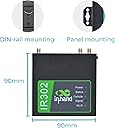
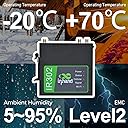
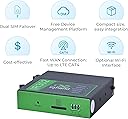
The InHand Networks IR302 is a rugged industrial IoT 4G LTE Cat 4 router with dual SIM failover, enterprise VPN security, and cloud-based remote management. Designed for mission-critical applications like EV charging, ATMs, and digital signage, it ensures uninterrupted connectivity with multi-layer link detection and automatic self-recovery. Featuring Wi-Fi, Ethernet, and digital I/O ports, it supports versatile integration in harsh environments, certified for major US carriers Verizon, AT&T, and T-Mobile.


| ASIN | B0BBVFP8HR |
| Antenna Location | family |
| Antenna Type | Retractable |
| Best Sellers Rank | #13,822 in Electronics ( See Top 100 in Electronics ) #107 in Computer Routers |
| Brand | inhandgo |
| Built-In Media | Antennas, Ethernet Cable, Power Supply, Quick Start Guide |
| Compatible Devices | Personal Computer |
| Connectivity Protocol | Cellular |
| Connectivity Technology | Wi-Fi |
| Control Method | Remote |
| Controller Type | Switch |
| Coverage | Up to 80 meters indoors, suitable for harsh environments |
| Customer Reviews | 4.2 out of 5 stars 71 Reviews |
| Data Transfer Rate | 150 Megabits Per Second |
| EU Spare Part Availability Duration | 3 Years |
| Frequency | 2.4 GHz |
| Frequency Band Class | Single-Band |
| Has Internet Connectivity | Yes |
| Has Security Updates | Yes |
| Is Electric | Yes |
| Is Modem Compatible | Yes |
| Item Dimensions L x W x H | 3.54"L x 3.54"W x 0.98"H |
| LAN Port Bandwidth | 10/100Mbps |
| Manufacturer | InHand Networks |
| Maximum Upstream Data Transfer Rate | 50 Megabits Per Second |
| Mfr Part Number | IR302-FQ38-WLAN-INHANDGO |
| Model Name | IR302-FQ38-WLAN-IO |
| Model Number | IR302-FQ38-WLAN-INHANDGO |
| Number of Antennas | 2 |
| Number of Ports | 2 |
| Operating System | RouterOS |
| Other Special Features of the Product | Access Point Mode, Guest Mode, QoS, WPS |
| RAM Memory Installed | 128 MB |
| Router Firewall Security Level | High |
| Router Network Type | Wired and Wireless |
| Security Protocol | WPA-PSK,WPA2-PSK |
| Special Feature | Access Point Mode, Guest Mode, QoS, WPS |
| Voltage | 36 Volts (DC) |
| Warranty Description | 3 years |
| Wi-Fi Generation | Wi-Fi 1, 2, 3 |
| Wireless Communication Standard | 802.11b, 802.11g, 802.11n |
| Wireless Compability | 802.11b, 802.11g, 802.11n |
O**R
Great little Verizon-compatible LTE modem/router
At my rural home, an LTE connection is my only option for internet. I had been using a MOFI LTE router, but after a hardware failure and abysmal customer service, I swore off that brand and went in search of a different manufacturer. There aren't that many consumer-friendly LTE modems that are approved by Verizon, so I was really glad to find this InHand unit. I think it's probably meant to be used mostly for remote location IoT devices, but it has been working great as our home's primary internet connection for several months now. Connected to a 2X MIMO log periodic outdoor antenna, this unit consistently delivers excellent throughput and stability. Customer service so far has been great, too. I had a few configuration questions early on, and the InHand folks were quick to reply and helpful. Keep in mind that this is not bleeding edge technology. The modem is not the most current and supports only LTE. Also, the built-in WiFi is minimal at best (2 GHz only, single antenna), which is another reason why I figure this was designed to provide remote connectivity for IoT devices. None of these are a big deal for me - home routers are a dime a dozen, so I just connected one to the InHand's Ethernet port, and we were up and running with good WiFi. And I don't mind that the LTE modem is an older category. Our signal is marginal here anyway, and I'm not trying to do any carrier aggregation. Just need consistent, stable connectivity to the Verizon bands on our local tower, and this device provides that for sure.
E**N
The most solid 4G dual sim router money can buy.
The most solid 4G dual sim router money can buy. I have purchased 18 of these to use with T-Mobile as primary SIM and Verizon as failover. All routers are up and running for over 3 months. Have only needed the failover once and that was due to a T-Mobile outage in that particular area. The Verizon SIM kicked in as designed and my network suffered only a ~2 minute outage. Can't say enough good things about this seller and the device. 10/10.
K**M
Very reliable - works on Verizon and T-Mobile
I have deployed several of these on Verizon and T-Mobile and they are outstandingly reliable, compared to some of the other 4G modem options out there. No needing to reboot periodically to keep it working. It's very easy to set up Zerotier which allows me to admin them remotely. The interface is a bit clunky/outdated, but generally you can do what's needed and reliability is more important for my use cases. The external antenna option has been useful to me as well.
J**.
Great concept. Nice package. Terrible interface and support.
I purchased this router for an off-grid property as a way to have my solar system connect to the internet and be able to access it for data metrics and monitoring. The initial setup was a bit more complex than it should be... but, I managed to get the device online and connect to Verizon with a new SIM for that purpose. The device performed well for about a week or so and then would no longer connect to Verizon. I thought it could be due to a firmware update that I applied as a best practice, so I reverted the firmware to the version that was previously installed and had the same issue. I then did a factory reset and reinstalled the latest firmware available. That did not fiz the problem. It would still not connect to the cellular network. I took a look at the logs and there was an error showing up describing an issue with the modem driver. At that point, I reached out to Inhand via online chat and email. I got a response asking for more info (serial number, where did I purchase the unit, SIM card and so on. I provided that info AND the logs showing the error with the modem and they continued working the support script without a deeper dive into the log files I provided... several emails later, they noticed the error and asked if the device was installed in a "vibrating environment" and if I could connect to a wired network to troubleshoot. What should have happened is to admit that there was a hardware error and offer to RMA this unit and replace. I believe this device has a modem module that either failed OR was not installed correctly and has a bad connection to the rest of the system. I wasted 4-6 hours messing around with this and as of today, it is going to be returned to Amazon without a resolution from Inhand. If you buy this, be aware that it is a bit more comlex than a standard router configuration AND if you require support, it is not local or expedient and they are not proactive about working with customers. I really like the form factor and concept... but, they are not really very good at supporting their products.
S**L
Bad IMEI Number
TMobile is telling me that the IMEI number printed on the device is invalid. I was able to connect to the device with the default IP address and use/pwd combination. Unfortunately the IMEI number is not listed in the webserver. Currently the device is useless. I've reached out to inhand technical support. inhand support is delayed, because they are in China, but responsive. I am currently working in the issue with them via email. I will report back once a resolution has been confirmed.
A**G
So far, Inhand IR302 worked flawlessly for 2 month
Inhand IR302 Industrial Cellular Router was used as primary connection to internet for 2 months without problem. IR302 receives signal from cell tower; converts cellular signal to Ethernet signal and communicates with computer using RJ-45 LAN port. More detailed instructions for setup would be helpful: Login > Network > Cellular > SIM Network Provider > select from list of major networks such as AT&T, T Mobil, Verizon, or choose 'Profile 1' if carrier is not on list > scroll down to 'Profiles, Index 1' and enter APN ('ccdata' for Consumer Cellular, my carrier). To store and refresh data: Network > Cellular, and confirm the new data is stored. Ignore 'Access Number *99#'; it is an old parameter for one of the dial-up phones carrier in China. Tech support was very helpful; provided instruction to test recognition of device, and ping test to check packet sent, received and lost.
V**N
Awesome
Really like this unit. Been using it for a while now for remote monitoring package. Reliable connection over weak cellular access. So many features, and DIN rail mounting is a big plus. Would recommend
F**N
You should have experience setting up a router
There was small amount of difficulty setting it up but the tech-support from inhand is excellent. There’s also a 60 page online manual that can be very helpful. I installed the device about 600 feet from my cabin at a site that has a good cellular signal. Using yogi antenna I transmit Wi-Fi to my cabin. There are some signal loss, but there’s also trees in between the transmitter and my cabin. The nearest cellular tower is at least 3 miles away. The power usage is very low so I’m using one 75 W panel and an 50Ah LiTime lithium iron battery and Morningstar brand PWM charge controller. But I think the solar panel exceeds the needs.
U**R
Une merveille.
Enfin un routeur 4G solide, fiable avec une doc claire et explicite ainsi qu'un support de qualité. Il peut paraître cher mais ça vaut 10x le prix des routeurs "pas chers" à la qualité et au fonctionnement douteux (testés plusieurs fois). Et c'est aussi un des rares à avoir des ports LAN : indispensable pour créer un réseau indépendant du principal et connecter un switch POE par exemple. Apprareils déployés sur des chantiers de construction ouverts : résistance et connectivité exemplaires.
I**X
One of the best affordable LTE router
Using this on solar-powered IoT units. They are easy to set up and tested on Telus (Canada) and T-Mobile (USA). The free cloud portal is also great and would not live without it.
I**N
Avoid this piece of junk
This device is a piece of junk. The instructions are inaccurate which makes dealing with it pretty annoying. At the end of the day this is the problem: With SIM card inserted and factory reset performed, the device will connect via Cellular network with DEFAULT SETTINGS The moment you CHANGE ANY SETTING OTHER THAN THE ADMIN PASSWORD - the device STOPS ROUTING TRAFFIC. Being that this was purchased for its failover aspect and simply enabling failover causes the device to stop routing, this item is being returned.
N**L
Default username and password does not work.
The default username and password does not work. Resting the device is of no use either. Keeps returning with login failed error l. I really wish it worked.
Trustpilot
2 weeks ago
2 months ago