🖇️ Connect, Create, Conquer: Label Like a Pro, Wherever You Go!
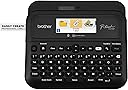
The Brother P-Touch PT-D610BTVP is a professional-grade label maker designed for busy retail, warehouse, and business environments. It offers versatile connectivity via Bluetooth and USB, a vibrant full-color LCD preview screen, and high-resolution printing with extensive font and design options. Compatible with Brother's genuine TZe tapes up to 1 inch wide, it includes 175 business-specific templates and enhanced memory for quick reprints. The VP model adds a convenient carry case, making it perfect for on-the-go professionals who demand precision and style in labeling.


S**N
Easy to use and versatile label maker
Overall, I really like many aspects of this label maker. It is my first Brother label maker, but I've I had experience with other brands. The difference was that they all required a computer to use. I tested this label maker with the provided sample labels using different templates. I printed directly from the label maker, via Bluetooth with an Android phone, iPad, and a Windows computer. The mobile app is called iPrint&Label and the desktop software is called P-Touch Editor 6. Functionality between mobile and desktop was similar, but as you can imagine, the desktop app was more robust. The case that came with it was functional and there was space for the sample labels, the printer, and the ac plug. You can choose to use six double batteries (not included) instead if you need a more portable solution. Build quality for the label maker itself is solid. It is a matte plastic with a little bit of a sheen to it. I didn't notice any fingerprints on it. The keys felt good, but they have a little too much side to side movement for me. Hopefully it won't be an issue in the long run. The print quality was mostly good, a font did look a little jagged when printed depending on the template chosen. This only showed up on one label out 30. For me it wasn't a deal breaker and I'll do more testing to see if it comes up again. I use the label maker for my photography and video gear, but also use it for some additional items around the house. To peel off the label, turn it over and separate the two part split on the bottom. I did try readjusting the positioning of a label that I put on a case and it came up easily. To be fair, I did it within a short amount of time and not after a day or two. In terms of sound while printing, it is noticeable for sure, but I didn't find it to be excessive with regard to volume. I would definitely recommend this to people who like the flexibility of printing without a computer, even though the desktop app does work with Mac OS and Windows at the time of this review. It will definitely take time to work through all of the templates and maximize all of the available options.
P**.
Great results on kitchen ceramic pots!
I recently got this label printer. I have to admit that it beats all my expectations! I is highly versatile in label sizes, fonts and styles. I can connect it to my PC via USB or to my phone via Bluetooth. I installed the Brother apps on it and I can print labels in additional languages that are not available out of the box. The packaging of the device is strong and the touches are clear and easy to use (not too small). The first test was in the kitchen, on all ceramic containers for various ingredients. The results are fantastic. My only regret: I did not get one of these earlier!. I highly recommend this item. I got a transport case for it, also available on Amazon. It is worth it.
J**A
Awesome Label Maker!
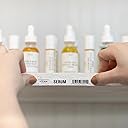
I love this printer! The labels come out clear and the lettering is smooth. The tape reels it takes are easy to change out. It will fit a few different size tapes too, meaning you can make labels of various sizes. It has numerous symbols / emojis built into the machine along with a full keyboard making label creation super simple. The phone app is also easy to use. The build quality is nice and the keyboard is easy to use. I hooked it up to my phone via Bluetooth easily and have had no issues with using that. I just finished using it to make labels for my coffee/cocoa/tea room toppings. They all came out great!
T**N
Very versatile label maker!
Great quality and battery life for a refurbished unit. Can’t complain about the print speed. Love the functionality between my phone and my PC. Great for annoying the spouse with random and obvious labels although I purchased it for my IT and networking business. Templates for patch panels and asset management have been really handy.
B**R
For the price, it’s awesome
So far so good. Like that it can plug in to my computer and I can use the software to make labels really fast. Then I like that it can be used remotely on battery power and I can run around my house making labels and labeling stuff. That’s huge overall I can’t complain. It’s due in the job and it’s better than my old one which broke after 20 years.
F**H
Works great as long as you use the older software
Great Label Printer just note this: Online manual is confusing because it talks about features not available in the newest version of P Touch editor (v 6). Long story short: If you want some of the advanced features of this Label printer, use the older version of the software- at least until Brother updates 6 to have the same features as 5.4. To get 5.4 you have to chose an older model like QL570 and get it from there. You can run 6 and 5.4 at the same time, but you may have to uninstall and reinstall the print driver when you add the second version and then you are good. Version 5 lets me import from Excel and print serial numbers out as bar codes. Should be great for inventory at work and they include a working sample with 5.4 Both Bluetooth and USB work great. You have to use USB for some functions like template transfer Tape cartridges are not cheap but are reasonable. As a IT admin for 30 years, I have had good luck with Brother products. They are not perfect but have been super reliable . As a homeowner, I like them enough that I just ordered a their new color laser (LED) (MFC-L3780CDW) today! Not looking forward to buying toner but worth it to get away from inkjet and all the problems they come with. One last thing: if you are on the line between this 610 model and the slightly cheaper 410 model: The 610 is worth it for sure. I have the 410 and while it works great, the 610 offers a lot more connectivity because of Bluetooth . You can't easily print (if at all) to the 410 from your phone because it lacks bluetooth. The color screen on the 610 is MUCH MUCH easier to SEE because it larger, backlight and in color. I can barely see the 410 in my home office as it is on the dim side. No issue with the 610. Also the 610 prints 1" compared to 3/4" tape for the 410. The $60 extra is well worth it to me.
V**A
Muy buena calidad he comprado al rededor de 6 rotuladoras y todas en perfecto estado
J**Z
La calidad del producto es buena
I**R
Quite a versatile device with many options of cartridge sizes, fonts, etc.
M**R
Very professional
M**D
Very good
Trustpilot
1 month ago
2 weeks ago