We remain fully operational. Our teams are working around the clock to ensure your deliveries continue safely.

DOWNLOAD THE APP


Copyright © 2025 Desertcart Holdings Limited
DOWNLOAD THE APP



🚀 Elevate your network game with silent, speedy, and smart connectivity!
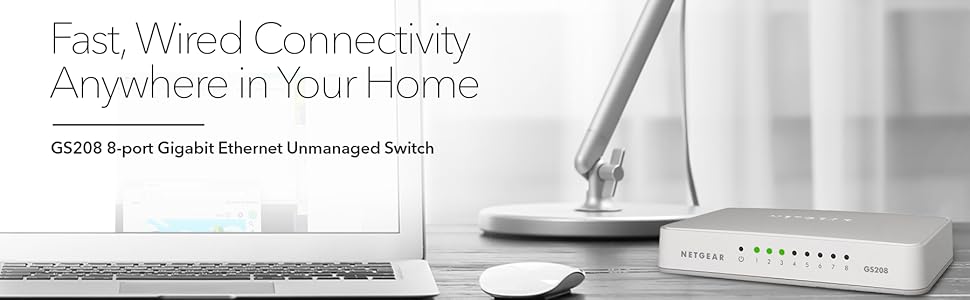
The Netgear GS208 is a compact, fanless 8-port Gigabit Ethernet switch designed for effortless plug-and-play network expansion. It supports desktop or wall mounting, operates silently with low power consumption compliant with IEEE802.3az standards, and delivers consistent 1000 Mbps speeds across all ports—ideal for professionals seeking reliable, energy-efficient connectivity without the noise.



| ASIN | B00AFVB41S |
| Best Sellers Rank | 168,412 in Computers & Accessories ( See Top 100 in Computers & Accessories ) 1,045 in Network Switches |
| Brand Name | NETGEAR |
| Case Material Type | Plastic |
| Color | White |
| Customer Reviews | 4.7 4.7 out of 5 stars (1,211) |
| Data Transfer Rate | 1000 Megabits Per Second |
| Interface | RJ45 |
| Item Weight | 0.2 Kilograms |
| Manufacturer | Netgear |
| Manufacturer Part Number | 0713180 |
| Model Number | GS208-100UKS |
| Number of Ports | 8 |
| Platform | Windows |
| Product Warranty | 1 year |
| Switch Type | Network switch |
| UPC | 606449090444 |
| Unit Count | 1.0 count |
| Upper Temperature Rating | 40 Degrees Celsius |
T**R
Plug and Play - Easily handles MULTIPLE Blu-Ray HD streams
First off, this is an awesome product, totally plug and play with absolutely no configuration required whatsoever. Simply plug in your cables and off you go - it automatically detects whichever port has the connection from the router and the which one is connected to your computer or other devices, you don't have to do anything. I use mine to connect an AV receiver, Smart TV, Sky HD box and HTPC to my home network. I simply plug in the various devices to this switch and then run cable between it and my main router. Everything connected and configured automatically as soon as it was plugged in. For a stress test I streamed HD content to the Sky box over the internet, over the Smart TV and over the HTPC. I also sent two Blu-Ray rips from my NAS to the HTPC, each one averaging roughly 25 mbps. All the streams worked perfectly and the switch only got very slightly warm to the touch. A final good point - the power cable and the ethernet ports are on the SAME side of the device. Many switches have these on opposite sides with is a pain for cable management. One ANNOYING point - The older version of this switch would adjust the colour of the LED lights on the front to indicate the speed of the connection over that port. That is, if you had a 100mbps device it would turn orange whilst a 1000mbps device would turn the indicator green. This is quite handy for quickly checking the network is operating as fast as it should. This particular switch seems to simply stay green, despite the speed of the connection. I've tested it with several confirmed 100mbps devices and a green light is all you get.
F**S
Top-notch!
I already have a GS105, which I like very much, in another part of my house and needed a switch for my AV cabinet. The GS105 has been flawless in operation for the 7 years I have had it for so Negear was an obvious first candidate for another swtich. This review is for the GS208, which is an off-white coloured compact unmanaged gigabit network switch. The device has both the electrical and network (RJ45) connections on the back (unlike the GS308) and a set of lights on the front - 9 in total, all green, with one representing power and the rest each of the ports. The lights flash reassuringly or annoyingly depending on how you look at it. I think white lights would have looked better. The AC adaptor is compact enough and has a switch on the wire to turn off power (first time I have seen this). The AC adaptor itself protudes downwards but doesn't need much clearance. The device is made of plastic (unlike the GS308 which is metal) and doesn't have any rubber feet or mounting holes - this doesn't bother me as I have no need to mount it anywhere. The device is attractive, remains cool and silent in operation, whilst neat and tidy because all the connections are at the back. I have the device currently connecting a few devices (Sonos, PS3, Sky+ HD) and connecting upstream to a homeplug. I plan to add a wifi access point, AV Receiver and possibly a HTPC - I think under the TV or on a desk you'll be hard pushed to use more than 8 ports.
C**Y
Good Network Switch
This switch seems more 'reliable' than the Netgear GS605NA 5 Port unit it replaced. I had problems with the GS605 which only became apparent following its retirement on acquisition of the GS208. I suspect following many hours of use the GS605 would lock up and reset on disconnect of the upstream connection (I would power off the XAV5421 it was plugged into. I needed more connections so acquired the GS208 as a replacement. The GS208 is in use around 8 hours a day with at least 6 devices plugged into it. It seems to run cool which gives it a feeling of being well engineered. The connection indicator lights on the front don't blink in an annoyingly over bright fashion. The device just sits there doing a great job, serenely reliable, unnoticed, but loved. The extra memory and features in these units do allow for noticeably higher performance than than the GS605NA 5 Port Gigabit Ethernet Switch it replaced. I have moved terabytes of data through it without a hint of a problem. A good performance upgrade and not expensive.
D**E
GS208 is a (cable) drag
This a review of the GS208 8-way gigabit ethernet switch. This review does not apply to any of the other models which this listing sees fit to lump together. This is my first time buying an ethernet switch, and so far it seems to work great. My only problem is that with so many cables dragging on it the thing won't stay put. So the obvious thing was to bolt it onto the wall, which is when you discover that it has no wall mounting holes. Happily there's a very good solution: use a spudger to pop the gray base off, and you'll find two hollow pillars in the base which are perfect drill guides to drill out two holes. Then reduce the height of the pillars slightly with a counter sink , don't overdo it, 1mm off is about right. Use the holes to mount the base on the wall (use wallplugs), cover screwheads with tape to prevent a short, and then the main body of the switch clicks right on. Very neat, and very strong! Now I just need a way to tidy up the cables themselves...
Trustpilot
2 weeks ago
2 weeks ago