We remain fully operational. Our teams are working around the clock to ensure your deliveries continue safely.

DOWNLOAD THE APP


Copyright © 2025 Desertcart Holdings Limited
DOWNLOAD THE APP
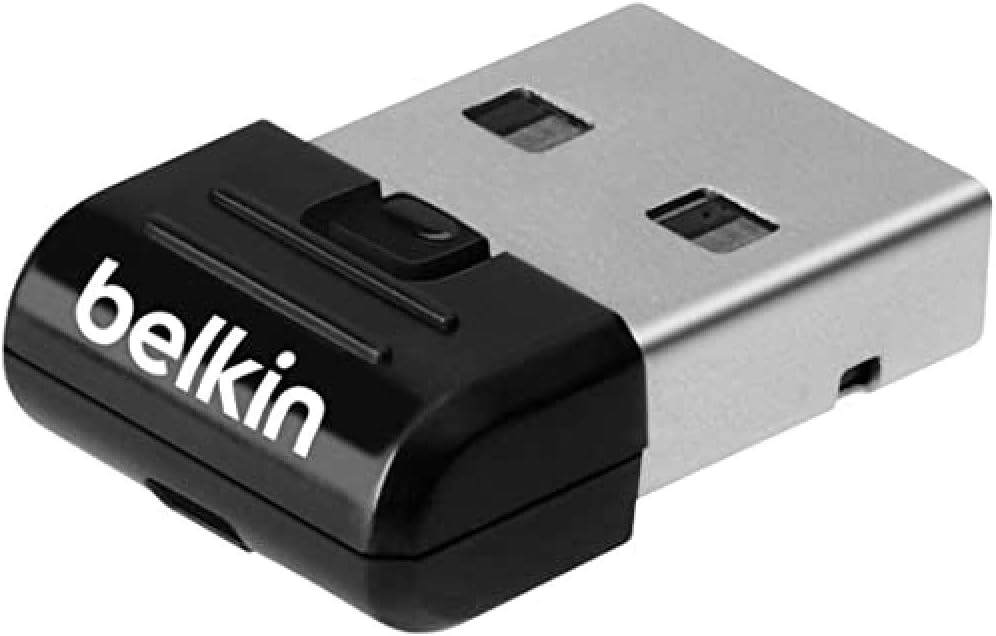
🚀 Elevate your workspace with wireless freedom — stay connected, stay ahead!
The Belkin F8T065BF USB 4.0 Bluetooth Adapter is a sleek, ultra-lightweight device that adds Bluetooth 4.0 wireless connectivity to desktops, notebooks, and tablets. Supporting up to 7 devices within a 10-meter range, it offers backward compatibility with older Bluetooth versions and plugs into any USB port with minimal power consumption. Ideal for professionals seeking a clutter-free, efficient workspace with broad device compatibility.
| ASIN | B009IQB3US |
| Brand Name | Belkin |
| Color | Black |
| Compatible Devices | Keyboard, Mouse, Smartphone, Speaker, Tablet |
| Compatible Operating System Family | Windows |
| Customer Reviews | 4.3 4.3 out of 5 stars (441) |
| Data Link Protocol | Bluetooth, USB |
| Data Transfer Rate | 3 Megabytes Per Second |
| Global Trade Identification Number | 00722868893753, 05055818251163 |
| Hardware Interface | USB 2.0 |
| Item Part Number | F8T065BF |
| Item Weight | 0.06 Kilograms |
| Manufacturer | Belkin |
| Manufacturer Part Number | 0869692 |
| Minimum Required Operating System Version | Windows 2000 Professional |
| Model Number | F8T065bf |
| UPC | 644535519479 722868893753 722550156609 758399149205 |
| Unit Count | 1.0 count |
B**A
Used with Bluetooth Wireless Headphones - Works Perfectly!
I wanted to use my Bluetooth wireless headphones with my PC which didn't have Bluetooth built-in, so I ordered one of these. I'm running Windows 10 64-bit and upon plugging the Belkin Bluetooth adapter in it was detected and drivers automatically installed, without the need of the supplied drivers CD. Once you have the dongle plugged into your machine the Bluetooth symbol will appear in the taskbar area of the Start menu in Windows, simply right click it and then 'Add a Bluetooth device' to begin pairing it with whatever you intend to use it with. Two things: - If you're using wireless headphones or speakers with it, you will need to set your headphones (or wireless speakers) as the default playback device. Right click the volume icon on your taskbar and select Playback devices to do this. - Make sure you un-pair your headphones or speakers from any other device first (such as your phone) since my headphones wouldn't pair with my PC until I had done this.
A**W
Worth the money & easy to install
I installed this on an older laptop which had lost its functioning Bluetooth due to a complete reinstall of Windows 7 some years ago. It's important to follow the instruction for the install to the letter - they are not complex but if you don't you can expect problems; like those I read from other purchasers who seemed to think they knew better. I uninstalled all other Bluetooth drivers before attempting this install so my laptop was clean prior to commencing the install. It worked perfectly and as advertised. Remember... even though the install works properly and the unit is speaking to the laptop you may need to go into the PC Settings page/sound and select the correct audio output so that audio is routed through your Bluetooth.
R**E
Good product, stupid flashing light.
I bought a bluetooth keyboard the other day to work with my Mac and iPad Pro - which it does wonderfully. I also wanted it to work with my Windows 7 based laptop so I have just one keyboard for everything. Bought this Bluetooth adapter because of the price and Belkin is a good make. At first, Windows didn't find any drivers for it, so I popped in the disc that came with the adapter, installed the software, and then it worked like a charm. I was looking for a application in the Start menu, but it wasn't there. Instead there is a Bluetooth icon in the Notification Area (down by the clock in the right hand corner). But once I found it, the keyboard and a Bluetooth mouse hooked up like a charm. My only reason for giving this adapter 4 stars instead of 5, is because it has a blue light just below the surface, and when it's working, the light flashes. Now, this may sound like a very trivial thing, and in the big picture it is. But I find it VERY annoying. Usually, a flashing light indicates there is a problem or it is trying to sync, not that it's working perfectly. I've gone into the settings and configured it to not constantly be looking for devices, but still the light flashes. Sorry, but I don't need a light telling me it's working. The downside to my work laptop is that it only has 2 USB ports, one either side. So I can't even tuck it away in the back where I won't see it. Guess it's going to involve some black electrical tape to cover it up. Otherwise, pretty good product.
D**0
It Installs Easily & It Works!
I am very pleased with this product. Like some other reviewers, I had previously bought a cheap Bluetooth adapter via ebay. This installed fine but didn't work (credit to the seller in China, I got a refund before they had even received the item back). So I thought I would go for a name brand with good reviews and am pleased I did. The device itself is about as small and unobtrusive as anything can be that fits into a USB port. It also has a blue light on to remind you it is there. However, most important for me was that it installed at the first attempt with no problems and worked straightaway (and has continued to do so). It comes with a proper instruction manual (very simple requirements). Excellent!
D**Y
Needed more info
I would have given a much better rating because it is an excellent product, which came very fast, however, and I did look again closely at the item details, I found out after opening, it wasn't compatible with vista, now unless that was hidden somewhere it made it pretty pointless for the laptop I bought it for. I can however use it some where else, but still I was a little dissappointed.
O**8
Software a nightmare
I can't actually review the hardware as the software wouldn't install fully without errors despite apparently being compatible with my version of Windows. I did some searches for solutions but the only recommendations I really came across was to install the latest version of the software - which was the one on the disk which came with the device. Without the software working properly, I could just about connect to my other bluetooth devices but couldn't sync or send data in fact I could barely maintain a connection even if the devices were virtually on top of each other and all potential sources of interference were disabled. So, in short, the hardware may work perfectly, but the software is rubbish.
R**Y
Allelujah - it works!
Having had my fingers burnt on previously buying cheaper USB BT4.0 dongles which failed to deliver on installation, I 'bit the bullet' and went upmarket and I'm so glad I did. The Belkin F8T065BF was a breeze to install on both a Windows 7 laptop and my venerable XP machine, and best of all it worked immediately on both! Bluetooth device discovery is fast and accurate, the connections to BT speakers and headphones are reliable, so all-in-all I am very pleased with this little gizmo. Not the cheapest but it works!!! So wish I'd by-passed the cheap and nasty alternatives in the first place, and bought a pair of the Belkin devices!
T**T
Funktioniert einwadfrei - hab`s allerdings nur bei geringer Entfernung getestet.
A**O
Dopo aver provato diversi adattatori USB Bluetooth, posso finalmente dire che questo funziona perfettamente anche su Apple MacBook. Assolutamente Plug & Play, nessuna configurazione da effettuare. Vede tutte le periferiche e a differenza di altri adattatori, abilita senza problemi anche AirDrop. Assolutamente consigliato.
C**L
Comme le signal bluetooth de ce mac pro est ridicule et qu'il cause des latences et des déconnexions avec une magic mouth, J'ai cru bon de suivre les commentaires et acheter ce produit. Pourtant, sur le paquet rien n'indique sa compatibilité avec MacOS. Mais aucun regret, elle est parfaite ! Dans les préférences bluetooth le jumelage est demandé, la clé ne s'affiche pas comme "connecté" mais pourtant lorsque je la débranche en façade du mac pro, la souris se déconnecte immédiatement. Pour moins de 20 €, me voilà en 4.0. La méthode complexe qui consiste à mettre une antenne (fixée sur façade arrière après perçage...) cablée sur la carte bluetooth est donc à oublier ! Merci Belkin et surtout les autres commentaires :)
D**A
Este adaptador Bluetooth de Belkin es un producto excelente y 100% Recomendable. El rango que tiene (a no ser que nos pongamos tras paredes de plomo) es bastante bueno y funciona tanto con mac, windows, android e iOS. Además, nos será muy útil para poder usar los teclados y ratones inalámbrico que perdamos el conector y vayan por bluetooth.
A**R
Kız kardeşimin eski masaüstü bilgisayari içim aldım. 3 oda mesafede is görüyor.
Trustpilot
3 weeks ago
3 weeks ago