Desertcart purchases this item on your behalf and handles shipping, customs, and support to KUWAIT.
🎯 Wingman XB 2: Your ultimate wireless controller sidekick for flawless retro and modern gaming!
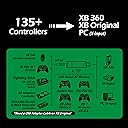
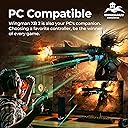
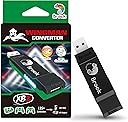
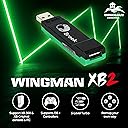
The Brook Wingman XB 2 is a cutting-edge wireless controller adapter designed for XB retro consoles and PC, supporting multiple controller types including Xbox, PlayStation, and Switch Pro. It features adjustable turbo levels, customizable button remapping, and lag-free wireless connectivity, delivering a seamless and personalized gaming experience. Compact and easy to set up, it’s the perfect upgrade for gamers seeking versatile, high-performance controller compatibility.
| ASIN | B0BJ6M9JPD |
| Additional Features | Adjustable Turbo, Remap, Wireless Controller Adapter for Xbox Consoles and PC |
| Best Sellers Rank | #31,055 in Video Games ( See Top 100 in Video Games ) #638 in Xbox Accessories #5,033 in PC Accessories |
| Brand | Brook |
| Brand Name | Brook |
| Color | black |
| Compatible Devices | XB 360, XB Original and PC Consoles |
| Compatible Video Game Console Models | Microsoft Xbox 360, Microsoft Xbox SERIES X, Nintendo Switch, Sony PlayStation 3, Sony PlayStation 4, Sony PlayStation 5 |
| Connectivity Technology | USB |
| Controller Type | Gamepad |
| Customer Reviews | 4.2 out of 5 stars 752 Reviews |
| Hardware Platform | PC, Xbox |
| Item Dimensions | 3.03 x 0.79 x 0.51 inches |
| Item Weight | 13.4 g |
| Manufacturer | Brook |
| Manufacturer Part Number | Wingman XB2 |
| Model Name | Wingman XB 2 Converter |
| Model Number | Wingman XB2 |
| Package Quantity | 1 |
| Unit Count | 1 Count |
| Warranty Description | 1 year |
J**S
Plug and Play Perfection
The Brook Wingman XB2 does exactly what it promises. Within seconds, I was using my Elite Series 2 controller on my Xbox 360 with zero hassle. No lag, no complicated setup — just plug it in and play. The only things to note are that you won't be able to turn on the console with the controller, and occasionally you may need to resync it. But overall, if you've got modern controllers and want to breathe new life into older consoles, this little adapter is a must-have.
C**S
finally resolves my biggest issue with the Series X
the series X is a great console but i've never loved the xbox controller (even all the way back to the 360), so i was so excited to find this adapter that lets me use my PS5 dual sense. it works as perfectly as possible, just be aware you won't be able to turn on the xbox with the dual sense (or other non-xbox controller), and you have to connect it with the usb cable every time before you can use it wirelessly (but it does work perfectly wirelessly once you do that). i imagine this is a technical limitation that just can't be overcome with the way the adapter is tricking the xbox into thinking you're using a MS controller. also i think the price is very reasonable compared to other similar devices like the cronus.
K**I
No input lag
Pros: - No input lag (at least I cant feel any) - Easy to use - 3rd party controller wireLESS on xbox - imo good price - REALLY GREAT CUSTOMER SUPPORT Cons: - If you want to use controller wireless you need to plug in with microusb cable anyway, unplug it and then turn the controller again. - you cant turn on xbox with paired controller Why great customer support? I broke mine with installing bad firmware for previous version. There was no new one on website so i wrote to company and they send it to me, so i repaired it easily.
W**A
Product works, installer sucks and a bit of false advertising. Lack of multi controller support.
From the testing, works pretty well. Within 3 hour testing on 360 and PC with Wireless XBOX Series Controller there were no disconnects. And it's a plug-and-pair-and-play so it's pretty easy to use. However, installing drivers was a *chore* - for some reason, on all my PCs and Laptops dongle did NOT want to cooperate to install drivers. No clue why but software they've "provided" (had to look into like 15 sub-websites with even Google Drive as an offline installer!?) was so hidden I had to mess with it for over 2 days before I got it to work. Additionally, Dongle (or maybe software) is buggy/loose enough that all the previously mentioned software and drivers didn't recognize it - It was "Not detected", "Detected" for millisecond, then back to "Not Detected". So I had to find perfect angle (and wait few moments) before I got it to work with installer. I'm unable to say how it looks on Linux since I did not test that (but I'm guessing it probably works since 360 adapter is built in there without additional drivers) but Dongle on Windows - no matter the port USB 3.0 or 2.0 - did not cooperate with Xbox360 adapter - so the part where you can put Adapter into the Dongle's Port into USB Slot is false advertising, or my fresh install PC is problematic (betting on the former). Overall, it's a good product but *lord* is it expensive to ship. Polish Amazon doesn't sell them so I had to ship it from American one to my address. Not a biggie with waiting but ~10% of monthly salary. Jeez. Edit: After finally getting a chance to test it out, turns out on actual 360 it can only allow ONE. of the 3rd party controllers. My original 360 pad doesn't work anymore and I had to buy second Series controller. Nope, either the old one or new one connected at the same time. By this point why did I bother? I'm better off buying those chinese ripoff 360 controllers.
Z**S
Works great with xbox 360 but does not work with xbox one/series
Works great with my xbox 360 slim and xbox one and series controler. No noticeable latency all the buttons work. Its really nice being able to use a newer xbox controller that is more comfortable. Just keep in mind you can only connect with one controller to the adapter at time and does not work with xbox one or series consoles. This is because of an Xbox update that only allows licensed approved Partners controllers. It did work before this Update
H**R
Must have for 360 Users.
Use it to on the 360 with my XBONE Controllers
G**D
My Xbox Finally Found Its Wingman
I bought this over two years ago so I could use a King Kong Pro 2 controller, which is officially made for Nintendo Switch I think, while playing my Xbox Series X. It has worked perfectly except for needing to restart the Xbox when the game I’m playing gets an update. A minor inconvenience for being able to use a controller with hall effect sensing joysticks and never have stick drift again. I recently upgraded to the King Kong Pro 3 controller and it works just as well. I sure went through a lot of Xbox controllers before I figured this out.
A**S
Struggles With Rumble On OG Xbox And Wireless On All Consoles
This would be an easy 5 stars if it worked correctly all of the time. Unfortunately, this adapter struggles in a couple of areas: - When using wireless controllers, the connection just randomly drops after a duration of play. It doesn't matter if you're playing on OG Xbox or on Xbox 360, this happens. - On OG Xbox, the rumble support is very hit and miss. On some games the rumble works as I would expect, but on others it either doesn't work at all or the controller gets stuck vibrating endlessly. I have not been able to find a firmware update on their website that fixes these issues.
シ**き
ほぼPS5のコントローラーでxbox series xでプレイできるが…、2024年1月22日、使えなくなった
PS5とXboxとを持っているのですが、コントローラーを比べるとPS5の コントローラーの方が「カチッ」として凄く使いやすい。Xboxのはなに か「フニャフニャ」して操作が安定しません。特に「偽りのP」で梁の上 を移動するシーンがあり、先に敵が居て投擲物を投げてくるので素早く 動く必要がありましたが、フニャフニャするので梁から落ちてしまうこと が多く投げ出したかったです。その後3時間ほど落ち続け何とかクリアし ましたが、どうしてもPS5のコントローラーでプレイしたいと感じて購入。 最初にファームウェアのアップデートが必要なのでyoutubeで学習し 無事完了。Xboxに挿入しペアリング完了後直ぐにプレイ。これが純正の 様に違和感なく使えて満足している。唯一、PS5のコントローラーで Xboxの電源を入れることが出来ない事が残念なところでしょうか?それ と価格はやや高いかなと思います。 評価は、やや価格が高いことを考慮しても互換性機能が高い事から☆5つ とした。 ※本品はXboxを対象としたコンバーターでニッチな商品ですが、ここま で完成度高く作り込んだ事が素晴らしいと感じています。 2023/10/02追記 レビュー書いて三日後に値下げ、かなり悔しー! 2024/01/05 追記 今日になって「xboxに未承認のデバイス…」という「貴方が接続している コントローラーのことは知らんがな!」的なコメントが出てくるようになり ました。そのまま無視すると一応使えますが、最近よくバグるようになった のはそれが理由だったのかと感じてます。 10~11月末までは極めて良好 12月は結構不安定で良くバグった 2024/01/01からかなり不安定、電源を入れると「未承認…」と強くワーニング が出ます。Brookさんには早く対応して戴きたいですね。 2024/01/22追記 今日久々にプレイしようとしたら全く使えませんでした。 もう駄目みたいですよ。ほぼゴミ化した。
L**N
Playing games on the Xbox 360 with a Xbox Series controller is pure bliss.
Title says it all really. Being able to use current gen controller's on "old/retro" console's is a game changer. Especially when its almost impossible nowadays to buy decent 3rd party controller's, or original controller's that don't have any issue's after all this time through wear & tear. So easy to use too... *Connect the Wingman XB2 device to your PC, Download Brooke's software updater from they're site & update if needed. (Will most likely already have the latest update on the device when you get it, At least mine did anyway. But it wont hurt to check for update's with fixes) *Connect the Wingman XB2 device to your OG Xbox/Xbox 360 console & power it on. *Press & hold the 2 side button's on the Wingman XB2 until it start's flashing. *Press & hold the sync button on your controller until it start's flashing. *Within a few second's, Its connected. Great success. Highly recommend this device for your old OG Xbox & Xbox 360 console's!!! Love it!!!
G**I
A qualidade
Funciona perfeitamente!
S**I
Xbox One Controller su Xbox 360
Visto la mancanza di controller validi per rigiocare a vecchi giochi (nel mio caso Forza Motorsport 2, 3 e 4) questo adattatore risolve il problema permettendoti di giocare con il controller della Xbox One. Connessione Wireless immediata e senza nessun bisogno di aggiornare fimware.
H**.
بروك محول وينجمان
يشغل يد نينتندو على الاكس بوكس امر جدا جميل 👌
Trustpilot
3 days ago
2 months ago