Buy anything from 5,000+ international stores. One checkout price. No surprise fees. Join 2M+ shoppers on Desertcart.
Desertcart purchases this item on your behalf and handles shipping, customs, and support to KUWAIT.
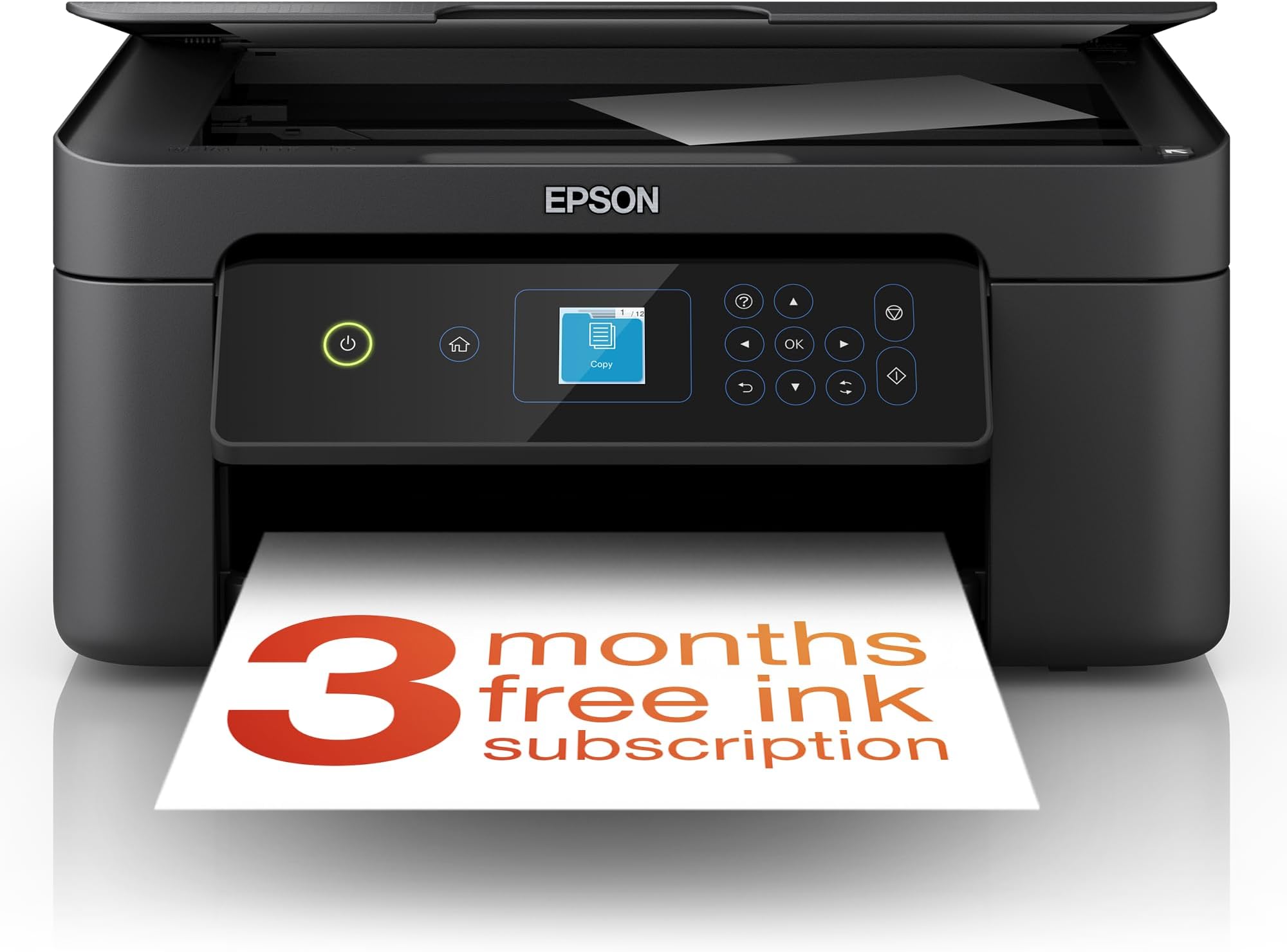
🖨️ Elevate your home office game with Epson XP-3200 — where style meets smart printing!
The Epson Expression Home XP-3200 is a compact, affordable 3-in-1 inkjet printer offering high-resolution 5760 x 1440 dpi printing, automatic duplexing, and versatile wireless connectivity including Wi-Fi Direct. Designed for home and small office use, it supports easy mobile printing via the Epson Smart Panel app and uses individual Pineapple 604 ink cartridges for cost-efficient, vibrant color output.


| ASIN | B0BB7CPCSK |
| Additional Printer Functions | All In One |
| B&W Pages per Minute | 27 |
| Best Sellers Rank | 554 in Computers & Accessories ( See Top 100 in Computers & Accessories ) 6 in All-In-One Printers |
| Box Contents | Printer-Power lead -Inks |
| Brand | Epson |
| Brand Name | Epson |
| Color Depth | 24 bits_per_pixel |
| Color Pages per Minute | 15 ppm |
| Colour | Black |
| Compatible Cartridge | Epson-branded ink cartridges |
| Compatible Devices | Smartphones |
| Connectivity technology | Wi-Fi |
| Control Method | App |
| Controller Type | Android |
| Country of Origin | China |
| Customer Reviews | 4.2 out of 5 stars 799 Reviews |
| Display Type | LCD |
| Dual-sided printing | Yes |
| Duplex | Automatic |
| Global Trade Identification Number | 08715946702728 |
| Hardware Interface | USB |
| Ink Colour | Black |
| Item Dimensions D x W x H | 17D x 37.5W x 30H centimetres |
| Item Type Name | Colour Laser Printer |
| Item Weight | 4.3 Kilograms |
| Manufacturer | Epson |
| Maximum Copies Per Run | 100 |
| Maximum Copy Resolution Black and White | 5760 x 1440 dpi |
| Maximum Copy Resolution Color | 5760 x 1440 |
| Maximum Copy Speed Black and White | 27 ppm |
| Maximum Print Resolution Black and White | 5760 x 1440 dpi |
| Maximum Sheet Capacity | 100 |
| Maximum Supported Paper Size | A4 |
| Maximum print Resolution Color | 5760 x 1440 optimized dpi |
| Model Name | XP-3200 |
| Model Number | C11CK66401 |
| Model Series | XP-3200 |
| Model name | XP-3200 |
| Network Connectivity Technology | Wi-Fi |
| Number of Trays | 1 |
| Other Special Features of the Product | Network-Ready |
| Output sheet capacity | 100 |
| Paper Size | 9x13 / 10x15 / 13x18 / 20x25 |
| Print media | Paper (plain) |
| Printer Output Type | Colour |
| Printer Resolution Vertical in Black and White | 567 Centimeters |
| Printer Type | Inkjet |
| Printing technology | Inkjet |
| Product Warranty | 28 Days DOA -12 Months |
| Resolution | 5760 x 1440 |
| Scanner Type | Photo |
| Series Number | 10 |
| Special feature | Network-Ready |
| Specific Uses For Product | General home use, small office use, wireless printing, and individual ink replacement |
| Total USB Ports | 1 |
| Unit Count | 1.0 count |
| Warranty Type | limited warranty |
| Wattage | 1 watts |
F**E
Great little printer
After constantly struggling with a HP printer, I decided to go back to Epsom a brand that I had used many years ago and which had served me well. I was not disappointed. This compact printer was a dream to set up and prints wirelessly from my phone and tablet effortlessly. Very pleased and was delivered in just a couple of days. Would recommend for home use..
A**R
The XP3200 is a good printer but it doesn't come with much ink
Since my trusty XP322 decided to cease to work I needed a similar replacement and having always used Epson printers decided on the XP3200 as a close match. The printer has virtually the same capabilities as my old XP322 but annoyingly they don't seem to come with full ink cartridges these days. The supplied cartridges are just for Setup and Configuration as shown on the cartridge. I managed to get a few pages of print out of them. After that I used some third party inks which work just as well. Installation wasn't too hard. Since this has Wifi and can work with a smartphone and can also take part in Epson's Readyprint ink subscription service, it initially wants to connect to the your network and internet. Since I didn't want this I ignored that option and just continued to set it up using a USB cable. Windows 10 immediately found the printer and installed a defaut print driver but this has limited capability so its better to download the setup utility fron Epson's web site - once again I declined any attempt to connect to the internet and also disabled automatic updates. The printer itself feels a little more plasticy than my old one and the paper movement mechanism is a lot noisier. One feature the SP3200 has that my old XP322 didn't have is automatic double sided printing. To be honest it might seem like a nice convenient feature but its a lot slower than turning over the paper manually. It prints, scans and copies just like my old printer and the driver options look just the same, so it was an easy switch over. Good quality print and scan but genuine inks are expensive and you'll need something to get going as those supplied are only for setup.
M**Y
So easy to set up
I am not a computer whiz Kid, and I am not knowledgable on Apps etc, just wanted a basic printer/scanner to run off my computer after my very old printer gave in. I took a chance on this printer concerned that most reviews were about linking to mobiles etc. In fact I just plugged the mains lead in and connected the printer to a USB port on my computer, turned on and the printer did the rest. It installed without any reference to downloading off the net etc and even the small screen for 5 minutes showed what was happening, then it just atomatically ran, the only thing I had to do was put the 4 inks (supplied in the package) into the machine, but even the small screen covered this. I have only had it 3 days, prints are excellent and are produced reasonable quickly, scanner works perfectly. Not tried double sided print outs yet nor connected to apps on phones (don't want to). I will keep count of copies to comment at a later date on the life of the ink cartridges supplied. If you want a reasonably priced printe/scanner, very very easy to set up, looks strong and not plasticky then I can recommend the xp3200. Lastly pleased I went for this with the small screen for just £15 more, well worth being able to see what is happening and receiving instructions, there is no manuel but one is not needed. (I suppose I could download one, but no need) .
S**S
Very good product
Very good product
R**Y
Poor print quality, uses a lot of ink
I've owned this printer for a year now and I'm finally giving up with it. Every time I come to use it, the print quality is poor with horizontal lines running through. So of course I go through the process of cleaning the print heads and realignment, which seems to use almost all the ink, because then I get warnings that ink is low. So I replace the cartridges, get the pages printed at print quality I could only describe as average. Then a week or so later, next time I want to print, the quality is again dreadful with lines running through it, and the whole cycle repeats. I honestly think I must have printed less than 150 colour pages in a year, but I've replaced the cartridges 4 times (at nearly £40 a set) so this printer is too expensive to run, costing me literally more than £1 per page. In summary: Colour quality, very poor. Print quality very poor overall. Time to print first page is really slow. Expensive to run. Uses a LOT of ink. See photo to see just how dreadful the print quality is. On the plus side (ha ha) it was easy to set up and it supports Apple Airprint. Good scanner.
M**N
The best cheapest printer around.
My third Epson printer.
A**.
Well made poorly documentd
OK product - pathetic instructions on Setup . I don't know who gets the job of writing instructions for electronic devices- is it a punishment for being the worst communicator in the office ?? repeated failure to open milk bottle at correct end ? Website's not up to much either It just refused to work ( for me) with a USB cnnection contrary to the ad To be fair they are no worse than the industry standard
L**H
Nice n compact
I found it very easy to set up just went on you tube followed the instructions up and running in half n hour really pleased with the printer
J**H
Waste of money
Very very disappointed .
S**O
Love it!!! Easy to use and set up!
As above!
M**L
Disappointed
Grand for black and white prints. It's busting my chops trying to get head aligned. Nearly out of ink before I've started. Hopefully because it's new it might print itself out of this
I**E
good item
Nice little unit, copies and prints very good
R**N
Installation
Eventually worked out how to install . Not very tech savy
Trustpilot
3 weeks ago
1 month ago