


🚀 Upgrade your rig with WD Blue: Speed, reliability, and efficiency in one sleek package!
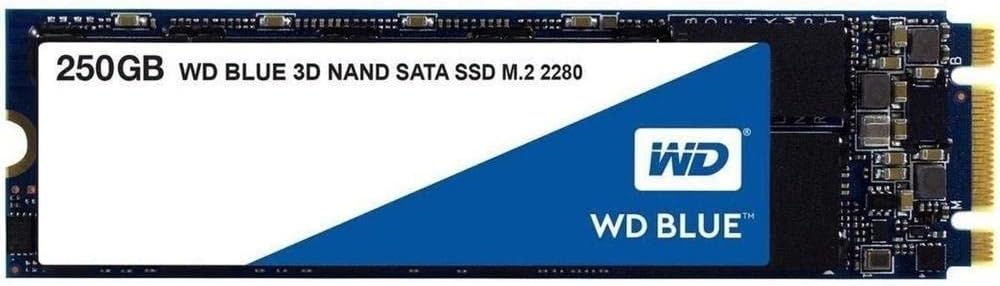
The Western Digital WD Blue 3D NAND M.2 SATA SSD offers 250GB of fast, reliable storage with read speeds up to 550MB/s. Featuring advanced 3D NAND technology, it delivers enhanced endurance and reduced power consumption, making it ideal for gaming, creative software, and everyday computing. Its compact M.2 form factor ensures easy installation, while the WD SSD Dashboard provides comprehensive drive monitoring and management.



| ASIN | B073SBV3XX |
| Best Sellers Rank | 251,012 in Computers & Accessories ( See Top 100 in Computers & Accessories ) 1,403 in Internal Solid State Drives |
| Box Contents | WD WDS250G2B0B 250GB Blue 3D M.2 2280 SATA III SSD |
| Brand | Western Digital |
| Brand Name | Western Digital |
| Cache Memory Installed Size | 250 |
| Color | Blue - High Performance |
| Compatible Devices | Desktop |
| Compatible Video Game Console Models | Sony PlayStation 5 |
| Connectivity technology | USB |
| Customer Package Type | Standard Packaging |
| Customer Reviews | 4.6 out of 5 stars 3,178 Reviews |
| Data Transfer Rate | 750 Megabits Per Second |
| Digital Storage Capacity | 250 GB |
| Digital storage capacity | 250 GB |
| Enclosure Material | 3D Nand |
| Form Factor | Form factor M.2 2280 |
| Global Trade Identification Number | 00718037856292, 10718037856299 |
| Hard Disk Description | Solid State Hard Drive |
| Hard Disk Form Factor | 2.5 Inches |
| Hard Disk Interface | Serial ATA |
| Hard Disk Rotational Speed | 1 RPM |
| Hard disk form factor | 2.5 Inches |
| Hard disk interface | Serial ATA |
| Hard-Drive Size | 250 GB |
| Hardware Connectivity | SATA 6.0 Gb/s |
| Hardware Platform | PC |
| Installation Type | Internal Hard Drive |
| Item Type Name | Blue 3D NAND SATA SSD, 250GB |
| Item Weight | 0.01 Kilograms |
| Manufacturer | Western Digital |
| Manufacturer Part Number | WDS250G2B0B |
| Media Speed | 525MB/s |
| Model Name | WDS250G2B0B WD BLUE 3D NAND SATA SSD |
| Model Number | WDS250G2B0B |
| Network Connectivity Technology | USB |
| Number of Items | 1 |
| Product Features | Portable |
| Product Warranty | 3 year limited warranty |
| Read Speed | 550 Megabytes Per Second |
| Special feature | Portable |
| Specific Uses For Product | Gaming |
| UPC | 718037856292 |
E**Q
Perfect for OS - Great for Gaming - Decent Speed
Super simple to install. Swapped over my OS (Windows 10) on my laptop to this SSD and never looked back. Huge difference from using a HDD for my OS. My laptop used to start in around 3 minutes but since switching to this, my laptop can be off to on youtube video in less than 30 seconds. Even with the SATA speed limit on this drive of around 500MB/s when comparing to my younger brothers NVMe drive which can do around 3500MB/s. It’s still quite snappy. I have the 250GB storage capacity so obviously you’d need to juggle a few files to fit things to this drive. My recommendation is to use this solely for the OS and smaller files. I do install some games on this drive however as the load times get a huge boost. I never have any overheating issues or anything. Works fine
J**W
Easy to install
This drive is a fantastic addition to my new build, having used mechanical drives for many years and the length of time it takes to set them up, this was a breeze. The drive is basically a small circuit board with a connection on one end you insert into the M2 socket and a semi circular cut out at the other that the screw goes through. Easy installation into MSI x370 Carbon motherboard (with Ryzen 1600X + 16gb DDR 4 ram). Installed windows 10 with usb 3 flash drive and was ready to go within 5 mins. Once fully set up, Windows now boots to login screen in less than 20 seconds. The drive is fast and responsive, however as this drive is 250gb (Windows 10 comes in at around 25gb), I have installed all my software on to this SSD and set up shortcuts to libraries for each user on to an internal SATA drive to save on space. A simple to navigate dashboard console can be downloaded from manufacturers site, this displays all the details about the drive & updates can be initiated through the software. My only regret is (on a very tight budget ) I couldn't afford a larger capacity, but would not hesitate to purchase one of these WD drives again.
S**0
Good SSD
Amazing SSD, but it doesn't come with an mounting screws, which need to be ordered separately. Really sped up my PC!
T**.
Good speed and good value or money!!!
I bought the 250GB WD Blue 3D NAND to install it in a LincPlus P1 laptop and works perfectly! 20 seconds to login to Windows 10. I used Macrium Reflect to copy the original partitions onto the new disk and worked very nice. It took 5 minutes for the cloning process. Be sure to fully updates your windows and install any programs you want to use, before you clone the partitions. The read/write speed is very good for SATA.
S**T
basic M2 SSD, it works as intended
this is a standard M2 type SSD, efficient but not mind blistering speeds. I got this as a 2nd SSD for my PC (already having an M2 NVME installed) the speed from this are nowhere near as fast as my main SSD, but I knew this when buying. but for cost/speed/storage comparison it is a good buy.
M**C
SSD died after 2 months
Wasn't happy with 240gb version of this SSD since the first day i bought it. It was connected to Gigabyte B450 mobo and i always had problem with low read/write speeds which could be outperformed by any other better hard drive. At first i thought it's because it's being connected via SATA only M.2 slot on motherboard but same thing happened when in enclosure and connected to external USB. Tested on three computer and was getting similar speeds on all of them. Don't buy it. It is just annoyingly slow disk. And as cherry on top, it died on me today after less then 6 months of use and I was not using computer a lot, approx. 4-5 hours per day. Suggestion: Avoid green or blue WD SSDs ecpecially M.2 format ones
I**V
Fast and Compact
In combination with Neoteck Aluminum USB 3.0 to NGFF M.2 Hard Disk Box SSD External Enclosure Case Converter Adapter for Windows XP Vista Windows7 8 8.1 MAC Linux-Black , this makes a really nice external drive, easy to put together, very fast and very compact. I formatted it as exFAT so that I could read and write on Mac's and PC's - it works perfectly on both.
A**N
Use this if your motherboard has an m.2 slot but the cpu/motherboard combo doesn't support nvme
Whew! I finally figured this out. I have an ASUS motherboard with an m.2 slot and an Athlon processor, and when I put in an nvme type ssd, the bios said the m2 slot is 'empty.' Turns out there are TWO TYPES of ssd that can go in an m.2 slot. There is the nvme type and the Sata type. They look identical so one should not get confused with a sata ssd. It is an m.2 ssd but the internal electronics is sata type. That is what this product is, and after I returned the identical-looking nvme product and got this, I have a new SSD and it initialized using windows disk managmenet without needing to do anything in the bios.
Trustpilot
2 months ago
3 days ago