We remain fully operational. Our teams are working around the clock to ensure your deliveries continue safely.

DOWNLOAD THE APP


Copyright © 2025 Desertcart Holdings Limited
DOWNLOAD THE APP
Buy anything from 5,000+ international stores. One checkout price. No surprise fees. Join 2M+ shoppers on Desertcart.
Desertcart purchases this item on your behalf and handles shipping, customs, and support to KUWAIT.
🚀 Unlock Big Views & Bigger Possibilities with Galaxy A04e!
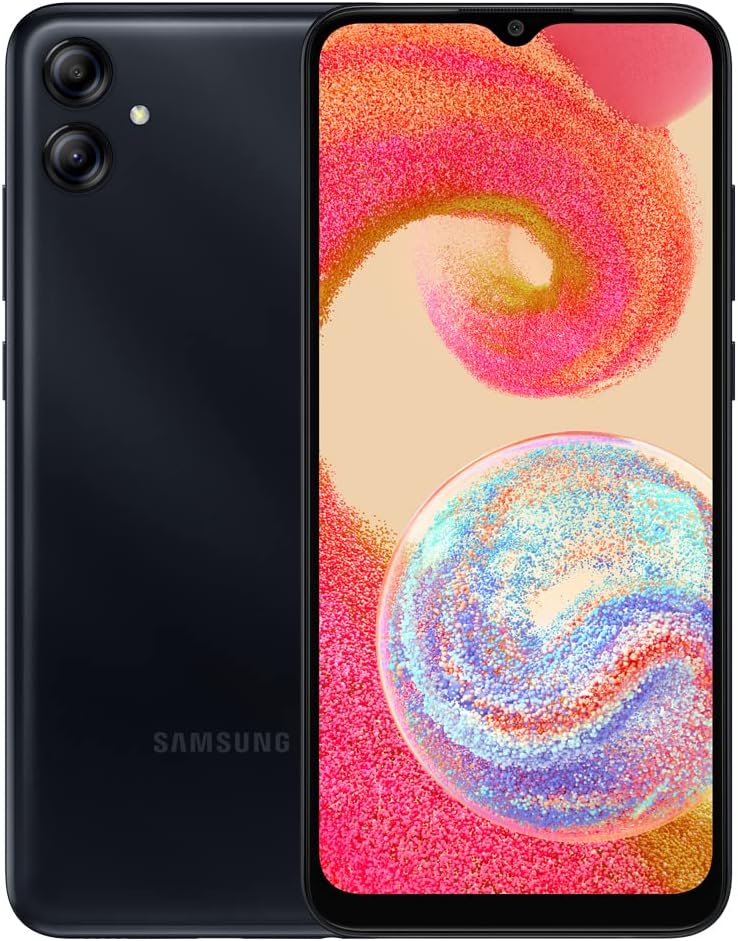
The Samsung Galaxy A04e is a factory-unlocked international smartphone featuring a 6.5-inch HD+ Infinity-V display, an efficient octa-core processor with 3GB RAM plus virtual RAM expansion, and versatile cameras (13MP main, 2MP depth, 5MP front). It supports up to 1TB expandable storage and boasts a robust 5000mAh battery, designed for GSM networks like T-Mobile and select Latin American carriers. This sleek, glossy black device balances style, performance, and affordability for the globally connected professional.
| ASIN | B0BLZN9NDG |
| Additional Features | International Version, Factory Unlocked, Dual SIM, Compatible with T-Mobile, Mint, Tello, and Metro in the USA Market, and any GSM provider in Latin America |
| Aspect Ratio | 16:9 |
| Battery Average Life | 24 Hours |
| Battery Capacity | 5000 Milliamp Hours |
| Battery Description | Lithium-Ion |
| Battery Power | 5000 Milliampere Hour (mAh) |
| Best Sellers Rank | #31,891 in Cell Phones & Accessories ( See Top 100 in Cell Phones & Accessories ) #578 in Cell Phones |
| Biometric Security Feature | Fingerprint Recognition |
| Brand | Samsung |
| Built-In Media | Phone, Power Adapter, SIM Tray Ejector, USB Cable |
| Camera Description | Front, Rear |
| Camera Flash | no flash |
| Cellular Technology | 4G |
| Color | BLACK |
| Compatible Devices | T-Mobile |
| Connectivity Technology | Wi-Fi |
| Connector Type | USB Type C |
| Customer Reviews | 4.0 4.0 out of 5 stars (1,148) |
| Display Pixel Density | 270 Pixels Per Inch (PPI) |
| Display Resolution Maximum | 720x1600 |
| Display Type | LCD |
| Effective Video Resolution | 8 Pixels |
| Flash Memory Supported Size Maximum | 1 TB |
| Form Factor | Smart Phone |
| Frame Rate | 30 FPS |
| Front Photo Sensor Resolution | 5 MP |
| GPS Geotagging Functionality | True |
| Headphones Jack | 3.5 mm |
| Human-Interface Input | Touchscreen |
| Item Dimensions | 7 x 3.5 x 2.5 inches |
| Item Weight | 6.63 Ounces |
| Manufacturer | SAMSUNG |
| Material Features | durable and lightweight |
| Memory Storage Capacity | 3 GB |
| Model Series | A |
| Model Year | 2019 |
| Number of Front Cameras | 1 |
| Number of Rear Facing Cameras | 1 |
| Operating System | Android |
| Phone Talk Time | 24 Hours |
| Processor Series | MediaTek Helio |
| Processor Speed | 2.3 GHz |
| RAM Memory Installed | 3 GB |
| Rear Facing Camera Photo Sensor Resolution | 13 MP |
| Refresh Rate | 60 |
| Resolution | 720 x 1600 |
| SIM Card Slot Count | Dual SIM |
| Screen Size | 6.5 Inches |
| Shooting Modes | Portrait |
| Sim Card Size | Nano |
| Specific Absorption Rate | 1.6 Watts per Kilogram |
| Specific Uses For Product | General communication, International travel, and Multi-region use with GSM providers |
| Video Capture Resolution | 1080p or 720p |
| Warranty Description | No Warranty |
| Water Resistance Level | Water Resistant |
| Wireless Network Technology | Wi-Fi |
| Wireless Provider | T-Mobile |
A**R
Great budget smartphone
This phone works great. It doesn't have all the features of a standard phone (NFC, Biometrics, Certain apps may not be supported, etc.) but it's still a decent Samsung device. The screen resolution is lower and will be noticeable if you are switching from a higher end device, but it's not unbearable for the price. I have Ultra Mobile, and it connected right away once the sim was inserted. Read the description carefully, as not all networks will work on this device.
L**Z
Worth the money
Good for traveling
L**.
Not compatible
I bought this a few months ago for emergencies and finally needed it. It never wanted to connect to the network(tmobile). Tried many things. I guess it's not compatible, I thought it would work since it was unlocked. Now I unfortunately have an expensive paper weight.
J**E
The product is still locked and not working.I need it be replaced
I received the phone but could not use because it shows blocked sign instead of connecting to network or show cell functionality. How ca. You help solve the problem.in short the product above is defective
M**B
How to Use w/ Mint SIM
Mint Setup Instructions: Once you’ve activated your plan and inserted your SIM card or installed your eSIM, text SETUP to 6700 to have the correct settings sent to your phone (or just keep reading because we provide them below) Steps Go into your phone’s Settings Select Connections or Search Access Point Names Select Mobile Networks Tap Access Point Names (APN) Tap the 3-dot menu in the top right > Reset to default Select Add to enter the following information as shown (Note: the input process is case sensitive): APN Settings Name – Mint APN – Wholesale Proxy – (leave blank) Port – (leave blank) Username – (leave blank) Password – (leave blank) Server – (leave blank) MMSC – http://wholesale.mmsmvno.com/mms/wapenc Multimedia Message Proxy – (leave blank) Multimedia Message Port – 8080 MCC – (do not change default values) MNC – (do not change default values) Authentication Type – (leave blank) APN Type – default,supl,mms,ia APN Protocol – IPv4/IPv6 APN Roaming Protocol – IPv4/IPv6 MVNO type: GID MVNO value: 756D 7. Tap the three dots in the top right corner and select Save 8. Ensure that the new Access Point Name is selected 9. Restart your phone After your phone powers back up, you can test these new settings by sending yourself a picture message.
A**A
Excelente ya he comprado 2
B**A
Excelente Telefono, lo usé para llevar para Cuba y excelente calidad. Coge todas las coberturas y muy bueno muy muy bueno
A**A
Has everything you need from a phone except the performance is very slow.
Screen size is great. Cameras are okay which is expected. It can perform basic tasks like messaging and call but that's pretty much it. Web browsing could be cumbersome.
T**Y
El celular que pedí para mi nieta esta muy bien. El color le gustó mucho y además llegó muy bien y rápido.
G**O
Muy bueno y rapido
J**A
Easy adjustment from older versions of iPhone for people for who need a smart phone and basic functions
S**H
awesome
U**7
Funciona pero hay mejores opciones aunque samsung es samsung
Trustpilot
1 month ago
1 month ago