Buy anything from 5,000+ international stores. One checkout price. No surprise fees. Join 2M+ shoppers on Desertcart.
Desertcart purchases this item on your behalf and handles shipping, customs, and support to KUWAIT.
🚀 Elevate your Raspberry Pi projects with touch—compact power, big impact!
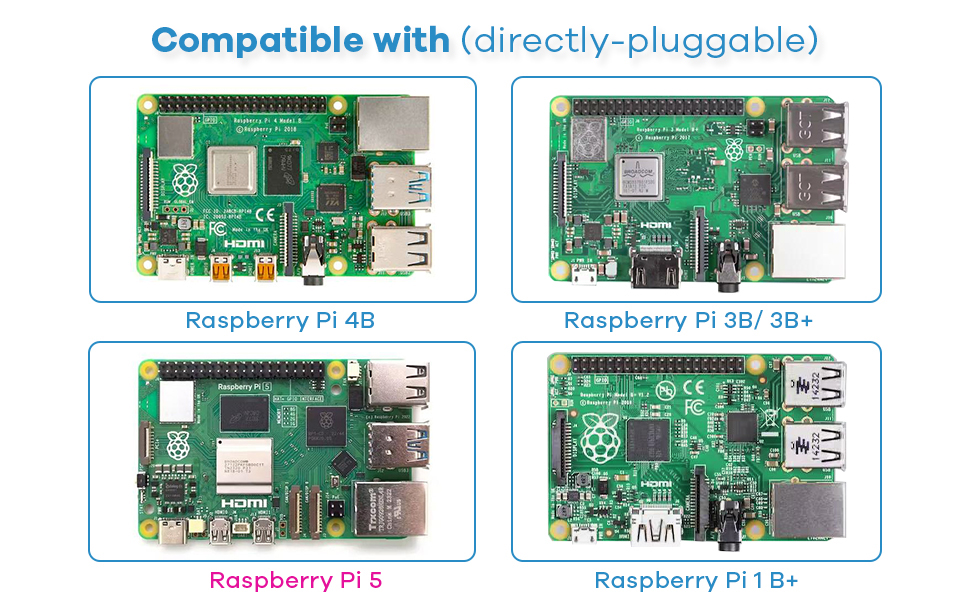
The Hosyond 3.5 Inch 480x320 TFT LCD SPI Display Panel is a plug-and-play touchscreen designed specifically for Raspberry Pi models B through 5. Featuring a vibrant 3.5-inch resistive touch display with 480x320 resolution and a wide 165° viewing angle, it requires no external power and supports multiple Linux-based OS. Complete with a stylus, driver tutorials, and technical support, it’s engineered to streamline your Pi projects with crisp visuals and intuitive touch control.


| ASIN | B0BJDTL9J3 |
| Additional Features | Touchscreen |
| Aspect Ratio | 16:9 |
| Best Sellers Rank | #10,480 in Electronics ( See Top 100 in Electronics ) #4 in LCD Touch Panels #350 in Computer Monitors |
| Brand | Hosyond |
| Built-In Media | 1 x 3.5" raspberry pi touchscreen, 1 x touch pen |
| Color | Default |
| Compatible Devices | Raspberry Pi A, B, A+, B+, 2B, 3B, 3B+, 4B |
| Connectivity Technology | USB |
| Contrast Ratio | 1000:1 |
| Customer Reviews | 3.7 out of 5 stars 321 Reviews |
| Display Resolution Maximum | 320 x 480 |
| Display Technology | LCD |
| Display Type | LCD |
| Has Color Screen | Yes |
| Image Contrast Ratio | 1000:1 |
| Item Dimensions D x W x H | 0.77"D x 3.36"W x 2.19"H |
| Manufacturer | Hosyond |
| Model Number | Hosyond-3.5-480x320 |
| Mounting Type | Panel Mount |
| Native Resolution | 320 x 480 |
| Number of Component Outputs | 1 |
| Picture Quality Enhancement Technology | TFT |
| Pixel Pitch | 0.00163 |
| Power Consumption | 0.65 Watts |
| Processor Count | 1 |
| Refresh Rate | 60 Hz |
| Resolution | 480 x 320 pixels |
| Response Time | 32 Milliseconds |
| Screen Finish | Glossy |
| Screen Size | 3.5 Inches |
| Screen Surface Description | Glossy |
| Shape | Rectangular prism |
| Specific Uses For Product | Learning |
| UPC | 782917535652 |
| Unit Count | 1.0 Count |
| Viewing Angle | 165 Degrees |
| Voltage | 5 Volts (DC) |
| Warranty Description | No |
| Warranty Type | Manufacturer Warranty |
S**N
Packs a lot of features in a tiny size - worth the chance
I love this little screen. I had to send it back because the raspberry pi 4 purchased at the same time stopped working. We decided to go with a different item so we couldn’t use this. That being said…. The item was as described. Connection was simple if you follow the driver process. Make sure you use the official adapter for the pi to run this item as well. The clarity was nice and the touch feature was excellent. Size is perfect for traveling—if you need reading glasses or have vision concerns…the next size up should work. Setup - if you follow the directions it was as easy as pie (sorry had to put the pun in)….just make sure you have the drivers and is installed properly. Grab a 40 pin cable extension if you want a different setup. Connectivity - no problem. Once the setup is done, you get to see the item working. It’s not like the higher definition items but for field work this is perfect. Picture quality - it works for field work and troubleshooting Viewing Angles - seemed to be good for me. I’m in Washington state so it’s not super bright here…. Size - perfect for on the go set up Quality - shipped securely, brand new and description works well. It includes a stylus as well Overall - I was only disappointed that I needed to return this item due to changing needs for a project.
H**8
DONT BUY SAVE YOU MONEY
I bought this 3.5" Hosyond display for my Raspberry Pi 3B, but it has been a nightmare to get working. The drivers are completely outdated, the installation instructions are confusing, and the GitHub repositories for framebuffer support won’t compile on modern Pi OS. SPI touchscreen and display support just don’t work reliably. Huge waste of money and time — I do not recommend this product.
C**S
Perfect, exactly as advertised!
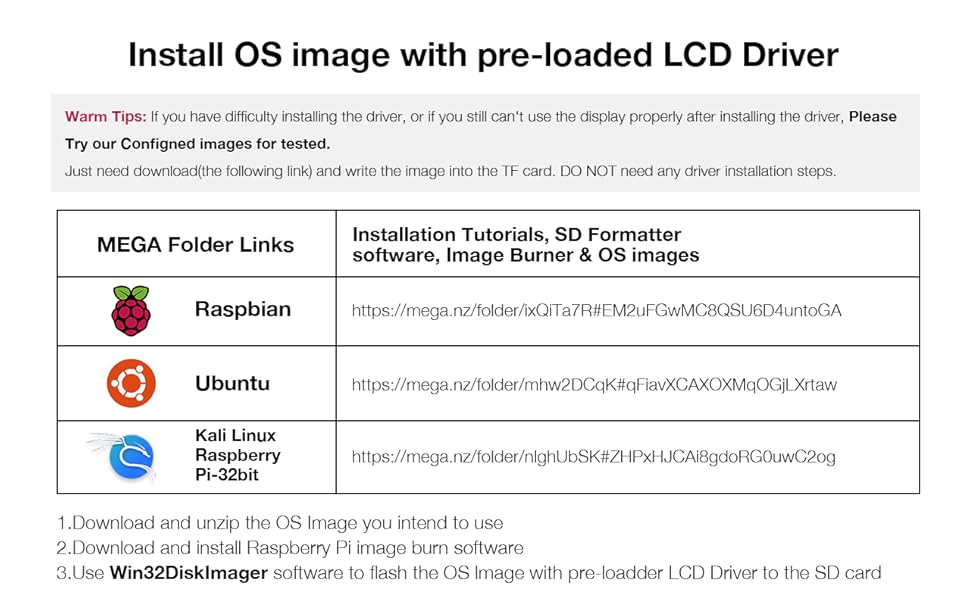
I needed a small display for my raspberry pi. It was honestly fairly easy to connect to my raspberry pi considering how much of a hassle other displays can be. This one was just a one-and-done. I was a bit concerned at first, because I didn't see raspberry pi 3A+ on the compatibility list, but it works just as good. For those who are struggling to install the drivers, find the tutorial page linked on this product page, scroll all the way to the bottom and download the raspberry pi system image that is compatible with your raspberry pi. No additional steps needed, just install that image onto your micro SD card with the raspberry pi imager. (For those complaining about user-friendliness, raspberry pis and their hardware are not meant to be user friendly. It's an experience, and you may learn a few new things)
S**E
Very handy, but do your research
I've used several of these in different projects. They work great. That having been said, it's not always easy to get them working, depending on your board and distro. I some cases, it may not even be possible. I can tell you that it will work with raspberry pi os bookworm without too much trouble.
A**D
perfect
YT vid: "How To Install 3.5 inch TFT LCD Display On Raspberry Pi (step-by-step guide with code)" basically downloaded a thing, ran a script, and all of a sudden I have a live terminal on my rpi.
X**N
Not user friendly
Mixed review. Used this to create a cyber deck. It attaches to the Pi, NOT via HDMI. I am new to electronics/coding but this WILL NOT WORK with a simple terminal code. I followed several tutorials and I think the code they used was outdated, and the code you need to use is not easily accessible from the merchant selling the screen. After several tries with adding the screen myself, I went to the merchants website and downloaded the Raspian OS plus LCD screen drivers. You have to reimage the OS to your SD so starting from scratch to use this screen (unless your more savvy then me) and unfortunately the OS combo is an older OS. I think this screen is not compatible with newer Raspian OS. For me, this is fine, but for a lot of people this will not work for them. Screen works well once you get it up and running though. Read the reviews, watch tt’s for how to’s. And prepare for a battle 🤣.
D**H
This is a very nice little screen, I was amazed at the picture quality.
This is a very nice little screen, I was amazed at the picture quality. It's also amazing this comes with a touch screen and speakers for this price. My only complaint is I tried to use it as a virtual stream deck but wasn't able to get it to work easily and repurposed the monitor for a Raspberry Pi display, this wasn't a problem with the monitor but rather my laptop setup.
I**R
Awful colors, backlight bleeding.
Make yourself a favor and buy original Waveshare display for +$10 more! Cons of this clone: 1. Colors washed out and bleeding 2. Not real 320x480 (and you realize that when you see small text on a real Waveshare display!) 3. Doesn't support adjustable brightness 4. Touch sensivity not uniform (by a lot!) Checked it with Spyder X colorimeter and was shocked... No more clones for me, done... I don't have spare time to waste.
E**Z
Excelente producto
Excelente producto, cumple con todo lo descrito
D**N
Works with Raspberry 3
Works well but a little tricky to get working with Raspberry
A**R
Unusable drivers
As other reviews have mentioned, you need to install third party drivers for this display to work properly. However, when used on a Rasperry Pi 0, installation of the drivers causes some sort of issue where it can no longer connect to the network, and thus you can't use SSH to complete the setup. Might be fine for other devices that have inbuilt wifi, but I was not able to make it work over USB LAN, so it accurately is near impossible with a headless setup.
P**.
Bien correct.
Bien correct pour le prix.
M**R
not working with pi5 and ubuntu - support is terrible
I had a negative experience trying to get it to work with Pi5 and Ubuntu. The support I received was not helpful at all.
Trustpilot
2 months ago
2 days ago