Buy anything from 5,000+ international stores. One checkout price. No surprise fees. Join 2M+ shoppers on Desertcart.
Desertcart purchases this item on your behalf and handles shipping, customs, and support to KUWAIT.
🚀 Clone smarter, not harder — the ultimate SSD upgrade sidekick!
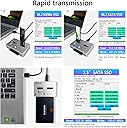
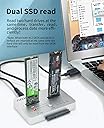
The AOKO M.2 Duplicator is a professional-grade, bidirectional offline cloner and docking station that supports simultaneous NVMe and SATA SSD/HDD cloning. Featuring USB 3.1 Gen2 speeds, tool-free operation, and a durable aluminum design for heat management, it’s engineered for seamless data backup, system upgrades, and drive recovery across a wide range of M.2 and SATA drive sizes.


| ASIN | B0B41NDY3H |
| Best Sellers Rank | #49 in Hard Drive Docking Stations |
| Brand | AOKO |
| Color | NVMe to SATA SSD/HDD Mutual Clone |
| Compatible Devices | Desktop, Gaming Console, Laptop |
| Customer Reviews | 4.0 4.0 out of 5 stars (69) |
| Hardware Interface | USB Type C |
| Input Voltage | 12 Volts (DC) |
| Item Weight | 0.32 Kilograms |
| Manufacturer | AOKO |
| Mfr Part Number | M.2 Duplicator +SATA Adapter |
| Model Number | M.2 Duplicator +SATA Adapter |
| Number of Ports | 1 |
| Total Usb Ports | 1 |
| UPC | 752844230609 |
S**X
25 & 50% alternate blinking with 75 & 100% means TARGET device smaller than SOURCE device
One customer stated theirs did not work - "left and right blink pattern. 25% and 50% would blink. Then 75% and 100% would blink" - this indicates the TARGET device is smaller than the SOURCE. This just happened to me so I attached a larger drive and clone worked, (slow NVMe to Sata SSD but worked.
B**D
Excellent
Works great and is very fast -- less than an hour to clone a 256GB SATA SSD (with very little space left) to a 512GB NVMe. A couple of tips you might find helpful: - If you're cloning to a larger drive, be sure to turn Bitlocker off first. Unless the drive is completely decrypted, you won't be able to extend your old volume to include the extra space now available in your new drive. [Note: Your target drive must be the same size or larger than your source drive. You cannot clone to a smaller size drive.] - To extend your existing volume to include the extra space of your larger drive, use a freeware product like Partition Mini-tool. - To clone NVMe to NVMe, you must first clone to a SATA drive (no larger than your target NVMe), then clone that SATA drive to your target NVMe.
P**N
10-hour backup time.
I use 4tb NVME and SATA 4tb SSD HDD. Back up drive time are 10 to 12 hours. Everyone worked purchase 4 will order 2 more. I use it to data backup my laptops.
M**N
What i order is what i got
It works and you will buy it because you doing it all on your own
G**N
Good but disappointing at the same time.
The product seems well constructed. It takes a bit to get it to recognize two drives. I used it once to clone from an NVMe to a Sata 2.5" drive successfully. However, I was very disappointed to find out I could not clone from NVMe to NVMe. For what it does, so far its worked.
D**N
It does not get any easier!!!
for building a new computer or updating drives in current one you all need this badly!! it is metal compact and eaxtemely easy to use.
C**N
does what it says
I had a hard time getting other products read a m2 sata...finally found one that works...did have to wiggle the chip a little...but it works...something the others did not.
D**A
Awesome product at an amazing price.
Used it today to recover an NVE drive and cloned it to a SATA SSD. 1TB in about 1 hour. Amazing offline cloning!
S**N
Been trying two day get clone sadly don’t work for me.
Trustpilot
3 weeks ago
2 weeks ago