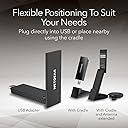
TL;DR: pricy, delivers barely adequately (200 Mb/s) under desk, and but performs well when included cradle is used to move antenna higher. (connection is close to saturated for me). Do not purchase if you have only USB 2.0 connections -- most PCs within the last 7 years or so should be fine there, though. It will work, but you'll be wasting your money as a cheaper device will suffice. What I'll first cover is: 1. should you even be looking at this? What scenarios seem to make sense for buying it? 2. Setup Experience 3. Performance 1. Should you even look at this/buy this? This is expensive. If you want very basic wifi internet access for a PC/mac/other USB-capable device, then you can get reasonable quality lower performance brand-name gear in the $20-$30 range at time of writing. If you want to try your luck you can get some random unknown brand that may claim on paper to be as good as this for a third the price. While I wouldn't go the random brand approach (tech can be a pain to configure, networking doubly so, and wifi networking even more so), a good quality $25 adapter for basic internet access is not at all a bad choice. So why pay four times as much (say) for this? For me, I was used to 2.5 Gb/s and 1.0 Gb/s wired ethernet speed. When a lightning storm took out the local switch, I bought this as a temporary workaround for my wi-fi-less desktop. I'm happy. The other possibility is that you've got a good quality slightly older notebook (or NUC or desktop) that you want to use WiFi 6E on. This is a great choice in that scenario, but only if you need the added speed or different frequencies. (Possibly useful in situations where you are close to router and there is heavy WiFi use in your area, but only if your local router supports Wifi 6E. Check first.). The third scenario: you've got a basic device where the existing wifi got fried and your primary uses are light browsing and email, then I'd probably get a cheaper device unless you find the prospect of slightly slower internet just too horrible for words, and you know your local router/WAP is capable of giving you added speed via at least Wifi 6. Another scenario is that you really care about aesthetics: this is a pretty nice looking device, and while larger than very small portable adapters, it's still small, and a lot better looking than most of the "Shove a big antenna on something and see what happens" solutions. A final scenario is that you just want to future proof. Buy this for basic use today and hope to use it for something fancier in a year's time when you upgrade a router or whatever. Not crazy about that scenario since prices do come down, but I can just barely see the appeal. Certainly if you're intending only to use advanced features such as Wifi 6E in 2026 or later, I'd forget it. Prices will likely be cheaper then, barring inflation and a whole Mad-Max scenario. 2. Setup Experience IMPORTANT: Something they don't mention explicitly and should: plug into a USB 3.0 or better. 3.0 is fine; you don't need 3.1, 3.2, 3.0 gen 1 blah blah. But USB 2.0 will limit you to about a third of the potential bandwidth this device can deliver. My goodness. They included a USB thumb drive with the software (for Windows) on it. A lot of cheaper solutions don't bother with this, but obviously, if you're installing onto a computer with a precarious or non-existent internet access situation, this is worth its weight in, well, silver at least. (Admittedly it's a pretty light drive!) The documentation with my device included an English-language quickstart guide, a list of links to guides in other languages (20 all told, ranging from Finnish through Greek and Hungarian to Chinese, Korean and Japanese), and a legalistic pamphlet on warranty and disclaimers. The quickstart guide was excellent, complete with pictures and symbols. If my English was very poor, I might have struggled with it and been forced to download one of their other 19 language guides first. That said, the guide and software were aimed completely at Windows 10/11 PC's. I couldn't have completed the installation without the guide; that said, I'm pretty unfamiliar with installing Wifi (hardware and software) on a device that's never used it before. I followed the guide and it was absolutely straightforward. It would have been nice if the installer had given the same hints as the guide but this is just being lazy. 3. Performance Here is a negative. The performance was mediocre when plugged directly into a desktop underneath a desk. It was about one sixth the potential capacity. Still nice, but not worth paying for when you could get the same from a $25 brandname device. Another negative: the quite elegant cradle had a very short cable (two feet?) making it very difficult to position the device for improved performance. I managed to perch it precariously on the edge of my desk and performance improved to the point where I was saturating a half gig connection. (I can't test further at this time). That said, it definitely performs considerably better than a budget device once the cradle is used and the antenna is more exposed. So what would make it better? - wizard -- in different languages -- brought up automatically by installation software - longer cable - some means of easily testing maximum performance to router - coupled with above, an automated means of telling you where antenna was best positioned ("Hold it here for 2 seconds, now move it. etc.") Overall it met and exceeded my expectations. I would buy it again, and this is my first Netgear product ever.