Buy anything from 5,000+ international stores. One checkout price. No surprise fees. Join 2M+ shoppers on Desertcart.
Desertcart purchases this item on your behalf and handles shipping, customs, and support to KUWAIT.
👁️🗨️ Watch smarter, live safer — your 360° peace of mind in 4K clarity!
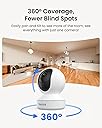
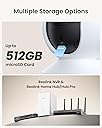
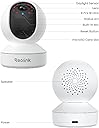
The REOLINK 4MP 2K Indoor Camera E1 is a cutting-edge WiFi 6 security solution designed for modern homes. Featuring ultra-clear 4MP video, enhanced infrared night vision up to 40 feet, and smooth 360° pan with auto motion tracking, it ensures comprehensive coverage of your space. Smart cry and motion detection alerts keep you instantly informed, while two-way talk and privacy mode offer interactive control. With versatile local storage options supporting up to 512GB microSD cards and no subscription fees, this camera delivers reliable, private monitoring for babies, pets, and home security—all managed effortlessly via the intuitive Reolink app.


| ASIN | B07X81M2D2 |
| Alert Type | Motion Only |
| Antenna Location | Indoor Security |
| Are Batteries Required | No |
| Best Sellers Rank | #8 in Dome Surveillance Cameras |
| Brand | REOLINK |
| Built-In Media | Reolink E1, 5V1A Power Adapter(1.5m power cable), Mounting Plate, Mounting Hole Template, Quick Start Guide |
| Color | White |
| Compatible Devices | Reolink PoE NVR, Reolink WiFi NVR, Reolink Home Hub Pro, Reolink Home Hub |
| Connectivity Protocol | Wi-Fi |
| Connectivity Technology | 2.4GHz WiFi |
| Control Method | App |
| Controller Type | App Control |
| Customer Reviews | 4.2 out of 5 stars 18,297 Reviews |
| Effective Still Resolution | 4 MP |
| Effective Video Resolution | 4.0 |
| Enclosure Material | Plastic |
| Field Of View | 80 Degrees |
| Focus Type | Auto Focus |
| Form Factor | Dome |
| Frame Rate | 20 fps |
| Indoor Outdoor Usage | Indoor |
| Indoor/Outdoor Usage | Indoor |
| Installation Type | Freestanding |
| Item Dimensions | 2.99 x 2.76 x 4.21 inches |
| Item Weight | 7.04 ounces |
| Light Source | Infrared |
| Manufacturer | Reolink Digital |
| Model Name | E1 |
| Model Number | E1 |
| Mount Type | Surface Mount |
| Night Vision | Night Color |
| Night Vision Range | 40 Feet |
| Number of Channels | 1 |
| Number of IR LEDs | 8 |
| Number of Items | 1 |
| Other Special Features of the Product | 4MP, Auto Tracking, Instant Cry Alerts, 2.4G WiFi, Night Vision, 2-Way Talk |
| Photo Sensor Resolution | 4 MP |
| Photo Sensor Technology | CMOS |
| Power Source | Corded Electric |
| Recommended Uses For Product | Indoor Security |
| Room Type | Bathroom, Bedroom, Classroom, Garage, Hallway, Kitchen, Living Room, Nursery, Office, Study Room |
| Shape | Dome |
| Special Feature | 4MP, Auto Tracking, Instant Cry Alerts, 2.4G WiFi, Night Vision, 2-Way Talk |
| Specific Uses For Product | Indoor Security, Pet Monitoring, Baby Monitoring |
| Unit Count | 1.0 Count |
| Video Capture Format | MPEG-4 |
| Video Capture Resolution | 4MP |
| Video Encoding | MPEG-4 |
| Voltage | 5 Volts |
| Water Resistance Level | Not Water Resistant |
| Waterproof Rating | Indoor Use |
| Wattage | 3 watts |
| Wireless Technology | 2.4GHz WiFi |
| Zoom Type | Digital Zoom |
D**N
Great quality, Camera, and Excellent Price!
This is our 5th ReoLink camera. We had a specific application for this one so the solar charging and all that goes with outside cameras was unnecessary. So for about 25 bucks we got a great camera! The picture quality is excellent, the pan and tilt are smooth as glass, and the installation was super easy. Now, about the connectivity to my WiFi. I'll admit that I ordered with some hesitation due to so many reviews talking about how it was very difficult or completely impossible. NOT SO with this one. I followed the instructions (same as the other cameras) and....not exaggerating....I was up and running in under ten minutes. And it took me about 2 minutes to add it to the app on the rest of my devices. Reolink will remain our go-to when adding security cameras for sure!
P**I
Great camera for your home.
Need a replacement for another cheap WiFi camera brand, this is your camera. Works great no subscription required. It is a little slower with the delay, but it records great. No zoom function. Setup is simple. Overall highly recommend, compared to other cameras I have these are a no brainer. I did have one that PTZ failed but Customer support was on it and Sent me a new camera and a box to send the old one back.
T**Y
Works fine, but no RTSP/ONVIF, no static IP
The camera is fine and what you'd expect. However, all other Reolink cameras I've bought before (about 28 different cameras) have had ONVIF and used RTSP. These don't have that - they use a proprietary streaming protocol. If you want to use software other than their app (e.g. iSpy/Agent), then on your DVR server, you'll need to install Neolink and build the appropriate config file, and my experience so far says even that is fairly unreliable. So, I'm pretty disappointed that I can't integrate these into my regular DVR/live view/detection system without an unreliable intervening software, and that I don't have ONVIF to transmit the camera's detections, so have to do motion detection etc. fully on the DVR server. Also, they don't allow you to set a static IP, which is a minor annoyance (because then if you switch routers, you'll have to update either the IP assignments on the router or the IP addresses in the Neolink software). Anyway, camera works as expected and if you just want to use the Reolink app, you can ignore all this. I use Agent in part so that I can hear the audio on my phone with the screen off or other apps in the foreground (useful for baby monitoring), and it would be great if Reolink would make it so their app would do that.
L**A
The best decision!!!
Since I got my Reolink camera for my dogs, it’s been literally the best decision 🐾📷 I can watch them in real time when I’m not home, talk to them, and hear them clearly. It gives me so much peace of mind knowing they’re safe at all times. The video quality is super clear, even at night, and the app is very easy to use. It also detects motion, so I can always keep an eye on what my babies are doing (even if they’re just sleeping 😂). If you have pets and want to feel more connected to them when you’re away, 100% recommended. Totally worth it ❤️
T**Y
Unable to use with Alexa app / devices. UPDATED
The cameras work fine with the Reolink app and were easy enough to add to the Reolink Cloud service that I purchased for the first pair of cameras I purchased. Unfortunately though, I purchased an Amazon Echo 15 to use as the primary device to access and view the cameras with. The Alexa app displays no Reolink access under the Security and Devices list. I’m unable to locate Alexa interface under Reolink or vice versa. I thought I had selected devices/systems that would interface and communicate with each other based on the information presented in the adds listing stating the would work with each other but as of now I am stuck with cameras I can only view on the Reolink app on my phone. If I am able to figure out how to use it how I had initially intended to through YouTube videos (no success yet), I will come back and update this review. Until then, three stars for stand alone Reolink app access is all that I can honestly give. I guess we just can’t have it all…… Oh and I have actually tried to use my 11am Fir Tablet and my brand spanking new 55” Fire TV to view these Reolink cameras via Alexa. UPDATE - Via continued searches and finally finding a solution to my set up issues, everything is now working properly. I stumbled upon a Reolink subreddit on Reddit and after reviewing the posts of other Reolink camera users who also use Alexa devices I was able to isolate and correct my set up issue. For those who may be having frustrating issues, this is the place to seek advice, help and answers and it will save you time flipping through poorly explained procedures as presented on YouTube. Also, on a final note, thank you Reolink for offering me a refund. Now that all is working as it is supposed to that will not be necessary.
K**R
Reolink has lost focus on what the customer wants / needs.
I use to love Reolink, but like this purchase, I find I am returning more and more of their products for the below same reasons One of the great features of Reolink was reliability, ease, redundance, consistency in set up – good scalability and great customer service; the force multiplier of Reolink. If you had an issue connecting to WIFI, it always came with an ethernet port as backup (which ALWAYS worked in getting you set up for WiFi). I returned this product for not having an Ethernet port and the wifi pseudo-AI / auto set up failing miserably - now common issue with Reolink It appears the tech team is no longer in the driver seat, but the marketing department - and thus the Reolink performance has degraded the last year. Instead of more Wifi Range, the real Achilles heel of the Reolink eco system, if seems to focusing on pseudo-AI voice instructions. To make their new camera’s look more modern, they hide the antennae, at the expense of WIFI range and also removing the ability to mitigate WiFI range problems with things like antennae boasters. To a potential buyer – I would suggest you look at older models of Reolink’s cameras only. They perform better, easier to set up, and are more scalable; not to mention Reolink NVR WIFI firmware currently has not been updated to interface with the newest cameras. To Reolink if you want to provide real value to Reolink customers, stop this sudo AI international marketing/packaging stuff you are doing - work on wifi range, the real Achilles heel of your eco systems. • Get your AC1200 Dual-Band Mesh Wi-Fi Extender released (or at least scale your NVR so you can use third party extenders like Netgear) • Bring back your WiFi Antenna extenders, or better, release an improved version that increases range even more. • Stop hiding Antenna internally, which degrades their wifi range - if TP-Link and Netgear use external antennas, the is no tech excuse for you to not do so. • Before you release a new model, make sure your WiFi NVR (DVR/Router appliance) firmware supports it. • Go back to written instructions, (where each page was dedicated to one language, or YouTube channels that were dedicated to one language). Get rid of this marketing / new packaging effort of pseudo-AI set up in an unnecessary international “we are the world” packaging. Besides providing less information, a 3-sentence written instruction is now 15 sentence diatribe of foreign languages. Or at the very least, add the old option of “press 1 for English, press 2 for Spanish, press 3 for Korean, press 4 for Japanese……
Z**N
Not my first Reolink!
Have numerous of these security cameras, after changing from a different non secure device a few years ago. Just needed a few more. Never had any issues with Reolink. Truly like the quality of the product and the quality of the video. Easy/convenient set up. Highly recommend!
J**8
They're a good value but sound quality and motion detection is lacking
I've deployed 5 of these now. They are a great value for what you get and you don't need to sign up for any subscription service to use them. The app works really well. Set-up is very simple. They have been reliable with no known crashes or anything like that. Push notifications of motion is very useful. And the ability to record events on the SD card which you can then playback on the app is great. Picture quality is great. night vision is great. The talk-back speaker works pretty well. I bought 5 and I'll probably buy more. My gripes are that the motion detection is really finicky. At the higher sensitivities (a setting in the app) the camara's own auto iris changes will trigger the motion detector and send me notifications. At night, random dust particles in front of the night vision lights will trigger motion detection. If you back off the sensitivity, I dance like a monkey in front of the camara it it won't detect me. The sensitivity scale in the app is 0-100 with 100 settings so you have to really spend a lot of time fine tuning the setting to capture human motion without sending you a ton of annoying cry-wolf notifications. I noticed that newer versions of the FW have new features that are supposed to help with more intelligent identifications of humans and pets. But those setting are really quite confusing and I'm not sure if they are helping or not. I played with them and really could not see much difference in performance. Regarding the FW, I have camaras with older FW and ones with new FW. I cannot find a way to update the FW over the air via the app. The "help" FAQ's seem to imply that you have use a PC and possibly hard-wire the camaras for the update. If remote OTA FW updates are indeed available, I cannot find it in the app and the support pages say very little about it. So when you back off the sensitivities and other settings to prevent false-alarms, I'm left with not a lot of confidence that it's going to do the job of detecting bad-guys when it's supposed to. Of the five I bought, I'm using four for security monitoring and one as a granny cam. The voice com feature is good for talking to granny in an urgent situation. But the microphone quality is pretty bad. The echo-cancellation works great but the mics pick up a ton of noise and the compression algorithms add additional artifacts (most notably and lot of squeaks, chirps, warbles and such). Even the recordings are plagued with these artifacts. These camaras could really use a good mic-array and better signal processing. All in all, these continue to be a great value... Low cost, no on-going fees. Great for nanny cam, baby monitor, or granny cam. But you have to spend some time with them to fine tune the motion detection. And sound quality is lacking.
L**S
Excelente producto
Muy practico
A**R
Great indoor camera
Very easy to install, clear picture, links up flawlessly to the Reolink app.
M**T
Excellent Picture Quality & Easy Setup – Totally Worth It!
I’m very impressed with this camera! The picture quality is truly up to the mark – crystal clear, sharp, and vibrant. One of the best parts is how easy it was to install and set up. Highly recommended for anyone looking for a high-quality, hassle-free camera. Great value for money! -MOHIT ✌️
L**Z
It works if you figure it out
Ok the quality of this hardware is great. But the whole thing suffer by the software side. During the set up the apps require you to point the camera to join your WiFi network, this IS the suffering part: first the apps do not scan WiFi, you need to type in SSID and password by yourself. Secondly, if for any reason it fail, you need to hardware reset your camera so it will restart the whole set up. I’m using a latest wifi7 and none of my 4 SSID work, NONE (include 2.4, smart, MLO, and the isolated 2.4). End up I need to use my phone personal hotspot to make it work. However, once it work, then you can go back to the apps and change to your SSID normally. It was only the initial set up fail whatever reason.
A**N
Great affordable camera
Easy to connect, affordable, good clear pictures, does what I need.
Trustpilot
2 months ago
1 month ago