Desertcart purchases this item on your behalf and handles shipping, customs, and support to KUWAIT.
💡 Light up your life—automatically, effortlessly, brilliantly.
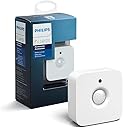
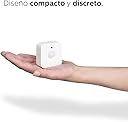
The Philips Hue Indoor Motion Sensor is a wireless, battery-powered smart sensor designed exclusively for Philips Hue smart bulbs. It detects motion and ambient daylight to automate lighting—turning lights on when you enter a room and off when you leave—while offering a gentle night light mode. Installation is quick and wiring-free, with flexible placement options. It requires the Philips Hue Hub to integrate seamlessly into your smart home, supporting up to 50 lights and HomeKit compatibility for advanced control.


| ASIN | B076MGK22M |
| Antenna Location | Walkway |
| Battery Description | AAA |
| Best Sellers Rank | #197,633 in Industrial & Scientific ( See Top 100 in Industrial & Scientific ) #7,891 in LED Bulbs |
| Brand | Philips Hue |
| Color | White |
| Compatible Devices | Philips Hue smart lights |
| Customer Reviews | 4.6 out of 5 stars 3,419 Reviews |
| Global Trade Identification Number | 00046677473389 |
| Item Dimensions D x W x H | 1.1"D x 2.44"W x 2.44"H |
| Item Type Name | Philips Motion Sensor for Smart Lights (Installation-Free, Smart Home, Exclusively for Philips Hue Smart Bulbs) |
| Item Weight | 8 g |
| Manufacturer | Signify North America Corporation |
| Mfr Part Number | 473389 |
| Model Number | 929003067507 |
| Mounting Type | Wall Mount |
| Number of Batteries | 2 AAA batteries required. (included) |
| Number of Items | 1 |
| Number of Packs | 1 |
| Operating Temperature | 15 °C |
| Power Source | Battery Powered |
| UPC | 046677473389 |
| Unit Count | 1 Count |
M**E
Typically expensive Hue accessory, but worth it for offline operation
Typically expensive Hue accessory, but worth it for offline operation. Requires the Hue hub, which is where you want to set up the motion lights (as opposed to in an Alexa routine). The motion lights continue to work, even if you unplug your router, the Internet is having trouble, etc. What a revelation, that these are able to match the utility of "dumb" motion lights, ancient X10 systems, etc. :) Very easy to set up with the Hue hub and app and Alexa sees them almost immediately as well. Give it a name, tell it which room (or zone) it is in and it is off and running. That being said, $50 is still pretty outrageous for such a thing. This is my second one and the first has worked trouble-free for years. Come to think of it, the battery should be getting pretty low by now, but the app has not yet warned about it. They certainly outlast the sticky switches, despite near constant use in my application. Update for Alexa routine users: as expected, the extra complication of communicating between Philips and Amazon (through the Cloud?!) can break, rendering related routines useless. Light still comes on, of course, but no routine-based extras while they work out whatever happened. This feature had been reliable up until now. :( Update: They fixed the routines quickly. No issues since.
B**S
Might make you look like a creeper...
Funny story. A friend from out of town came and stayed with me right after we’d just installed this into the bathroom. She goes in to take a shower and comes back out a couple seconds later with this in her hand, sets it on the counter, and says “I don’t know what this is but it looks like a camera and it’s freaking me out.” It was hilarious! We just started laughing and explained to her what it was and that it was important unless she wanted to take a very dark shower! Then my mom came over and said “I assume that’s not a camera or something...” No guys, were not creepers!! We promise. Technology... Anyways, these add such a nice touch to our hue system! They’re really easy to install, and have a good motion sensing range in the. The first one we installed was in the bathroom which is actually really convenient. Just make sure you set the timer to longer than the length of your shower or you’ll find yourself sticking your arms out of the shower curtain waving like a maniac till it finds you... yeah that happened. But we switched the timer and it’s really nice! And you can always either tell Alexa to turn the lights off or do it from your phone - you just have to ruin all the habits your parents taught you about turning light off when you leave a room which is actually a lot harder than I thought it’d be! I’m excited to add them into the walk in closet too, I think that will be really nice. Definitely would recommend them!
K**6
Will be buying more!
This was super easy to set up and connect! There was no screw to attach the one little part to the wall so I had to use my own. It has worked every time since we got it and I plan to buy more (one for a closet and on for our hallway!). The quality is great as are most Hue products. I just wish they were a little cheaper so I could buy even more :).
H**N
Plays well with Apple
I bought several Hue products to act as a system for automating my household lights in certain rooms for daily use, & also to give the illusion that someone is at home when no one is. The products included the one for which I am posting this review, and I will be posting the identical review for the other products I bought. The products involved are the White Ambiance Decorative Candle 40 W dimmable, the White Ambiance 60W Dimmable, the Dimmer Switch with Remote, the Motion Sensor, and the Hue Hub. I use these products over an eero based WiFi system, with the Apple HomeKit app operating on my Apple TV4. I control them remotely from my iPhone and my iPad, using the Home app from Apple and the Hue app. (You really need to use both to set the system up, because it maximizes your options to do so.) Setting up the system was quite easy, and all of the accessories work as one would expect. Nevertheless, there is room for improvement, which is why I’ve rated all of them, together, as 4 rather than 5 stars. The biggest problem I have with the system concerns our chandeliers. Both of the ones we have are dimmable, and one of them is controlled by switches at two different doorways. Both of them take 3 light bulbs, and neither of them will function reliably if all three of the bulbs are Hue bulbs. The problem is that when all three of the bulbs are Hue bulbs, they flicker on & off, rendering it impossible to use the chandelier at all. This is a known issue with certain light fixtures which are dimmable, and Phillips is upfront with the likelihood that this could occur. Unfortunately, you won’t know if you have the problem till you try it out. The best solution is to rewire the chandeliers so that they are not dimmable. But pending having that done, I discovered that the living room chandelier works just fine if one light socket is left empty. Not true for the dining room chandelier, but for that one, I discovered that if two of the bulbs are Hue, and the third is a refrigerator light bulb, the flickering does not occur. The problem is that in order to use the scheduling & remote features for the Hue bulbs, the socket the bulbs are in have to be switched on all the time, which means that in the dinning room, the refridgerator light winds up being on all the time. A minor problem I have with Hue lights is that they are all 60 watts (or less). This is not bright enough to read by. For instance, I had three 100 watt bulbs in both our chandeliers, and even when I get three Hues to operate correctly in them, it’s not quite bright enough. I’m hoping that Phillips is working on higher watt versions of the Hue bulbs. The remote device and the motion detector work just fine. Oddly, the motion detector also gives the temperature at the place where it is positioned. For what it’s worth, the ordinary Hue bulbs will work outside even when the temperature drops as much as 20 degrees below zero. At least, that’s been my experience after about a month of use involving a lot of subzero temperatures.
M**E
Excellent Product!
I use Apples HomeKit in our house and garage and needed something in the garage to turn the lights on automatically when someone opens the door and walks in. The first Homekit enabled motion sensor I purchased from another manufacturer constantly dropped off the network giving me "Unreachable" errors in the Home app. Because I have several Philips Hue lights in our home and have had great luck with them I decided to give their motion sensor a try. I'm very glad I did as it solved my lighting issue in the garage perfectly. Setup was pretty straight forward, although I do find the Philip's Hue app a bit cumbersome to get around in. Once the app found the device and installed it in the Home app I was able to create a new automation. Now when motion is detected it turns on three of my Smart Plugs connected to shop lights. I wasn't sure if the Hue motion sensor would be able to turn on non Philips Hue products but it works great. From the time it senses motion to activation of all three lights is under a second so it's very responsive. In the Home app automation I created for the sensor and lights I've set the lights to turn off after 20 minutes of no motion detected. As long as i'm moving around in the garage the lights will remain on. Perfect for what I need. The motion sensor comes with a magnet which when attached to the device allows you to place the sensor on metal surface. I placed mine on the side of my gun safe which is facing my garage door. I do find it odd that Philips included the magnet but the screw they include to attach the magnet to the sensor is a wood screw. The sensor housing has fine threads. It still works as there is virtually no weight too sensor so you only need to turn the screw a quarter turn to get it to bite. But it's still not correct and a dumb oversight on Philips part. Another nice feature of the motion sensor is the inclusion of a temperature sensor. Now I can see the temp of my garage from my Home app anytime I want. However, the Home app doesn't let you use the temperature sensor for any automation. I'm not sure if this is a Apple issue or Philips but it might be nice to say turn on a fan in the garage if a certain temperature is reached. All in all though I would highly recommend this product to anyone wanting to add a motion sensor to their Homekit setup.
M**T
Upgraded from SmartThings
I previously used a SmartThings motion sensor but, for whatever reason, that sensor had 2 problems that this sensor (when used in conjunction with a hue bridge) does not. First - that one took a moment to respond. It wasn’t a long time per se but it was long enough that I might as well just go flip the light switch myself. Secondly the SmartThings motion sensor would sometimes lose connection. It wasn’t often but it happened a few times and in fact the final time I was bever able to get it connected again. So I bought the hue motion sensor. BIG IMPROVEMENT. It registers the motion and triggers the associated routines nearly instantly and it has never once lost connection. It costs more than the SmartThings one but I have a lot of smart home devices and the best advice i can give is : reliability is king. Its not worth saving money on a device that won’t work every time you need it to work. TLDR: Pros: — works nearly instantly — reliable and stable (stays connected) — compatibility with a huge variety of other smarthome ecosystems (I use it in alexa routines which allow it to control almost anything that works with alexa — great value (worth the price) Cons: — does cost more than budget options
C**H
Easy to install
Installing the Motion Sensor took a couple of minutes, just open the app for your phone/tablet and follow the easy directions. The hardest part was finding the ideal place for it. I wanted mine for the bathroom. The sensor comes with a magnetic mount and mount that you can affix with an included wall screw. I used the magnet. Tip - mount it as high as you can, at least for a bathroom application. Preferably on the ceiling in the middle of the room. If it's not high enough, you'll soon discover a disconcerting feeling when the lights go out while showering. I stuck mine above the heating/cooling air vents which are right below the ceiling in my bathroom, see picture. I kept the default setting to turn off the lights after five minutes of no activity. Between 11 PM and 8 AM, the default setting is to dim the light(s) to a nightlight, but you can adjust the times or do away with it completely if you like. As I have three HUE bulbs in the bathroom, I created a new scene for the bathroom for a one bulb nightlight, the other two turned off. Three bulbs in a nightlight configuration were way too bright. I have the more expensive HUE color bulbs in other rooms. The color bulbs can be dimmed to just a faintest light. The Philips Hue White bulbs however don't dim completely or enough for my preference. That's a criticism of the bulb, not the sensor however. At least with the sensor when I awake in the middle of the night to use the bathroom, my eyes are not blinded with light of a thousand suns anymore. You can do away with your separate outlet nightlights, and keep the bathroom light switch in the always on position.
E**K
Works well with Alexa
I have something like 15 of these, all of them triggering Alexa routines. Every now and then one will decide to quit working. I just go through the setup process again, which doesn't take much time at all. With all my devices I probably have to do that once every couple of months. They are connected by using the zigbee bridge installed in the Echo Show 10 and Echo 4th generation devices. I've seen reviews in the one star section here where people clearly didn't understand how to use these with Alexa. Press the setup button on the motion sensor, or in an older one use a paperclip or a sim extractor to enter the setup mode. Lights will begin flashing on front of the motion sensor indicating it is in the discovery mode.. In the Alexa app, hit go to devices and select the + sign. Select motion sensors, and then scroll down to "Other." DO NOT select Phillips. On the next page select Zigbee. The Alexa app goes through a discovery process and in my experience doesn't have a problem doing that. Once the unit is discovered, complete the process as you do with all devices. Then, create routines using the sensors to trigger lights to turn on or off, locks to lock out unlock, etc. I love these sensors.
K**R
Works well
This works with Alexa, and is sufficiently small to be unnoticeable to unwelcome intruders.
S**N
works great and attaches almost anywhere!
easy to attach and start using right away. can attach it directly to fridge using the magnetic attachment in box. can also attach it to light fixtures and vents magnetically without screwing anything in. setup is fairly simple with hue app. best used in hallways. automatically can switch off light after 5 mins of no motion detection. can change that in settings. choose light sensitivity using hue app so it will adjust light brightness based on how much light the sensor detects. works great with iphone and home app in general on ios.
J**D
On time
Good choice for home improvement
I**Z
Buenísimo y funcional
Compre dos sensores, los posicione en las escaleras, uno en planta baja y otro en planta alta, así que cuando es de noche y pasas, en mi caso enciende la luz de la escalera y pasillo de planta alta, simplemente amo. Super fácil de sincronizar y tiene opciones buenas para que los configures a tu gusto. La batería por cierto les dura literal años y te avisa cuando ya es tiempo de cambiarla.
C**W
Works perfectly
Nothing more to add, it just works.
Trustpilot
1 month ago
1 month ago