

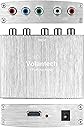

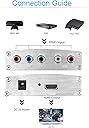


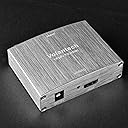
Component YPbPr RGB to HDMI 4K Converter V1.4 Support PS3, DVD, Xbox 360 to HDTV, Monitor and Projector
Product ID: 53526602
Details
- BrandVolantech
- ManufacturerVolantech
- Number of Channels2
- UPC643858663647
Buy Volantech Component YPbPr RGB to HDMI 4K Converter V1.4 Support PS3, DVD, Xbox 360 to HDTV, Monitor and Projector: Video Converters - desertcart.com ✓ FREE DELIVERY possible on eligible purchases Review: Delivers as promised - This inexpensive device allowed me to connect a legacy DVD player to my new UHD (4K) TV. It was easy to connect and immediately worked. The picture quality was very good. Could not ask for more. While the device provides RCA plugs for the audio signal I only used it for the video signal since the DVD player uses an optical audio cable (Toslink) to connect to my A/V receiver. My next step is to use a Toslink splitter to connect the audio signal from the DVD player to the AV receiver and the UHD (4K) TV. Of course, the video signal to the UHD TV will only be as good as the signal from the DVD player. I don't have an immediate plan to upgrade to a 4K Ultra HD Blu-ray player as my DVD collection is neither in 4K (UHD) nor HD (Blu-ray) quality. This device makes the best use of the AV player and DVD and CD collections that I already own. Review: Worked great with ps3 - Bought it for a ps3, the hdmi port didn't work. Got some component cables hooked it up and it work perfectly. Crisp image perfect colors. My only complaint is its not really 4k but it's definitely 1080p 60fps glorious goodness. Sad to hear other people had different experiences.
| ASIN | B077XS61S2 |
| Customer Reviews | 3.9 3.9 out of 5 stars (340) |
| Date First Available | December 4, 2017 |
| Is Discontinued By Manufacturer | No |
| Item Weight | 5.6 ounces |
| Item model number | 4336300000 |
| Manufacturer | Volantech |
| Package Dimensions | 4.9 x 3 x 2.4 inches |
R**R
Delivers as promised
This inexpensive device allowed me to connect a legacy DVD player to my new UHD (4K) TV. It was easy to connect and immediately worked. The picture quality was very good. Could not ask for more. While the device provides RCA plugs for the audio signal I only used it for the video signal since the DVD player uses an optical audio cable (Toslink) to connect to my A/V receiver. My next step is to use a Toslink splitter to connect the audio signal from the DVD player to the AV receiver and the UHD (4K) TV. Of course, the video signal to the UHD TV will only be as good as the signal from the DVD player. I don't have an immediate plan to upgrade to a 4K Ultra HD Blu-ray player as my DVD collection is neither in 4K (UHD) nor HD (Blu-ray) quality. This device makes the best use of the AV player and DVD and CD collections that I already own.
P**R
Worked great with ps3
Bought it for a ps3, the hdmi port didn't work. Got some component cables hooked it up and it work perfectly. Crisp image perfect colors. My only complaint is its not really 4k but it's definitely 1080p 60fps glorious goodness. Sad to hear other people had different experiences.
C**W
Gets the job done fairly well
Overall, I'm impressed with the picture quality. Bought this to use a Wii with component cables on a new HDTV that lacks component input (and also tested it with a Playstation 2 and specific games like Gran Turismo 4 that can output 1080i). I have NOT had any issues with the picture/audio dropping out as other reviewers have mentioned. The only real annoyance I have with it stems from the fact that I'm a techie, and there is no such thing as a TV with enough inputs for all my gear, so I have to use HDMI switches. This device is simply ON any time it is plugged in, and will output a blank screen over HDMI whenever there is no input on the component side, which makes it impossible to use this with an auto-sensing HDMI switch that automatically changes inputs when it detects a new video signal. I wish this device could detect the presence or absence of the input component video signal, and put the HDMI output to sleep when no input is present.
C**M
Garbage quality, cheaply made!
I bought this component to HDMI silver unit because it had largely positive reviews. Opened it up, noticed it felt cheaply made. Plugged in both my Wii and PlayStation 2... holy interference Batman! Analog waves and snow all over the screen, and it only got worse when I wasn’t touching the device! Not to mention there was no sound. Figuring a bad solder, I ordered a replacement. Still no sound, and while the interference was mostly gone, the picture was still noticeably muddier than my tv’s built in component inputs... and now there’s a consistent flickering black bar at the top of the screen. Not to mention this does not upscale the signal at all. I bought this hoping it would allow me to play my PSOne games on a display that doesn’t accept anything under 480p — assuming the HDMI protocol would carry a 720p minimum signal. I was wrong - the signal went dark when the PSOne game booted, just like when using the component cables directly... rendering this device even more useless than it already was.
H**S
Use with Panasonic HVX200
I recieved this gem today to use with the Panasonic HVX200 camera. I expected it to work, but did not expect much else. The HVX200 was designed before HDMI outports were on cameras. Searching the internet to get some idea how to use an HDMI port with one, all info says you can't. The HVX200 has a component cable out and does support up to 1080i out. Plugged the camera into the box and voila Picture and sound through HDMI. Now what I didn't expect was even better. I shoot with Atomos Ninja Blade external recorders. I figured what the heck try it out. The Blade likes it and records at 1080i. No skippy (Atomos) users know what that is. Now I can use the HVX200 and a Ninja Blade. A $20.00 box brings the ninja blades and HVX200 together. Now I am one happy customer with this. One addition. You must use the analog audio input on the Ninja Blade. The Blade doesn't seem to accept the embedded HDMI Audio. Easy work around for such an advancement.
I**7
Should work for most devices, but mileage may vary with PS2
I bought this converter because my current TV simply doesn't have the Component video outputs I was needing for my PS2 slim setup. However, when I initially had the converter's HDMI end hooked up to a HDMI switcher in my console setup, there were infuriatingly random 1 to 2-second "blackouts" where the audio and video would inexplicably cut out for a moment and interrupt my gameplay. Back when I got this thing, I was contemplating returning it because of the blackout issue I was having with my PS2... However, plugging the converter's HDMI end directly into my TV's second HDMI port has notably lessened the frequency of the blackouts, so your mileage may vary depending on your particular setup. For context, my current PS2 setup with the converter looks like this: PS2 Slim system > PS2 component cable > this converter > HDMI cable > TV HDMI 2 To make sure it wasn't a converter problem, I've tested it by plugging up my PS2 component cables into my PS3 slim. After changing my PS3's video settings accordingly and playing a bit of Sonic Unleashed to test the signal stability, I'm glad to report that there were no blackouts at all! The converter's picture quality was excellent from what I can recall, and it was fairly simple to set up and use, aside from the whole PS2 "random blackout" snafu I've went into detail about. Do keep in mind that this is merely a video converter, so don't expect anything fancy, such as upscaling or what-have-you. In short, this converter's perfectly serviceable for hooking up devices with component video output to TVs that just don't have the appropriate input ports built-in on a budget. If you're buying this or something similar exclusively for a PS2, then I'd like to warn that your mileage may vary depending on your particular setup, if the random blackout issue I've seen is anything to go by.
Trustpilot
1 month ago
2 weeks ago