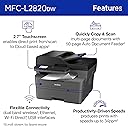
🖨️ Compact power, big productivity boost!
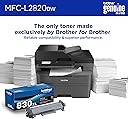
The Brother MFC-L2820DW is a compact, monochrome all-in-one laser printer designed for small offices and professionals who demand speed, reliability, and versatility. Offering fast 34 ppm printing, automatic duplexing, and a 50-page auto document feeder, it streamlines multi-page tasks. With flexible connectivity including dual-band Wi-Fi, Ethernet, USB, and a 2.7” touchscreen supporting cloud apps, it fits modern workflows perfectly. The included Refresh subscription trial keeps toner costs low and hassle-free, making this printer a smart, eco-conscious choice for high-volume black & white printing, copying, scanning, and faxing.


| ASIN | B0CPL9C83B |
| Additional Printer functions | Copy, Fax, Scan |
| Best Sellers Rank | #2,239 in Office Products ( See Top 100 in Office Products ) #5 in Laser Computer Printers |
| Compatible Devices | Laptops, PC, Smartphones, Tablets, iPhone |
| Control Method | App |
| Controller Type | Android |
| Customer Reviews | 4.4 4.4 out of 5 stars (866) |
| Date First Available | January 15, 2024 |
| Dual-sided printing | Yes |
| Duplex | Automatic |
| Hardware Interface | Ethernet, USB |
| Included Components | AC Power Cord, Drum Unit, Telephone Line Cord, Toner Cartridges |
| Initial page print time | 8.5 Seconds |
| Ink Color | Black |
| Item Weight | 22.5 pounds |
| Item model number | MFCL2820DW |
| Manufacturer | Brother |
| Max Copy Speed (Black & White) | 34 ppm |
| Max Input Sheet Capacity | 250 |
| Max copy resolution black-white | 1200 x 1200 dpi |
| Maximum Black and White Print Resolution | 1200 x 1200 Dots Per Inch |
| Maximum Media Size | 8.5 x 14 inch |
| Maximum copies per run | 99 |
| Model Series | L2820 |
| Number of Trays | 1 |
| Number of USB 2 Ports | 1 |
| Output sheet capacity | 250.0 |
| Print media | Envelopes, Labels, Paper (plain) |
| Printer Ink Type | Toner |
| Processor Count | 1 |
| Product Dimensions | 15.7 x 16.1 x 12.5 inches |
| Scanner Type | Flatbed, Sheetfed |
| Sheet Size | Up to 8.5 x 14 |
| Specific Uses For Product | Home, Office |
| Supported Media Sizes | Legal (8.5 x 14 inches) |
| Total Ethernet Ports | 1 |
| Total USB Ports | 1 |
| UPC | 012502672654 |
| Warranty Type | Limited |
R**Y
Great printer, but set up instructions aren't necessarily as "Eze" as they claim.
After years of struggling with inkjets and wasting more ink than I actually used in printing, I finally gave up and bought a toner-based laserjet. Should have done that years ago, but they were so expensive and inkjets were so cheap. Live and learn. I downloaded the EzeSetup as recommended. The printer worked fine printing internal reports and copying, but wouldn't receive print jobs from the wired network, the wireless network, or the USB plugged directly between the printer and the PC. All print jobs showed being sent then changed to "error". Being one who likes to figure things out myself, I kept banging my head against the printer (didn't affect the printer but gave me a headache). Eventually, I saw a link on a Brother support page to a download of the full package for my printer, complete with all drivers, associated software, everything. After I downloaded and installed that package, the set up went flawlessly. Within a few minutes, I was printing and was very happy!! About my only complaint would be the sounds the printer makes to, I guess, let you know it's received your instructions and is processing them. It's easily turned off or turned down through the display screen, though, so it's easily fixed. The printer is quick, reasonably quiet, and turns out great black & white pages; crisp, clear, and easy to read.
N**K
Simple, Reliable Printer for Everyday Use
The Brother MFC-L2820DW is a great all-in-one printer for black and white printing. It’s fast, easy to set up, and prints sharp documents. Scanning and copying work well too, and it connects to Wi-Fi without issues. If you just need a solid printer for everyday use at home or in a small office, this one works great. It arrived quickly and was packaged well.
K**D
Another great Brother product
Replaced my 19 year old MFC 7840W that served me so well for all those years with this unit. I thought it might be harder to set up than before based on some reviews but I thought it was super easy. I just plugged it in, selected my wifi/input the password, placed the toner cartridge and paper into the machine and it was ready to go. I also downloaded the Brother App just in case I wanted to scan something. I didn't sign up for the toner monitoring/replacement plan. I wouldn't have bought this unit if I had to use something like that like with some manufacturers. The printer shows up on my network fine. Prints look great and I just used the manual feed and that worked fine. There's videos online that show the whole setup process in the event you need it.
A**E
This unit does not support duplex copying, scanning, or faxing.
Initial review. 90% of greatness. I upgraded my previous Brother MFC to get duplex capabilities. This new unit *only supports* duplex printing. If you want duplex scanning, copying, or faxing, consider the MFC-L2900DW.
P**R
Brother copy and scan, fax and print
It works just as expected. I had one before and Believe me I will not try any other brand It is a perfect balance for home office and small business.
E**Y
Second Brother, better than my first. Good features.
My second Brother multifunction laser printer. First one lasted 11 years. The scanner finally developed a defect making it useless for quality scans. This one is improved. Wireless printing is nice, though mobile printing is kludgy. Fine with me, I never use it. Just wanted to try it out and won't be doing it again. Scanning is good. Printing is good. Slightly smaller than my previous model.
B**R
Tough set up!
Great job printing...when it works. Set up is not like HP or other printers that just take you through a series of prompts and bam you're in business in minutes. I've had this printer for more than 4 months now and have spent more money on outside technicians than I did for the original printer purchase... it still doesn't work. There is no initial personal technical support and instructions just take you in circles. I have a brand new HP Desktop running Windows 11 so it doesn't get any more normal than that. Outside Technicians get things running, but as soon as I reboot everything goes away including icons on the Desktop. I call up the printer in search or use desktop commands and get error messages that I have no print drivers or need to reload software. I have to go completely through the setup process every time I print.
R**H
Brother does it again!
I love Brother laser printers. This is my second one. I had a similar Brother but I needed one with auto. feed function for copying and scanning. This is built really nice. The print is great for a black and white printer. And unlike color printers, there is only one toner and, if you shop, you can pay less then $50. It also lasts longer. It dual prints and it is fast. I highly recommend this printer. Well worth the price.
J**M
Buena impresora aunque no se puede escanear doble lado.
J**N
Parfait pour le bureau
B**K
4 and a half stars so far - short term review. I made it print and I made it scan - I am in my sixties and have zero formal computer training. It did take me over an hour to set it up but that's me. This machine would be good for a home office or business in my mind - if you don't need color.
M**E
Had one for years, but it just quit. So I got another one because I really don't like a few other suppliers.
V**I
Got this printer to replace a very old HP that I had to go to and physically connect to all the time (plus it was so old that the drivers were having issues half the time). As we only use laptops and the printer isn't anywhere near where we usually work, I really wanted to get something WiFi enabled so I can just print without having to hook it up and hoping it works without restarting the computer. Didn't realise how much I'd like the connectivity - printing Amazon returns from the phone feels awesome! Also, the scan to email is great as well! Oh and lastly, screw HP with all the subscription and lock down BS. Not going near that company until they stop all that stuff.
Trustpilot
2 months ago
1 month ago