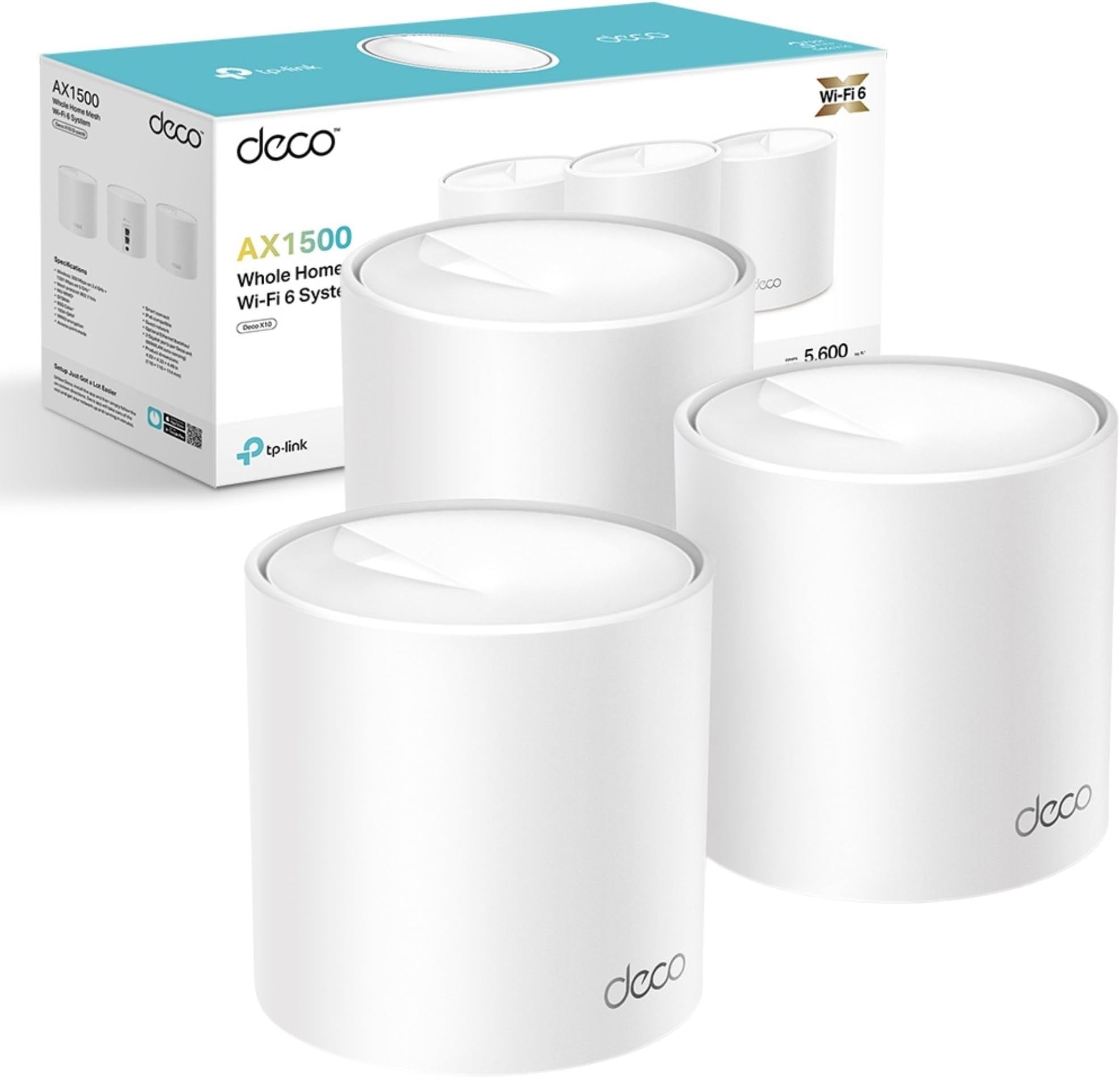
🚀 Elevate your home network—fast, smart, and unstoppable.
The TP-Link Deco X10 (3-pack) is a Wi-Fi 6 mesh system delivering AX1500 speeds up to 1500 Mbps and seamless coverage up to 5600 ft². Featuring OFDMA and MU-MIMO, it supports multiple devices simultaneously with ultra-low latency, ideal for gaming and 4K streaming. Easy to set up via the Deco app, it offers unified network roaming and robust parental controls, making it perfect for busy homes demanding reliable, high-speed connectivity.


| ASIN | B0CPMBLJW2 |
| Batteries Required? | No |
| Batteries included? | No |
| Best Sellers Rank | 393 in Computers & Accessories ( See Top 100 in Computers & Accessories ) 3 in Whole Home & Mesh Wi-Fi Systems |
| Colour | white |
| Coverage | 5600ft² |
| Customer Reviews | 4.3 4.3 out of 5 stars (536) |
| Date First Available | 6 Dec. 2023 |
| Included Components | Deco X10(3-pack) |
| Item Package Quantity | 1 |
| Item Weight | 1.2 kg |
| Item model number | Deco X10(3-pack) |
| Manufacturer | TP-Link |
| Part Number | Deco X10(3-pack) |
| Product Dimensions | 11 x 11 x 11.4 cm; 1.2 kg |
| Size | 3 Pack |
| Special Features | Robust Parental Controls |
| Style | AX1500 WiFi 6 |
| Usage | Business, Gaming, Personal |
C**S
Quick and Easy to Setup.
Surprised me by how little time it took to set up. You need to download an app to your phone and follow the very easy instructions. We have a rambling old house with 3 foot thick walls. Our previous AC2600 system installed in 2018 could not maintain a connection in some parts of the house. I decided to buy 2 sets of of these WIFI 6 rather than one set of WIFI 7 for same money, because I wanted the extra coverage rather than a little more speed. This has worked perfectly. There are no dead spots in the house. The system is noticeably faster. No problems at all. Strong steady signal everywhere.
A**N
10/10
This mesh WiFi system is excellent. Setup was very easy and only took a few minutes. Everything worked straight away with no hassle. Once it’s set up, you don’t need to manage it at all. It pretty much runs itself, which is great if you don’t want to mess around with settings. WiFi is strong and stable all around the house. Overall, a brilliant system that does exactly what it should. Reliable, simple, and stress-free. Highly recommended.
M**N
Works well in stone house
Works very well..way better than an extender. Super easy to install. I now have super fast broadband all around my old stone house with thick walls, not just in the living room,.like before
L**S
Works brilliantly (so far)
I didn't find it easy to set up but that was probably just me. Mostly it was because I was confused about which password I was supposed to be using and where so I ended up with two accounts neither of which worked. The website was no help but surprisingly I was able to speak to a very helpful and patient agent who sorted it out and another helpful agent for a similar problem later. Another issue was connecting the PC to the printer. After I put in the new passsord I got the printer connected message so felt like a competant adult at last but the printer wouldn't print so that didn't last long. I found out online that it was a very common problem. Lots of things were recommended, none of which worked, for me anyway. There was also an issue with printers not working with a network band of 5GHz (my printer) but apparently you can't change the network band so that was disheartening. I gave up at that point. Later I was looking at my new TP-Link app and noticed the reboot router option so I gave it a go and the printer leapt into life and spewed out my test pages. All that effort and angst was definitely worth it though. The download speed I got in the room with the router was about 29 before and is now over 40 in every room. So 5 stars for that and 5 stars for the helpful agents. The app is very useful too.
A**M
Properly improved the Wi-Fi, no fuss
Pretty much plug and play, and it’s made a genuinely noticeable difference to the Wi-Fi around the house. I used to have the usual dead spots and patchy speeds, but now it’s consistently good wherever I am, and the speed seems strong throughout. The app is decent and makes setup and day-to-day tweaks easy enough. I really like being able to set up separate guest and IoT networks, it just feels a bit safer keeping things split out. Only minor grumbles really: I couldn’t get the VPN option to work, and it lives in the “labs” section so it feels a bit experimental. Also, it would have been nice if the web configuration page was a bit more fully featured, but in fairness the app covers most of what you actually need, so that is just personal preference. Overall, much better value than paying £10 a month to BT/Sky for something you never even end up owning. Would definitely recommend.
M**N
Compare mesh v ap, mesh worked best for me
I have 1gb fibre broadband, but unfortunately they placed my router at the front of the house (modem and router separate) I recently purchased a ubiquiti u7 access point and placed it in the center of a 3 floor home Originally worked great but noticed there was a lot of dead zones for wifi I then looked into replacing it with this product and so far it is great, quick and easy setup, however it wouldn't work directly off the modem so it does need to be connected to the router WiFi is never guaranteed speeds but I'm safe to say that I'm getting great download and upload speeds, and because it comes with 3 units, all 3 floors are fully covered This product has fixed all the dead zone issues I've had before and great value
D**D
1 start for now - until I get this working!
Others have said this is easy to set up, but I have so far not found that to be the case. I appear to have to scan to set up a TP-LINK Id in order to get the App to work, and then it requires more permissions setting to detct devices on our network. I am hoping that eventually it will work, in which case I'll reset my 1 star rating. I bought this in order to improve coverage for wireless devices which might want or prefer to attach to 5GHz wireless access points. Another TP-Link product, the Powerline+Wireless extender bought very recently "just works" - more or less with no configuration. However that is limited to the 2.4 GHz wireless band, and some of our mobile devices don't switch bands or stations automatically. Others have told me of success with Mesh networks, and I was hopeful that this would do better than the system we recently upgraded. There seem to be too many hoops to jump through with this product - and also the TP-LInk site may gain a lot of information about the devices in our network. That may not be a problem, but I do not trust every device or website which claims to be secure and to "protect me" - there's always the possibility that such devices and sites are in fact doing exactly the opposite. I'll see if I can get this working - otherwise it'll be returned for a refund.
S**A
router arrived at good condition. everything works fine...
N**E
Superb wifi mesh system, easy to install, app is very easy to use. No more dead spots in my house, great speeds all over, no lag no matter how many devices connected, great coverage. Highly recommend.
E**Y
أنا قعدت ادور شوية وعملت كمية مقارنات مابين الكذا نوع اللي موجودين ووصلت في الاخر لل DX10 أولا لإنه تقريبا بيغطي أكتر من 500 متر مربع وثانيًا لإنه WIFI 6 التركيب سهل جدا ومش محتاج أي حاجة .. ال 3 وحدات زي بعض .. بتوصل واحدة بال Router وبعدين بتحط ال إتنين الباقيين في الاماكن اللي مش بيوصل ليها Wifi أنا عندي المكان كبير وكمان عشان كنت عاوز احط كاميرا على الباب تحت .. فـ الموضوع كان ظريف وسهل وال Wifi كان وصل بكل سهولة لدور تحت في لقطة مهمة بس وهي الغاء ال WIFI بتاعت ال روتر الأصلي عشان ميبقاش في 2 نتورك كل حاجة سهلة من التطبيق اللي موجود على الموبيل اسمه Tplink Deco عظيم طبعا
A**U
تم تغطية المنزل طابقين بالكامل بشكل ممتاز
Y**I
يضعف النت الاصلي ويعطيك اشارة بكل الدور بس وهمية وضعيفة ولاتعمل وفر فلوسك واطلب ألياف او روتر ثاني من الشركة المشكلة عندك مثل موبايلي او الاتصالات
Trustpilot
3 weeks ago
2 months ago