Buy anything from 5,000+ international stores. One checkout price. No surprise fees. Join 2M+ shoppers on Desertcart.
Desertcart purchases this item on your behalf and handles shipping, customs, and support to KUWAIT.
🎮 Level up your game with speed, color, and style — don’t just play, dominate!
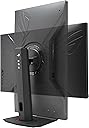
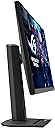
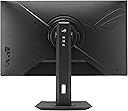
The ASUS ROG Strix XG27ACS is a 27-inch QHD gaming monitor featuring a 2560x1440 resolution, 180Hz refresh rate, and 1ms Fast IPS response time. Designed for pro gamers and creators, it offers vivid 133% sRGB color accuracy, HDR400 support, and advanced motion blur reduction with ELMB Sync. Connectivity is future-proof with USB-C DisplayPort and multiple HDMI ports. Its ergonomic stand supports full adjustability and a tripod socket, backed by a 3-year warranty for reliable performance.


| ASIN | B0CV24GQ9W |
| Adaptive Sync | G-Sync Compatible |
| Additional Features | 180Hz, 1ms response time, Blue Light Filter, Eye Care, Flicker-Free, Phone holder feature on Monitor platform, Tilt, Swivel, Pivot, Height adjustable |
| Aspect Ratio | 16:9 |
| Best Sellers Rank | #4,227 in Electronics ( See Top 100 in Electronics ) #166 in Computer Monitors |
| Brand | ASUS |
| Brightness | 400 nits |
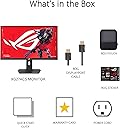
| Built-In Media | DisplayPort cable, Power cord, Quick start guide, ROG pouch, XG27ACS gaming monitor |
| Color | BLACK |
| Color Gamut | 133.0 |
| Compatible Devices | Desktop |
| Connectivity Technology | HDMI |
| Contrast Ratio | 400:1 |
| Customer Reviews | 4.4 out of 5 stars 977 Reviews |
| Display Resolution Maximum | 2560 x 1440 Pixels |
| Display Technology | LED |
| Display Type | LED |
| Hardware Connectivity | HDMI |
| Has Color Screen | Yes |
| Image Contrast Ratio | 400:1 |
| Item Dimensions D x W x H | 8.6"D x 25.3"W x 15.5"H |
| Item Weight | 14.6 Pounds |
| Manufacturer | ASUS |
| Model Name | XG27ACS |
| Model Number | XG27ACS |
| Mounting Type | Wall Mount |
| Native Resolution | 2560x1440 |
| Number of Component Outputs | 3 |
| Picture Quality Enhancement Technology | ASUS Fast IPS, ASUS Extreme Low Motion Blur Sync (ELMB SYNC) |
| Processor Count | 10 |
| Refresh Rate | 180 Hz |
| Resolution | QHD Ultra Wide 1440p |
| Response Time | 1 Milliseconds |
| Screen Finish | Matte |
| Screen Size | 27 Inches |
| Screen Surface Description | Matte |
| Shape | rectangular prism |
| Specific Uses For Product | Business, Gaming, Photo Video Editing |
| Total Number of HDMI Ports | 2 |
| UPC | 197105406070 |
| Unit Count | 1.0 Count |
| Viewing Angle | 178 Degrees |
| Warranty Description | 3 years |
| Warranty Type | 3 Year Warranty with ARR |
L**U
Amazing monitor
I’ve been using this ASUS ROG monitor for a while now and I honestly love it. The display looks sharp and smooth, especially while gaming. The high refresh rate makes everything feel much more responsive, and fast-paced games look great with minimal blur. The colors are vibrant, brightness is solid, and the screen feels immersive during long sessions. It’s also comfortable to use for everyday things like browsing, watching videos, and general PC use. One feature I really appreciate is the adjustable monitor stand. Being able to change the height and angle makes it much easier to get a comfortable setup, especially during longer gaming or work sessions. It feels sturdy and well-built, not flimsy at all. Build quality feels premium, and the design has that clean gaming look without being over the top. Setup was easy and the on-screen menu is simple to navigate. Overall, I’m really happy with this monitor. It performs great, looks great, and has been one of my favorite upgrades for my
D**O
Great monitor for price
Great monitor! Purchased this to go along with my new PC build. After a month of using it daily I've got to say I'm pretty Impressed. Color and brightness are extremely good, easily allowing me to see things I couldn't with my old laptop screen. I really love the built in blue light filter so I can actually use it at night without getting a headache or hurting my vision. VRR is also great when paired with my 9070XT and I don't see any tearing or ghosting like on my old monitor. The 180hz refresh rate is also a really good sweet spot if your a casual gamer like me. Good viewing angles, and adjustment is extremely easy. You can lift and rotate it with just a few fingers and little force. Also really cool how you can rotate it 180 degrees if you wanted to use it as a secondary monitor without having to buy a custom stand. Setup and instructions were also really easy, (I thought I was skipping a step when putting it on the stand but it really was just click into the circular socket and you're done, no screws necessary.) Build quality is also very solid, feels sturdy with a good weight to the monitor itself and its stand. If I had one complaint it would be that the bottom of the stand can be a little cumbersome and big especially if you have a smaller desk but its not too bad, just something to keep in mind if you have limited space. Overall verry happy with my purchase, definitely would recommend if your looking to get into 1440p gaming
E**C
Great Monitor for 1440 Gaming
Although they can be a bit pricy for my liking, ASUS products don't miss in my experience. Neither does this one. For 100$ off the original price, this monitor was a steal. It's OSD features multiple visual settings that can give your screen deep blacks like a VA while still providing the colorful visuals of an IPS. Brightness is great as well, even at 50% it's still more than adequate to see everything on screen. Its height and tilt adjust makes it great for desks with elevated monitor stands and people using chairs lacking adjustment capabilities. The buttons and tiny joystick behind it on the right side make the OSD easy to control and access. As far as gaming goes, it's great, however there is one hiccup I had. Turning on VRR made this monitor spewing bricks, the refresh rate kept changing so frequently that the monitor's upper half would flicker until I clicked a window that would make it stop, only for it to continue once more. Not sure if this is a monitor side issue or if I did something wrong on my end, but after endless troubleshooting I leaned towards the former and ultimately decided to turn it off. It's no big deal for me personally, I can still get 240FPS on the games I play that allow it. All things considered, I scored big time with this monitor, and if you choose it, so will you.
D**O
A Console Gamer’s Dream!
ASUS ROG Strix XG27ACS Review: A Console Gamer’s Dream The ASUS ROG Strix XG27ACS is a standout choice for console gamers who want to maximize the capabilities of modern systems like the Xbox Series X and PS5. Offering a perfect mix of 1440p resolution and support for 120 fps, this monitor hits the sweet spot between stunning visuals and fluid gameplay. Key Features Tailored for Console Gamers: - 1440p Resolution with 120Hz Refresh Rate: The highest resolution available on most consoles while maintaining 120Hz performance, delivering crisp visuals without sacrificing smoothness. - 4.5ms Average Response Time: Though not the absolute fastest, this response time ensures smooth transitions with minimal ghosting, perfect for nearly any gaming scenario. - Low Input Lag: With near-imperceptible input lag, every button press translates into instant on-screen action, a must for competitive and fast-paced games. Why It’s the Best Bang for Your Buck: The XG27ACS combines premium specs with an affordable price, making it an incredible value for gamers looking to upgrade their experience. Its balance of performance, visual quality, and affordability, make it a top-tier option without venturing into overly expensive territory. When to Consider Upgrading: There are only two scenarios where upgrading might make sense: 1. Esports-Level PC Gaming: If you're diving into competitive PC gaming, you might need a monitor with a 240Hz or higher refresh rate. At that point, it’s likely time to invest in a high-end gaming PC as well. 2. Cinematic 4K Experiences: For players who prioritize stunning visuals in single-player games, a 4K monitor running at 60 fps may be worth considering. Final Thoughts The ASUS ROG Strix XG27ACS is arguably the best monitor for console gaming at 1440p and 120 fps, offering incredible performance and visuals without breaking the bank. Unless your gaming needs shift dramatically, this monitor is the perfect long-term choice for console gamers looking to get the most out of their hardware.
C**S
XG27ACS - Impressions after opening and setup.
Day 1 Impression: On-Sale $234 shipped. 27qhd highHZ, can't complain. nice packaging and accessories. Love the stand - matches my RogStrix G513QY laptop nicely, very sturdy. Purchased to mount on a mobile desk with the 15inch laptop screen removed. The screen itself is rather light, easy vesa mounting if needed. usb-c to usb-c display is a bonus. The Display is... "As expected" for the price and NAME BRAND. except.... The anti-glare "FOG" almost looks like backlight bleeding at angles, definitely a tradeoff for no major glare in well-lit areas. My Display showed Zero dead pixels, 1 small spot (1inch) of backlight bleed on the bottom horizontal run, but I can live with it... for the price. Menu/Picture settings are easy to navigate, and the QHD is beautiful, even with standard hdmi 60hz. Very Happy purchase for a budget laptop extension/extra display. If it works like this for 3-5+ years no troubles, I'll say it's a good purchase. Time will tell. ***In the picture shown, the blue areas are the Anti-Glare FOG, noticeable in dark scenes when in a dark room or when viewing at angles. It is not truly noticeable during day/lights-on. The Green area is the small Backlight Bleed (Not noticeable during day or other than black screen) Second photo is during the day on black screen test, slight "Angle-AntiGlare Fog" nothing harsh. For the SALE price, I would repeat the purchase, no real complaints, hope it holds up.
B**P
Disappointed. Stuck pixels. Horrible backlight Glow. Fuzzy Anti glare
With everything going on with Asus, their QC and CS I was hesitant but it was hard to pass up a 1440p 180 Hz monitor for $200. Arrived, very easy to assemble and the stand is amazing, included DP cable is generic so do yourself a favor and purchase a $15 1.4 if using DP (short as you can get away with). Very simple I/O, USB-C is kind of worthless as it's not enough to power anything and there's no KVM switch. Turned it on and immediately noticed a fuzziness to everything, especially whites. Did a little research and it's the anti glare coating. My old 1080 Asus has a matte screen and doesn't have the grain. The brightness is great, while it's not true HDR it is enough to use HDR and does make games look better, I set mine to sRGB and HDR on. Unfortunately you won't be able to turn blue filter on with this mode, so be aware your eyes may begin to hurt after an hour. Which brings me to my next gripe, the OSD software doesn't match the hardware OSD. Okay fine. Started playing a game and thought I may have had motion blur turned on, no it's the monitor. It's bad. Turned on ELMB and made it a bit better, downside is HDR turned off and the display brightness took a beating. Also be aware this is an 8bit color monitor. There's confusion because it lists 10bit in the OSD as well as a few places online because of the model that's $600 and shares almost an identical model number. The only 10bit monitor in this price range I believe is the Tuf. The panel glow on my unit is horrendous unless you sit 5 feet away it's extremely noticeable on the bottom right even when looking dead center. If whatever you're watching or playing has lots of dark scenes it's all four corners. After adjusting some settings a dialogue box popped up and left a streak of pixels down the bottom right. I did everything recommended by others in the community and they're stuck. Now I have to return a monitor that is backordered for two months so I'll just be getting my money back (hopefully). Roll the dice with this one. Like most things in life, cheap isn't quality. There are no such things as "budget friendly" monitors that are good. I'll begrudgingly forking over money for a nicer mini LED LG. Lesson learned.
J**N
Good overall. Read for more info.
I bought this monitor two years ago during a sale. I have to say that I am pretty satisfied with the overall product. The stand, the build quality, the size, and the fact that there have been no dead pixels so far. However, why did I take one star off? Because of flickering. I don’t have a separate GPU to complete further testing, but when using the HDMI port, there was noticeable flickering. I tested different cables, but that did not fix the issue. My secondary monitor worked fine with the same HDMI port. The flickering stopped when I switched to a DisplayPort (DP) cable and port. I recommend it but not on full price. Be aware of the possible flickering issue
H**M
Great value for money
Great value for money, and quality product. It's compatible with G-Sync and great for any GPU that can handle QHD gaming, and 180Hz is great for any game, and the color accuracy is pretty good, and it also can be tilted with no problem and easy to setup. It's great for gaming and programming as well.
N**I
Decent Monitor
Good colours and response time. Brightness is good for indoor use. Refresh rate is good . Hdr is not that good as ips panel. Seamless to transfer from Type c to Dp to hdmi . Good product for this price range. Some can feel bazels are little bit large.
J**E
2k asus 180hz
من افضل الشاشات بفئتها السعريه (متوسطه-شبه عليا) بعد رحلة بحث طويلة عن شاشات التو كي اقدر اقولكم بالراحه ان هذي افضلهم (بدون ذكر شاشات الفئة العليا مثل الاوليد) شكلها جميل ولونها حيادي يناسب جميع انواع السيت اب -(اللون اسود الى الرمادي)- بدون اضافه اي الوان قويه سواء صفراء او حمراء مثل شاشات اي او سي قاعدتها بلاستيكيه ثابته وقوية وخامات التصنيع جودتها عاليه وبأمكانك تعديل الشاشه بشكل عمودي او افقي او تعدل ارتفاعها, يعيبها ارجلها اللي جايه على شكل قوس كبيره وتاخذ مساحه من الطاولة يفضل اخذ ستاند خارجي في حال توفر مواصفات الشاشه الكليه, الوان-سرعه استجابه-سطوع-تباين (التباين 1095:1) - (السطوع 493 على اعلى سطوع و 75 في اقل سطوع) -يوجد اتش دي ار لكن كعاده شاشات الاي بي اس لاينصح بتشغيله بسبب قله السطوع والتباين- دقة الالوان في الشاشه بخارج الصندوق (بدون تعديل) شبه دقيقة لكنها مشبعه بزيادة ويفضل تعديلها في حال كنت تشتغل شغل احترافي يبغالها تعديل بالذات في النقطه البيضاء ودلتا اي (بامكانك شراء قطعه تصحيح الوان في حال كنت مهتم) او بامكانك تحصل بروفايلات جاهزه يمديك تحملها تلقاها بقنوات مثل هاردوير انبوكس وغيرها (الشاشه بصفه عامه امكانيه التعديل فيها جدا ممتازه مع مود اس ار جي بي مفتوح وبامكانك تستخدمها في الشغل الاحترافي) سرعه الاستجابه,, مع تشغيل وضع الاوفر درايف على فاست تعطيك سرعه استجابه 5.2 (مع الادابتف سنك) الفاست هو افضل مود فيه مود اعلى منه لكن احتمال يجيك قوستنق والمود اللي اقل من الفاست هو نورمال مع تشغيل الاوفر درايف على نورمال تعطيك سرعه استجابه 6.9 (مع الادابتف سنك) انصح في هذي الشاشه وبقوة سواء لشغل احترافي او قيمنق وسواء ps5or Xbox او pc
P**S
Great Reliable Secondary Monitor
Using the ASUS XG27ACS as my second monitor next to a 4K OLED. Obviously, it doesn’t hit OLED levels, but the IPS panel is solid reliable, consistent, and the colors are great. IPS has always been a dependable choice. That said, feels a bit overpriced for what it is. If your PC can handle 1440p and you’re picky about image quality, might be worth stretching for an OLED. Burn-in used to be a concern, but a lot of OLEDs now come with 3-year burn-in warranties, so that helps. Overall, happy with it. Just wish it was priced a bit better.
A**A
Would recommend for sure. Jack of all trades
Excellent Monitor. Great Colors, high refresh rate, good response times. No clear cons aside from the contrast but that's to be expected from IPS panels. However, the monitor can't turn on HDR (although it doesnt really matter) and only works if you put DP stream 1.2 in settings (although maybe because im using a mini dp adapter), but aside from that its great. Would 100% recommend! P.S There is no grainy matte coating that previous models have. Its fixed and looks great.
C**N
Muy buen monitor
Hasta ahora todo bien. Por el precio que lo compre (estaba en oferta) lo considero una buena compra. Este nivel de precio y gama esta muy competido, pero este monitor en particular si creo resalta mucho. Hay bastantes reseñas buenas, inclusive de Monitors Unboxed. Vengo de un viejo U2515H, el cual es aún un muy buen monitor pese a los años, así que ese estoy tomando como comparación. La verdad no le encuentro muchas fallas o en que quejarme (tomando en consideración las fallas usuales de paneles IPS). Los colores de fabrica son excelentes pero algo muy "chillones" y con tino rojizo, lo cual es común en paneles "wide gamut". El modo sRGB es en mi opinion bastante acertado y bien calibrado. Este monitor no vino con tarjeta de calibración y Asus no le da mucho enfoque a esto en su pagina (pero si dice algo escondido que esta calibrado de fabrica y la reseña de Monitors Unboxed lo confirma), pero comparado con el U2515H (el cual si esta calibrado de fabrica y viene con tarjeta de calibración) se ve idéntico. Personalmente lo dejo en sRGB, ya que me produce menos molestia en los ojos y los colores se ven mas naturales. El nivel de brillo es adecuado, un poco mas brillante que el U2515H. Modo HDR no aumenta mucho el brillo, pero la verdad este no es un monitor HDR. El VRR funciona de maravilla. Tiene 20 niveles de Overdrive, pero con el que viene de fabrica es más que adecuado para mi. No percibo nada de "ghosting" y el tiempo de respuesta es excelente. Si sufre de un poco de parpadeo cuando estas en números bajos de tasas de refresco (menos de 70), pero no es algo muy molestoso. El IPS glow es algo elevado y en mi unidad en particular tiene un tono rojizo. Solo es algo que noto cuando el monitor muestra una imagen puramente negra de pantalla completa, en usos normales o incluso cuando viendo contenido oscuro no se nota. El contraste de negros si es algo bajo y se nota la diferencia comparado con el U2515H. Igual los ángulos de vision no son tan buenos como en el U2515H. El soporte y base del monitor es excelente y con buena estabilidad, como en el U2515H. Es fácil de manipular y te permite amplio rango de ajustes (altura, rotación, elevación, pivote). El diseño externo del monitor no es muy "gamer" lo cual me gusta (se ve más profesional y no tiene luces RGB).
Trustpilot
1 day ago
1 week ago