We remain fully operational. Our teams are working around the clock to ensure your deliveries continue safely.

DOWNLOAD THE APP


Copyright © 2025 Desertcart Holdings Limited
DOWNLOAD THE APP
Buy anything from 5,000+ international stores. One checkout price. No surprise fees. Join 2M+ shoppers on Desertcart.
Desertcart purchases this item on your behalf and handles shipping, customs, and support to KUWAIT.
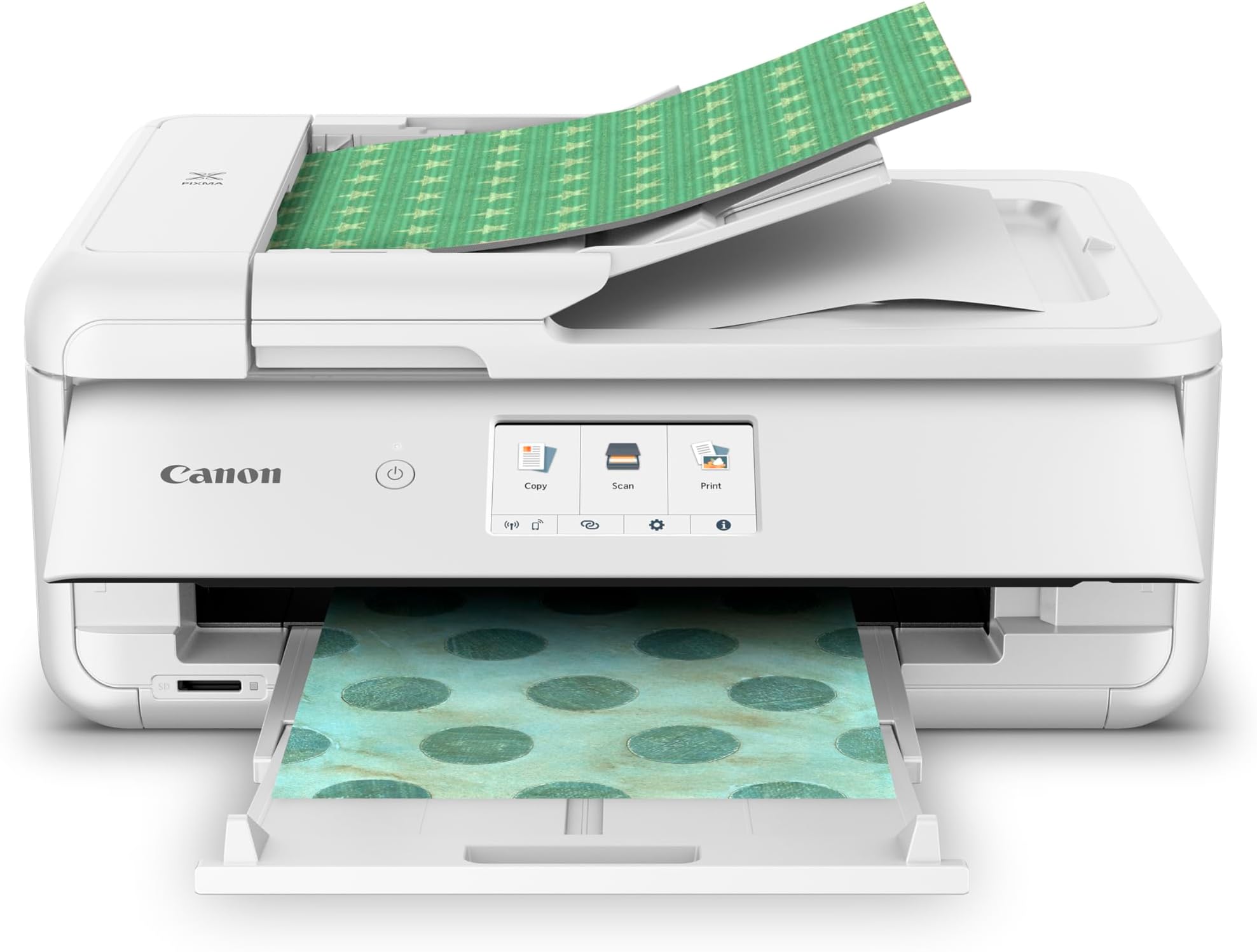
🖨️ Elevate your home office game with pro-level prints at your fingertips!
The Canon PIXMA TS9521Ca is a compact, wireless all-in-one inkjet printer designed for home and small business use. It delivers fast, high-resolution prints up to 15 ppm in black, supports versatile media sizes including 11x17, and features a user-friendly 4.3” touchscreen. With auto duplex printing, a 20-sheet document feeder, and seamless mobile connectivity via WiFi and the Canon PRINT app, it combines convenience and professional-quality output in one stylish package.


| ASIN | B0CX69SZMB |
| Additional Printer Functions | Copy, Scan |
| B&W Pages per Minute | 15 ppm |
| Best Sellers Rank | #20,781 in Office Products ( See Top 100 in Office Products ) #33 in Ink Tank Printers |
| Brand | Canon |
| Built-In Media | Inkjet Cartridges, Paper |
| Color | White |
| Color Depth | 24 bits_per_pixel |
| Color Pages per Minute | 10 ppm |
| Compatible Devices | Smartphones |
| Control Method | Touch |
| Customer Reviews | 4.0 4.0 out of 5 stars (300) |
| Display Type | LCD |
| Dual-sided printing | Yes |
| Duplex | Automatic |
| EU Spare Part Availability Duration | 1 Years |
| Hardware Interface | SDXC |
| Ink Color | Black |
| Item Dimensions D x W x H | 18.5"D x 14.5"W x 7.6"H |
| Item Type Name | Inkjet Printer |
| Item Weight | 394 Ounces |
| Manufacturer | Canon USA |
| Maximum Copy Resolution Black and White | Up to 4800 x 1200 dpi |
| Maximum Copy Resolution Color | Up to 4800 x 1200 dpi |
| Maximum Copy Speed Black and White | 15 ppm |
| Maximum Media Size | 8.5 x 14 inch |
| Maximum Print Resolution Black and White | Up to 4800 x 1200 dpi |
| Maximum Sheet Capacity | 100 |
| Maximum print Resolution Color | Up to 4800 x 1200 dpi |
| Model Name | PIXMA TS9521Ca |
| Model Number | 2988C052 |
| Model Series | PIXMA TS9521C |
| Number of Trays | 2 |
| Other Special Features of the Product | Epeat Qualified |
| Output sheet capacity | 200 |
| Paper Size | 3.5” x 3.5”, 4” x 4”, 4” x 6”, 5” x 5”, 5” x 7”, 8” x 10”, Letter, 11” x 17”, 12” x 12”, Legal, U.S. #10 Envelopes Supported Media Inches |
| Power Consumption | 14 Watts |
| Print media | Paper (plain) |
| Printer Connectivity Type | Ethernet, USB, Wi-Fi |
| Printer Output Type | Color |
| Printer Type | Inkjet |
| Processor Count | 1 |
| Resolution | 4800 x 1200 |
| Scanner Type | Sheetfed |
| Series Number | 9521 |
| Specific Uses For Product | Home office, small business, mobile printing, auto duplex printing |
| Total Usb Ports | 1 |
| UPC | 013803378429 |
| Unit Count | 1.0 Count |
| Warranty Description | 1 year manufacturer |
| Warranty Type | Limited |
| Wattage | 14 watts |
D**.
Highly recommended from a small (micro) business owner!
I LOVE my Canon printer! I've had it for a year and a half, and I use it a ton for my small business- almost daily at times. It can print 300lb/ 110 gsm card stock- sometimes I have to hold the sheet down a bit so the roller grabs on to it, but other times it grabs it on its own- either way, 300llb card stock and also thin tracing paper! I use it for stickers, packaging, thank you cards and so much more. The prints are such good quality! I was hesitant about purchasing it initially because of limited drivers on a Mac and also received a defective machine from Amazon, but I'm so glad I got it. I have tried 3 different brands of non-OEM ink with it and the printer accepts them with no issue. I highly recommend this printer!
B**O
Great clear photocopier for card making
Beautiful copies produced by this machine! Nice enough that I can use the pictures for making my cards. It's not the fastest photocopier that I sit and relax while crafting so it doesn't bother me. I'll wait with no problem to get the beautiful images that it produces and takes my cardstock through the rear finder with no problems at all
C**Y
Pixma printer
Love this printer! I’ve used it for regular paper and photo paper works great easy to use and prints fast. The setup was quick. I’ve had no issues with it jamming or running through ink yet.
S**T
WORST PRINTER I'VE EVER OWNED - READ BEFORE PURCHASING
I hate this printer, I bought it in a hurry and completely regret not looking into it's functionality more. It's my fault for not, but now I'm stuck with it. I have never had a printer that felt like it has a constant issue, as this one does. If my husband didn't throw away the box, I'd return it. First off, it holds much less paper than my previous printers. Second, the front LCD screen panel has to be open to print or it gives you an error. This is extra inconvenient for me as I have my printer at a high location and it looks ridiculous to keep the panel open. Lastly, I didn't realize that you have to feed specialty paper in the back, which is totally inconvenient, and when you select the rear tray function for the print option on your computer, the printer beeps in warning and you have to manually ok your selection on the LCD panel every single time you use the rear feeder. Not to mention that the rear feeder isn't internal and pops up and out at a weird angle, also looking ridiculous and would make it hard to use in a shelf system. I foresee this rear feeder breaking very easily when pulling it in and out. The print quality seems comparable to other printers, but with all of the other issues, it doesn't make it worth it to me.
L**C
UPDATED REVIEW - Better! Unsure…But have always loved Canon Products...
**UPDATE 8/31/25 - Increase in stars - I figured out the issue of the 5100 Error Code - It causes an issue if you have anything sitting on top of the printer (extra paper, a book, or anything of weight). It pushes down on the top document feeder and somehow misaligns the inside pieces, to cause the ink carriage that goes back and forth inside to not operate correctly, and it cannot get back and forth to print (it would make a terrible grinding & clicking sound that we couldn’t figure out)… Not sure why it happens, but now we just ensure that the top is free of paper or anything extra before hitting print, and it seems to work without issue. Great print quality that I’ve come to love with Canon PIXMA, and nice to have the document feeder for the copies now! Just wish Canon’s QuickStart Guide stated not to set anything on top. I didn’t see an issue, but quickly realized it was. Just wanted to share my findings, in case anyone is experiencing the same issue, and needs a solution! Original Review - Mixed feelings. I have always been a Canon owner, Cameras and printers. This is my third Canon PIXMA Color Inkjet Printer. I just wanted an upgrade of a similar type, to include a top-feeder copier and paper cassette that holds a little more paper. All of my previous wi-fi models with flatbed scanner have lasted many many years each. They are easy to set up, are a good value for print quality, and they are all-in-one. This new TS9521Ca has been a little finicky. It always pops a 5100 Support Code for no apparent reason (although it is after it makes a terrible sound, and I know I have removed all the orange tape). I think I have figured out that it’s when the paper tray is pushed in sometimes that it will do that. Sometimes the print head ink/ carriage won’t move when I open the lid, but I am able to move it by hand to try to troubleshoot. I’m still trying to isolate why it does it and will likely have to call Canon Support if it happens again, so that I can hopefully get a replacement or fix. I bought extended warranty, but that doesn’t kick in until after the first year. I want to love it like the others because it prints amazing, and works great. It’s just the error codes making me a bit nervous and frustrated with lost time messing with it, as it’s tough on my small business. I have only had it for two months, and it’s already errored twice. Will update if anything changes significantly.
K**S
Perfect home crafting printer
My sister has a sublimation printer and also a cut printer but I decided to go with Canon and I'm really thankful that I did. It does so many different cool things and I can just cut out the things myself if I need to. Print quality is really nice and it's easy to use which is the most important for me. Lots of preloaded features and plenty of apps to support. The one I got does not have Bluetooth but it has wireless and I haven't missed the Bluetooth at all. Can print on many different papers. Perfect for home crafting.
S**S
Nice printer
Prints very nicely. I use it for junk journaling pages. It does seem to go through ink fast and I probably should have gotten a tank printer but it was a lot more money. Colors looked good using canon ink but I tried an off brand and the colors were bad. That was due to the ink though and not the printer. I haven't had any problems with the printer itself.
L**T
Excellent product
Worth every penny
Trustpilot
2 weeks ago
4 days ago