Buy anything from 5,000+ international stores. One checkout price. No surprise fees. Join 2M+ shoppers on Desertcart.
Desertcart purchases this item on your behalf and handles shipping, customs, and support to KUWAIT.
🚀 Elevate your home network to warp speed with ASUS ZenWiFi BQ16 Pro!
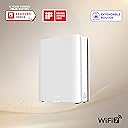
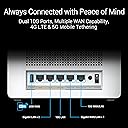
The ASUS ZenWiFi BQ16 Pro is a cutting-edge quad-band WiFi 7 mesh router designed to deliver ultra-fast wireless speeds up to 30 Gbps and robust coverage across 4000 sq.ft. Equipped with 12 internal antennas and dual 10G Ethernet ports, it ensures seamless connectivity and eliminates dead zones. Featuring AiMesh technology, multi-SSID support, subscription-free AiProtection Pro security, and smart home device management, it’s engineered for the modern connected home and professional-grade performance.


| ASIN | B0D398ZNSM |
| Antenna Location | Business, Gaming, Home |
| Antenna Type | Internal |
| Best Sellers Rank | #17,030 in Electronics ( See Top 100 in Electronics ) #119 in Computer Routers |
| Brand | ASUS |
| Built-In Media | BQ16 Pro(W-1-PK), Power adapter, Quick start guide, RJ-45 cable, Warranty card |
| Color | WHITE |
| Compatible Devices | Gaming Console, Personal Computer, Smart Television, Smart Thermostat, Smartphone, Tablet |
| Connectivity Protocol | WiFi |
| Connectivity Range | 4000 Square Feet |
| Connectivity Technology | Wi-Fi |
| Control Method | App |
| Controller Type | App Control |
| Coverage | 4000 sq.ft. |
| Customer Reviews | 4.0 out of 5 stars 43 Reviews |
| Data Transfer Rate | 11529 Megabits Per Second |
| Frequency | 320 MHz |
| Frequency Band Class | Quad-Band |
| Has Internet Connectivity | Yes |
| Has Security Updates | Yes |
| Is Modem Compatible | No |
| Item Dimensions L x W x H | 6.9"L x 2.8"W x 8.6"H |
| Item Weight | 2.9 Pounds |
| LAN Port Bandwidth | 10 Gbps |
| Manufacturer | ASUS |
| Maximum Upstream Data Transfer Rate | 5764 Megabits Per Second |
| Mfr Part Number | BQ16 Pro(W-1-PK) |
| Model Name | BQ16 Pro(W-1-PK) |
| Model Number | BQ16 Pro(W-1-PK) |
| Number of Antennas | 12 |
| Number of Ports | 2 |
| Operating System | [Proprietary ASUS Operating System] |
| Other Special Features of the Product | Access Point Mode, AiMesh Node Mode, AiProtection, Parental Control, Primary AiMesh Router, Router APP |
| RAM Memory Installed | 2 GB |
| Router Network Type | quad-band |
| Security Protocol | AiProtection, VPN, WPA3 Enterprise, WPA3 Personal, WPA2 Enterprise , WPA2 Personal, WPA Personal, WPA Enterprise , WPS support |
| Smart Home Compatibility | Smart Home Compatible |
| UPC | 197105389090 |
| Unit Count | 1.0 Count |
| Warranty Description | 3 years ARR warranty |
| Wi-Fi Generation | WiFi 7 |
| Wireless Communication Standard | 802.11.be, 802.11ac, 802.11ax, 802.11n |
| Wireless Compability | 802.11.be, 802.11ac, 802.11ax, 802.11n |
D**.
Extremely fast Wi-Fi 7 and way more customization than I expected (worth the learning curve)
I’ve been using the ASUS ZenWiFi BQ16 Pro for about 6 months and it’s been amazing. The biggest difference for me is speed—I’m on a 2 Gbps connection and I can actually get the full bandwidth over Wi-Fi 7 on compatible devices, which I did not expect. It’s the first setup I’ve had where wireless doesn’t feel like a compromise. Although it's a mesh router, I only needed a single unit as it blankets my entire 2500 sq ft home with a very strong signal. The other thing I didn’t fully appreciate until I set it up is how much customizability ASUS gives you. There are tons of settings and options (multi-SSID / smart home network options, VPN features, parental controls, etc.), and it’s clearly built for people who like to tinker. That said, the settings definitely come with a learning curve if you’re not familiar with networking. It’s not “plug it in and forget it” if you want to take advantage of everything it can do. But once I got it dialed in, it’s been totally worth it. It also has two 10G ports on the unit, which is great if you’re building around multi-gig internet or faster wired backhaul. If you want very fast Wi-Fi 7 and you like having a lot of control over your network, this router is a beast. If you hate dealing with settings, expect a little setup time—but the performance payoff is real.
B**T
Very Impressed
Replaced Netgear RAX120 with the 1 Pack Asus BQ16 Pro.My computers have Intel BE200 or Qualcomm Fast Connect 7800 WiFi 7 cards installed. Setup didn't fully work with the phone app scanning the QR code on the bottom of the router but did work perfectly setting it up from my desktop PC logging in to the router IP address and creating ID,SSID and password.Once logged in I could access the advanced settings for channel selection and to turn MLO on/off.For the time being I have set the 2.4ghz,5ghz and the 2 6ghz channels to auto and enabled MLO while my learning the new router continues.
P**X
"PRO" router doesn't support VLAN
So, it was easy to set up, and the form-factor is very nice (unlike their ugly GT lineup) Buttt... for $500, even though this router is positioned as "IoT ready" (mentioned 11 times on the product's page)... and it has "PRO" in it's name... You do not get all the important features that cheaper routers have (including ASUS) Such as reasonable VLAN support. Sure, you can create an IoT or Guest network but... - You can't assign an Ethernet LAN port to a particular VLAN, as I mentioned - for instance VLAN you use for IoT. For me it was a deal breaker, but I am sure there are other limitations, for example I noticed that cheaper RT-BE88U allows you to enable Guest Portal (captive screen) if you need that... the BQ16 can't do that. The coverage did not impress me either (single node), signal strength displayed by my security cameras around the house was about the same as with my 8-year old Linksys WRT3200ACM. Customer support is also disappointing - when I contacted them the first time and told them that LAN > VLAN page is missing - they told me to Factory Reset the router... wasting my time. instead of checking if the router supports the feature I am asking about. Why ASUS is like that?... I do not understand. I will have to return this router now, because their "PRO" model does not support what other their routers support.
W**D
EXCELLENT MESH ROUTER SYSTEM!
This was by far the easiest Mesh installation I have ever had. I do not understand some of the negative reviews for ASUS . I bought one router to install and bought a second to create a Mesh environment. I defined the SSIDs for my 2g and 5g systems and the ASUS system did the rest. Updated core software on both units which takes a few minutes but was seamless. The Mesh installation was even easier. A GREAT router system. I went from 100mb to 900mb into my 1gig Internet provider.
T**R
Connectivity issues are horrendous, terrible buy
The connectivity issues as mentioned on other reviews and across the web are spot on. I can get past the endless pages of configuration, as I am a big fan of options, but this thing has taken weeks to get close to stable. I have 50+ smart devices and it takes hours to get everything configured. I so much wanted to ignore the horror stories, and now I am paying the price. Have always been impressed with Asus, stuck with their equipment and couldn’t be more disappointed with this. Firmware is clearly buggy, regardless of updates there is just too much wrong. Loss of connection both on internal network and with WAN. You get really excited for all the cutting edge features just to find out many of them don’t work or interfere with stable connectivity so they must be turned off. I have had down connections at least once a day for several weeks, but just enough to keep trying. After reconfiguring multiple times, searching the web for guidance, using AI for suggestions - nothing works and it all comes down to bad firmware and not being ready for the market. It’s gotten worse with time where some days were loosing connectivity every 10-15 minutes and the system logs prove a complete mess. I need stable connectivity for work and home security and this is just not up to par.
N**7
WiFi 7 Mesh for a Crowded Smart Home! Power User
The ASUS ZenWiFi BQ16 Pro doesn’t just deliver blazing-fast WiFi 7 speeds—it gives me total control over my network, and the interface makes it surprisingly easy. The fast, intuitive UI lets me tweak everything from Multi-SSID setups to VPN configurations in seconds, and adding new mesh nodes is a breeze (just plug and play). Why Power Users Will Love It: Pro-Level Customization: Fine-tune QoS, VLANs, and AiProtection without subscriptions—perfect for my 30+ devices. Effortless Mesh Expansion: Adding nodes takes under a minute, and roaming is seamless (no drops between floors). 10G Future-Proofing: The dual 10G ports handle my NAS and gaming rig with room to grow. For "Normal" Users? There’s a learning curve—features like VPN server setup or advanced parental controls might feel overwhelming. But if you want no-compromise performance, this is it. Verdict: If you’re a tech-savvy user or run a smart home with heavy demands, the BQ16 Pro is a monster—just be ready to dive into settings.
V**A
Expensive, but works good.
It is an expensive product but it is good and more elegant than traditional solutions full of anthenas looking like a spaceship. The signal strength is ok especially if you have a lot of walls. It is easy to setup as any other Asus router. Im using the wire to build the AI mesh so it works great. I have a GT Be98 Pro as the main router (which looks like an alien spaceship).
R**D
Super fast and easy to setup
Ultra fast! I regularly get over 2Gbps over all of my devices, even a couple of rooms away. One frustration is that the settings are split between the mobile app and the internal web page - There's no clear division between which setting will appear where. Most of the cloud integrations are a bit obnoxious and it will try to get you to pair with a G or A or F account. It works just fine if you don't give it one of those but it will keep asking you to do it.
A**R
Missing power brick
Can't give full review as this was delivered with a US-style power brick. Maybe it's a grey import? If so, what about warranty? As a general comment re connectivity: I have a BQ16 that had dropout problems while connecting via PPPoE to my fibre provider. This was solved through a combination of disabling IPv6 to the outside world (still enabled internally in our building to allow Home Assistant/thread to work) and by changing WAN/Internet Detection to PPP Echo, PPP Echo Interval to 30 and PPP Echo Max Failures to 5. Update: Mea culpa. I had not found the US to UK adapter in the packaging. Supplier has immediately offered to take back the router with refund hence the change in rating. Correspondence with them easy and timely. Their support merits a 5-star rating.
Trustpilot
4 days ago
1 month ago