


Buy anything from 5,000+ international stores. One checkout price. No surprise fees. Join 2M+ shoppers on Desertcart.
Desertcart purchases this item on your behalf and handles shipping, customs, and support to KUWAIT.
🚀 Step into your personal VR universe—where the future feels like home!
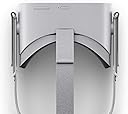
The Oculus Go is a standalone VR headset featuring 64GB of storage, Qualcomm Snapdragon 821 processing, and built-in spatial audio. Designed for effortless portability, it offers a wire-free experience with crystal-clear optics and an intuitive controller. Perfect for immersive media consumption, social VR meetups, and casual gaming, it balances comfort and cutting-edge tech to bring a personal theater and social hub right to your head.
| ASIN | B07B4NLKKF |
| Additional Features | Microphone Feature |
| Age Range Description | Youth |
| Best Sellers Rank | #186,060 in Cell Phones & Accessories ( See Top 100 in Cell Phones & Accessories ) #237 in Cell Phone Virtual Reality (VR) Headsets |
| Brand | Meta |
| Built-In Media | Product Instruction |
| Color | Grey |
| Compatible Devices | Television |
| Connectivity Technology | Bluetooth |
| Connector Type | 3.5mm Jack |
| Controller Type | Button Control |
| Customer Reviews | 4.3 4.3 out of 5 stars (8,090) |
| Display Maximum Resolution | 2880 x 1600 |
| Display Resolution Maximum | refer to description |
| Display Type | OLED |
| Field Of View | 100 Degrees |
| Global Trade Identification Number | 00815820020196 |
| Item Dimensions D x W x H | 8"D x 8"W x 4"H |
| Item Weight | 0.78 Pounds |
| Manufacturer | Oculus |
| Memory Storage Capacity | 64 GB |
| Mfr Part Number | 301-00104-01 |
| Model Name | 301-00104-01 |
| Model Number | 301-00104-01 |
| Operating System | Android |
| Platform | Meta |
| Resolution | 2880 x 1600 |
| Screen Size | 7 |
| Sensor Technology | inside-out tracking |
| Specific Uses For Product | Gaming |
| UPC | 815820020196 |
| Warranty Description | Limited Warranty |
N**L
The VR headset I was waiting for
My interested in VR started when I walked past a local electronics store and noticed the Samsung Gear VR headset on display. When I put it on I was blown away! But being in the Apple ecosystem I didn’t have a Samsung smartphone, and the idea of buying one just for this purpose was surplus to requirements. Also, the idea of buying a VR headset that has cables connected to a PC or Playstation has never appealed to me. So instead, I opted to use my iPhone 6s in a rather cheap headset - even though I was fully aware this wasn’t the best VR experience available. Even still, I found the VR experience reasonably impressive, or so I thought. Then along comes the Oculus Go. Finally… a VR headset that is self-contained, comfortable to wear, and doesn’t require cable connections to any fancy graphic cards and PCs. This ticked all the boxes and was what I’d been waiting for! So after reading a number of product reviews, I decided to get it. I tried to kept my expectations low (even though I was excited inside!) as this sometimes doesn’t help me when I’m eagerly awaiting for a snazzy new product to arrive. My main wish, however, was that I wanted it to be a noticeable step up from my iPhone VR experience. So when it arrived I excitedly unboxed it and set it up. I decided to give myself a few days to use it, as a fair assessment, before writing this review. My first impressions is that it is solidly built and well made. It feels very comfortable to put on. The weight of the headset is about right, as expected. Of course, it would be nice if it was lighter, but it’s comfortable enough to wear. After turning it on and seeing the display screen for the first time I immediate thought a number of things. The resolution is good, although didn’t appear quite as sharp as I anticipated, but more on that later. The sense of emersion, however, what a real improvement! For the first time, I actually felt like I was there… rather than feeling like a distant spectator with narrow vision as per my smartphone-based system. This is because it has a wide field of view of approx 100 degrees (although not published) vs 60 degrees with my smartphone-based headset. Combined with the 72Hz refresh rate which adds to the clarity of movement this also undoubtedly contributes to the sense of emersion. The Oculus Go comes with it’s own controller. I initially thought having to use a controller would detract from the VR experience, but I was wrong. It makes menu selection, system navigation and video scrubbing, etc, so much easier than the “move your head to the selection on the screen, and wait to confirm” concept. And using it throughout the VR experience feels quite natural, and surprisingly didn't require any learning curve to use it. Now, on the resolution side of things. When I read the specs on the Oculus Go has a screen resolution of 2560 x 1440 (1280 x 1440 per eye) I was excited! Comparing this to the screen resolution of 1334 x 750 (667 x 750 per eye) on my iPhone 6s - I calculated the Oculus Go has 4 times the amount of pixels. So when I first turned on the Oculus Go I was expecting to see a visually crisp sharp 4k display. But it didn’t seem like this. It’s a great image, very clear and detailed, and better than the resolution on my iPhone 6s… but it’s not like watching the display on a 4k television. It’s hard to describe, but the pixel edges are not as crisp as I imagined they would be. Now I do understand resolution is a subjective thing. And there are other factors involved, as in the so-called “screen door” effect which is caused by the distance between the pixel elements. With the built-in optical lenses precisely tuned to allow our eyes to focus on visual content which is physically very close to the display panel, this is a co-incidental effect. (Although the Oculus Go has been reported as having the least noticeable screen-door effect across the range of VR headset devices on the market). But does this detract from my immersive VR experience? Usually no, but it depends on the quality of content being shown. Low resolution picture and video content on the VR headset looks horrible! However, high resolution pictures and 4k video content looks amazing! The built-in speakers are reasonably good. Before it arrived I did pre-anticipate the built-in speakers would be low quality, but I’m pleasantly surprised with the sound quality. They are suitable for general occasions - but obviously not for privacy! There were a number of occasions I did forget that the sound was leaking to the outside world for all to hear. Slightly embarrassing, to say the least. But of course it is best to plug in a quality set of headphones for optimised sound quality. The downside is that is doesn’t support bluetooth headphones so it won’t connect to my Apple AirPods. I could use a bluetooth audio transmitter with a 3.5mm headphone jack, but it would ideally need to be mounted onto the headset, and can’t guarantee the audio quality it would transmit. On the con side, the limited amount of onboard memory means it’s very easy to fill up particularly when transferring a number of 4k video files across onto the device, and I’m speaking from experience here. But using a video player that streams content from the PC (over the wifi network) or cloud storage avoids this limitation. The supported software on the Mac that allow file transfers is sometimes buggy, but it works. It’s a real shame that the device doesn’t have a built-in SD card reader. Also, I find the battery runs down quite quickly, although I have been spending a fair amount of time on it since it arrived. I’m like a boy with a new toy, as they say. I probably get 2.5 hours of play from a full charge, which annoyingly takes the same amount of time to charge it. I haven’t got too much into the Oculus Store software yet, but there seems to be a reasonable amount of apps and content available. And no doubt the number of apps will grow over time. All in all - I love it! Which is why I give it a 5 star rating, otherwise it would be a more accurate 4.5 stars (if this was possible to do on Amazon). The pure simplicity of switching it on and it’s ready to go… no cables and no smartphone to worry about, and the share experience of emersion it gives - it’s totally worth it in my opinion. The main question I had - is the Oculus Go a definite improvement over from my previous smartphone-based VR experience? Most definitely yes! But even more so, it’s vastly superior! Now that I've experienced VR this good, there's no turning back! (unless you're watching a 360 degree video of course!) Important Note: As mentioned in the Oculus Go care page it’s important to keep the lenses away from direct sunlight when the device is not in use as it can cause sun damage on the inside screen panel. You can cover it accordingly, but what I do is place the card that tells you where to download the app over the lenses. It’s provided in the original box and fits perfectly over the lenses. I nearly threw it away. So glad I didn’t.
S**O
This is the best VR headset you can buy right now.
I've been interested in VR for many years. I started with Google Cardboard and eventually bought a Rift, after trying the Vive a few times and wanting the (in my opinion) better controllers. I've gotten plenty of enjoyment out of the Rift, but there's a couple things that prevent me from using it more frequently. The Oculus Go has solved these issues in a few meaningful ways: 1) Set-up time. When I get home from work, I'm tired and end up being super lazy. The fact that I can keep the Go on a side table next to my couch, and easily put it on at any time and enjoy VR, is a game changer. 2) Comfort with glasses. The Rift (without any modifications) is uncomfortable to use with my glasses. Oculus seems to have realized the importance of this with the Go, and has included a glasses spacer, which I use. Now, my glasses fit comfortably inside the headset, instead of having my glasses shoved into my face. I noticed no negative side effects from using the spacer. On a similar note, the stretchiness of the headset's straps make it easy to put the headset on while I'm already wearing my glasses. Previously I needed to put my glasses inside the headset first, which was a pain. If the spacer doesn't work for you, there's even an option to order prescription lenses that fit specifically into the Go. 3) Visual clarity. I always liked the idea of being able to watch movies in VR, but the screen door effect (SDE) of the Rift (and the original Vive) is intense enough that it is simply not worth it. The Go, on the other hand, has a significantly reduced SDE. It's still there, but I notice it far less frequently, and find myself enjoying watching movies and TV on the virtual big screen. PROS Apart from those upgrades, I've been loving the social aspects of the Go. Inviting a friend to a party is super simple, with persistent voice chat that functions perfectly. I was worried that the built-in speakers/headphones would get picked up by the built-in mic, but that is not the case. Meeting up in Oculus Rooms is a fantastic experience, and joining a game/app together (for those which support it) is seamless. Speaking of the built-in speakers/headphones, they are much better than I expected. I say "speakers/headphones" because they are not directly on your ears, but the sound is directed towards your ears in a way that makes it seem like you are actually wearing headphones. I expected them to sound tinny, but the audio is actually clear and has some bass. The included controller fits naturally in the hand, and is a pleasure to use. I navigate through menus and type with ease. Some apps/games I have tried: 1) Hulu VR. It's great experience watching TV with friends, but overall the app is a bit glitchy and finnicky to use. For example, you cannot recenter your view in-app, and trying to go to the Home menu quits the app instead of bringing up the "Quit/Resume" dialog box. Also, this doesn't seem to happen every time, but sometimes the location in the video gets out-of-sync with your friends, and I cannot find a way to fix it. This is really frustrating when it happens, because it is the entire point of using the app socially. 2) Netflix VR. Works really well, but no multi-user support yet. 3) Rush. Fun game created specifically for the Go, and it shows. It's a polished title with multiplayer support; I highly recommend it. 4) Ultrawings. One of my favorite Rift titles on the Go! Seems like they've captured the original experience very well. I haven't spent a ton of time with it, but so far so good. CONS 1) Early-days for VR apps. My main gripes with the system have been app-specific; mostly the issues I run into with Hulu VR. But hopefully over time app updates will improve the experience. 2) Battery life. The biggest issue with the hardware itself, by far. The headset only has a ~2 hour battery life, and charges slowly with the included micro-usb cable. So far this has not been an issue for me; I just make sure to fully charge the headset before starting to hang out with friends in VR. 3) Only 3DOF. The headset and controller are only 3DOF (unlike Vive/Rift/WMR/PSVR which are 6DOF) which prevents you from being able to move your head in the 3D space, as well as reach out and grab objects in that space. Manipulating objects is one of my favorite things to do in VR (see games like Job Simulator), but I can easily excuse this because the Go is a $200 device which does not require a gaming PC (or a PS4), and is completely free of cables. 4) No expandable storage. There is no SD card slot on the Go, which would have made loading media a much nicer experience. I am hoping they add USB OTG support in the future, so you could theoretically plug a USB flashdrive into the micro-usb port for viewing media. CONCLUSION This is the best VR headset you can buy right now. At $200, it captures the majority of the best aspects of VR at the time of writing this review. In the next couple years we are going to see more and more VR headsets, which will be better than the Go (and generally more expensive). In my opinion, it is not worth it to buy a "full" VR headset right now (Rift, Vive, WMR, PSVR), since we are so close to better products to replace these. However, if you want to see what VR has to offer right now, and you have friends that you would want to hang out with in VR, you cannot go wrong with the Oculus Go. Feel free to leave any questions you might have on this review. Hope this was helpful!
D**K
Impressive When Purchased With Known Limitations and Differences to Desktop VR In Mind!
First Things First: Separate your expectations comparitively to the PC VR experience. The one thing that this has going for it is the increase in resolution and H. This allows; 1) Less Screen-Door Effect (SDE) 2) Higher Level of detail due to higher Pixel Density Per Eye. 3) Up to 75hrz depending on the app dev to allow a VERY smooth experience, hence lower sickness feeling when turning your head. This is a completely stand-alone system. Setup is straight forward. 1) Go to the Android App Store (Play Store) or the comparable iOS Store and download the "Oculus" App. 2) Open the App & create your account. Choose your Username that can be anything you don't mind the public seeing. It can be changed once every 6 months. Your full name will come next. 3) After Creation verify your email with the link that was sent to your email address you registered. 4) Head in to set up your Oculus Go. Very straight forward. You can use the app to "purchase" apps as well. That way you don't have to use the Oculus Go to scrounge through apps when you can do it on your phone. You can even go to Oculus' website as well on the desktop to purchase. At the moment there are already a ton a major media apps I.E. Netflix/Hulu/HBO/Showtime/Etc./Facebook/3D Video & Image Software Plex Media Server also has an amazing app they are working on. It currently is avail as they wanted to push it out real quick. They are going to be updating it quite soon to work even more flawlessly with your home Plex Media Server. ALSO! Bigscreen VR is on here as well. They are staying in contact with the public about their developments and it's coming along well. If you are interested in utilizing your PC on your Oculus Go this is the App that will allow you to do so. I wish they had some sort of Chrome Remote Desktop App but Bigscreen VR is pretty great. They are currently working on optimzing it. At the moment I believe they have 1080p @30FPS. They are working towards 60FPS and higher resolution I think. Overall, the picture quality is impressive compared to the Rift/Vive/WMR (Lenovo/Dell/etc). This will put the resolution to the Samsung Odyssey and the HTC Vive Pro. Do note that this will not be on the same level as the Odyssey and the Vive Pro. They are hooked directly to the PC with a dedicated GPU pushing high demand 3D gaming. This device is more a fun "3D/VR Experience" but mainly a nice multimedia portable device. This is one of the best public VR experiences avail though. It is completely standalone. Doesn't heat up anywhere as much as your phone does when you used the Samsung VR HMD for phones. This allows them to gut out useless phone hardware. The experience is smooth and more impressive than I imagined it could have been. I will say that the experiences are closer to mobile games than anything you'll get for a full PC VR setup. There is a lot of free content. NOTE: There is no MicroSD slot. At the moment there is no support for Micro USB port to read USB Flash Drives but from what I have been told, later software updates will add in support for those. There are several decent Micro USB Flash drives avail. If you want to use a regular size drive when the support is added, check out OTG to USB cords. Overall: I was impressed. I purchased the device knowing the limitations already. If you do this knowing the limitations you shouldn't be let down. It would be nice to have 6DoFs but this is only 200 with a decent controller. I do with they had a couple little things here and there but at 200 it is essentially an overclocked Galaxy S8 phone + Gear VR. This is by FAR cooler running and by FAR cheaper than a $600 phone + $100 Gear VR HMD adapter + Controller. 1x Downfall: Currently the only thing that is slightly disappointing is the lack of battery life. As the devices main use is multimedia (videos/pictures/"experiences"), the device only last around 2-2.5hrs if you are lucky. When most movies are >2hrs this may become quite a problem. I'm planning on purchasing an Anker 15000mAh battery to carry with me. It's been suggested by Oculus NOT to charge and use it at the same time but heat shouldn't be bad if you are using it for a movie as opposed to a 3D experience which taxes the system a good bit more. Best Wishes to all. **Edits** 5/2/18 - After a tweet by Palmer Luckey showed up, we were shown a simple teardown. He confirmed that there is an 18650 - 2600mAh battery cell. This should be quite interesting. If this is the case, someone could easily come in and make a direct replacement upgarde. After iFixit does this teardown difficulty grading we should know more. 18650s can go up to 3500mAh batteries. This should be interesting when more information comes to light. We might be able to add another 1hr of battery life if this is the case. I will keep this updated as long as people continue to find this review useful. 5/3/18 - After a bit of time with it I've readjusted my rating to a little more realistic rating. I thoroughly enjoy the device. Setup is easy. From what I hear you can hold the Vol up+down button at the same time and it'll access some WiFi menu instead of using a phone so you might be able to setup the device without a "new" phone. I am disappointed by the fact that Google is somewhat avoiding this device. There are no Google apps like Google Earth or Google Photos or YouTube. You can access YouTube VR/360 videos through the browser but they are somewhat limiting in the resolution. I will play with this tonight some more, but from what I have read it may already be possible to use a Micro USB flash drive to transfer content. There might be a side-loading trick so when I receive my Micro USB drive I will check it out and post an update! I will continue to update as I learn more!
L**S
Great for new people to VR and other who have used it for years already.
Outlined Review: Best VR first experience Who are these for: Anyone wanting to try VR with a quick, portable, easy setup solution. The Plan: Impulse buy really. I wasn’t looking for this, just browsing. When I ran across it and saw how easy it seemed to use, I figured how’s my chance to try VR and what the hype is all about. First Impressions: Very well packaged, smooth, easy, and organized. I figured this needed to charge first. Once it was done, I put it on my head and turned it on. I went through the setup process easily and was right into the Oculus home screen. This is not like seeing a commercial on tv or anything I’ve tried. It truly felt like I was standing right in front of a big virtual menu and inside a “real virtual” room. Right then, I knew this was going to be something I was glad I purchased. For Media: Music, movies, tv shows, documentaries, sports... you name it, this can play it completely unlike anything I’ve tried before. The experience of standing in front of a band playing live in a concert completely on the other side of earth is crazy, in a good way. I mean, I couldn’t understand a word of it or recognize the language, but I liked it. And watching a movie or show on this, takes you out of your physical location and into VR unknowingly. Next thing I know, the battery was about dead as it had been almost 3 hours of me using it. I couldn’t wait to charge it for more. For Games: At first, it’s easy to think that there aren’t many good games since many of the ones on here, or close to all, are games you may not have heard of before. But don’t let that fool you. Start exploring and you’ll soon find that there are tons of games and they are worth trying out... My mind... blown. I never thought I would have as much fun riding a roller coaster that I wasn’t actually riding. Yes, I know it isn’t the real thing. But you can’t help to feel that you’re a part of it, that you’re there. Anyways, there are fantastic games for this. Take a moment and try some free ones out. You won’t be disappointed. Tips: - I put clear Velcro on the side of the controller that comes with it. That way I can attach the controller to the side of the headset on the straps while I’m watching a movie or show and don’t need to use the controller for a while and not lose it. - If your cheeks start to hurt after a while, try tilting the sides where the straps are on the hard plastic pieces up while keeping the headset level. This will make the headset tilt slightly up and off your cheeks, something I wish I had known when I first got mine. - When not in use, put a microfiber cloth on top of your lenses in the headset. It will help keep them clean or from getting smudges. In conclusion: I know not much was said here concerning the Oculus GO itself. But it was, all of it. Because if a VR headset can make you feel the way this one does and you forget most of the time that you’re even wearing it, then I think that’s what makes a great VR headset. I’m excited to see the next step in VR. Pros: - Comfort level while wearing is good in my opinion. - Fast and easy to use and learn. - Comes with glasses insert that you can install easily to help keep it comfortable for people wearing glasses. - Quality materials used. Cons: - Short battery life. - Would like to see a visor version to swap out straps. - Not Bluetooth - Keyboard typing on it isn’t very user friendly. (Would like to see this resolved by being compatible with real keyboards. I would highly recommend this to anyone. Wether you’re new to VR like I was or you’ve been in the VR world for a while now, there’s no downside to having the Oculus GO. Thank you
A**S
Set your expectations right and you will not be disappointed!
Okay, so I've tinkered with Google Cardboard with my iPhone. But of course, that's pretty limited. It was neat, but no something I'd pay much money for. I spent a good chunk of time reading up on early reviews prior to the official release and decided on the Oculus Go. I had my expectations set appropriately. I wasn't expecting it to blow my mind as if I'd stepped 10-20 years into the future of tech. It's $200, and I understand how much technology you can really fit into that price point. That said, this is pretty darn awesome!! Part of my decision for Go vs. waiting for the Lenovo stand-alone, is that Oculus Go pairs up with the Gear VR store. Soooo many more apps and games in there... some 4-5 times more. And when you're talking 250+ vs. 1000+, that's significant! And while 6dof would have been nice, I can't see paying TWICE the price for it. My initial/primary use for it is to view my home media. I run a plex server at home, and Plex supports this device. It would actually be the only way I currently have to watch a couple 3D videos I have at home (don't you hate when friends/family buy you a gift you can't use yet). The video is not as nice as watching it on a high end TV. But you know what... those cost $600-2000 and is just a TV. Yes, you can see pixels. But after a while, I tune it out. I'm of the generation that remembers growing up with 320x200 TVs. Hell, my college TV was an old 13" VHS/TV combo I'd had since I was 10 years old hooked up to my commodore. So, still WAY better than that! Anyway... I got mine on Friday. The Plex app is good, but needs work (that's on them, not the Oculus Go). I started playing some games as well, and am really enjoying the VR experience. My wife was a little less impressed, but she also expects iPhone OLED reality. I explained the state of the tech to her and she was a little more understanding, but wants her Ready Player One experience already. LOL. My main cons (but not negative enough to take a way a star, for me): - The battery life could be better. 2-3 hours is a lot, but it's amazing how much you lose time when that thing is on your head. They say you're not supposed to have it plugged in to charge while wearing it, but no explanation. I'm not sure if it's about the heat of battery charging while also using it, or if it's a CYA legal disclaimer. But if it takes 3 hours to charge (what claims/reviews say) and 2 hours of play time, that means even if it is pluggged in and charging, it will drain faster than it can charge. - The fabric on the mask is good, but could be a tad softer. I've read some other VR goggles are uncomfortable and can't be worn for more than 30 minutes. This is better than that. But it does have some pressure points and leaves a good indentation on your face after wearing it for an hour or two. - The lenses fog up at first. From what I read, this is a common issue with these headsets. Seems like they would work on some sort of vents or something to promote airflow. But once they warm up (either by warming them [someone suggested a hair dryer for a moment] or after 10-15 minutes of wearing them), the fogging goes away. The $200 is well worth the price! I do hope for improvements with software updates. I think if people have their expectations set appropriately (do some research, watch a few video reviews), they will not be disappointed with the Oculus Go. It's fun and it's priced at a level that I do think will launch VR much more into mainstream. I do hope that more apps/games come out, and that 1000+ app store grows to 10000+ apps. I would love to see more adaptations of mainstream games, although, I suspect processor power wouldn't be able to handle them well with battery life. I'm still exploring the store to find new apps. I want to check out some of the virtual gatherings (wish I had time today to watch the live launch of XSpace rocket for Bangladesh). I don't expect my opinion/review to downgrade, unless I encounter a system failure that Oculus fails to support. If you're new to VR and not expecting a Ready Player One experience just yet, I think the Oculus Go is a good choice.
K**C
Be Aware of The 'God Rays'
I've owned a Playstation VR for almost a year, and I always think that the only major issue about it is the cables. Every time, it's kind of a big deal to open the drawer, take the device with all the cables, gamepad, motion controllers and headphones, and place yourself properly in front of the camera while looking for your surroundings to avoid any accidents, then when you are done, pack everything carefully and fit them in the drawer, etc. It becomes 'an organization' rather than a spontaneous fun moment. That's why I decided to give Oculus Go a try. Here are my thoughts about it after experiencing Playstation VR for months: PROS: - It's completely wireless, very easy and fun to use. - Resolution and image quality are pretty good. - Controller is small, it fits the hand well and does it all. - There are so many apps and nice experiences to try. - Packaging is just perfect! (Yes, I'm a designer) Very sleek, elegant and smart. - Setting up process is smooth and pleasing. Instruction videos are beautifully designed and animated. - It was hard to decide between 32gb and 64gb, but now, I'm pretty happy with my choice of 32, as it's just enough for many apps and videos (in my experience). CONS: - 'God rays' thing is serious. It's some kind of a glare caused by the device's lenses. When you are in a 3D experience, especially one with a dark atmosphere, you may not notice it that much, but if you would like to watch regular movies with the headset, you will definitely notice it, and in bright scenes, it can even ruin your experience. Just because of those rays, I cannot concentrate on any Netflix movie after a few minutes. I highly recommend you to find a way to try it before you buy the product for yourself. - Battery life is an issue. In my experience, it's slightly less than 2 hours with full charge. Oculus officially states that they don't recommend using the product with the charging cable. There is a debate about it though. Some people say that it's only because the provided cable is too short and you can damage the device if you don't use it carefully. Some others think that it's because of the little fire risk caused by the lithium battery. Either way, I choose not to take any risk and don't use it with the cable attached. - I found the touchpad on the controller a little bit uncomfortable because of its angle, but that's just a personal thing. You may like it the way it is. - Overall, I'm happy with my purchase and I will keep my Oculus Go. I didn't want to wait for Oculus Quest because I didn't want to spend more than $200 for my second VR headset. If it's OK for you to wait for a while, you may consider trying the Quest when it's released, and see if there is any improvement in terms of the god rays I mentioned above. - UPDATE: It's been 9 months since I bought my Oculus Go. Even though I rarely use it, its battery almost died in such a short amount of time. I wear it and look at the battery indicator. It says 25. I browse the menu for a minute, and it's 22. I open settings, take a look at a couple of things, and it's 17. It's almost 'not usable' anymore.
D**D
Simply the best COMPLETE intro to VR on the market.
Simply GREAT! I am shocked at any review under 3 stars. Any other VR device costs around $1,000 or more unless you are using your smartphone. However, to get the content, there is little to nothing else out there. And the Go is completely self contained! I mean you literally have all you need I the box. And there is so much free content, you don’t need to pay another dime and can fully enjoy all the features on this device. One person complained the battery life is too short. So plug the thing in to the wall! Another person complained the video quality is not worth the price. I used the Hulu app to stream movies and was blown away! Yeah, it’s not 4K on my TV, but I don’t have a cinema screen in my living room either. This product is, hands down, the best COMPREHENSIVE intro to VR for the price. Sure, use your smartphone and a Google cardboard VR device, but that will not compare with the immersive experience of the Go. Yes, some content has poor quality rendering, but that is not the fault of the Go. There are tons of high res VR videos and it keeps expanding. As for the screen door effect, that’s simply the trade off for the exceptional price. The Go is all you’ll ever NEED for a VR device of high quality and comprehensive features. That’s what makes it a smart buy, especially for the novice. However, combined with the affordable price makes it a great buy. Of course the Go is NOT all you’ll ever WANT. We all want greater resolution and a more immersive experience. Other more expensive units offer this, to a degree. But I just can’t see any serious negatives on this device. IMO it is the best possible buy you can get for the price. Just be ready to take some Dramamine before you try a fast moving game. You may even need it just for the set up if you get motion sickness easily. Get the Go and have the time of your life. I will say the only issue I have found is learning to navigate and determine what content is good for me. So be ready to learn a new skill. It is relatively intuitive and the learning curve for most should not be steep. But be patient and look for help on YouTube. A lot of good videos are out there to help train you on how best to use the Go. So Go......and Have fun!
F**I
So, so disappointing
As far as first impressions go, I was impressed initially by the videos and packaging, it felt like a high quality product when unpacking it. Pulled out the headset, started it up, the setup seemed to drive me to set up a Facebook account (which I don't have.) The interface should have tiles with "Create Oculus Account" or "Sign in with Facebook Account." BUT that wasn't the case here, it was Facebook account and in smaller font, "create oculus account." After setup of the headset and the app on my phone, here are my gripes: 1. Battery life. There was enough battery life when initially opened to set up the headset, download 2-3 apps and maybe watch one VR video (3-4 minutes). Charged the headset for about an hour and half, had it up to 60% battery life and that lasted about 30-40 minutes. Seemed on the low end. 2. Casting to phone or smartTV. This was painful and the cast hardly ever rendered on any devices casted to in realtime. Note, the Oculus wasn't able to directly cast to my TV, so I had to install the application to an Andriod/iOS device and hope I could cast/mirror from there to my TV. Installed it on my phone with the hopes that I would be able to cast to my TV. Didn't work. Then installed Oculus app to my new-ish iPad, the cast to the iPad was choppy and it wouldn't cast to my TV. This REALLY impacts the user experience for those not wearing the headset. FYI, I cast my phone to my TV fairly regularly. My kids cast YouTubeKids from their iPads to our TV on their own, they push a button and voila, iPad to TV! 3. The Operating System seems really cheap. The user interface/experience is horrible. 4. Prior to purchasing the headset, scroll through the application library/store online. I was somewhat taken aback on how pricey the applications are, found a few free applications, like epic roller coasters, with the free version of this application, you get 1 roller coaster track and your pick of one or two cars for that track. Come on Facebook. 5. Downloaded Bait, Coco, VR Youtube, Netflix and a few others. I tried to like the headset but the applications were extremely pixelated. 6. Micro USB?!? I would have been able to overlook the MicroUSB had you provided a cable that was over 3 feet long. Given No 1 (battery life), why not include a cable long enough to allow us to keep our headsets plugged to a power source while in use? The adapter was really cheap, and barely stayed connected to my power strip. [shaking my head] 7. No bluetooth/built-in cast I just re-packed the Oculus and am sending it back after 2 days of use. That's my experience. Seems like many others loved it, it was the reviews on Amazon that drove my decision, which is why I felt the need to post my experience since there's an overwhelming "loved it!!!" on here.
A**️
Buena resoluición, portable, hermoso y cómodo
Oculus Go es digamos, un headset mid/high-range, es decir, un punto más arriba de la media, superando las expectativas dado sus especificaciones. Es un headset independiente y de calidad, claramente no es un Rift o un HTC vive pero no necesitas una PC gamer para poder utilizar el headset. Como su nombre lo dice “Go” es para llevártelo a donde quieras y usarlo cuando quieras, es claramente una revolución de VR para poder hacerlo masivo, para su precio está excelente, ahora sin duda alguna abrirá un mercado nuevo para el mundo de la realidad virtual. La resolución digamos que está en un punto medio, para este precio está bien pero quizás si valdría la pena pagar un poco más para tener una mejor resolución, sin embargo, es buena para todo lo que conlleva un producto así. Puntos a favor: - Puedes configurar el Oculus Go sin un teléfono. Mantenga presionado el control de volumen hacia arriba / abajo y se abrirá un menú de configuración. - Independiente y sin cables molestos, es decir, no necesitas una PC poderosa para usarlo, simplemente póntelo y a disfrutar - Diseño moderno y minimalista con materiales de construcción de calidad - Está basado en Gear VR y ya cuenta con un mercado, ya existen muchas aplicaciones para este. - ALVR (más sobre esto abajo) extiende las capacidades. MUY RECOMENDADO. - Cuenta con la aplicación de Netflix para disfrutar todo el contenido como si estuvieras en el cine - Abajo menciono el problema del calentamiento, el punto a favor es que tiene un apagado automático cuando excede cierta temperatura. Puntos en contra: - La batería sin duda es su punto más débil con una duración de 2 hrs para Gaming y 2:30 hrs para películas y contenido multimedia. - NO tiene capacidad para expandir la memoria - 3 grados de libertad (es un headset más que nada para multimedia y algunos que otros juegos) - El calentamiento es un problema y aunque es de esperarse, se calienta muy rápido, hay que tener cuidado con el sobre uso de este. Oculus Go + ALVR ALVR es una pantalla de VR remota, es de código abierto (open source) para Gear VR y Oculus Go. Con él, puedes jugar juegos de SteamVR en tu headset. ALVR como menciono, te permite jugar los juegos de Steam VR haciendo streaming desde tu PC a tu Oculus Go, ojo: debes tener una PC buena para esto y opcionalmente, aunque recomendable, un control de Xbox One con bluetooth.
ル**ュ
Good
Good
H**K
Great but
Amazing seller cost to cost uae . Original product . Fun if you are into media consumption. But I will say spend a little extra and get the quest . Much better in every category .
B**H
Great for passive VR consumption
If you're into mobile VR and know the limitations of the Oculus Go, you're in for a great time even with the 32gb base model. After all, sometimes all you need is a simple pointer as a controller when you want to watch a movie on a long flight.
H**M
best entry level vr headset
this is a must have gadget if you are into watching movies surfing web or even playing light games in a huge screen screen/lenses are crystal clear
Trustpilot
4 days ago
2 months ago