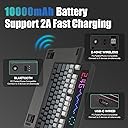
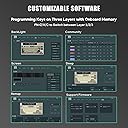
🎮 Elevate your desk game with the keyboard that types as uniquely as you do!
The EPOMAKER DynaTab 75X is a sleek 75% wireless mechanical keyboard featuring a vibrant 540-LED RGB dot-matrix screen, hot-swappable silent Sea Salt switches, and multi-mode connectivity (Bluetooth, 2.4Ghz, USB-C). Designed for gamers and professionals alike, it offers premium gasket-mounted typing comfort, rapid charging with a 10000mAh battery, and deep customization through dedicated software—making it a standout centerpiece for any modern workspace or gaming setup.


| ASIN | B0CT2BQS9X |
| Additional Features | Backlit, Customizable Display Keys, Ergonomic, Hot-Swappable |
| Antenna Location | Business, Education, Everyday Use, Gaming |
| Best Sellers Rank | #34,530 in Video Games ( See Top 100 in Video Games ) #1,670 in PC Gaming Keyboards |
| Brand | EPOMAKER |
| Built-In Media | Keycap Puller, USB Cable |
| Button Quantity | 84 |
| Color | Black Grey |
| Compatible Amazon Tablet Models | Amazon Fire 7 12th Generation, Amazon Fire 7 5th Generation, Amazon Fire 7 7th Generation, Amazon Fire 7 9th Generation, Amazon Fire 7 Kids 12th Generation, Amazon Fire 7 Kids 5th Generation, Amazon Fire 7 Kids 7th Generation, Amazon Fire 7 Kids 9th Generation, Amazon Fire 7 Kids Pro 11th Generation, Amazon Fire 7 Kids Pro 9th Generation, Amazon Fire HD 10 11th Generation, Amazon Fire HD 10 13th G… |
| Compatible Devices | Gaming Console, Laptop, PC, Tablet |
| Compatible Operating System Family | Windows |
| Connectivity Technology | 2.4ghz Wireless, Bluetooth, USB-C |
| Customer Reviews | 3.9 out of 5 stars 49 Reviews |
| Enclosure Material | Plastic |
| Hand Orientation | Ambidextrous |
| Keyboard Backlighting Color Support | RGB |
| Keyboard Description | Gaming |
| Keyboard Layout | QWERTY |
| Manufacturer | EPOMAKER |
| Model Name | EPOMAKER DynaTab 75X |
| Model Number | EPOMAKER DynaTab75X |
| Number of Keys | 84 |
| Number of Sections | 4 |
| Power Source | Battery Powered |
| Recommended Uses For Product | Business, Education, Everyday Use, Gaming |
| Series Number | 75 |
| Special Feature | Backlit, Customizable Display Keys, Ergonomic, Hot-Swappable |
| Style Name | Contemporary |
| Switch Type | Silent |
| Theme | gaming |
| Total USB 2.0 Ports | 1 |
| Unit Count | 1.0 Count |
| Warranty Description | 1 Year Warranty |
A**R
Very good, programmable keyboard.
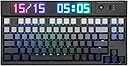
I wanted a keyboard that was wireless but had a wired option. I got this on sale after watching a review and am really liking it so far! I like the programmable RGB LED screen which also does animations!
J**P
too niche
The LED screen is a great idea, but executed too weirdly. I wish the pixels weren't so insanely huge, the DPI needs much higher resolution. Then if you could write custom programs for it, and have a community to upload shared codes would be amazing! I would love to the ability to have endless customization options, and see/try what other people invented.
C**T
not bad not good
love the sea salt silent switches but I switched them out for the akko silent fairy (lubed) ones i wanted even quiet ones absolutely love this keyboard only things that kept it from a 5 stars 1.) software is horrendous can't find away to change the clock from 24hr to 12 not a big gripe but like come on now. 2.) absolutely not a new product when they claimed it was bought for 22 dollars which is a steal but there was already scratches on the dot matrix and the peal was not present so beware
N**E
Software kills it.
Cool idea and execution for the price but the software makes the screen actually unusable for any custom anims. You also have to make an account to download any pre-made effects... no thanks sketchy Chinese keyboard brand. You can't scrub through the frames when editing the led bar in the software without hard crashing. Hardware Good Value, Software no value, so I have to take the under. 2 Stars.
Z**L
I don't like mechanical keyboards... But I LOVE this one!
I prefer the super thin and super quiet keyboards with scissor style keys. And I have tried A LOT of mechanical keyboards over the years, but all of the ones that I have tried, no matter how quiet the keys were supposed to be, were not all that quiet. The sea salt silent switches on this keyboard though, are the quietest mechanical keyboard switches that I have ever tried. However, it will take some getting used to for me to use this keyboard. Because the keys are so sensitive that I keep putting two spaces between words. Well, maybe it's just the space bar that's too sensitive, because I haven't been putting doubles of anything else. Anyway, the reason that I have taken a star off of my rating, is because there's hardly any instructions. For one, they don't say ANYTHING about how or where to get the software that's used to customize the screen and the backlighting. And then, they could be a bit more detailed about how to connect the keyboard. Because I had a hard time getting it to connect via Bluetooth, and an even harder time getting it to connect via a wired connection. Getting it to connect using the 2.4 GHz connection was plenty easy to do at least. Which, I would have been fine with just using that, but it is required to hook the keyboard up with the wired connection in order to download animated screens and animated backlighting scenarios that other people have uploaded to the software. I'm not sure how I exactly got it to connect with the wired connection, but I think it was just simply a case of not having the keyboard switched to the wired connection for a long enough period of time. Meaning that, I would switch the switch to the wired connection, and when it wouldn't connect I would switch it back to the 2.4 GHz connection within only a few seconds. When it finally connected though, I had switched it to the wired connection again, but this time I left it there for a while because I started doing something else. And after about a minute or two my computer beeped indicating that it was connected. As for the programming software, you need to go to Epomaker's website, find this keyboard and select it as if you were going to purchase it, and then just keep scrolling down until you see the link for downloading the manual and the link for downloading the software, both right next to each other.
A**R
quieter than expected! lots of fun!
This keyboard is really quiet and full of fun! Love it!
R**Z
Buyer beware
Dont waste your money on this. 3 weeks after getting this it wont connect to the computer. Pretty much locked out since it wont work on wired or bluetooth. It was connected with bt first, when the PC goes to sleep keyboard starts malfunctioning. Horrible. Too expensive to not even work.
C**N
Me gustó
El producto se siente genial, el switch sealt salt es espectacular.
B**X
Hübsche Tastatur
Sehr hübsche Tastatur, die Sea Salt Silent Switches machen ihrem Namen alle Ehre. Fühlt sich gut an. Keycaps fühlen sich ebenfalls sehr hochwertig an. Eine sehr schöne Tastatur!
S**A
2.4G disconnects frequently + received a damaged product
2.4G wireless connection is intermittently not working but of course its 3-in-1 so wired works perfectly fine and yet to try Bluetooth. Unfortunately I also received what seems to be a used product as the keyboard arrived with no protective peel on the RGB screen and is all scratched up as per my video. Otherwise, the Sea Salt Silent switches are amazingly smooth and quiet (as you’d hope). Looks fine with the lights on and can’t complain too much as I have purchased while on sale but be wary you may receive a used product.
S**E
Amazing
Quasi 1 giorno di full utilizzo , una bomba veramente molto elegante compatta e per chi magari odia quel rumore pesante dei switch selezionate "sea salt silent switch" per avere un feeling silenzioso alla digitazione dei tasti. Consiglio vivamente !
W**H
My First Mechanical Keyboard
This is my First Mechanical Keyboard and it's decently the most Unique with a Dot-Matrix RGB LED Screen. You can connect the keyboard by Bluetooth, wired by the USB-C to USB-A and 2.4Ghz modes using the supplied USB receiver that's located under the cover by the more selector switch. There is so many options to customize this keyboard, I don't know were to start. You need to go to EPOMAKER's Website an download the EPOMAKER DynaTab 75X Drive to help you customize and configure the keyboard. I don't do gaming with my keyboards, just doing a lot of photo editing work. I go through a lot of keyboards so I wanted to try a different type of keyboard that will last longer then a few mouth so I decided to to give this a try. The Dot Matrix Display, I just leave it on the date and I choose the Sea Salt Silent Switch for a more quite typing, I'm not use to the clacking. The typing experience is excellent, I'm very surprised how well it feels. The build quality is mainly ABS plastic anis heavy because of the 10000 mAh battery, My only issue I have with the keyboard are the labelling on the keys. They are in front of the keys and not traditional on top, so never taking typing in school makes it harder for me to type without seeing the keys. This is not the fault of EPOMAKER, I just have to order the correct key caps where they are swappable, this will help me change it over easily. I have so much to learn on what this keyboard can do but I'm looking forward to customize it to my use case. Again, I am very impressed with my first mechanical .
N**N
Proper headturner
Use this for office and home and it is a great conversation piece. It has all the necessary keys but most importantly the mode switcher is on top of the keyboard where many keyboard hide the mode switcher round the back or side. I replaced the switches with my own and am very pleased with home this turned out. Great keyboard for modders or non-modders.
Trustpilot
4 days ago
3 days ago