Buy anything from 5,000+ international stores. One checkout price. No surprise fees. Join 2M+ shoppers on Desertcart.
Desertcart purchases this item on your behalf and handles shipping, customs, and support to KUWAIT.
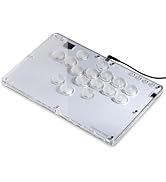
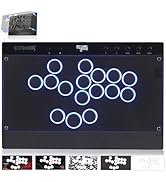
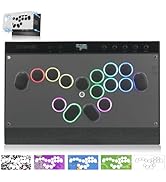
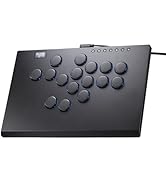
🎮 Elevate your game with the speed and style of the CosmoxGaming M16 Plus!
The CosmoxGaming M16 Plus is a premium leverless arcade stick featuring a durable CNC-machined aluminum body, Kailh crystal low-profile hot-swappable switches, and ultra-low 1ms latency via a Raspberry Pi GP2040 PCB. Compatible across PC, consoles, and handhelds, it offers ergonomic comfort, turbo mode, and firmware updates—designed for both casual players and pro-level fighting game enthusiasts seeking precision and customization.


| ASIN | B0D2X5BK7R |
| Customer reviews | 4.3 4.3 out of 5 stars (61) |
| Product Dimensions | 36.5 x 26.49 x 3.99 cm; 1.1 kg |
C**.
Currently my favorite Leverless controller. I got 4 including this. The Victrix Pro FS 12, Kitsune, Punkworkshop and this. The build quality is almost exactly like the kitsune but i prefer these switches more. From what ive noticed as well its less of a finger magnet then the Kitsune. Kinda crazy for the price point you pay for. This is my new main now.
J**N
Fantastic controller. It uses a gp2040 pcb so its about as fast as it gets in terms of the internals. Its a slightly faster pcb than 8bitdo leverless, but slightly slower than the new (much more expensive) novablade pro that was released a few months ago, but the differences are largely unnoticeable and more a theoretical advantage than anything. They all feel nearly instantaneous and youll find the system limitations of the game you play to be the real bottle neck, not the pcb. The gp2040 raspberry pi pcb has a much faster and more reliable pcb than the pcbs usually found in arcade sticks like the nacon daija or mayflash. If youre used to stick, youll notice this controller is much faster than what youre used to, youll develop new gameplay styles for sure. Once your nervous system adapts, youll find pcb speed irrelevant because your hands will form a connection to the subtlities of the controller. The switches installed are low profile crystal kalith switches, so very fast and reliable. If youre used to arcade sanwa type buttons, youll find these buttons are clearly superior and more reliable for faster gameplay and less mushy when you bottom out. If youre coming from an 8bitdo, youll find these buttons to be smooth and not clicky. Moreover, you can experiment with different styles of fingering than just traditional pianoing because of their sensitivity- this can make you less predictable in fighting games and make you a leverless wizard in no time. Just know the standard mx switches you see with keyboards arent compatible with this controller, few leverless controllers are,though ive seen them here and there pop up. these are low profile switches, not mx switches. So if you are looking to mod your controller with cherry mx silver speed switches or some other high end switch like that, you wont be able to but i think youll find these more than plenty fast enough for whatever you wanna throw at it, seriously! The buttons are very silent and have a nice premium feel. The case is aluminum and feels quality. Every controller has a personality to it, youll enjoy the way this feels. If you play very aggressively and frequently, the switches should feel perfect for about 4-7 months. When you begin to notice very slight issues, its time to switch out (when i say slight, i mean slight, it probably wont even be noticeable unless your game play is super tight and fast and enter into juggles on purpose). When its time to switch out switches, I suggest the shadow hunters, its probably the best switch compatible with this controller and they have a more satisfying mechanical feedback. They are very easy to install and like 20 bucks if you wanna upgrade. I got some warnings. Since the switches are low profile, you also wont be switching the switches under the caps with your standard mx switch puller as there is nothing to pinch but smooth plastic. This may feel like a dead end, but its not. You gotta use two a thin tip screwdrivers or drill bits (or something like that) and carefully extract it that way on the sides until you get under it and pry it out. It sounds scary but its very easy. After you get one out, the rest will be super easy. Also i ruined my controller on accident by trying to take the back plate off. I took out all the screws from the back and tried to wedge/pry it free from the mounting rods on the corners. I managed to get a millimeter under and now the dpad stopped working. That back plate is on there pretty solid, dont mess with it. Its probably also glued on, so unless you know what youre doing, I would avoid. There is also no reason to go back there. Pcbs rarely need to be replaced ever. Youre gonna probably want to at least map an up button on the dpad, but the mapping software can look intimidating and techy. Google gp2040-ce web configurator and follow the directions- plenty of youtube tutorials as well. Its not so bad. On that note, I dont think youll find too many advantages with the extra buttons. I know some players like to map a throw or parry button for the top right button, but if youre fantasizing about mapping some big long combo macro to one of the buttons I think youll find it to be more a hinderance to your gameplay. If you know, you know. Anyways, hoped this helped. People mention this controller as being a nice starter, but its very advantagous for even professional levels. This controller can take you as far as you want to in fighting games.
J**O
Buen manejo, diseños y botones, me encantó.
A**X
I love leverless controllers and have a Hitbox and Victrix ProFS12 and while I like those I always had a tough time using them on the P2 side in Tekken (not in street fighter for some reason). Wavedashing and backdashing in Tekken 8 was almost impossible for me on those controllers, but not on this controller! In a day I was wavedashing and backdashing fast from both P1 and P2 sides and getting EWGFs consistently. I am not using macros, but I did map another set of left/right directionals to 2 other buttons to make this possible. I got this on a slight sale and so far this has been worth the money I payed over the Hitbox and Victrix. Here are the pros and cons: Pros: - Build quality is ridiculously good for the price. - Buttons feel amazing and responsive. Not too sensitive and also don't have to mash them hard to register. They sound great, but I will experiment with different switches to see if I can get them to feel and sound even better. I still kind of prefer the Gravity KS buttons I installed on my Victrix though. - Lots of customization for the buttons and macros. - The price. - Compact, but has a bit of weight to it. - Plenty of room for hands to rest. - can change switches Cons: - No USB cord lock like on the Kitsune. - the update process was kind of weird... I'm lucky I found out about it through a Youtube video. - No native PS5 support (to be expected at this price point) - It's still a bit small to fit on my lap comfortably. This is one huge advantage of Victrix over this one. - Customization is limited. Overall, it's a solid purchase and this will probably be my controller of choice to use in tournaments once I get a PS5 adapter. Not sure how long it will last, but as long as I get a couple of years out of it I'm good!
J**0
For the price, this stumps the competition. I bought the Haute42 M16 Plus this week, and it is very, very nice. I debated hard on the 16 or the 12, but you will learn quickly having the extra buttons (especially in SF6) is amazing. I will say, I would join their discord channel or catch a YouTube video on how to update firmware and some other basics. However, when you get this thing set up (which really is not hard) it is awesome. Compared to some competition being at $400 and $300 dollars, this thing lacks no quality. I would say it is even better. Thanks to Haute42 for the sweet controller and not overcharging the fan base!
Trustpilot
1 month ago
2 months ago