Buy anything from 5,000+ international stores. One checkout price. No surprise fees. Join 2M+ shoppers on Desertcart.
Desertcart purchases this item on your behalf and handles shipping, customs, and support to KUWAIT.
🔥 Cool smarter, game longer — the ultimate thermal upgrade you didn’t know you needed!
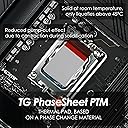
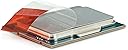
Thermal Grizzly PhaseSheet PTM is a premium 50x40mm thermal pad featuring phase change material that liquefies at 45°C to ensure optimal heat transfer. It offers superior thermal conductivity, long-lasting performance without drying or pump-out, and is non-electrically conductive for safe use on CPUs, GPUs, and sensitive electronics. Designed for easy application and durable cooling, it’s the go-to solution for professionals seeking reliable, maintenance-free thermal management.


| ASIN | B0DB84CQW6 |
| Best Sellers Rank | #2 in Thermal Pads |
| Brand | Thermal Grizzly |
| Brand Name | Thermal Grizzly |
| Cooler Heatsink Compatibility | Broad range of coolers and heatsinks |
| Customer Reviews | 4.5 out of 5 stars 1,215 Reviews |
| Global Trade Identification Number | 04260711991059 |
| Manufacturer | Thermal Grizzly |
| Model | TG-PS-50-40 |
| Number of Items | 1 |
| Number of Packs | 1 |
| Part Number | TG-PS-50-40 |
| Unit Count | 1.0 Count |
J**1
So easy. So effective. Won't need to open laptop again.
I've used Thermal Grizzly's graphene before; it was so impressive I knew I would never use Thermal paste again. However a laptop is a bit different from a desktop: it's going to flex, it's going to be at an angle. Also, the way laptop cooling systems attach to the motherboard don't allow for the amount mounting pressure most solutions require. The only solution that can accommodate this (relatively) reduced mounting pressure sure, and (even if small) frame flexing, is a Phase Change Pad. Regular paste quickly dries up due to "pumping," and never makes great contact, even when freshly applied. So, from the factory your laptop's cooler could be greatly improved with this product. My friend had been struggling with a 1 year old laptop that never worked right. This is an entry-mid level gaming laptop, minor power draw - not some monster with a 5090 graphics card. Since new he had problems with the CPU shooting up to 100 (or 110 according to HWINFO64) and throttling to a fraction of its advertised performance. This got worse over time: his CPU would thermal throttle just watching YouTube; putting the fans on max didn't even help (which indicates a thermal interface material contact problem). He tried using liquid metal in a desperate attempt to get it working: this is extremely risky, esp on a laptop... if just a tiny amount gets onto the motherboard your entire PC can get fried! Needless to say the liquid metal didn't work either. We decided a phase change pad was the only option left. There are other products for sale, but they don't list a brand/manufacturer; it is impossible to know the durability, thickness, thermal performance, and therefore value of these products. With Thermal Grizzly we knew we would be getting a top-of-the line product; it was worth paying a few dollars more and the no-name products: disassembling a laptop is not something you want to do more than once, be it immediately or a few months down the road, and regardless of whether you have an iGPU or a 5090, your laptop was expensive - you don't want to put some unknown product on the most important and sensitive component. The thermal grizzly pad in this size was big enough to do the CPU die and GPU die 2x. You can look up your die size if you are unsure, but the sizes are going to be very similar for most people. It is nice to have extra material, just for peace of mind - but applying this pad is very easy. Put it in the freezer for a few minutes. Peel off one of the plastic protectors, then apply just like a phone screen protector. The isn't so fragile and light weight that it will fall apart in your hands: you can adjust it etc without tearing. Even if you don't get a picture perfect application - the beauty of this product is that it forms to the exact thickness your PC requires. If one area of the CPU is getting slightly less pressure, and has a slightly larger gap between the cooler... liquid metal and paste cannot help you. This pad CAN. This totally fixed his PC - immediately. They say performance gets better over multiple cycles, but we saw a 10* drop immediately - and this is without having the fans at full blast. Long story short -- this little product fixed his laptop. It was unusable, now he is able to game for hours straight without problems. Like any gaming laptop is expected to do. Another spectacular product from Thermal Grizzly. I wouldn't use anything else.
W**3
Reliable and Efficient Cooling
If you're reading through reviews on this stuff, chances are you're looking to find out how it differs from standard thermal paste, and whether it's worth your time. Hopefully I can help you with that. Thermal Grizzly's Phase Change pads have many advantages over paste. Since I like to start reviews with the good, let's look at a few. Thermal paste dries out, and when it dries it loses its ability to conduct heat. It's a good practice to repaste every couple of years because of this. If you're the type of computer user who upgrades often, this probably won't apply to you since you're either getting rid of your old system before that paste dries, or you're constantly re-applying it anyway as you change cooling solutions or upgrade CPUs. On the other hand, if you like to run your systems as long as possible, these pads are for you--they DON'T dry out. Pretty nice stuff if you're going to be using them in a server or a system that won't see much in the way of regular maintenance. These pads also don't suffer from "pump out." Since your CPU and heat sink are usually made of different materials, they expand and contract at different rates. Over time, more and more paste gets pushed out until you've got areas with poor coverage. Phase change pads are solid at room temperature, and they turn into a sort of paste under high heat: your pads are expanding and contracting right along with your heatsink and CPU rather than being pushed out. I've repaired enough computers in my time to know that most of you don't apply thermal paste properly to begin with. Most folks fall into the "more is better" mindset and make a proper mess, like they're making a peanut butter sandwich. Others use far too little and have a lot of area uncovered. These pads take all the guesswork out of that by completely covering the die with a uniform layer. Also, if you're careful while removing your heat sink, you might be able to reuse the pad. It's solid at room temperature, remember, and it never dries out. If all that sounds good to you, here's how you use it. First, store the pad in the refrigerator until you're ready for it. It's solid enough at room temperature, but it'll rip less easily if it's cold. While the pad is chilling, remove your heatsink and clean off all that old paste. (Told you you use too much of it.) 99% rubbing alcohol works great for this. Take your pad out of the fridge, and line it up to your CPU surface. Use a Sharpie marker to mark off the length and width, then cut the pad to size. Now for the fun part: peel one side of plastic off the pad. Lay the exposed pad on your CPU, then press it down. Use your fingers to roll any air bubbles out of it. Then CAREFULLY... SLOWLY... peel the top plastic off. The pad is going to want to stick to the plastic more than it's going to want to stick to your CPU, so be patient with this. Once done, carefully install your heatsink (try not to slide it around, which might wrinkle the pad). Time to test temps, right? Well, no... not exactly. The pad needs a few hot/cold cycles in order to work its way into all the microscopic nooks and crannies. The general recommendation is to run a stress test for ten minutes, then power down the system to let things completely cool. Ten cycles like this is what most people recommend, but I've found four or five is enough. This is where Youtube reviewers tend to mess up, by the way: they'll slap on a pad, immediately run a stress test, then conclude the pads aren't as good as paste. Nothing could be further from the truth. Once cycled, you very likely will be getting lower temps than you would have gotten with tried-and-true paste. And you'll never have to apply it to that system again. That's my way of addressing the main disadvantage of the pads, which is that you could buy a tube of paste for what you're paying here. On the other hand, you're going to be applying that paste over and over again--and probably using too much of it anyway. (Don't worry, that's the last time I'll berate you for this.) The other downside is how meticulous you have to be about applying it. Just slow down and take your time. If the pad does rip, do your best to fix it and you should be fine. Highly recommended!
N**N
Works very well for high end mobile hardware in a laptop. EDIT also use on pc.
This works better than paste and as well as kryosheet (graphene pad) but without electrical conductivity. NO kapton tape needed. All you need is this and a scissors. Put it in the fridge for 20 minutes or freezer for 10 minutes. It gains a rubber like consistency where u can cut it with a scissors to the sizes of the cpu and gpu die, peel off one side, place it on the cpu and gpu then peel off the other side and you're done. Tweezers wont work, you have to use a razor blade or something as thin and flexible to help peel off the plastic on both sides of the material. Place the cooler on, screw it down tight as it will allow. Put the system under full load, and i mean full. What happens is the heat transfer to the laptop's heat sink is increased greatly. The only thing hot to the touch in the laptop at full load is the heat sink, nothing else. As it should be. Max temps on an i7 8750h cpu + gtx 1080 mobile are 67-75 Celsius under load (different games from mmos to first person shooters) and 47-50 degrees idle (just normal web browsing or video watching). Its better than thermal paste, as good as kryosheet. It doesn't dry out like thermal paste because it turns back into a solid when cooled below 40 degrees so u get a good 10 years+ easy without needing to repaste. As it thermal cycles the thermal conductivity gets even better, what it plateaus to i dont know. So far ive cycled about 5 times as of this review and Im getting good temps, can only think it will stay the same or get even lower temps as time passes. Thermal paste is obsolete. EDIT Also applied this on my computer and some computers at work, temp drops are better, FAR better than stock paste or the best thermal paste you can get your hands on. Though it will take more thermal cycling for the results to show, ie 60 or more cycles between room temperature and anything above 60degrees Celsius. The hotter a cpu can get, the less cycles you need. Temperatures stabilized (reached a point where they dont get better or worse) on my home computer faster than it did on the computers at work which use 9th gen i5s compared to 7th gen r5 7600x3d which my desktop uses and is under way more load than the ones at work. Forget the bad reviews talkin about bad application and screw ups, those people have too much lead in their water supply. If you have sense, you KNOW this thing makes thermal paste obsolete or you will come to the realization after trying it yourself.
A**R
Very worth
I'm about 6 months in with constant usage, and this PTM shows little to no degradation alongside my pads I installed. Massively helped, even if the application was cumbersome at first. I caved, and used a scalpel to cut and layer it onto my CPU. It dropped the temps on my overheating Alienware (shocker) from 98°c under heavy load down to 70°c under AIDA64. My fans dropped considerably now that I don't have to run them at max speed anymore. Stability is good, and as long as you can disassemble something down to the cooler and die it should work on just about anything. I was already wowed by TG's Kryonaut when I repasted this laptop for the first time 6 years ago, and I'm just as impressed in how it took so long for the material to degrade enough to warrant an upgrade. I have so much left over, I could easily do a desktop PC with this after I did my laptop. The storefront is also pretty good too, being a California company and all they're local to me which meant I received my order quickly.
S**T
Works great on our RX 6400
The simplest thermal paste application I've ever experienced. Takes up to 10 heating cycles for it to reach maximum efficiency? Could have fooled me! On the first run it tightened up the temperature delta between the GPU hotspot and GPU temperature on our XFX SWFT RX6400 (low profile) from ~15C with the stock thermal paste, down to under 10C difference. I haven't paid much attention to the temperatures since my initial testing after installation over a month ago. Easy 5 stars from me! Will definitely be purchasing this product again in the future.
E**K
Excellent PTM for the experienced.
Replaced the almost nonexistent application of cheap thermal grease Dell uses on their Alienware M16 R2 (Core 7 Ultra 155V, RTX 4070) and it works better than expected. Was told it was better than the PTM7950 and with so many knockoff of it, just makes sense to buy this. It did lose a star though as there is little room for error. Enough for 1 application and 1 screwup. And separating it from the plastic is tough and will likely break. But no big deal. Temps went from 100s to low 70s under load. Highly recommended. However keep it mind it will not show immediate results and needs a few heat/cool cycles to fully work.
L**T
Thermal Grizzly Thermal pad.
First time buying this product. Easy to install. I am surprised that it dropped my PC temperatures to an average of 40 degrees. Most definitely recommend over paste. I have a AMD Ryzen 7 5700X and they run hot. I have been playing my games on ultra and its been running cooler. It's a must buy.
T**N
Works well but not sure if its worth the price.
Works as intended. I neglected to do a proper thermal test to see the difference between paste and the phase sheet, but it seems to be similiar in performance. I do like how ot fits perfectly on the cpu and doesnt squeeze out the side creating a needless mess. But, you only get one sheet so I am still not sure if its better then regular thermal paste which can give you multiple uses.
M**J
Works flawless. Especially amd processors in laptops
This thing slaps.
T**E
Exceptional Performance
Decided to try this instead of Honeywell one because that one is difficult to find. In terms of application and ease of use it's pretty much the same as Honeywell. And I suppose performance wise as well because it's been quite some time since I applied it and my gaming laptop has not thermal throttled or even needed to ramp up fans a lot. Overall it's quieter, colder and stutter free. I highly recommend to ditch normal compounds and get this instead. Follow instructions carefully and remember to clean every part of your heatsink and cooling system properly because using this.
C**L
Thermal Grizzly - PhaseSheet PTM (50 x 40 mm) - High Performance Thermal Pad
Excellent getting 30c to 70c on hotspot watting for inbeding on a rx9060tx gpu 30c to 45c have got a few heat sinks an the back plate thou.
S**E
Cryo shift?
Excellent cooling. CPU maintained at 38C at idle versus 46C with cryosheet which found has uneven clamping when replacing to phaseshift.
İ**R
Uzun ömürlü
Normal termal macunlar kadar dereceleri düşürüyor ama diğer macunlar 1 hafta iyi, 1. ay bittiğinde üzmeye başlardı. Bu ise çok daha uzun süre dereceleri koruyacağı belli. Paranız yoksa da biriktirin bunu alın, uzun vaade de çok daha iyi olacak. Uygulaması zor, videolarını izleyin.
Trustpilot
2 weeks ago
5 days ago