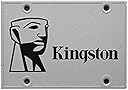
⚡ Upgrade your workflow with lightning-fast Kingston SSDNow A400!
The Kingston SSDNow A400 240GB SATA 3 SSD delivers up to 550MB/s read and 490MB/s write speeds, offering a 10x performance boost over traditional 7200RPM hard drives. Its compact 2.5-inch form factor ensures compatibility with most laptops and desktops, making it an ideal budget-friendly upgrade for faster boot times, reliable storage, and enhanced productivity.


| ASIN | B01FJ4UL2S |
| Are Batteries Included | No |
| Best Sellers Rank | #87,995 in Computers & Accessories ( See Top 100 in Computers & Accessories ) #572 in Internal Solid State Drives |
| Brand | Kingston |
| Colour | Silver |
| Computer Memory Type | Unknown |
| Customer Reviews | 4.4 4.4 out of 5 stars (2,010) |
| Date First Available | 18 May 2016 |
| Form Factor | 2.5-inch |
| Hard Disk Description | Solid State Drive |
| Hard Disk Rotational Speed | 7200 RPM |
| Hard Drive Interface | Serial ATA-600 |
| Hard Drive Size | 240 GB |
| Item Dimensions LxWxH | 10 x 7 x 0.7 Centimeters |
| Item Height | 0.28 Inches |
| Item Weight | 56.7 g |
| Item Width | 2.75 Inches |
| Item model number | SUV400S37/240G |
| Manufacturer | Kingston |
| Net Quantity | 1 Count |
| Processor Count | 1 |
| Product Dimensions | 10 x 6.99 x 0.7 cm; 56.7 g |
| Series | SSDNow A400 |
| Voltage | 240 Volts |
| Wattage | 2 |
| Wireless Type | Radio Frequency |
P**H
Excellent SSD.. Buy it without any Second Thoughts.!!
Purchased this SSD @ 4999/-. First of all I would like to extend my thanks and gratitude to Kingston and amazon too for making available such a sweet and great product at such a sweet deal. I purchased this SSD simply for my OS and downloading stuff because i was fed-up with standard internal HDD's speed,nearly takes forever to boot up windows and all. [Note: Those who purchase this HDD would need 2.5" SSD mounting brackets for installing this SSD in your PC Cabinet. Usually those mounting brackets come with your Cabinet itself(in my case) but if u don't got it cuz many cheaper cabinets dont provide it, so no worries you can easily purchase one from amazon or any online or local retailers. Also u need SATA 3.0/SATA 6gbps(both are same) port in your motherboard for this device to give you its full advantage and speeds. Using SATA 2.0/SATA 3gbps port will severly bottleneck its performance.] Now of to the Pros and Cons: Pros: i) SSD is very light.(Feels weighing like a couple of biscuits taken together) ii) Installaton is very easy.(Note: Requires 2.5" SSD mounting brackets) iii) Transfer speeds are blazing fast. iv) OS boots up in around 10-20 seconds(which is pretty extreme) v) Transfer speeds are: Read: 200-400mbps (In Case of SATA 3.0 -> SATA 3.0 & Depending on device used) 70-150 Mbps (In Case of SATA 3.0 -> SATA 2.0 & Depending on device used) Write: 150-250 Mbps (In Case of SATA 3.0 -> SATA 3.0 & Depending on device used) 50-100 Mbps (In Case of SATA 3.0 -> SATA 2.0 & Depending on device used) Cons: i) Build quality could have been better.Can get damaged or get broken or worse if mishandled. Apart from Pros and Cons and i highly recommend this SSD to every buyer out there who are looking for budget friendly SSD..!! Please go for it without any second thoughts.
A**I
Lets put a smile on your face!
The hard disk is great and should work with all laptops that have a 2.5 inch hard disk. I installed windows 7 yesterday and it boots in 6 seconds. The best part is you can start working a s soon as you see the desktop. No lags, no pressing the refresh button. 240 GB is enough space if you have an external hard drive. The hard drive also comes with a texture printed on it and is a delight to hold. This is my first SSD. If you have been using a hard disk I seriously recommend getting this one as its cheap and as soon as you see the benefits, you will have a smile on your face. Copying a large file from SSD to SSD gives a speed of around 200GB. I highly doubt anyone would copy files on the same SSD so the bottleneck of the transfer speed will depend on the device you are copying to/from. I installed Ubuntu as well and it booted in 2 seconds before I even understood what happened. It gets better, this is not the fastest SSD but the faster ones are marginally better and you will not feel any increase in performance. However, if your budget is higher, look for SSD's that have a longer life rather than higher speed. In case of speed, any SSD can beat a HDD.
V**H
Everyone must upgrade to an SSD!
I mounted the SSD in my Desktop PC and there is a major performance boost right away! If you're switching from a mechanical Hard Disk, you'll easily notice the improvement in responsiveness of your system. I get similar benchmark scores as other users, no surprises. Performs as expected. Just that the SSD is running about 4-5°C hotter than my Hard Disk Drive. At idle, the HDD is at 36°C and the SSD ranges from 40-42°C. I'm not sure if this is normal or not but anything under 50°C should be fine in my opinion. Apart from that, to fully utilize the SSD's potential, I would recommend performing a clean installation of Windows instead of using a migration or disk cloning software. Because in some cases, you may migrate your Windows Local Disk to the SSD but some programs might be installed on the mechanical hard drive bottlenecking your performance. After performing a clean install of Windows 10 (which by the way took only about 10 minutes from a formatted drive to a fully functional Desktop experience), the shutdown time was under 4 seconds and the startup time about 6 seconds. This with all basic software applications installed (eg. Chrome etc.), which in my opinion is impressive. My System Specs :- Intel Core i5 4670K 8 GB DDR3 RAM (1600 mhz) AMD Radeon R7 250X I was previously using WD Green 1 TB desktop HDD which had about 4000 hours on it. There were no issues with the HDD though. My only reason to upgrade was to increase the responsiveness of my system. I would recommend you to go for this or for that matter any SSD upgrade in your budget, because any SSD will give a significant performance boost over a conventional mechanical drive. Infact, an SSD upgrade may well give you more performance improvement than a RAM increase, given if you already have 4/8 GB of RAM depending upon your requirements.
D**T
Best for First time SSD user at a affordable price. A person need nothing more.
Awesome SSD and will be the best buy at Amazon. The speed exceptionally changes when you shift to SSD. Pros: -Got it for 4999 at Amazon (The drive is not even available with everyone ) -I guess SSD are always good so nothing specific to this. -Light Weight -Nice Logo -Metallic Cover -Easy to Install Cons: Could have much cheaper. I haven't faced any issue since I bought it and I think it has been few months now . I use it with original Windows 10 Pro and I works fantastic. After the Intel Screen Mobo the system takes only 2 seconds to come to login screen and takes no time after entering password to you working on any software you use. I will suggest you to install only very important software which you need on this rather just buy a 1 TB HDD either from Seagate or WD to run games and stuff . Do not overuse the space in this SSD at least try to keep 50 GBs empty everytime . And so is with HDDs . Have good time upgrading to an SSD with this great product .
H**N
Çok iyi
J**S
Meu PC ligava em 3 minutos, agora em 38 segundos. Vou trocar o do meu not também. Bom investimento, Pena que no brasil é um absurdo.
P**3
Win7内臓のノートPC強化のため、HDDからSSDに乗せ換えました。 Win10をクリーンインストールするので、事前にデータは移す必要はなく、 事前に念のためフォーマットして認識することを確認しました。 OSバックアップのUSBから起動して、無事にWin10環境がセットアップできました。 まずは一安心。これから速度など、効果があったか検証してみます。 実測はどうあれ、体感的に早くなっていれば満足なので、不満があればまた書き込みます。
A**O
Compre este SSD para regresar a la vida mi Macbook pro del 2010 ya que se sentía demasiada lenta con el disco duro tradicional de fabrica... después de instalarlo junto con RAM extra mi Mac parece como nueva a pesar de que la conexión al SSD es SATA 2, el sistema (Sierra) lo carga en menos de 30 segundos, es muy responsiva en ningún momento se congela como cuando tenia el disco tradicional (me refiero a ese pequeño tiempo que tarda un disco tradicional en leer o cargar un programa), no soy un usuario intensivo de Mac es decir para nada trabajo con cuestiones de diseño o cosas que demanden potencia pura del equipo pero pienso que este SSD rinde mas que suficiente para esos trabajos, lógicamente interviene todo el hardware del equipo (procesador, memoria, graficos, etc.) pero enfocándonos en el SSD solamente pienso que si es muy capaz. El SSD como la mayoría de aquí lo recomiendo sin mayor problema la marca Kingston es de buena calidad, es un SSD "estandar" es decir no es un SSD de gama alta que maneje altas tasas de lectura o escritura pero para la mayoría de usuarios la verdad es que no van a notar la diferencia, en cuanto a la conexión es tipo SATA 3 pero es compatible con SATA 2 sin problema (como en mi caso), el SSD como dato para aquellos que no sepan mucho de computadoras se puede usar también en una PC de escritorio para que no piensen que solamente es para portátiles. En cuanto a la compra en Amazon todo salido muy bien, lo compre y elegí envio gratis (no prime) y llego antes de lo que se esperaba, el empaque llegó entero y asi como llego lo instale en menos de 5 min en mi Mac.
B**R
Reçu en quelques jours, acheté le premier sur le compte Prime de mon père, le deuxieme pour une réparation d'ordinateur d'une amie. Disque ultra rapide, je boot mon pc en 10 sec et il s'éteint en moins de 5 sec !!! incroyable, rapide, efficace en lecture comme en écriture et à un prix défiant toute concurrence !!!
Trustpilot
1 month ago
3 weeks ago