Buy anything from 5,000+ international stores. One checkout price. No surprise fees. Join 2M+ shoppers on Desertcart.
Desertcart purchases this item on your behalf and handles shipping, customs, and support to KUWAIT.
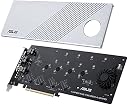
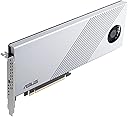
ASUS Hyper M.2 x16 Gen 4 Card (PCIe 4.0/3.0) supports four NVMe M.2 (2242/2260/2280/22110) devices up to 256 Gbps for AMD TRX40/X570 PCIe 4.0 NVMe RAID and IntelR platform RAID-on-CPU functions Two-phase power solution with up to 14-watt output supports the latest NVMe drives Large heatsink and active fan reduces M.2 SSD temperatures for unthrottled transfer speeds and enhanced reliability Adapted server-grade PCB supports up to four PCIe 4.0/3.0 M.2 drives, with up to 256 Gbps bandwidth for smooth data transfers Compatible with AMD TRX40/X570 PCIe 4.0 for NVMe RAID and supports Intel platform RAID-on-CPU functions Also support other vendors" motherboards via PCIe bifurcation in BIOS setting PCIe 4.0/3.0 x16 interface, compatible with PCIe x8 and x16 slots, support data transfer rates up to 256 Gbps. External Connectors Up to 4 x M.2 slots (Key M), type 2242/2260/2280/22110 (supports PCIe 4.0/3.0)* * Supports PCIe M.2 storage devices only. Maximum SSDs support will vary, depends on different motherboard's design. LED & Button 1 x M.2 FAN Power Switch 4 x M.2 access LEDs Features AMD TRX40/X570 Series Motherboard models with PCIe 4.0 support Supports PCIe 3.0 bandwidth for other RAID on CPU models. Maximum numbers of M.2 SSD support will vary, depending on different CPU specs and PCIe bifurcation settings in different ASUS motherboards. Please see the FAQ link for full compatible lists and further information: https://www.asus.com/support/FAQ/1037507 Dimentions 27 (L)*12.2(W) *1.5(H)cm Review: Read the fine print Review: Kein Spielzeug für Laien! - Die Karte funktioniert zu 100%! Auch mit 4 SSDs, wenn man weiß was man tut! Vorab, wer ein normales Motherboard (Office-PC, Gaming-PC) hat und auch eine Grafikkarte im System hat, wird es wahrscheinlich nicht schaffen mehr als 2 SSDs ans laufen zu bekommen und das auch nur unter Einbußen der Grafikkartenleistung. Die PCIe Lanes müssen halt aufgeteilt werden. Wer noch nie etwas von "PCIe Bifurcation" gehört hat oder weiß wieviel Lanes die PCIe Slots des Motherboards oder die verbaute CPU kann und wie man diese aufteilt, sollte spätestens jetzt aufhören zu lesen und die Karte nicht kaufen! Die Karte ist halt nichts für Laien! Um die volle Funktionalität der Karte nutzen zu können – insbesondere die Aufteilung des PCIe x16-Slots in vier x4-Lanes (PCIe Bifurcation) – muss dies im BIOS des Mainboards manuell konfiguriert werden. Viele Mainboards unterstützen diese Funktion nicht von Haus aus oder erfordern ein BIOS-Update. Eine falsche Einstellung kann dazu führen, dass die SSDs nicht erkannt werden oder das System instabil wird. Bei mir läuft die Karte unter Proxmox VE absolut stabil, es werden alle 4 SSDs (WD RED SN700) immer erkannt und die Karte erreicht auch einen ordentlichen Durchsatz. Eine SSD benutze ich für Snapshots innerhalb von Proxmox VE. 3 SSDs sind durchgereicht und laufen als Cache Pool im RaidZ1 in einer Unraid VM und das alles ohne Probleme.
| ASIN | B0863KK2BP |
| Brand | ASUS |
| Brand Name | ASUS |
| Compatible Devices | Personal Computer, Laptop, NVMe SSD |
| Country of Origin | China |
| Customer Reviews | 4.2 out of 5 stars 354 Reviews |
| Global Trade Identification Number | 04718017624923 |
| Hardware Interface | PCI Express x16 |
| Item Weight | 322 Grams |
| Manufacturer | ASUS |
| Model Number | HYPER M.2 X16 GEN 4 CARD |
| Operating System | Windows, Linux |
| Style | Modern |
| Style Name | Modern |
B**N
Read the fine print
J**B
Kein Spielzeug für Laien!
Die Karte funktioniert zu 100%! Auch mit 4 SSDs, wenn man weiß was man tut! Vorab, wer ein normales Motherboard (Office-PC, Gaming-PC) hat und auch eine Grafikkarte im System hat, wird es wahrscheinlich nicht schaffen mehr als 2 SSDs ans laufen zu bekommen und das auch nur unter Einbußen der Grafikkartenleistung. Die PCIe Lanes müssen halt aufgeteilt werden. Wer noch nie etwas von "PCIe Bifurcation" gehört hat oder weiß wieviel Lanes die PCIe Slots des Motherboards oder die verbaute CPU kann und wie man diese aufteilt, sollte spätestens jetzt aufhören zu lesen und die Karte nicht kaufen! Die Karte ist halt nichts für Laien! Um die volle Funktionalität der Karte nutzen zu können – insbesondere die Aufteilung des PCIe x16-Slots in vier x4-Lanes (PCIe Bifurcation) – muss dies im BIOS des Mainboards manuell konfiguriert werden. Viele Mainboards unterstützen diese Funktion nicht von Haus aus oder erfordern ein BIOS-Update. Eine falsche Einstellung kann dazu führen, dass die SSDs nicht erkannt werden oder das System instabil wird. Bei mir läuft die Karte unter Proxmox VE absolut stabil, es werden alle 4 SSDs (WD RED SN700) immer erkannt und die Karte erreicht auch einen ordentlichen Durchsatz. Eine SSD benutze ich für Snapshots innerhalb von Proxmox VE. 3 SSDs sind durchgereicht und laufen als Cache Pool im RaidZ1 in einer Unraid VM und das alles ohne Probleme.
C**/
Exotic but really rather good.
J**S
Has been a fast, solid performer in service
M**Z
Destekleyene mükemmel bir ürün
Benim anakart ve işlemci pci express portunda z490 anakart i5 11400f işlemci ile sadece tek port çalışıyor normalde anakart ve işlemci pci slotu destegi varsa 4 ssdye kadar tanıyor bende 1 port çalıştı bu benim suçum işlemci desteğine bakmadan satın aldım .tek port çalışınca iade etmek zorunda kaldım
Trustpilot
1 month ago
3 days ago