Desertcart purchases this item on your behalf and handles shipping, customs, and support to KUWAIT.
🚀 Elevate your Wi-Fi game — because buffering is so last decade!
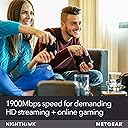
The NETGEAR Nighthawk R6900P AC1900 Smart Wi-Fi Router delivers ultra-fast dual-band wireless speeds up to 1900 Mbps, covering up to 1800 sq ft and supporting 30 devices simultaneously. Equipped with 4 gigabit Ethernet ports and a USB 3.0 port, it offers versatile wired and wireless connectivity. Advanced features like MU-MIMO, Beamforming+, Dynamic QoS, and NETGEAR Armor security ensure optimized performance and robust protection. Voice control via Alexa and Google Assistant adds modern convenience, making it ideal for busy homes and professional environments.


| ASIN | B07C65K9H9 |
| Antenna Location | Security |
| Antenna Type | Fixed |
| Best Sellers Rank | #14,666 in Computers & Accessories ( See Top 100 in Computers & Accessories ) #467 in Computer Routers |
| Brand | NETGEAR |
| Built-In Media | Nighthawk AC1900 Smart WiFi Router^Three (3) detachable antennas^Ethernet cable^Quick install guide^Power adapter |
| Color | black |
| Compatible Devices | Phone, Mac, PC, Wireless Devices, Media Streaming Devices, Laptops, Computers, Tablets |
| Connectivity Protocol | ethernet, wi-fi |
| Connectivity Range | 1800 square_feet |
| Connectivity Technology | Ethernet, Wi-Fi |
| Control Method | Voice |
| Controller Type | amazon_alexa, android, ios, vera |
| Coverage | Medium-sized home |
| Customer Reviews | 4.3 out of 5 stars 5,149 Reviews |
| Data Transfer Rate | 1300 megabits_per_second |
| Frequency | 1 GHz |
| Frequency Band Class | Dual-Band |
| Global Trade Identification Number | 00606449118223 |
| Item Dimensions L x W x H | 13.7"L x 10.08"W x 3.11"H |
| Item Type Name | Netgear R6900P-100NAS Nighthawk AC1900 Smart Wi-Fi Router – MU-MIMO Dual Band Gigabit |
| Item Weight | 750 g |
| LAN Port Bandwidth | 1 gigabits per second |
| Manufacturer | NETGEAR |
| Maximum Upstream Data Transfer Rate | 950 megabits_per_second |
| Mfr Part Number | R6900P-100NAS |
| Model Name | R6900P-100NAS |
| Model Number | R6900P-100NAS |
| Number of Items | 1 |
| Number of Packs | 1 |
| Number of Ports | 4 |
| Operating System | Microsoft Windows 7, 8, 10, Vista, XP, 2000, Mac OS, UNIX, or Linux |
| Other Special Features of the Product | QoS, WPS |
| RAM Memory Installed | 256 MB |
| Router Firewall Security Level | High |
| Router Network Type | wireless |
| Security Protocol | WPA2-PSK |
| Special Feature | QoS , WPS |
| UPC | 606449118223 |
| Unit Count | 1 Count |
| Voltage | 120240 volts |
| Warranty Description | 1 Year Warranty |
| Wi-Fi Generation | WiFi 5 |
| Wireless Communication Standard | 802.11ac |
| Wireless Compability | 802.11ac |
A**T
This NETGEAR Nighthawk R6900P is working great!
It was super easy to swap this router with my old one. I just copied all of our same passkey & router name info, including No SSID Broadcasting as I always set previous routers, all of which was an option in the Setup process, to make the transition smooth for all of our connected devices, including the Ring® doorbell & NETGEAR Extender downstairs and it went very well! (I always disable SSID Broadcasting for added security......it does NOT prevent devices from connecting wirelessly if the correct SSID & passkey is entered and saved on the device.....by disabling the SSID Broadcast, our neighbors can't see our router's name or that it even exists). This NETGEAR NightHawk R6900P is using both 2.4GHz & 5GHz simultaneously, something that our Linksys E3000 was supposed to do, but never really did (I could tell on the admin screen for the E3000 that it was always broadcasting 5G, which it should still do, even if no devices are connecting through it). The only small issue I noticed with this router is logging into the router's settings, all of my previous routers over the last 20+ years, I've been able to assign the router's User Name and Password, but with the NightHawk, I can only change the router's password, I cannot change the User Name from "admin", which seems odd to me. Otherwise, since installing this router 24 hours ago, I'm completely impressed, however, if anything changes, I will update my review. Note: in one of the two photos, you'll see the fourth LED from the right is orange/amber......that was indicating that one of the PCs I have hooked up to the router via ethernet was at 100Mbps vs 1000Mbps or gigabit......that PC was not powered on and hadn't been since installing the Nighthawk, but as soon as I powered it up, it went to white.
M**E
Super quick set up - Super fast speeds!
Let me start by saying that I have been using my cable company's combination modem/router for wifi in my home. In my house it's me, my husband, an 11-year old and a 3-year old. The 11-year old has electronics that connect to the internet and my 3-year old LOVES Disney+ so we are constantly streaming and on multiple devices throughout the house at one time. Someone was always getting booted off, so I finally decided to spring for a separate router. There are so many routers out there, I really didn't know where to start, but someone at Best Buy once suggested the Netgear Nighthawk with the MU-MIMO technology. I wasn't totally sold at first because of the price, but now that I have it - I WILL NOT GO BACK. I literally set it up while taking a phone call (yes - it was easy enough to multi-task without issues)! My internet has never been this fast. You could tell the difference the second I connected my devices to it. I have probably about 10 devices set up to it so far, and no issues. I will say that the lights on the router are super bright, so try to make sure it's not in a room you sleep in if lights bother you. My only regret is not getting a protection plan on it... I would hate to see something happen to it. I'm too attached already, LOL. All in all it's a fantastic product, and I would 100% recommend it to anyone.
L**D
Solid router, it's hard to think of cons.
So originally I had Spectrum's newer routers, the ones shaped like a tower. Due to unforeseen circumstances, I had to exchange it for an older model that wasn't holding up to the amount of devices I had connected (about 35, got a lot of Google Home's :^P). This router basically alleviated all those issues, and I get better connectivity in a 2-floor 2000 sqft home than with the either old router. Speed at the weakest zones are about half the allotted bandwidth, so it's hard to be upset. Setup wasn't too bad either. tl;dr: PROS: • Easy to setup. • Strong signal for around 2000 sqft. • No bottlenecking with a lot of devices. CONS: • If I had to nit-pick, it takes up a bit of desk space. The tower model of router is pretty ergonomic in terms of desk real-estate. This kinda pancakes out. Otherwise, solid router!
A**A
Great when it works; Terrible when connection drops & firmware updates are all useless.
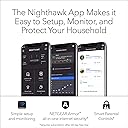
It is currently 2021, I bought this router back in 2019 as an upgrade for a 7 year old router with the price tag of $199. I have always understood the saying "you get what you pay for", and with this router, I thought I did. I shouldn't have compromised and replaced it right away, but I wanted to give the benefit of the doubt. As a decade+ user of Netgear products, I wanted to try their Nighthawk router and it did not disappoint, in the first year, that is. And as long as you use the original firmware that it came with and not update, you'll be content. At that time and even till now, the firmware updates significantly cuts down isp's speed to 70%, more or less. Aside from that hiccup, everything on paper that describes this product is on point. With a little bit of tinkering, you can set up your home wifi perfectly. You can set up the router via the Nighthawk App or thru the web browser. I used the latter to set up mine. As with many network things, they eventually shows signs of wear and tear, and starts to deteriorate. I was hoping for this router to last me at least 5 years but sadly, it is time to let go. The constant drops and resets of its connection has place me at my wits' end. Plus the poor firmware updates that failed to improve it adds to the wound. Lastly the hack that occurred in 2020, with no firmware update to fix it's vulnerability puts it on my cutting block. Thankfully not all Netgear routers were affected so I hope that my next Nighthawk router would have better luck against getting hacked. Currently I'm torn between the Rax200 and the Orbi Mesh Pro triband wifi 6 units; I'm hoping my next choice would last me at least 5 years this time. I've reported my support ticket many times, spoken to more than a dozen helpful netgear tech support and a handful of supervisors at the netgear support site on how to fix and improve the router; but ultimately they were only able to provide me with a temporary patch. One was to revert to the original firmware so that the loss of 30% was fixed.
J**.
You could get a higher priced router, but why?
Works great; setup wasnt terribly complicated...ATT Uverse/Fiber users will need to turn off the radio signals (2.4 AND 5ghz signals) as well as configure the ATT supplied gateway to bridge or IP passthrough in order to make your router function properly. The GUI works great and is very intuitive; I was able to use advanced functions by simply nosing around the tabs for the different functions. The MU-MIMO technology is a godsend, and I now have 11 devices in my house utilizing the same connection, and none interfere with the other. I can game, my wife watches netflix in HD, and my daughter can watch her favorite youtube vines, and we do it all at the same time with no issues..for power users if you absolutely have to divert bandwidth allocation this router can do it. But my personal favorite function as a parent is the ability to use parent controls from the network map to make sure my daughter follows the rules we set. We can even block any device with the touch of one button. Also, if you are a social bug you can configure a guest connection with encryption if you want to stay on the safe side. All and all a quality router at a very affordable price.
N**S
Absolute garbage.... don’t waste your time or money....
Updated review: ONE STAR FOR THIS PIECE OF GARBAGE! Zero if it were possible. Just don’t. Don’t buy this router. My initial review details all the bugs I dealt with. After a third-party helped me get it up and running, it completely died a couple months later. The router worked great for a couple months. Once its armor trial expired, it went south. Took it to third party and they confirmed that it’s a very flawed product and was essentially dead. Going to try to send back to Netgear since I can’t return it to Amazon. I don’t even want my money back, I just never want to see it ever again. Will never purchase another Netgear product after this headache. Previous review: This router is great! Exactly what I needed! I purchased it new, HOWEVER, when I initially went through the install using my laptop, every time I tried to update its firmware, it failed. Operating it without updated firmware resulted in slow internet speeds and getting flagged as a freaking bot by Google--not good. Tried to update firmware through the app and even though the firmware downloaded successfully (hooray), the router couldn't find the internet (though the lights indicated otherwise) or could then not find itself (rescind hooray)--existential crisis? Took the router to a local IT store and they were able to download firmware successfully and remove 47 bugs the router came with. It's been a journey. In the end, I'm happy with it. Just wish it would have operated exactly like this without needing a third party's assistance. I'm fairly tech savvy but ended up with a good headache after my first two setup attempts. Oh, and tech support was not easy to access--I watched Netgear's videos and read the FAQ but couldn't find anything about firmware not downloading successfully. Registered product to access tech support, logged in, computer said product wasn't registered, tried to register again, computer said product has already been registered... logged in, it worked. Filed ticket, obtained tech support number, called and they couldn't hear me or I couldn't hear them. At this point, I did box it up and prepared to return it to Amazon, when my boyfriend decided we should try to seek an independent tech support solution. Glad we did. Because in the end, I do really like this router. So 4-stars it is...
T**Y
Great Router that Boosted by Speed up to my Paid Service Speed!!!!
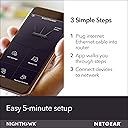
I knew my WiFi just wasn’t as fast as it should be. Using a speed checking application, I was only getting 25MBS and my plan said I should have 200 MBS. No wonder my devices kept dropping. I was using Apple’s Airport Express and had for years. I got the idea to look for a new wifi router so I chose this Nighthawk router based upon recommendation from my nephew. OMG!! I couldn’t believe the difference as soon as I plugged it in and set it up. My speed testing app (as well as the router’s own speed test) was OVER 200mbs!!!!! My other router had either gone bad or was just garbage. With the Netgear app, the router was extremely easy to set up. I was up in running no more than 10 minutes after I had it. I used the same SSID as my old router so I wouldn’t have to reprogram all my devices!! Highly recommend this router. Seems to give me good coverage in my two story home (1,800 sq ft).
C**R
Very good router for the price
It’s a very good router for the price. I live in an apparent and recently added a lot of wifi devices. My old router was not able to handle all the devices and it was very slow. Then I bought this router from Amazon and am really impressed. All my devices are working great and getting full internet speed now. 2.5GHz signal will become weak when you move away from router but 5GHz signal is still stronger. I am getting 40 Mbps download speed for 2.5GHz signal and over 100 Mbps for 5 GHz signal when you are close to the router. Also really impressed by the set up using the App and we can see and control lot of things (like the devices connected to my network) using the App. I am yet to explore it completely. I have 10 devices connected and getting good speed in every corner for my 1300 sq. ft appartment.
M**R
Would not buy again
I do not recommend this product. We lose internet almost daily and are forced to restart the router. The problem started after 1 month. The compagnies customer service was no help.
E**)
NETGEAR Nighthawk Smart WiFi Router (R6900P)
Good router for your money.
Trustpilot
3 days ago
2 weeks ago