Buy anything from 5,000+ international stores. One checkout price. No surprise fees. Join 2M+ shoppers on Desertcart.
Desertcart purchases this item on your behalf and handles shipping, customs, and support to KUWAIT.
🚀 Power your next-gen build with ASRock X870E NOVA – where speed meets stability!
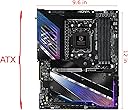
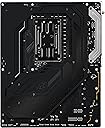
The ASRock Phantom Gaming X870E NOVA WIFI motherboard is a premium ATX board designed for AMD Ryzen 7000/8000/9000 series processors. Featuring a robust 23-phase power design, support for DDR5 RAM up to 256GB at 8200 MHz, and five M.2 slots including PCIe 5.0 Gen5, it delivers exceptional performance and future-proof expandability. With dual USB4 Type-C ports, WiFi 7, and optimized 5Gbps LAN, it offers cutting-edge connectivity for professional and gaming setups. Its toolless M.2 heatsinks and sturdy build quality make it a top choice for enthusiasts seeking reliability and speed.
| ASIN | B0DFZQJFC1 |
| Best Sellers Rank | #38 in Computer Motherboards |
| Brand | ASRock |
| CPU Model | Ryzen 7 |
| CPU Socket | Socket AM5 |
| Chipset Type | AMD X870E |
| Compatible Devices | Personal Computer |
| Compatible Processors | AMD Ryzen 7000 Series Processors, AMD Ryzen 8000 Series Processors, AMD Ryzen 9000 Series Processors |
| Customer Reviews | 4.1 out of 5 stars 172 Reviews |
| Global Trade Identification Number | 04710483949654 |
| Graphics Card Interface | Integrated, PCI Express 4.0 |
| Item Weight | 1 Kilograms |
| Main Power Connector Type | 24-Pin |
| Manufacturer | ASRock |
| Memory Clock Speed | 8200 MHz |
| Memory Slots Available | 4 |
| Memory Storage Capacity | 256 GB |
| Mfr Part Number | 90-MXBPX0-A0UAYAZ |
| Model Name | X870E NOVA WIFI |
| Model Number | X870E NOVA WIFI |
| Number of Ethernet Ports | 1 |
| Number of Ports | 35 |
| Platform | Windows 10, Windows 11 |
| Processor Socket | Socket AM5 |
| RAM Memory Technology | DDR5 |
| Ram Memory Maximum Size | 256 GB |
| S/PDIF Connector Type | Optical |
| System Bus Standard Supported | SATA 3 |
| Total Number of HDMI Ports | 1 |
| Total PCIe Ports | 3 |
| Total SATA Ports | 4 |
| Total Usb Ports | 21 |
| USB 2.0 | 6 |
| Warranty Description | 1 year |
J**L
Surprisingly good motherboard
I was very skeptical about this motherboard, the last time I had purchased an ASRock motherboard was over 5yrs ago & it only lasted one year. I was very surprised when I received the package, and opened the box, it was literally so beautiful, I seriously paused for a moment to just appreciate the beauty. The motherboard is put together very well, I couldn't believe it's an 8-layer PCB, has a metal back plate, and all of the PCIe lanes correctly setup for the lower price that it is verses the competition. I do understand that there have been issues with previous versions of the bios mostly with PBO settings. My motherboard came with bios 3.20, and I promptly updated to 3.25, now there is another bios version available, however I believe this is for upcoming new CPUs & I haven't yet updated my bios to the latest. I also do not use PBO, I set a multiplier & set the CPU core voltage & SoC voltage & it's been stable. I am using a 9800 X3D, set all 8 cores to 5.4 GHz, set CPU core voltage to 1.24v (it actually goes lower on its own), & SoC voltage to 1.24v (it also goes lower on its own). While I don't dismiss there could be an issue with this motherboard & it killing CPUs, I do think it is mostly due to users just plugging in the CPU and just allowing it to run at system defaults, which has shown will do in the CPU based on how good the cooling it has. The only issue I had with the motherboard is that it has to have a thumb drive formatted as Fat32, which means you need a smaller size drive to get this done. Once I got found a smaller size drive, it updated quickly and all is well. The only other downside for me is that the bios looks likes & feels like something from early 2000s, so this is also why that you are stuck to using a Fat32 formatted drive, so if ASRock wants to truly fix something, this would be a huge plus if they could fix their bios & be able to use larger size drives for updates. One last issue I had is the memory list, I have 3 different memory kits & only one is on it, however, its rock solid on the EXPO I profile, so I just mention this as a warning to make sure to look at the qualified memory list, & also this is the first time I've seen a M.2 drive support list, again make sure to go over this list to make sure you don't have compatibility issues later. Overall, I would recommend this motherboard & has been completely stable since the start & I will come back and change the review should something happen. Speaking seriously, I am about to give up on AMD due to mostly memory compatibility issues, I still have Intel systems working today & are older systems & they were stable from day one & didn't have to jump through all these hoops to just get it working, I truly hope AMD can get this sorted out soon, because at this moment I have no hope, because we are like 3yrs or more into the platform & memory issues still exist. ASRock needs to seriously work on their own software for their products. The software they have made to control the system fans, while works, it doesn't work well & also their software for the lighting control works, it's just very clumsy & strange to use. It would be great if they could get their software put together better. My Computer build: Windows 11 Pro CORSAIR 7000D AIRFLOW Full-Tower ATX PC White Case ASRock X870E NOVA WIFI AMD X870E ATX Motherboard bios v3.25 AMD Ryzen 7 9800X3D overclocked to 5.4ghz all cores 1.24 volts G.SKILL Trident Z5 Neo RGB Series 64GB (2 x 32GB) 288-Pin PC RAM DDR5 6000MT/s Model F5-6000J3040G32GX2-TZ5NR Samsung 980 Pro M.2 2280 1TB PCIe 4.0 x4 NVMe (boot drive) Crucial P3 Plus M.2 2280 4TB PCIe 4.0 x4 NVMe (game drive) Western Digital SN850X 1TB PCIe 4.0 x4 NVMe (backup drive) be quiet! Silent Loop 3 420mm CPU AIO Liquid Cooler with 6 Phanteks D30-140mm fans setup in a push/pull in front of case 3 Phanteks D30 140mm set as exhaust on top of case 1 Phanteks D30 140mm reverse blade fan as rear intake fan ASRock Phantom Gaming PG-1600G 1600W 80 PLUS GOLD & Cybenetics PLATINUM Full Modular Power Supply ATX3.1 & PCIe5.1 ASUS TUF Gaming GeForce RTX 4090 OC Edition Gaming Graphics Card Logitech Z906 5.1 Surround Sound Speaker System THX certified CORSAIR K70 RGB PRO Wired Mechanical Gaming Keyboard-Cherry MX RGB Red Linear Switches Corsair Dark Core RGB Pro SE Qi Wireless Charging Certified ASUS ROG Scabbard II Extended Gaming Mouse Pad Creative Sound BlasterX AE-5 Plus 32-bit 384 kHz PCI-e Interface Sound Card Samsung S90C 55” QD-OLED TV 4k UHD HDR 144hz Free sync Premium Pro (main monitor) LG OLED42C2PUA 4K evo OLED TV (2022) – (second monitor)
C**C
Great Features, Performance, and Value
Good onboard WiFi 7 and bluetooth support (unfortunately using a standard screw-on coaxial antenna connection instead of easy click on/off solutions). PCIe - keep in mind the bottom PCIe slot is x16 wide but ONLY operates up to x2 mode. So if you need a x4 card, like many PCIe capture cards then choose another board! USB ports are plentiful and support the latest and greatest in USB 4. Good RGB and fan support with well placed ARGB and PWM/DC fan headers. The RGB does not look too tacky and is adjustable with OpenRGB (the Asrock software is a bit buggy). Good RAM compatability, but I recommend checking the memory QVL before purchasing a RAM kit (works with KLEVV CRAS V RGB DDR5 6000 MHz - good value RAM as well) Well built and hefty. The convenience features are also awesome: - Integrated IO shield means no fiddling with one and less alignment issues - Each NVMe slot has a little rotating plastic bit where the screw typically goes, so installing and SSD is just a matter of moving the small plastic bit with a finger instead of needing a screwdriver. - The graphics card slot pull tab is much easier to press than the regular tabs and helps taking out the GPU to access NVMe slots or swapping cards. One of the few(er) boards that will allow populating all NVMe slots without decreasing the bandwidth of the graphics card. Does not matter for a lot of applications, but if graphics memory bandwidth is important it is nice to know that it will support it.
L**N
Worked great, until it fried my CPU
For the 7+ months it worked, it worked fine. No problems, everything worked as it should have, even the RAM worked at the right speed. Easy to set up and connect everything, plenty of USB ports. Then a few days ago it decided to fry my CPU. Nothing changed in the system, nothing new added, wasn't even running anything, it was just idling while I was doing something else, and decided to fry my 9800x3D. Now I have to deal with AMD customer support (surprisingly easy) and ASRock customer support (not surprisingly easy). I honestly don't even want a new board, I just want my money back.
J**S
The best X870E motherboard for AM5 at a reasonable price
It seems every MB I considered had it’s detractors and I carefully considered the reviews I found on Amazon and Newegg and I read many. There seemed to be a consensus that the ASRock Phantom Gaming X870E Nova had the best bang for the buck feature wise. My experience with it is that it was relatively easy to work with, it’s well laid out, seems to be very robustly built with a sturdy back plate and has a robust power stage. The instruction manual has a lot to be desired, I’ve seen far better in the past and it took me a bit of time to figure out where everything is in the BIOS but with time and patience I figured it out. Remember to go to the ASRock website and download the Software/BIOS Setup Guide in addition to the User Manual. Remember to configure the BIOS to use the Integrated Graphics Controller from the MB prior to installing the GPU which requires the proper drivers being installed first which you download from the GPU vendor. Also ASRock can install the necessary drivers for the MB in the BIOS, Boot into the BIOS, and a notification will pop up in the lower right corner of your screen saying, "Do you want to one-step-install the latest drivers simply from ASRock Auto Driver Installer?" Select YES and it will do it as long as you have a network connection. After I installed Windows 11, the MB kept failing to boot because my BIOS was not set to by default to enable Security Device Support, the computer would go into a rapid cycle where it could try to open Windows and then reboot because it didn’t see “Security Device Support enabled”. So hit F2 go into the BIOS, click on “Advanced” scroll down to Trusted Computing and Enable it and it will boot! After this it has been smooth sailing ever since. It boots very quickly, is rock solid, it’s in use hours a day – no issues. I would certainly buy this again now that I know a bit more about it. I hope this helped those of you struggling with the decision and may your next build be GREAT!!
G**V
Good board with some caveats.
Very good motherboard with minor issues in 3 months of running it. Pro: - stable and fast - supports latest and greatest - support helped with the setup - when board refused to boot they suggested correct way to clear CMOS, which differs from the way it described in the manuals: you need to hit clear button 5 times in succession, not once. - indicator of problems and CPU temperature on the motherboard. - BIOS can be updated without CPUs - You can install 5(!) M-2 drives if you want. - relatively inexpensive Cons: - Uses WiFi chip that occasionally stops working unless you completely power down the PC. This happens more often in Linux, but can happen in Windows as well. Happened once for me in 3 months. - One of the SATA ports went bad for me after 1 month of use, the other though works fine. Other considerations: 1. Refused to power up with 2x64GB memory until I cleared the CMOS 2. Refused to boot with 9950x3d until I updated the BIOS, which you should do anyway as older BIOS can burn the x3d processor. 3. After a month of use, one of the SATA ports went bad, switching to another fixed the problem. Other that that works stable and fast.
P**P
Best AM5 Feature Packed Value Board
I had an MSI x870 (non E) that was only a week old but was dropping out nvme's randomly. So I started looking around for a board that had its USB4 ports on dedicated pcie lanes to cpu, and was able to not sacrifice anything major if I stick 4 or 5 nvme's in. Most of the x870/x870E boards will need to sacrifice something, ie if you use m2_4 maybe your USB4 will be cut to half speed, or if you use X your main pcie 5.0 x16 slot turns into an x8. This board doesn't really have any limitations that way. It does sacrifice some things like a second nvme slot directly connected to CPU, and if you populate the 5th nvme slot one of the pcie slots will off but 99% of people wouldnt ever use the x1 pcie slot anyways. The board is overbuilt, it has a near full backplate coverage making it very rigid and durable. The EZ latch system does work, and works better that I have has with the tilt out style on asus boards. If you do plan on dual booting or using all your nvme slots for lots of transfers please do keep in mind everything southbound of the CPU, ie m2 slots 2 ,3, 4, 5 your sata ports, most USB ports not on the IO backplate will share pcie 4.0 x4 bandwidth. This is not usually a problem but something to keep in mind. If you think your going to make a large raid array with 4 nvme drives you wont see the speed actualized. This x4 bus is piped to two chipset controllers which is how this board and most X870E boards get all the various IO. With that said this is definitely the best price to performance board with the most amount of things you can install. I currently run 4 x 4TB drives, 1 x 4TB pcie gen 5 nvme in the cpu nvme slot, and 3 x 4TB nvme on the chipset side. Dual booting off the gen 5 slot, gaming and other data southbound and I see or notice no negative performance. Everything on the chipset stays cool, this is in a be quiet 501 pure base with pretty mild fan speeds going. The board fits my Dark Rock Elite cooler without issue. The main cpu gen 5 nvme slot cooler is pretty lightweight, aluminum and could probably be replaced for better gen 5 heat dissipation by a thermalright cooler or something else especially if you are water cooling the cpu have room for a tall nvme tower cooler. With ASRock there is a lot of internet noise about x3d chip death because of gamersnexus and other outlets. I don't think anyone has a real answer as all the data out there is bro-science at best. People are buying enthusiast cpus and boards and smoking them, ASRock has patched out many issues on the boards this year. I am running 3.40 firmware, I set my SoC voltage to 1.10v (below the recommended 1.2) and I disable PBO limits (so just using default limits) with an overall -50mv undervolt and CO -25/-20 on a 9950x3d and all my voltages are pretty low and 100% stable. Overall I am very happy.
S**N
Amazing product
This board is a great product, it was built well, is heavy, has fast wifi, fast ports, and the features are more than the average user needs. It never runs hot and it looks amazing.
A**Y
A Great Motherboard Once You Get To Know It!
It seems every MB I considered had it’s detractors and I carefully considered the reviews I found on Amazon and Newegg and I read many. There seemed to be a consensus that the ASRock Phantom Gaming X870E Nova had the best bang for the buck feature wise. My experience with it is that it was relatively easy to work with, it’s well laid out, seems to be very robustly built with a sturdy back plate and has a robust power stage. The instruction manual has a lot to be desired, I’ve seen far better in the past and it took me a bit of time to figure out where everything is in the BIOS but with time and patience I figured it out. Remember to go to the ASRock website and download the Software/BIOS Setup Guide in addition to the User Manual. Remember to configure the BIOS to use the Integrated Graphics Controller from the MB prior to installing the GPU which requires the proper drivers being installed first which you download from the GPU vendor. Also ASRock can install the necessary drivers for the MB in the BIOS, Boot into the BIOS, and a notification will pop up in the lower right corner of your screen saying, "Do you want to one-step-install the latest drivers simply from ASRock Auto Driver Installer?" Select YES and it will do it as long as you have a network connection. After I installed Windows 11, the MB kept failing to boot because my BIOS was not set to by default to enable Security Device Support, the computer would go into a rapid cycle where it could try to open Windows and then reboot because it didn’t see “Security Device Support enabled”. So hit F2 go into the BIOS, click on “Advanced” scroll down to Trusted Computing and Enable it and it will boot! After this it has been smooth sailing ever since. It boots very quickly, is rock solid, it’s in use hours a day – no issues. I’m using G.SKILL Trident Z5 Neo RGB Series (AMD Expo) DDR5 RAM 64GB (2x32GB) 6000MT/s,CL30 (Remember to enable EXPO in the BIOS) Ryzen 9 processor, Asus RTX 4060, Seasonic Vertex 750 PSU, Scythe Mugen 6 Dual Fan Black Edition CPU Air Cooler – All purchased on Amazon. I would certainly buy this again now that I know a bit more about it. I hope this helped those of you struggling with the decision and may your next build be GREAT!! Art
A**R
Great gaming Motherboard
This thing is a beast. No issues with my 9800X3D so far (fingers crossed) although I have been keep right up to date with the BIOS updates. If you want a Motherboard for AMD which allows you to use 4xNVME without lanes being blocked - this is the one for you. Wifi and BT are also solid. I didn't build this PC myself, so if you're going down that route - check other reviews.
J**H
Great X870E mobo at reasonable price
The delivery by local seller was fast Was skeptical on Asrock X870E when I saw print on the box mobo was produce in Vietnam - Hooked up with a 9800x3D cooled by Lianli GA2 Performance on Rad 7900XTX in Lianli 011D EVO case - No need to do BIOS update and booting up on Win 11x64 without a hitch. - XPG DDR5 2x16 was boosted to 6000 with PBO enable No compatibility issue so far. Did some gaming for few hours, no stutter or hang up. Will update later after tweaking and getting some milage out of the combo Good Buy if you can get the stock
L**E
Otima placa!
A placa é linda e muito boa, tive uns problemas inicialmente com a bios, até achei que estava com defeito, mas foi só dar clear cmos que funcionou perfeitamente.
R**O
Amore a prima vista...
Dopo un mese che la uso va da Dio (grat grat)!! Stabile e solida.
M**S
Love this mobo :)
It has so many NVMe drive slots and its really neat looking. I bought it to upgrade from AM4 to AM5! Love it since!
Trustpilot
3 weeks ago
2 days ago