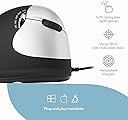
🖱️ Work smart, rest smarter — the mouse that cares for your hand and your hustle.
The R-Go HE Break Mouse is a wired, right-handed ergonomic mouse designed for medium hand sizes (165-185mm). Engineered in the Netherlands, it features a vertical shape to reduce RSI by promoting natural hand posture and improved circulation. Its patented break software uses color signals to remind users to take healthy breaks, winning the 2021 Benelux Office Award. With customizable buttons and adjustable DPI, it supports both Windows and Mac platforms. Made from recycled plastic, it blends comfort, productivity, and sustainability in one sleek package.


| ASIN | B01MEF0OGZ |
| Antenna Location | Office |
| Are Batteries Included? | No |
| Are Batteries Required | No |
| Best Sellers Rank | 116,641 in Computers & Accessories ( See Top 100 in Computers & Accessories ) 2,167 in Mice |
| Brand | R-Go Tools |
| Brand Name | R-Go Tools |
| Button Quantity | 5 |
| Colour | Black |
| Compatible Devices | Laptop, Personal Computer |
| Connectivity technology | USB |
| Customer Reviews | 3.9 out of 5 stars 74 Reviews |
| Enclosure Material | Plastic |
| Global Trade Identification Number | 08719274490623 |
| Hand Orientation | Right |
| Hardware Platform | Laptop, PC |
| Included Components | 1 |
| Item Dimensions L x W | 18.5L x 16.5W centimetres |
| Item Type Name | Ergonomic Mouse |
| Item Weight | 0.17 Kilograms |
| Manufacturer | R-Go Tools |
| Manufacturer Part Number | RGOBRHESMR |
| Minimum Required Operating System Version | Windows 7 |
| Model Name | R-Go HE Break Mouse |
| Model Number | RGOBRHESMR |
| Movement Detection | Optical |
| Movement detection technology | Optical |
| Network Connectivity Technology | USB |
| Number of buttons | 5 |
| Operating System | Macos, Windows |
| Power Source | Corded Electric |
| Product Features | Ergonomic Design |
| Product Warranty | 2 year manufacturer |
| Range | 5.0 meters |
| Special feature | Ergonomic Design |
| Style Name | Right Handed - Wired |
| Theme | Rainbow |
| Unit Count | 1.0 count |
D**M
Does what it says on the box
“The R-Go Tools ergonomic mouse was provided to me free of charge by the manufacturer for testing and reviewing and the views shown here are my personal opinion.” The mouse was very easy to use and set-up.
A**R
Pretty good ergonomic mouse but a tad overpriced
The R-Go Tools ergonomic mouse was provided to me free of charge by the manufacturer for testing and reviewing and the views shown here are my personal opinion. First impression is that is looks like a cheap plastic ergonomic mouse. Its very light which can only be a bonus for those with rsi. Whilst the buttons and plastics look cheap, they work well and are nicely positioned to reduce arm and wrist strain. It tracks well and works as good as any other quality mouse. Available in left and right handed and two different sizes it will fit the majority of hands without problem. My only reservation is the price. £99.00 rrp is priced to match very high quality ergonomic mice. Similar products are available on Amazon for less.
M**N
Very comfortable
Nice deign and works well, wouldn't be without it.
C**E
R-Go Tool
The R-Go Tools ergonomic mouse was provided to me free of charge by the manufacturer for testing and reviewing and the views shown here are my personal opinion. Upon recieving the mouse I noticed that the cord was nylon braided which gives this a real premium look. It is soft to the touch and creates a natural hand and wrist poistion. All the buttons are conviently placed covering a large surface area suitable for a range of differntly sized hands. Installing was very easy and would be easy for anyone to install. The light system is handy to have and reminds me take breaks. My only negative is that it does feel almost to light.
K**L
Great product, well designed and thought out
The R-Go Tools ergonomic mouse was provided to me free of charge by the manufacturer for testing and reviewing and the views shown here are my personal opinion. As a veteran of the IT industry for over 26 years, it’s fair to say I have used and recommended quite a few products over the years. Upon opening the product and on initial examination, it is clear to see this product has the feel and look of a premium product. When I started using it, you can tell from the design and ergonomics of the mouse are very well thought out and alot of attention to detail has gone into the product. After using it for a while, it is fair to say it is an excellent product and one that I would recommend
P**F
Once you get used to it....
“The R-Go Tools ergonomic mouse was provided to me free of charge by the manufacturer for testing and reviewing and the views shown here are my personal opinion.” As the headline says, once you get used to it. Let's face it we're all used to "conventional" mice. I don't know who invented the original mouse but whoever it was got it wrong. It's only now that we've come to realise that the traditional mouse requires an unnatural hand position and can lead to RSI and Carpal Tunnel problems especially for heavy users, this type of mouse tries to address this. I have never considered buying a mouse like this, having used other people's ones in my IT support role I had never found them intuitive, especially having used a conventional mouse for the last 35 years. So when I received an email from the manufacturer asking if I'd like to try one out in exchange for an honest review I thought I may as well give it a go, I was never going to buy one for myself, this way I've nothing to lose. 6 months later, I have now unplugged my old mouse completely (having left it connected "just in case"). I am used to the new, more natural, hand position completely. The most notable difference though is that I no longer feel the bones/tendons in my hand "cracking" back into place (or whatever they were doing) after a heavy mouse use session, that just doesn't happen anymore.. The DPI adjustment I have found quite useful, being able to change the pointer speed on the fly saves a lot of time. I haven't found the "take a break" warning feature useful but I understand how it may benefit others, particularly gamers. It took a week or two to get used to this mouse but I'm glad I did. 6 months ago I would never have bought this style of mouse, I WOULD NOW!
A**L
Attractive and robust design with a natural feel
The short version of this review is: ‘A good, well designed product. Comfortable and easy to use with a natural feel, which prompts you to take a break at intervals of your choosing. The build quality is very good and it feels robust.’ Now for the long version: The mouse (mine was the right-handed, wired version) came in sturdy, well-presented packaging. Inside the box was the mouse and a very small leaflet with text too tiny to read. This is OK, though, because there was also a card directing me, in nice big letters, to the R-GO web site to download the software. The easy-to-navigate web site also contains everything that you need to know about the mouse and other products. The mouse has a pleasant feel and all the buttons and the scrolling wheel fall naturally to hand. The design is such that your wrist is kept straight and your forearm, hand and the mouse all work as one. There is no need to move your wrist. On the left-hand side are buttons to advance and retreat through web pages. These are above and below your thumb, which rests naturally on the side of the mouse. Also on the left-hand side is an attractive backlit logo which changes colour (green to amber to red) according to how long you’re been working. The light slowly pulses when it changes from one colour to the next, making it more noticeable. When the mouse has been still for the time that you set for your break, the light turns back to green. There is also a small switch on the underside of the mouse which lets you turn the light off. If you do this, the R-GO app will still run in the background, monitoring your usage. The intervals for changing from green through red are user-configurable. The interface for this is minimalist and clear. The following settings are available: Time to short break; time to long break; duration of short break; duration of long break and maximum daily use. On the right-hand side of the mouse is a scroll wheel positioned for your index finger, plus large left and right click buttons above and below. There is also a button which adjusts the sensitivity of the mouse. A nice touch. All of this seems to be designed to minimise wrist movements, which it does very effectively. I don’t suffer from Repetitive Strain Injury (RSI) and nor do I want to. I do, however, suffer from lower back problems which seem to have eased when I started following the break times that I set on the R-Go mouse. Bonus! DISCLOSURE The R-Go Tools ergonomic mouse reviewed here was provided to me free of charge by the manufacturer for independent testing and reviewing. This review was made after diligent and fair testing and represents my unbiased opinion.
D**T
Good, easy to use mouse - lightweight and comfortable
This mouse seems well made with a long braided cable, it is quite light - lighter than some other ergonomic mice I have used and came nicely packaged in solid cardboard box. The ergonomic side of it does seem a much more natural position to hold hand than a conventional mouse and I have used it for a few weeks now without any issues, just needed to select the right DPI setting to work for me from the button on the mouse as by default it picked up some crazy high dpi movement. Because it is so light pressing the side button especially is quite hard without moving the mouse at the same time. There are 4 buttons + DPI setting and scroll wheel/middle button though there doesn't appear to be any way of changing the use of the extra two buttons which are on the side and thumb operated either through the softawre supplied or the standard Windows 10 mouse options -- they do "back" and "forward" in web browser and haven't found them doing anything in other apps yet.... I only found they did "back" in a web browser after trying one out having typed out part of this review and finding it disappear! The mouse comes with software which is intended to help you take breaks from using mouse and computer in general, by default it times you to have a short break every 10 minutes of use, and then every 2 hours for a longer break. The software controls a large LED logo on side of the mouse itself and an icon in the Windows toolbar and the app window if not minimised turning them from green to amber to red. I have to say it hasn't changed my usage of the computer or the time I spend clicking a mouse though unfortunately though it may help with someone in an office environment to stick to suggested rules. The main down side of this software is that it doesn't take into account actual usage of the mouse -- the "mouse usage" counter is always increasing so I have had it where a pc switched on from hibernate starts with a "red" light need a break and also sitting there watching a training video with no mouse movement the icon changes from green, orange and to red every 10 minutes. In fact at the moment the PC is showing it has been used for nearly 24 hours and I have "0" minutes until my next break so it is showing "red". No doubt cleared after a reboot. In summary it's a good ergonomic mouse though I think the R-Go software maybe needs a few tweaks to make it actually identify mouse usage rather than what appears to be a simple timer, and perhaps more obvious feedback than a light on the side of the mouse - a vibrate function perhaps and/or some notification / audible feedback from the app too? Disclaimer -- The mouse was provided to me free of charge by the manufacturer for testing and reviewing but the views shown here are my personal opinion and not influenced by them!
K**R
This ergonomic R hand mouse is perfect
I've been using a Contour ergonomic mouse for about 11 years due to the issue with my R hand, several months ago my hand and shoulder started becoming more and more painful to the point that it was almost impossible to use the mouse. After doing considerable research on an ergonomic mouse and on R-Go Tools, I decided to take a chance, after all, how much more painful could it be using this type of mouse. Long story short, this is the perfect mouse for me, my hand pain has been reduced tremendously when I'm working, and no more painful arm or shoulder. I gave this product 5 stars, it actually deserves a perfect 10!
A**R
Too heavy
Too heavy
J**E
Sehr gute Maus, auch in klein und mit Fingerablage
Qualitativ macht die Maus einen wirklich guten Eindruck. Die Maus ist schön leichtgängig, die Tasten schön leise. Sie schmiegt sich gut in die Hand und bringt endlich die gewünschte Entlastung zur Vorbeugung von Sehnenscheidenentzündung durch Überlastung. Besonders gut finde ich, dass es die Maus endlich mal auch in kleinerer Größe für Frauenhände gibt und, dass sie eine Ablage für den kleinen Finger hat! So kann man die Maus auch prima bewegen, ohne, dass die Finger bremsen! Das haben nur sehr wenige Mäuse. Da die Maus mit Kabel ist, hat sie nur ein dauerhauft leuchtendes R im Kreis in blauviolett, blinkt und stört also auch nicht. Davon gibt es leider kein Foto auf der Produktseite. Wurde auch schnell geliefert. Leider ist der Preis recht hoch mit knapp 61€, die große Maus kostet mehr als 10€ weniger. Eigentlich müsste das umgekehrtsein!!! Das ist das Einzige, dass ich bemängele. Dieses Produkt ist wirklich sehr zu empfehlen.
I**.
Für meine Hand nicht geeignet
Für meine Hand nicht geeignet Qualität top
V**.
Almost perfect mouse.
Very comfortable mouse. I love the shape, button placement and precision of the mouse. One caveat , Mouse wheel is too rough and imprecise for my liking.
Trustpilot
3 weeks ago
1 week ago