We remain fully operational. Our teams are working around the clock to ensure your deliveries continue safely.

DOWNLOAD THE APP


Copyright © 2025 Desertcart Holdings Limited
DOWNLOAD THE APP
Buy anything from 5,000+ international stores. One checkout price. No surprise fees. Join 2M+ shoppers on Desertcart.
Desertcart purchases this item on your behalf and handles shipping, customs, and support to KUWAIT.
🚀 Elevate your workspace — the ultimate multi-device mouse for the modern pro
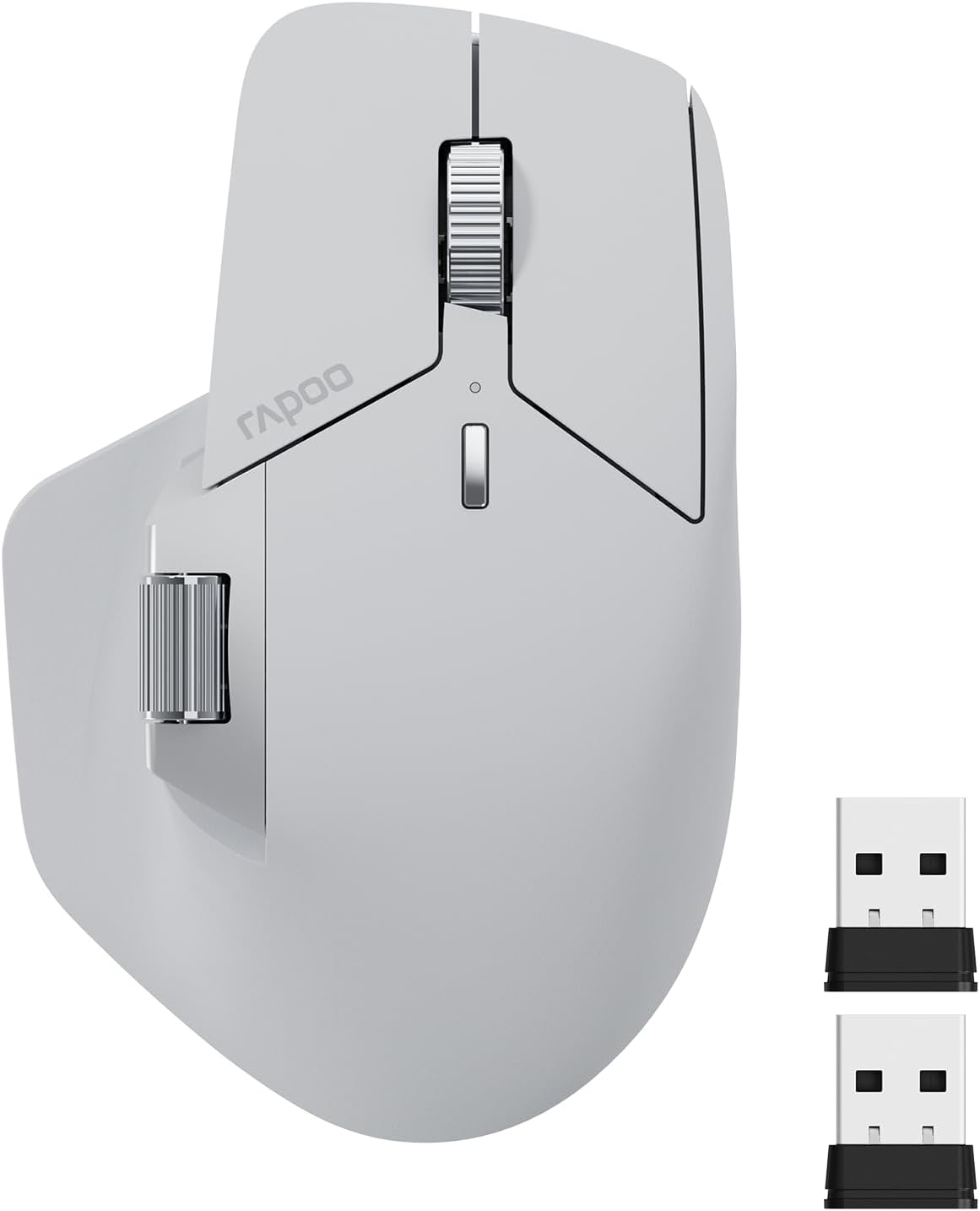
The RAPOO MT760 is a versatile wireless mouse featuring Bluetooth 5.0 and 2.4GHz tri-mode connectivity for seamless switching between up to 4 devices. It offers 7 adjustable DPI levels up to 4000 for precise control, 11 programmable buttons for enhanced productivity, and an ergonomic design optimized for comfort. Powered by a rechargeable 800mAh battery, it delivers up to 90 days of use on a single charge, making it a reliable, high-performance tool for professionals managing multiple devices.




| ASIN | B0CMZ1PQV6 |
| Additional Features | 7 Adjustable DPI, 90 Days Battery Life, Ergonomic Design, Wireless Charging Enabled, Programmable Buttons, Up to 4 Devices, M+ Cross-Computer Technology |
| Antenna Location | Office |
| Are Batteries Included | Yes |
| Are Batteries Required | Yes |
| Battery Average Life | 90 days |
| Best Sellers Rank | #64,694 in Computers ( See Top 100 in Computers ) #1,860 in Computer Mice |
| Brand | RAPOO |
| Built-In Media | 1 x MT760 Wireless Mouse, 1 x USB-C Charging Cable (USB-A to USB-C), 1 x User Manual, 2 x USB Dongles (One stored at the bottom of the mouse) |
| Button Quantity | 11 |
| Color | Gray |
| Compatible Devices | Personal Computer, Smartphone, Tablet |
| Connectivity Technology | Bluetooth |
| Customer Reviews | 4.3 4.3 out of 5 stars (912) |
| EU Spare Part Availability Duration | 90 Days |
| Enclosure Material | Plastic |
| Finish | Matte |
| Hand Orientation | Right |
| Hardware Platform | Linux, Mac, PC |
| Item Dimensions L x W | 12.3L x 5.4W centimeters |
| Item Weight | 110 Grams |
| Manufacturer | Shenzhen Rapoo Technology Co., Ltd. |
| Model Name | MT760 |
| Model Number | MT760 |
| Mouse Maximum Sensitivity | 4000 Dots per Centimetre |
| Movement Detection | Laser |
| Number of Batteries | 1 D batteries required. (included) |
| Operating System | Linux, Mac, Windows |
| Power Source | Battery Powered |
| Range | 10 |
| Style Name | Modern |
| Theme | OFFICE |
| Unit Count | 1 Count |
B**N
This mouse is honestly amazing for the price and as long as you are looking for a simple mouse, this will fulfil 99% of the requirements. Build quality: 9/10, the only reason I deducted a mark is because it does look a little cheap, got some rough edges but other than that in the hands it feels great. How it feels: The clicks aren't your typical cheap mouse clicks, they feel solid but also don't make a snappy click sound, but rather a dampened "thump" sound/feel. I say sound, but in reality it's dead quiet and perfect for the office. Some people have said that the middle mouse button is easy to press and I will slightly agree with them. It is not light enough that you would accidentally trigger it and you may get used to it very quickly however it could be a bit light for some people. Side buttons feel a bit mushy but are okay. The side scroll wheel is amazing. Driver: The driver is truly atrocious, the UI even looks bad. Don't expect much from the macros, you can only bind simple things that combine ctrl, or shift, or alt, or win, PLUS one other key. This means you can't create any complex macros like you could in Logitech, so this is definitely not going to be a powerhouse users. As an engineer, this is fine for me. As a video editor this may not be fine for you. Features: This does feature bluetooth connectivity as well as the ability to move your cursor between two completely different devices if you have both of them plugged into the same LAN network and have a usb receiver in both of them. Additionally, it has 1000hz polling and the sensor feels extremely responsive. Cons: This does not have the free scroll that the mx master has, depending on your profession this could be a deal breaker. For me, it is fine to not have it. All in all, I would have given it a 4/5 if this was any more expensive than it is, but for the price, you are getting a solid piece of kit as long as you aren't expecting it to be an MX Master. If you want an MX Master, simply get an MX Master, you will be severely disappointed if you get this mouse.
V**H
I’ve been using this Rapoo mouse for a while now, and it has turned out to be a great choice. The design is sleek and comfortable, making it easy to use for long hours without any strain. The connectivity is smooth, and the response time is quick, which really helps during work that requires precision and efficiency. Overall, it’s a solid, dependable mouse that offers great value for the price. Definitely recommend it!
A**R
النسخة اللي طلبتها كما في صفحة المنتج هي الحجم العادي... MT760 النسخة اللي وصلتني الحجم الكبير... MT760L
S**M
I have Logitech Master S2 and Logitech gaming mouse, but for me the Rapoo mini is the best I've ever had. The fit is super comfortable, and the clicking actions is soft-click and actually very enjoyable. Do yourself a favor and get one.
D**K
Better than expected. Works great with my Mac- the side-scroll was the most important feature for me because I use it a lot on the Magic Mouse that I'm replacing with this mouse. I connected via BT with no issue at all; put the mouse into BT mode and saw it show up in my BT menu on my Mac within seconds. The left and right clicks are very quiet. The Mouse is soft-to-the-touch and fits like a glove, for me. This is also my first ever ergo mouse because it I could never find one with side scrolling. Again, that is by far, the most important feature about this mouse, for me. Closely trailing this side scrolling in the #1 spot, it the fit. My hand fits comfortably, feels natural- the side scroll wheel doesn't feel too far away from my thumb, which was a concern when I was "window-shopping". Very happy with this purchase so far and the added convenience of the page-back and page-forward buttons (literally) right at my fingertips, makes it even that much easier to enjoy this mouse. I strongly recommend it.
Trustpilot
2 weeks ago
2 months ago