Buy anything from 5,000+ international stores. One checkout price. No surprise fees. Join 2M+ shoppers on Desertcart.
Desertcart purchases this item on your behalf and handles shipping, customs, and support to KUWAIT.
🎧 Elevate your audio game with the FMA120 – where pro-grade sound meets next-gen Bluetooth innovation!
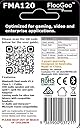
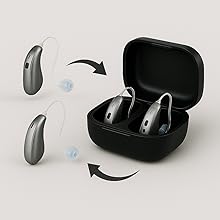
The FLOOGOO FMA120 is a compact USB Bluetooth 5.4 adapter designed for professionals and gamers seeking premium audio performance. Supporting aptX Lossless codecs and low-latency modes, it ensures flawless sound for PCs, Macs, Linux, and major gaming consoles. Its unique Auracast TX/RX/Relay functionality enables multi-device broadcasting and hearing aid compatibility, making it a versatile, plug-and-play solution for immersive, inclusive audio experiences.


| ASIN | B0CN71FL92 |
| Audio Input | USB-A |
| Audio Output Mode | Stereo, Broadcast |
| Audio Output Type | Bluetooth, Auracast |
| Best Sellers Rank | 25,929 in Computers & Accessories ( See Top 100 in Computers & Accessories ) 114 in Bluetooth Network Adapters |
| Bluetooth support? | Yes |
| Brand Name | FLOOGOO |
| Colour | white |
| Compatibility Options | Smartphones, Headphones, Laptops, Speakers |
| Compatible Devices | Headphones, Smartphones, Laptops, Speakers |
| Connectivity Technology | USB |
| Connector Type Used on Cable | Bluetooth |
| Control Method | Push Button |
| Country of Origin | Australia |
| Customer Reviews | 4.3 4.3 out of 5 stars (130) |
| Enclosure Material | Plastic |
| Hardware Interface | Bluetooth |
| Includes Remote | No |
| Installation Type | wired |
| Item Dimensions L x W x H | 39L x 19W x 7H millimetres |
| Item Weight | 5 Grams |
| Manufacturer | FLOOGOO |
| Media Types | bluetooth |
| Model Name | FMA120 |
| Number of Channels | 2 |
| Number of Ports | 1 |
| Power Source | Corded Electric |
| Product Features | Auracast Compatibility and Relay Functionality |
| Rechargeable Battery Included | No |
| Supported Application | Windows, Mac, Linux, Gaming Consoles |
| Supported Standards | Bluetooth V5.4, aptX HD, aptX Adaptive, LE Audio |
| Unit Count | 1.0 count |
| Wireless Compability | Bluetooth |
G**F
Works with Oticon Intent 1 & Steamdeck OLED
My Floo Goo FMA120 arrived this morning, did a quick update to the latest firmware using the FlooCast software on my Microsoft Surface Pro 9. Now have my Oticon Intent 1 hearing aids functioning as a head set to my PC. Also plugged the FMA 120 into my Steamdeck Oled & it also connects the audio to my Intent 1 hearing aids without issues. Could not be happier.
G**M
Fantastic, it works with my hearing aids
I have Windows 11 24H2 and was pleased that within 30 mins of receipt I was able to download the latest irmware and get this working. Fantastic!! It is really easy to install and configure and has full support for my Starkey hearing aids which are Bletooth LE audio.
M**S
Amazing Auracast Transmitter works with Resound Enzo IA Hearing Aids
Very happy with this product - highly configurable and works extremely well with my Laptop and Resound Enzo IA hearing aids. Excellent value for money
L**G
Most compatible Bluetooth LE Audio transmitter
It is a great little device to have to test out different Bluetooth LE Audio capable devices. It works great with the Avantree AS70P in 'Gaming' mode. In fact it has the best compatibility so far. A few little issues I have: - The FlooCast user interface is a bit confusing, sometimes I don't know if it's searching for devices or not. - Sometimes the device will crash and I would get an "Unrecognized USB Device" error and then I need to unplug it and plug it in again. I've noticed that this mostly happens during mode switches. - The operating range could be a bit better
A**E
Nach ein paar Realtek-basierten Bluetooth-Antennen (Windows Bluetooth-Stack) und dem Sennheiser BTD 700 Dongle (Knack-Geräusche seit Firmware 3.11.0, Probleme mit aptX Lossless, bzw. Wechsel zu aptX Adaptive) habe ich den FlooGoo FMA120 für mich entdeckt. In Verbindung mit der FlooCast-App ist der Dongle eher ein Schweizer-Taschenmesser als ein gewöhnlicher Dongle. Ich nutze den Dongle mit einem Bose QuietComfort Ultra (Gen 1) Headset. Über die App kann ich sauber zwischen allen Codecs wechseln und das Headset macht die Wechsel (insbesondere im Vergleich zum BTD 700) problemlos mit. Die blinkende LED lässt sich per App abschalten, sehr gut. Firmware-Update (und da gab es schon diverse Upgrades) ist auch schnell eingespielt und die App lässt sich nach dem Autostart automatisch in die Systray minimieren. Zur Sprachqualität in Teams Meetings kann ich zwar noch nichts sagen, aber bisher bin ich sehr glücklich mit dem Dongle. Es lohnt sich also, ein paar Wochen (kommt aus den USA) auf das Teil zu warten.
G**H
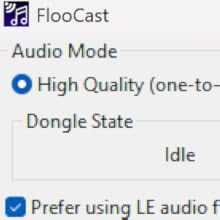
I bought the Sony INZONE Buds in 2023 and initially I was only plannung to use them for the PS5, knowing that compatibility will be limited. The peculiar feature of these is that they don't use any classic bluetooth connection or codec (like adptX), only LE Audio (also know als LC3 codec). The only method of connection was the bundled dongle, a rather flimsy piece of equipment and very soon I felt it a bit tiresome to always unplug it from one device and plug it into another; was almost a bit regretful over not having bought inears with broader compatibility. Nonetheless, since the headset was pretty great (good sound and very long lasting battery) I kept it while being on the lookout for a way to connect it to pc and smartphone another way. Smartphone compatibility simply rose over time, but on the pc front I went through several dongles without success. Among them the eppfun AK3040 PRO MAX, which claims to be LE Audio compatible as well as the Creative BT-W6 for which even the Creative support gave misleading feedback before the purchase, only to admit it isn't compatible after I returned the device. -.- I was about to give up when I stumbled over an Australian company, Flairmesh, producing a bluetooth LE Audio dongle, the FlooGoo FM120. Since I needed to import the dongle to Germany, again I sent a question to the customer support: "Is it compatible with the Sony INZONE Buds?" Their answer really suprised me: "No", but they promised me to buy the Sony INZONE Buds, test them and publish a compatible firmware. And...well...they did, a few weeks later. Nothing more to it other than to acknowledge and praise what is EXCELLENT customer support, dare I say a rare thing these days. I imported the dongle, and it works. If I had to dig up any kind of critique for the FM120, it'd be that the process of pairing bluetooth devices is a bit finicky. Because there is a button on their software that reads "add device" and I was expecting it to show me a list of devices to pair, as when you use a regular bluetooth dongle in Windows or when adding devices with a mobile phone. Instead it will automatically search for and pair with devices that are in close proximity to the dongle. The software is not needed for (subsequent) pairing, or at all. You just plug the dongle it, use the inears and it works. But with the software you can change modes and codecs according to your needs, be it high quality lossless audio or low latency for gaming. Especially the latter is very impressive because it really is fast, making for no perceivable audio delay for the inears I tested. There is a limitation in the hardware or software, as in that an LE Audio device will always take precedence over any classic bluetooth device. This is a limitation by the current available chipset for LE Audio and other dongles (who weren't compatible in the first place though) have these notes plastered on their description pages as well. I tested several classic bluetooth headsets / inears (before I settled to only use the Sony INZONE Buds, as they are the best I have anyway) and when only these you can easily switch between them. All in all I'm very pleased with the whole process of aquiring the FlooGoo FM120 and it finally fullfills the task I've been looking for, for almost two years. :)
H**M
Finally, Stable Calls and LE Audio! This little adapter is a game-changer. I paired the FlooGoo FMA120 with my Sony WH-1000XM6 headphone and my Samsung Android phone, and the performance is excellent. It delivers crisp, clear LE Audio without any issues. The most significant improvement is with Microsoft Teams calls. Before, I had constant audio dropouts, but with this adapter, the connection is perfectly stable. It has made work calls significantly less frustrating. Important Note: You must upgrade the firmware as soon as you get it for it to work properly. The only real downside is that the firmware update software is only available for Windows. Despite the initial painful setup step, I highly recommend the FMA120. It's a fantastic solution for anyone wanting to improve call stability and take full advantage of LE Audio.
A**ー
このドングルはqualcomm系チップではないLC3対応イヤホン・ヘッドホンが接続できる点が最大の強み。 WF-1000XM6も問題無く接続出来て、ライトユーザー層であれば音ゲー(DJMAXとか)もシューティングやアクションゲームも違和感なく無線でプレイ可能。 接続の安定感も良し。 専用サイトでアプリを落とすところまでがパソコンに慣れてない人だと苦労しそうだが、一度接続さえできれば後は使うのみなので大した苦労にもならない。 これは良いものだ!
J**E
Fonctionne parfaitement, la connexion avec mes aides auditives Signia à été aisée (avec l'aide d'internet). Très satisfait
Trustpilot
2 days ago
5 days ago