💼 Elevate your data game with speed and style — don’t get left behind!
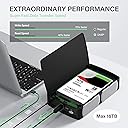
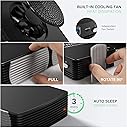
The FIDECO 3.5" Hard Drive Enclosure transforms your SATA HDD or SSD into a high-speed external drive with USB 3.0 and UASP support, delivering up to 5Gbps transfer rates. Crafted from premium aluminum with a built-in cooling fan, it protects drives up to 16TB from overheating while ensuring durability. Its tool-free, plug-and-play design offers universal compatibility across major OS platforms and brands, backed by an 18-month warranty and responsive customer support.


| ASIN | B07D72Z4XD |
| Best Sellers Rank | #1,343 in Enclosures |
| Brand | FIDECO |
| Color | Black |
| Compatible Devices | 2.5" SATA HDD/SSD, 3.5" SATA HDD/SSD |
| Customer Reviews | 4.2 out of 5 stars 834 Reviews |
| Data Transfer Rate | 5 Gigabits Per Second |
| Enclosure Material | Plastic |
| Global Trade Identification Number | 70306414237100 |
| Hard Disk Form Factor | 3.5 Inches |
| Hardware Interface | SCSI, Solid State Drive, USB, USB 2.0 |
| Hardware Platform | Universal |
| Item Dimensions L x W x H | 8.42"L x 1.57"W x 5.03"H |
| Manufacturer | FIDECO |
| Material | Plastic |
| Memory Storage Capacity | 16 TB |
| Mfr Part Number | SY-A3U-U3-JP |
| Model Number | SY-A3U-U3-JP |
| Product Dimensions | 8.42"L x 1.57"W x 5.03"H |
| Supported Devices Quantity | 1 |
| UPC | 703064142371 |
D**L
Works as advertised :)
I bought this to contain a 2.5" BarraCuda drive that first came in a LaCie case. The LaCie USB-C failed almost immediately, and I couldn't get to the drive to remove my data. So I opened the LaCie with a CHISEL a la YouTube and retrieved the drive, which was fine. The BarraCuda 5TB is 15 mm in height, which doesn't fit the usual SATA 2.5" enclosures, so I had to get an enclosure that was for both 2.5 and 3.5 drives. This enclosure works very well--I'm getting 3x the speed with this drive as it had in the LaCie enclosure--but there are several instructions that aren't very clear. There is a large power button with a small on/off switch next to it. The smaller switch controls the cooling fan. The instructions are not real clear about how to mount the drive in the enclosure. For 3.5" drives, the idea is to put the included screws in the bottom of the drive and then lock them into the slots provided in the enclosure. The screws did not fit my 2.5" drive, so I followed the suggestion of another reviewer and cut small pieces of Styrofoam to hold the drive in place while being used vertically. Such spacers would not be necessary if the enclosure is placed horizontally.
J**C
I do not normally review but had to write this one
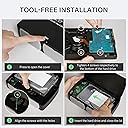
I purchased this HDD enclosure for a 6TB drive I had on hand and wanted to use as a TimeMachine back up disk for my MacBook Air. It is the best enclosure I have ever had, easy to install, minimum parts to attach, and NO tools required. The case opens with a press of the cover, the feet are already attached with spring locks that require a punch and 90º rotation to put them in place, snd the HDD "crews" included are also knurled knobs that fit in to locking slots in the bottom of the case. this insures proper alignment when you slide the drive into the connector, no chance of bending any of the connections. It took me less than a minute to install the drive in the case, I spent more time under my desk looking for an available outlet on my power strip. Finally, the power supply, although rectangular, has the contacts arranged in such a way they do not block the adjacent receptacle on the power strip. Overall an excellent design.
J**S
Works OK
I bought the enclosure to hold a 4 TB drive and attach it to a Smart TV to show videos. I picked this one primarily because it has its own power switch and a fan. The fan is so quiet I had to look closely to make sure it was on. Bottom line . . . it works just fine for what I wanted. More thoughts . . . . I was surprised / disappointed to find how light this enclosure was. I guess I didn't realize it's all plastic; some caution is in order. That's why I gave it 3 stars for value. The drive door is easy to open in that all you have to do is press the side. However, I found that annoying because I inevitably opened the door every time I picked up the drive. Of course, that's something you can get used to. If you buy this, look closely at where to attach the included screws. They go into the bottom of the drive and the screw heads fit into slots at the bottom of the enclosure. You then slide the drive to attach to the electronics and it locks in place. Overall the drive was easy to install but a little harder to remove. The screw heads "lock" in both directions. That's a good thing once the drive is installed but it makes it a little difficult to remove because it takes some pressure to pass the locks and I found it easy to push past the "install" slot and lock on the other side. Again, something you can get used to.
J**L
works exactly as advertised
This case comes with a cooling fan plus the fan has a switch. Another plus, the fan is quiet. Other cases advertised aluminum heat sink cooling or had a small case with a fan but, in my opinion, left very little room for air movement. This case provides room for air to circulate. The case can lay down but has two feet that can be turned 90% and then will stand upright. I use it standing up and it doesn't take up much space. Just what I needed and fell in the mid-range for price. It will hold both sizes of hard drives so I didn't have to guess at what size mine was in my computer (pulled my HHD for a SSD drive). Perfect.
E**G
Not only the best HD enclosure, but outstanding customer service to boot
I bought this for my PS4 external HD more than TWO years ago and have been using it ever since with zero issues. Recently someone broke the adapter when removing cables from the wall. I reached out to the company because i could not find a replacement adapter that worked. The company responded quickly despite the holidays, and sent me an ENTIRELY new unit because they didnt have adapters alone. What can you say about that kind of customer service?! Thank you, highly recommend the product itself becasuse of the fan and Auto on/off. customer service is another level
J**S
Effective in reducing drive temp - 3.5" mount is less than perfect - 2.5" mount unacceptable
Just rec'd so review is based upon initial impression. The mounting of 3.5 drives is done by screwing some "stand-off" screws into the bottom of the drive. You then insert the stand-off's into a keyhole slot in the carrier and slide the drive forward on to the SATA connector. Would probably work fine for 90% of all hard drives but my drive is a Seagate Exos 10TB which has screw holes spaced slightly longer. The front set near the connector worked fine but the back set did not align with key holes in the carrier so I installed with just the front set of stand-off's. Should be OK as long as I am careful when handling the enclosure. Also, as others have noted, there is no clip or spacer between the end of the drive and case, so theoretically, the drive could slide backwards and disconnect. Will be inserting some styrofoam or something similar to softly brace/wedge the drive in place. Cannot recommend this enclosure for use with 2.5" drive. Yes, you can install and it will work but there is absolutely no way to secure the drive with the included hardware. The supplied stand-off screws will not work with a 2.5" drive. The only physical support when mounting a 2.5" drive is the SATA connector, meaning the drive can easily slide loose off the connector. If you want to use 2.5" drive, then you need to apply some type material to wedge the drive in place. The manufacturer is being misleading in its representation of the product. Other minor negative is the power supply seems a little anemic, rated 12V @ 2A but is functional. Good news is that the fan is effective in reducing the operating temp of the drive. Previously, I was running the Seagate Exos (which is a 7200 RPM enterprise class drive) in an aluminum enclosure that was vented but no active cooling. The Exos tended to run around 40C/104F when idling and light usage. After installing in this new case, the same usage is running around 32C/90F. Ambient room temp is 26C/79F. Overall, the case is OK if you only intend to use with 3.5" drives. I initially gave this enclosure 4 stars but pulled 1 due to the just discovered 2.5" fiasco.
Y**S
You need the case with a fan!
I have two of these now, one purchased last year and this recent purchase. Both have 4TB Seagate IronWolf NAS hard drives in them. Installation of the hard drive is super simple and there is an on/off switch for the fan. Why wouldn't you want the fan? All hard drive cases should have one. I've stacked them on top of each other on their larger flat side using some slip resistant pads/feet on each corner. This also raises them up for better air circulation since the fan is on that side. Each hard drive runs at 77 degrees F in these cases. The USB 3.0 cable is a decent length but it's just a little shorter than I need so I replaced them with 3' cords. Now I don't worry about pulling on them and dropping them on the floor. Other than the cord I am perfectly satisfied with these cases. I wish the same brand was available for my external Blu-ray drive.
S**L
Two Bad Units - I'm Done
The first one was returned with broken internal parts - box was undamaged. Second one came and worked as it was supposed to... I guess. I installed my HDD, a 4TB WD, inside and fired it up. Formatted the drive and wrote about 1TB to the drive and ran checks - no issues. The LED, which is red (for danger? - who knows) stays lit and occasionally flashes blue - no clue why. It seemed okay until the next day with I felt vibration running through my desk (not caused by fan) and trackball. Not good! Then I realized that unlike my other 2 attached USB HDDs this one does not sleep, or accept Windows sleep functions. I checked to ensure all the settings were correct and they are. I made triple sure nothing was writing to the drive - nope. But the drive just spins away at full tilt. Then I read an answer to a question about sleep mode that says contact seller to get a link to a download for new software that enables sleep mode. Contact the seller how? This product is made in China (what a shock) and this company is so lazy they don't have a USA website for product support where you can download software. What?! Nice design, bad implementation, and less that useless support. I'm getting fed-up with products from China with bad. or no, quality control - too much of a waste of time. And since Amazon apparently will sell anything there's no way to trust product quality anymore. I wonder how many 5-star ratings are from people who didn't own this product very long. Back it goes - again, and finally.
N**R
Functionality
It works like a charmed, fitted my HDD without a problem and so far the perfirmance is great!
D**.
Don't forget to use the included screws!
This works well. Copying several terabytes at a time to my Seagate EXOS 16TB drive, the highest the temperature got was 37 celcius. Before I got this unit I used a Seagate 16TB external drive, which apparently contains the same model drive and the temperature reached 50 celcius in about an hour and I would stop to avoid overheating. So, this unit solves the heat problem totally. At first I thought the drive wasn't secured well enough, but then I noticed the "shoulder screws" in the box. Several reviews say that the drive isn't secured well enough, so I suspect they didn't notice the screws. One mentioned that a 2.5 drive wasn't held properly; I haven't tried one, but probably that's another person who didn't notice the shoulder screws in the box. Even with the screws it would still be possible for the drive to slide back and disconnect, but that would require significant force so I don't think it's a problem. I'm not sure why the review page is asking me to rate the "Warmth", "Value for Money", and "Thickness" of a hard disk enclosure.
B**Z
Funcional y Estético
Necesitaba este case para un disco 3.5" de 14 TB y funcionó perfectamente, estéticamente es bonito, tiene una tapa de metal... para abrir la tapa es solo de precionar pero eso también sería un defecto ya que se abre muy fácilmente el otro detalle que deberían corregir es que dentro del case al colocar el disco de 3.5" queda un espacio libre y al transportar el case con el disco instalado puede ocacionar que el disco se mueva...lo corregí cortando un pedazo de unicel a la media del espacio vacio. sin duda lo volvería a comprar ya que está a un precio considerable y por la compatibilidad con discos de alta capacidad.
H**A
excelente funcionamiento
funciona como debe y opera de magnifico justo lo que andaba buscando
A**R
Works as advertised.
Easy to install the Hard Drive, the fan is quiet when the drive gets hot. Very good product for the price.
Trustpilot
2 days ago
3 days ago