We remain fully operational. Our teams are working around the clock to ensure your deliveries continue safely.

DOWNLOAD THE APP


Copyright © 2025 Desertcart Holdings Limited
DOWNLOAD THE APP
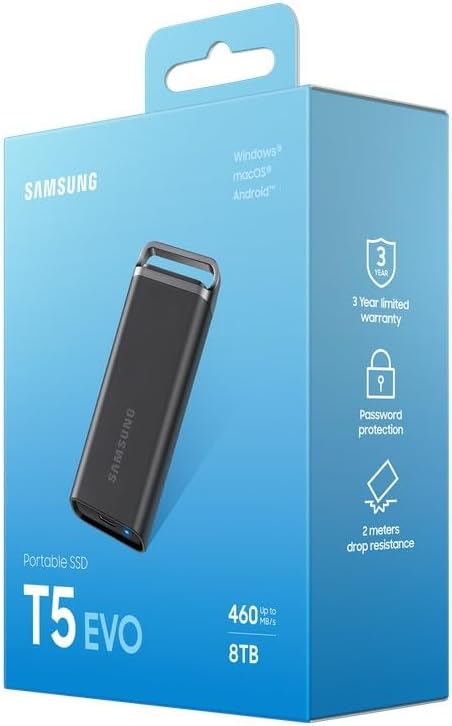





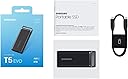



💼 Power up your productivity with storage that travels as fast as you do!
The Samsung 8TB T5 EVO Portable SSD combines massive 8TB storage with lightning-fast USB 3.2 Gen 1 speeds up to 460 MB/s, all in a compact, rugged design featuring shock resistance up to 6.6 feet and anti-scratch rubber skin. Ideal for professionals and creators on the move, it offers broad device compatibility and advanced 256-bit AES encryption, supported by Samsung’s Magician software for drive health and updates.
| ASIN | B0CGH93QTS |
| Best Sellers Rank | #449 in External Solid State Drives |
| Brand | Samsung |
| Customer Reviews | 4.3 4.3 out of 5 stars (40) |
| Date First Available | March 13, 2025 |
| Flash Memory Size | 8 TB |
| Hard Drive | 8 TB Solid State Drive |
| Hard Drive Interface | Solid State |
| Item Dimensions LxWxH | 3.7 x 0.67 x 1.57 inches |
| Item Weight | 3.6 ounces |
| Item model number | MU-PH8T0S/WW |
| Manufacturer | Samsung |
| Product Dimensions | 3.7 x 0.67 x 1.57 inches |
| Series | MU-PH8T0S/WW |
D**S
Love the speed
I have 5 of these, love them. Can not use all cables with them to maintain transfer speed. Tried one 2' cable which slowed down treasfer to low megs.
K**Y
Slow speed when close to full storage
Happy with the portability on this ssd. Really compact with 8gb of storage. I was able to store 25 years worth of photos in one ssd. The only problem I have is once the ssd is close to full, the read and write speed gets really slow.
J**O
Good portable SSO, just had bad luck.
The EVO is a great portable card, (My son has one that works great). I just happened to get one that had a problem. I downloaded my pictures to it, but when I plugged it in to show the family our Viking River Cruise to Europe, it was totally blank. Tried it a second time and it just wouldn't hold data. Don't be afraid to try it. I just had bad luck.
C**I
Dış darbe koruma kauçuğunun ısı konusunda olumsuz etkisi cihazın ömrünü olumsuz etkilemekte. Büyük dosyalar aktarırken harici soğutma ihtiyacı duyuyorum. Sıcaklık seviyeleri 60 dereceye yaklaşıyor. Bunun dışında cihaz çok güzel ve başarılı.
L**E
This is a review of the T5 EVO 8TB model after a month of occasional use for backup and file transfer. Be warned that it has serious compatibility & performance problems when used with the current Mac OS, and if you follow Samsung's advice (don't) you will even add security problems. As of August 2024 it is possible to be completely up-to-date with your Mac and the device firmware, and yet basically unable to mount this device due to poor USB behaviour. I have observed this on an 2017 Intel-based iMac Pro and an 2023 M2 MacBook Pro, both running the current Mac OS (Sonoma 14.x). To make it work at all, you can force it to downgrade to USB2 speeds by using/buying an older cable (an Apple USB Type-C charging cable works for this). This will severely restrict the throughput - in practice I get around 30MB/sec from them like this - but otherwise it will hang your computer on APFS mount (i.e. when plugged in), or with an exceptionally high quality cable, you may get a few MB/sec in fits and bursts, in between weird stalls. Evidently it has serious difficulty behaving like a normal USB block device at 5Gbps. (For those wondering, it has the same problem when attached to a USB3.2gen2 port via a high quality Type-C to Type-A cable that supports the high speed protocol; you have to use a cr*p one instead!) This picture gets worse, unfortunately. Samsung want you to downgrade the security of your Mac to install an unnecessary extra kernel driver. Well, I've tried it. Doing so didn't improve matters but will mean your Mac is now open to a variety of security vulnerabilities that it wasn't previously. Corporate users are mostly safe, because a competent IT department simply shouldn't allow that at all. Consumers, beware of Samsung's arrogant attempt to undermine your device security. If you're surprised by that, note that being forced to install corporate malware is commonplace in Korea, so perhaps their product managers think this is OK. It isn't. And of course, their junk driver is difficult to uninstall. If you search around you'll quickly find myriad reports of unhappy Mac-based consumers of the Samsung T5 - seems this is a very common compatibility problem with the series. I note that Samsung are amongst Apple's biggest competitors in the global phone market and I suspect it's possible they have no interest in acting professionally to resolve the problems reported by Apple customers. Note that the problem may not manifest immediately - many consumers report this problem kicking in once the device has had a reasonable (but not excessive) amount of data written. For me the problem manifested once about 5TB had been written (to an 8TB device). So you may at first think, "what's the problem". Only later will you be finding your system hanging on device reads and writes. Strong recommendation against.
Y**T
I regularly use an 8TB 2.5” SSD mounted in a USB 3 case for backups etc. It is not tiny and not exactly pocketed easily. This new SSD amazed me, it is less expensive by $100 than the 2.5” drive, includes a USB 3 interface and is as fast or faster while being almost as compact as the key fob remote for my car. Really solidly made, slick design suitable for a wrist strap or key chain loop. To be able to carry 8TB around in my pocket reliably is a game changer for backups. Highly recommended!
D**R
Bought this after reading a lot of reviews but rated 2 stars as for the bomb of a purchase price - usable disk space is only 7.27 TB out of 8 TB ( as claimed). Alas feel cheated as losing out on more than 700 GB is really uncalled for & should be well declared to potential buyers who probably would purchase it for it's sheer value for money kinda deal on a long term basis. But on the plus side this SSD is really compact in size with ultra quick transfer speeds a boon for frequent traveller's. No unusual sound or heating noted so far but who knows.....
M**T
Bought the 8tb because I need a fast/reliable spot to back up all my business projects since currently they are all on different spinning HDDs. But after loading it up to about 5tb I started to noticed the copy speed start to slow down. I chalked it up to the read speed of the HDD so thought nothing of it but at 6-7tb full it REALLY slowed down to around 20mb/s read. Still thought it was the HDD so after copying all 7tb of data I tried accessing files on it and the folders took no joke 30 seconds to load it let along the file previews. Did a few speed tests and it was as the images above show like 4-10mb/s read/write. Swapped out the USD-C cable with another and it improved the speed to around 20-40mb/s but that’s it. Mind you this thing is rated for 450mb/s. Did all the diagnostic tools Samsung provides and basically it’s just a slow piece of crap after 6tb of storage used. Avoid the 8tb version. This was legit my first and most likely my last Samsung product I’ll ever buy. Only good thing I’ll say about it is the build quality is top notch. No complaints there. Apart from the piece of crap USB-C cable. That thing is busted already.
Trustpilot
2 weeks ago
1 month ago