⚡ Carry Speed & Security in Your Pocket — Never Miss a Beat!
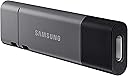
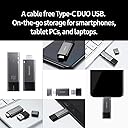
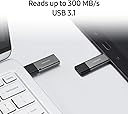
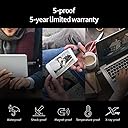
The Samsung DUO Plus 256GB USB 3.1 flash drive redefines portable storage with ultra-fast 300MB/s read speeds and a versatile 2-in-1 USB-C/USB-A design. Engineered for professionals on the move, it offers rugged durability backed by a 5-year warranty and advanced V-NAND technology, ensuring your files stay safe and accessible across all your devices.


| ASIN | B07DW33DNN |
| Additional Features | Shockproof, Temperature Proof |
| Best Sellers Rank | #2,702 in USB Flash Drives |
| Brand | Samsung |
| Built-In Media | USB |
| Color | Black/Sliver |
| Compatible Devices | Mobile, Tablet |
| Compatible Phone Models | Plus,Samsung |
| Connectivity Technology | USB |
| Customer Reviews | 4.6 out of 5 stars 10,061 Reviews |
| Flash Memory Type | CompactFlash |
| Global Trade Identification Number | 00887276265988 |
| Hardware Connectivity Technology | USB Type C |
| Hardware Interface | USB 3.0 |
| Item Type Name | Samsung DUO Plus 256GB - 300MB/s USB 3.1 Flash Drive (MUF-256DB/AM) |
| Item Weight | 7.71 g |
| Manufacturer | Samsung Electronics DAV |
| Memory Storage Capacity | 256 GB |
| Mfr Part Number | MUF-256DB/AM |
| Model Name | Duo Plus |
| Model Number | MUF-256DB/AM |
| Read Speed | 400 Megabytes Per Second |
| Special Feature | Shockproof, Temperature Proof |
| UPC | 887276265988 |
| Unit Count | 1.0 Count |
| Warranty Description | 5-year limited warranty |
| Write Speed | 40 MB per second |
J**M
Great product and value for what it is.
I bought this product a little while ago and found it to really useful and well thought out. Here is what I mean. I have a MacBook Pro 2018, which mean the only ports I have are USB-C ports, so this product is perfect for me, however, my parents have a PC with no USB-C port, which is no problem with this product because you just have to pull the back end to reveal a USB-C to USB 3.1 adapter, and you can even connect and USB-C cable to it to transfer data too. so you have three modes of data transfer. So it was no problem transferring anything to my parents PC. extremely simple and extremely fast. Now to talk a little about the product itself: Durability: This product feels very premium in the hand, the cap is perfectly cut to fit the USB-C end without being flimsy, so you can be sure that it will not come off by accident and get lost. Actually taking the cap off and putting it back on has a very satisfying feel to it. On top of that, the cap and the body of the USB both have two small holes to attach them with string, so if you are the type of person to lose caps, that is for you. this is a product that will last for years. Value for the money: For what the product is, it's durability and convenience (having 3 ways of transferring data (by USB-C, USB-C to USB 3.1 adapter, and the possibility to get it connected to a USB-C cable), the value for what you get is absolutely amazing. Summary: if you are looking for a durable, high-end product, without spending too much money, then you found it. This product will last you years, you can be sure of that.
D**R
It is a good, reliable drive
I am a programmer and use these things a lot. Most of these are very fast, but overheat and slow down. After enough over heating cycles, they just stay slow. This thing gets warm, but not overly hot like my other speed demons. I never just leave it plugged in for that reason. From a speed standpoint, it is still dialed in and flying. The little USB-A to USB-C converter is awesome since my customer machine is all USB-C and my machine is both, but my company issued Surface Laptop is all USB-A along with my many older machines, thereby making it easy to float around the fleet and transfer stuff. It feels stout, fits into the machines well, and chugs away quickly, so really there is no downside here. The only reason I didn't go for the larger drives is simply because I live in fear of losing it. I wish someone would make a way to find a stick when you lose it like a Apple tag or whatever. I would buy that drive!
G**B
Worth the pricetag. If speed is your need you are done shopping.
This is a a technical review from a technician about how I use this professionally. If that's boring just buy it. This is the best USB/A & Type C drive there is. I take side jobs fixing people's computers either at their office or their home. 99% of people are great but sometimes I want out of their space ASAP. Well, this cuts down a fresh install of Windows 10 by 15 minutes at least, vs other thumbdrives. Most recently someone was locked out and they were going to pay more if I didn't have to do a fresh install. So I needed this to add an admin user via CMD and it turned a 15 to 20 min into a 1 or 2 min job. Very very happy. I could not be happier. For the 99% of people I don't mind chit chatting with it makes them even more impressed and think I am even better than I really am. Good tools make the difference. There is enough space here that I partitioned the drive with windows 10 for fresh installs and then 2 portable versions of antivirus (depending on their free one from their ISP), a screen saver with my business info on it, portable CCleaner and EaseUS and some other settings on the other partition. If it is a customer I want to go above and beyond with I can just get all this done off the jump with no internet access and it rarely matters how good their computer is. I mean this thing is just great.
A**R
As good as it gets
I was hoping that this newer USB jump drive would be faster than my older jump drives, but this was not the case. As is true with every jump drive that I have recently tested, this unit was fast with small folders, reading and storing a 1.5 GB folder of small files in about 10 seconds. However, a 15 GB folder (600 large files) took six minutes to read and store. If you are working with large folders, either get a SSD and an external enclosure, or a M.2 drive and an external enclosure. Using a USB 3 connection, these will read and store the 15 GB folder in 45 seconds for the SSD and 35 seconds for the M.2 drive. A 27 GB folder (36,000 small files) took 130 seconds with the SSD, and 120 seconds with the M.2 drive. I didn't even try this folder on the jump drive - life is too short. If you are just working with files under about 2 GB, this jump drive is a good choice. Plus, it has a detachable adaptor for connecting USB C devices to a standard USB port (but not the other way around). It does get warm after lots of reading or writing, but not hot enough to be a problem. All in all, a reasonably-priced, good choice for a jump drive.
D**D
It works.
I only have one mobile device don't know if it's my mobile device or the memory stick. It's been working for a year no problems just if I push it all the way in it loses connection with my mobile device I have to just make sure it's pulled down snug, it's like the pins are too long or something. Wouldn't stop me from buying another one it's worked flawlessly over a year no issues, gets recognized right away. Just if you have issues where it loses connectivity just make sure it's not pushed in all the way just pull it out until there's a little bit of tension works flawlessly after that. My mobile device is a Motorola. Again no idea if the problem is my device female plug port or the USB stick pins. The USB drive does work flawlessly as long as I don't push it in all the way never had a problem with it. Just leaving this review in case someone else has a problem losing connectivity, this might solve your issue. Once it clicks in it just goes in too far on my device and the pins slide off the USB female connection going in too far. So I just pull it back until it doesn't want to come out without forcing it out no problem. I guess I would say it's not a snug fit that would be part of the problem. Every device is different though could just be mine. I've never lost any data and never had any problems with the device being recognized every time just can't push it all the way in.
S**T
Great Speeds!
Wow! This is the first 3.1 USB flash drive that transfers at advertised speeds. Movie files take less than a minute (6gb). I’ve included a screenshot from flashbench with benchmark speeds and posted the log below. I like that the flash drive has both a 3.0 and 3.1 connector. No matter where I go, I can connect my flash drive. I want to also note that I am using the front panel of my PC when I ran the benchmark. Might see increased speeds when using the back of the computer connected directly into the MOBO. Just some words of advise. I you are having issues with transfer speeds, try plugging the drive into the back of the PC. Refreshing devices. Refreshing devices. [Done] Starting benchmark. Bechmarking G:(0374520100004531) Started at 01/05/21 10:43:27 Filename: G:\test.tmp Starting large file benchmark. With 100MB file. 16384k:6 Write Speed:100.06MB/s 16384k:6 Write Speed:111.49MB/s 16384k:6 Write Speed:109.29MB/s 16384k:6 Average Write Speed:106.71MB/s 16384k:6 Read Speed:373.63MB/s 16384k:6 Read Speed:369.53MB/s 16384k:6 Read Speed:378.59MB/s 16384k:6 Average Read Speed:373.88MB/s 8192k:12 Write Speed:109.84MB/s 8192k:12 Write Speed:110.55MB/s 8192k:12 Write Speed:108.83MB/s 8192k:12 Average Write Speed:109.73MB/s 8192k:12 Read Speed:377.05MB/s 8192k:12 Read Speed:373.70MB/s 8192k:12 Read Speed:379.21MB/s 8192k:12 Average Read Speed:376.64MB/s 4096k:25 Write Speed:108.75MB/s 4096k:25 Write Speed:110.40MB/s 4096k:25 Write Speed:110.81MB/s 4096k:25 Average Write Speed:109.98MB/s 4096k:25 Read Speed:364.63MB/s 4096k:25 Read Speed:379.99MB/s 4096k:25 Read Speed:380.19MB/s 4096k:25 Average Read Speed:374.79MB/s 2048k:50 Write Speed:109.88MB/s 2048k:50 Write Speed:110.72MB/s 2048k:50 Write Speed:109.51MB/s 2048k:50 Average Write Speed:110.03MB/s 2048k:50 Read Speed:378.93MB/s 2048k:50 Read Speed:376.85MB/s 2048k:50 Read Speed:381.52MB/s 2048k:50 Average Read Speed:379.09MB/s 1024k:100 Write Speed:110.33MB/s 1024k:100 Write Speed:109.72MB/s 1024k:100 Write Speed:108.54MB/s 1024k:100 Average Write Speed:109.52MB/s 1024k:100 Read Speed:362.83MB/s 1024k:100 Read Speed:382.65MB/s 1024k:100 Read Speed:382.68MB/s 1024k:100 Average Read Speed:375.82MB/s 512k:200 Write Speed:110.96MB/s 512k:200 Write Speed:108.78MB/s 512k:200 Write Speed:109.35MB/s 512k:200 Average Write Speed:109.69MB/s 512k:200 Read Speed:383.60MB/s 512k:200 Read Speed:377.95MB/s 512k:200 Read Speed:385.22MB/s 512k:200 Average Read Speed:382.23MB/s Deleting file. Starting small file benchmark. With 10MB file. 256k:40 Write Speed:111.31MB/s 256k:40 Write Speed:102.42MB/s 256k:40 Write Speed:113.32MB/s 256k:40 Average Write Speed:108.80MB/s 256k:40 Read Speed:328.48MB/s 256k:40 Read Speed:348.11MB/s 256k:40 Read Speed:348.12MB/s 256k:40 Average Read Speed:341.32MB/s 128k:80 Write Speed:102.34MB/s 128k:80 Write Speed:109.73MB/s 128k:80 Write Speed:101.56MB/s 128k:80 Average Write Speed:104.42MB/s 128k:80 Read Speed:267.72MB/s 128k:80 Read Speed:306.58MB/s 128k:80 Read Speed:307.66MB/s 128k:80 Average Read Speed:292.76MB/s 64k:160 Write Speed:99.65MB/s 64k:160 Write Speed:97.25MB/s 64k:160 Write Speed:92.35MB/s 64k:160 Average Write Speed:96.32MB/s 64k:160 Read Speed:244.82MB/s 64k:160 Read Speed:256.00MB/s 64k:160 Read Speed:257.70MB/s 64k:160 Average Read Speed:252.71MB/s 32k:320 Write Speed:95.48MB/s 32k:320 Write Speed:93.38MB/s 32k:320 Write Speed:100.24MB/s 32k:320 Average Write Speed:96.28MB/s 32k:320 Read Speed:92.53MB/s 32k:320 Read Speed:95.24MB/s 32k:320 Read Speed:89.17MB/s 32k:320 Average Read Speed:92.24MB/s Deleting file. Starting tiny file benchmark. With 1MB file. 16k:320 Write Speed:68.34MB/s 16k:320 Write Speed:76.24MB/s 16k:320 Write Speed:75.91MB/s 16k:320 Average Write Speed:73.31MB/s 16k:320 Read Speed:50.16MB/s 16k:320 Read Speed:51.08MB/s 16k:320 Read Speed:49.83MB/s 16k:320 Average Read Speed:50.35MB/s 8k:640 Write Speed:51.88MB/s 8k:640 Write Speed:54.16MB/s 8k:640 Write Speed:52.08MB/s 8k:640 Average Write Speed:52.69MB/s 8k:640 Read Speed:32.34MB/s 8k:640 Read Speed:31.95MB/s 8k:640 Read Speed:33.42MB/s 8k:640 Average Read Speed:32.56MB/s 4k:1280 Write Speed:31.40MB/s 4k:1280 Write Speed:29.25MB/s 4k:1280 Write Speed:32.09MB/s 4k:1280 Average Write Speed:30.87MB/s 4k:1280 Read Speed:17.60MB/s 4k:1280 Read Speed:17.86MB/s 4k:1280 Read Speed:17.80MB/s 4k:1280 Average Read Speed:17.75MB/s 2k:2560 Write Speed:6.88MB/s 2k:2560 Write Speed:6.33MB/s 2k:2560 Write Speed:6.83MB/s 2k:2560 Average Write Speed:6.67MB/s 2k:2560 Read Speed:9.18MB/s 2k:2560 Read Speed:9.32MB/s 2k:2560 Read Speed:9.35MB/s 2k:2560 Average Read Speed:9.28MB/s 1k:5120 Write Speed:3.58MB/s 1k:5120 Write Speed:3.81MB/s 1k:5120 Write Speed:3.37MB/s 1k:5120 Average Write Speed:3.58MB/s 1k:5120 Read Speed:4.74MB/s 1k:5120 Read Speed:4.77MB/s 1k:5120 Read Speed:4.77MB/s 1k:5120 Average Read Speed:4.76MB/s Deleting file. Benchmark done. Ended at 01/05/21 10:44:05
M**L
A Great Choice
Review for Samsung DUO Plus 32GB. Background: Previously, I bought an HDMI recorder that included a generic USB drive that couldn't keep up with the recorder. Bad Chinese engineering, again. So I needed to find a replacement. I bought several completely different well-known brands of USB sticks. All worked great with my HDMI recorder. This DUO Plus is my favorite. I love how it's USB-C natively, includes a short adapter to converted to USB-A, and everything fits together snugly. So, I can use it with all of my USB-A and USB-C devices.
J**L
An ok drive that is not nearly as fast as it should be
Fundamentally, this flash drive is ok at doing what flash drives do: Storing data. It works, holds the amount advertised, etc. It is a USB-C drive at heart, with a spot in it to hold its USB-A adapter. A reasonable solution to wanting a drive with both A and C on it. The adapter fits snugly in the case, I doubt it would ever fall out on accident. Not quite as slick a solution as the ones with a switch that can cause either kind of plug to pop out but does the job well, particularly if you mainly use it in USB-C mode, as I do. However the devil is in the details and it is speed. For sequential reads the drive does indeed get speeds near its rated 400MB/sec. Not quite there, but close enough as to make no odds. However for writes, it is slow. Not "low end cheap drive" slow but MUCH slower, caps out at about 60MB/sec for sequential writes. About half the speed of a gigabit ethernet connection. It is considerably slower than my old Sandisk Extreme flash drive. This make is not nearly as useful for transferring files from one device to another. Sure it is great if you load it with files once and then copy them on to multiple other devices, but how often are we really doing that? My frequent use for flash drives is to move data from one computer to another which means that read and write speed are both important. With a write speed about 15% of the read speed, you are going to be doing a lot of waiting as things copy to it. To me it feels like a bit of a deliberately misleading design on Samsung's part. They optimized the drive for as fast a read as possible, and didn't both with good write speeds, and then just market it by conveniently leaving out the write speed number. So they aren't lying per se, the drive really does get the read speeds it advertised (on sequential transfers, flash drives don't do nearly as well at random transfers as SSDs do but that isn't their main purpose) but the write speed is just way too far below it to recommend.
C**N
No se como funciona
Querria utilizarlo para hacer copias de seguridad de mi telefono, pero no se como funciona.
K**Y
fast and works well both ways.
fast and works well both ways. i dislike the fact the cover is small and will get lost easily when u remove it to use the drive.
A**A
Great all rounder but.
Great all rounder product, nice design, shape & weight. Good dongle/converter for regular USB type A, However it's not particularly designed to be carried around in ur keychain. So minus 1 for portability. Also write speeds drop down significantly when processing large number of small volume files. And doesn't ever reach the advertised 300mb write speeds at its best, yet it's still fast enough.
D**L
Great little versatile USB
Value for the money is great, and the ease of mind knowing you can adapt to a lot of different technologies, old and new, and access your files with the same USB. Small and durable, quick and secure!
Z**A
E' davvero velocissima (almeno la 256GB), ma va usata bene.
Ce l'ho da pochi giorni e non posso dire molto di più che non che per ora ne sono entusiasta. Su affidabilità ed eventuali problemi, se ci saranno aggiornerò la recensione. Avevo prima considerato la Samsung Fit Plus, ma la comodità di avere una chiavetta che va sia su USB-A che USB-C è impagabile, in questo momento dove si sta passando da un formato all'altro. Mi pare un'idea geniale, ma come dirò dopo per connetterla in USB-A bisogna farlo nel modo "giusto". Premetto che ho la versione da 256GB, che come la 128GB è dichiarata arrivare a 300 MB/s in lettura (mentre la 32GB e 64GB sono dichiarate fino a 200 MB/s in lettura). Quindi ho la versione più veloce. Posso confermare che la mia versione da 256GB sostiene stabilmente sui 105-108MB/s in scrittura e tra 350 e 390 MB/s in lettura e, cosa importante!, non solo nei benchmarks ma anche nell'uso reale (copia di grandi file, tipo 40GB). E questo neanche connettendo direttamente al PC ma usando la connessione USB-A ad un hub Anker alimentato, con 7 porte USB 3.0 (ottimo acquisto fatto anch'esso qui su Amazon, "Anker - Hub in alluminio con 7 porte USB 3.0"). In sostanza, raggiungo quelle velocità su porte 3.0 pure passando attraverso un (buon) hub. E credo che sia la prima volta che vedo un prodotto che va sensibilmente PIU' del dichiarato! Per inciso: la chiavetta arriva formattata in FAT32, io l'ho riformattata subito in exFAT e dopo ho fatto i test di velocità, quindi quei valori sono relativi ad exFAT su una chiavetta appena formattata e sostanzialmente vuota e su connessione USB-A (in questo momento non ho ancora dispositivi con USB-C e non ho potuto fare la prova). Da notare che per avere questa velocità con il connettore tipo A bisogna far coincidere due piccolissime frecce (poco visibili), una sul connettore A ed una sul corpo principale della chiavetta, come spiegato sul retro della confezione. In una delle foto della recensione si vedono (anche meglio che ad occhio nudo) le due freccette. Non mi andava di fare la prova nel verso "sbagliato", ma in rete si legge di gente che ha velocità di soli 20-30 MB/s e immagino che sia perchè non hanno fatto coincidere le due frecce. Nota di biasimo a Samsung che non ha sufficientemente evidenziato la cosa sul retro della confezione (dove i caratteri sono piccolissimi, munitevi di lente!). Dato che la chiavetta è davvero piccola, l'ho munita di un bel cordino vivace, che consente anche di tenere legato il cappellotto (anche questo è un acquisto su Amazon, "Yaxiny Cordoncino da Polso per Cellulare, Unità Flash USB ..."). E dato che nel laccio ci rimane un pò di spazio, è possibile estrarre il cappellotto, tenerlo a lato ed usare la connessione, sia la USB-A che la USB-C. Per ora sono estremamente soddisfatto e mi sento di consigliarla.
Trustpilot
4 days ago
2 months ago