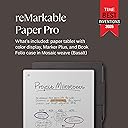
📝 Elevate your ideas—where paper meets the future of note-taking.
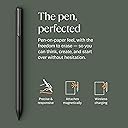
The reMarkable Paper Pro Bundle features an ultra-slim 11.8-inch color display designed for a natural paper-like writing experience. It includes the Marker Plus pen with eraser and six replacement tips, plus a premium mosaic weave Bookfolio cover with magnetic pen strap. With up to two weeks of battery life, adjustable reading light, and advanced note organization tools like handwriting-to-text conversion and PDF annotation, it’s the ultimate digital notebook for professionals seeking distraction-free productivity.


| ASIN | B0DGBDR2PM |
| Are Batteries Included | Yes |
| Average Battery Life (in hours) | 2 weeks |
| Batteries | 1 Lithium Ion batteries required. (included) |
| Battery Description | Lithium-ion or Li-Polymer |
| Brand | reMarkable |
| Color | red (burgundy) |
| Customer Reviews | 4.2 4.2 out of 5 stars (1,560) |
| Date First Available | October 9, 2024 |
| Graphics Card Description | Integrated |
| Item Weight | 526 g |
| Item dimensions W x H | 36 x 22.7 x 3.6 cm |
| Item model number | RM83C-1001NW |
| Lithium Battery Energy Content | 19.25 Watt Hours |
| Lithium Battery Packaging | Batteries contained in equipment |
| Lithium Battery Weight | 1.5 Grams |
| Manufacturer | reMarkable |
| Number Of Lithium Ion Cells | 2 |
| Operating System | Linux |
| Product Dimensions | 36 x 22.69 x 3.6 cm; 526.17 g |
| Resolution | 2160 x 1620 ピクセル |
| Screen Resolution | 1872x1404 |
| Series | RM83C-1001NW |
| Standing screen display size | 11.8 Inches |
| Wireless Type | 802.11a, 802.11b |
R**J
メモに特化した商品。高いし、英語表記だし、バッテリーも思ったより持たない。スマホよりは長持ちかな?だけど描きごこちや気軽に書けるささ、書いたものによって簡単に分類できるしとても気に入ってます。すぐに劣化しないことを願ってます
あ**ん
日本語対応無し(インストール可能)、処理速度は他の商品と遜色なし、アプリを使ったデータ共有も直ぐに反映、使い勝手は満足です。 データをメールで送る際も、アドレス履歴が表示されるので、いちいち入力しなくても、すぐに関係者への送信が可能。 バックライトをONにしておくと、4日ぐらいで電池がなくなります。 あとは、落下に要注意。カーペットのフロアに落としてしまい、拾い上げて画面を見たら、見事に一筋の線(画面の割れ)が。。。表示やメモ書きに支障はきてしていませんが、画面の強度は弱そうです。
M**G
The reMarkable Paper Pro delivers an exceptional writing and reading experience that truly lives up to its reputation as a “paper tablet.” The large 11.8-inch colour display feels natural on the eyes, and the integrated reading light makes it comfortable to use in any environment, day or night. Writing with the included Marker Plus pen is smooth and highly responsive, closely mimicking the feel of pen on paper, which makes note-taking, sketching, and annotating documents genuinely enjoyable. What sets the reMarkable Paper Pro apart is its focus and simplicity. Free from distractions, it’s ideal for professionals, students, and creatives who want to think, read, and write more clearly. The colour display adds real value for highlighting, diagrams, and PDFs, while the premium build quality makes it feel like a serious productivity tool rather than just another tablet. If you’re looking for a refined, purpose-built device that replaces notebooks and paper clutter, this is a standout choice.
A**I
What a device. Loving every bit of it. On surface, hardly has anything functionally but delivers exactly as promised- no nonsense writing on paper experience. I am going to to do bit of sketching too. This device even enabled me with daily diary writing habit as so convenient to do it. I also use it for office todos, meeting notes, rough work, and what not. If you love writing in notebook for any area then it can become your e notebook without losing physical paper writing experience. Go for it!
J**F
I am someone who takes a lot of notes and makes a lot of lists. I have pads of paper and scraps of paper everywhere, both at home and in my office. I liked the idea of this electric notepad to always have a place to take as many notes as I want and to have plenty of room to make the list as long as it needs to be. I also like having them all in the same place as I won't lose them. I love being able to have a hand written list converted to text, though I believe you have to have a subscription to the reMarkable app for this to work. You get a short free trial, though I went ahead and committed to a year long subscription at a reduced cost (versus monthly) as I like the idea of being able to transfer my notes between my reMarkable and both my personal laptop and my business laptop (you are required to download the desk top app to do this).. Yes, this electronic notebook is expensive, especially for my primary use. But I have found it to be very worthwhile in the two weeks that I have had it. I am less concerned with the feel of the pen on the screen. That isn't a sensation that I necessarily needed to have. It feels fine but isn't why I purchased this. To me, there is no real noticeable lag in writing and the text appearing on the screen. If you erase something, yes, the screen refreshes but I don't find that to be a hindrance and it really only takes a moment for the page to refresh. Some of the features I absolutely love are illustrated in the short video I am posting with this review. The eraser is great to have for small changes. Being able to select a section and erase that larger area is fantastic. Then, being able to select a section and move it around the page is great, too. I have downloaded a couple of the templates, specifically the calendar templates but I have not yet explored other templates that may be helpful. I also have not yet imported a PDF to edit and look forward to trying that out. I haven't even read the getting started guide yet. As soon as I received it, I started playing around with it and I find it to be pretty intuitive to use. I will eventually read it. I chose to go with the color version because I wanted to have the option to use additional colors or highlighting. However, this is probably the one negative I will note with this in that the colors are not vibrant at all. This is a function of the type of screen that it has. You can barely tell the difference between black and blue or between red and magenta font colors. The highlighting feature does work when putting a brighter color over a dark font (magenta highlighting black, for example). So it is functional but have low expectations here. While it is more expensive than only the B&W reMarkable, I am glad I have the color options. It came with extra pen tips though I have not had to change one out yet so can't comment on how long they last. The battery life is OK. I use it a lot so I suppose I should not be surprised that I may have to charge it more often than others do. I also tend to keep it on, or forget to turn it off. Or, really, put it into "sleep" mode rather than turning it off altogether. But it isn't that hard to charge as it uses a USB-C charger, and I have plenty of those around. In short, yes, this is an extraordinarily expensive electronic notebook but I do find good value in having it. After reading the reviews and considering the potential of having problems, I chose to purchase Amazon's extended warranty. And while this is not an element of the reMarkable product, I have a Prime credit card and appreciated the option of amortizing the cost of this item over a longer period of time to help defray the cost somewhat. I do recommend purchasing a protective case for it. I thought the ones sold in bundles with the reMarkable were way too expensive (I don't need a leather case and their non-leather case was still a bit pricey) and purchased a CoBak case for it, especially to be able to protect the screen when the notebook is in my briefcase or backpack. I had good experiences with CoBak cases with my Kindles previously. I heartily recommend this product!
S**Y
Beautiful hardware with basic software but I absolutely love it. The writing experience is clearly where the development of this device has been focused. The software is basic and there are some annoying quirks and bugs. For example, I have had out of memory errors switching between PDF’s and notebooks (necessitating a restart) and the eraser sometimes does not work when zooming in. This should not happen at this price point. The screen refresh does not bother me but it is clear they have “cheaped out” on choice of processor. Despite all this it excels in what it was designed for. I take copious notes and it has rarely (see above) let me down. The sync is instantaneous and the notebooks created are great. It has a nice tagging system for classifying notes. Battery life is so-so. I have the light switched off and it will get me through a working day but it will need charging regularly. I recommend this (dependent on your use case.) For me it is spot on, but if you want, for example, a Goodnotes feature-laden application, or wide app choice experience you won’t get it. It just focuses on handwritten notes. The handwriting feel is top drawer.
V**V
Best for reading and making notes
Trustpilot
1 week ago
2 weeks ago