Buy anything from 5,000+ international stores. One checkout price. No surprise fees. Join 2M+ shoppers on Desertcart.
Desertcart purchases this item on your behalf and handles shipping, customs, and support to KUWAIT.
📖 Turn pages, not heads—read smarter, not harder!
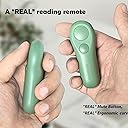
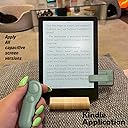
The SK SYUKUYU RF Remote Control Page Turner is a sleek, rechargeable device designed for professional readers and multitaskers. Compatible with a wide range of capacitive touchscreen devices including Kindle, iPad, and Android tablets, it offers a 30-meter wireless range using RF technology. Featuring silent operation, ergonomic design, and effortless plug-and-play pairing without WiFi or Bluetooth, it transforms your reading experience—perfect for cozy winter nights, travel, or hands-free convenience.


| ASIN | B0D8TZC9DZ |
| Additional Features | Ergonomic, Lightweight, Rechargeable, Universal |
| Battery Type | Lithium-ion or Li-Polymer |
| Brand | SK SYUKUYU |
| Button Quantity | 2 |
| Color | green |
| Compatible Devices | Kindle, Laptop, Tablet, iPad, workshop |
| Connectivity Technology | Radio Frequency |
| Controller Type | Button Control |
| Customer Reviews | 4.3 4.3 out of 5 stars (12,366) |
| Item Weight | 100 Grams |
| Manufacturer | SK SYUKUYU |
| Maximum Number of Supported Devices | 1 |
| Maximum Range | 30 Meters |
| Mfr Part Number | SKPT01 |
| Model Name | SK SYUKUYU RM |
| Model Number | SKPT01 |
| Number of Batteries | 2 CR5 batteries required. (included) |
A**L
A Must-Have Page Turner for Avid Readers
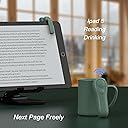
This page turner has been a fantastic addition to my reading routine! I use it with both of my Kindles— the Kindle Paperwhite Signature Edition (11th generation) and the Kindle Paperwhite (10th generation)—and it even works with my Samsung Galaxy Tab S6 Lite. It has greatly improved my reading habit, making the experience incredibly comfortable. I've already finished several books and have only needed to charge it once!My recommendation is to charge both the screen device and the remote as soon as you take it out of the box, so you can use it right away. To operate, simply hold the button on the back of your device (like the Kindle) for 3 seconds, then simultaneously press either of the two buttons on the remote, which you'll keep in hand. You'll know they're paired when the remote shows a green light during the pairing process.The device automatically turns off after 8 minutes of inactivity, and the battery life feels endless. I highly recommend getting this page turner, especially in combination with a stand like the one shown in the images—it makes for the perfect reading setup!
バ**2
ページめくりがリモコンで簡単にできます。 漫画のページをめくるのに、重宝しています。届いたら、バッテリーをチャージしてから使えば、すぐにサクサクページがめくれて便利です。本文が隠れてしまうこともなく、快適に使えます。
A**R
Great for the gym!
I got this to read on my Kindle at the gym. I have the regular Kindle, and I had to use the clear adhesive (which is included) to make sure the clip made contact with the screen. It worked great when I was walking on the treadmill and matched perfectly with my Kindle color.
T**A
開口幅が大きいので手帳型ケース左側で蓋を背面につけた状態でも使用できます 惜しい部分はリモコンと子機が一対のため、1セットではページ送り・戻りのどちらかしか出来ないことです せっかくボタンが二つ付いているのだから、子機二つとペアリングできればどちらもリモコン一つで対応できて最高なんですが、難しいんでしょうかね もちろん、一番いいのはkindle自体がリモコンとつながることですが…
H**U
Kindle Paperwhite(12世代)でのページ送り用に購入。 目的は • 電子書籍のページ送り • Kindle内蔵ブラウザで縦スクロールの漫画を読む際、右側のスクロールバーの“空白部分”をタップして大きく縦スクロールする操作 この2点。 結論から言うと、どちらも期待通りに動く。 まずページ送りは一切問題なし。押した瞬間にしっかり反応してくれて、タイムラグや誤作動もなかった。 本当に「ただページを送るためだけの道具」として安定している。 次に、今回一番期待していた“ブラウザの縦スクロール”。 Kindleのスクロールバーは狙う位置がかなりシビアだけど、クリップの位置を少し調整すれば、空白部分のクリックによる大きい縦スクロールがしっかり発動した。 縦スクロール漫画の読み進みが圧倒的に快適になった。 余計な機能はいらない、ただページとスクロールを送れればいい、という用途には完全にマッチしている。 これは買って正解。
A**様
Kindle paperWhite シグニチャーエディションとiPad Air 13インチ (M2)で使っていますが、捲りたい方向にBluetooth受信機を挟んで後方のボタンを押せばすぐペアリングが始まり、コントローラーのボタンを押すだけでサクサク動きました。 カラーバリエーションは豊富ですが、Kindle paperWhiteのフレームがブラックなのと、色に意識が奪われて読書の邪魔になるのは避けたかったので黒を選んだところ、馴染んで気にならず正解でした。 コントローラーには2個ボタンがあるけど、どちらを押しても進行方向は一方通行な事はレビューを読んで理解していたので問題なかったです。 腱鞘炎でKindle paperWhiteを手で持ち続けて読むのが辛かったのと、読むスピードが速いのでテーブルにスタンドを置いてもページを捲るたびに腕を上げてスライドする動作を続けているとテニス肘が痛むため導入しましたが、ビックリするほど楽になりました。 右手親指が母子CM関節症なのでボタンが硬くて負担にならないか心配でしたが、マウスのクリックと大差ない軽いクリックで反応するので大丈夫でした。
風**郎
1カ月で作動しなくなるって・・・なんだかなぁ~。 購入当初から、若干の作動不良を感じつつも。 そもそも論、通電した時点で返品交換を申し出ても、ムリゲーっぽいわけで。 そのまま使用で、やっぱアカンくなった。 レビュー評価が高かっただけに、残念でしかない。 キンドル端末、手に持ってるには微妙に重かったんのに・・・、なんだかなぁ~。
良**人
使い方は箱から出して、本体でタブレットを挟んで本体の電源を入れて、リモコンをクリックすると画面をタップした感じでページが変わりました。 充電式でタイプCで充電できました。 後、電源スイッチとクリックのスイッチを押すと緑色のインジケーターが光ました。 シャオミのタブレットRedmiPad2やiPadでアプリの本やPDFの文書を見るときに使えました。
K**D
This device essentially acts as a wireless single tap on the screen. It works with any device that can turn a page with a single tap. Wherever you place the receiver on the screen, it will tap that spot once every time you press the remote. It can't swipe, and because it can't tap in multiple places at once, it can't turn pages backward. However, for this one simple task, the device excels. It's very reliable and easy to use. Charging is straightforward, with a USB-C connection on both the receiver and the remote. The remote is a bit too small for my liking, and for some reason, it has two buttons with identical functions (both tap once). But that's a minor criticism.
S**H
Book-tok strikes again! I saw similar products in many videos of avid readers on Facebook and I had to try it out. This is such a great product! I can be all snuggled under my blankets and not have to emerge from my cocoon to turn the page on my Kindle. It also worked great for my Kobo, what I originally bought it for. You just have to be careful how thick your case is, if it's too thick, it won't work properly.
R**D
For lazy people. This is it That’s the review
K**R
Absolutely stoked with this gadget!. We're currently heading into Winter season down here in New Zealand, so all I really wanted to know (that wasn't mentioned in reviews that I saw), was if it worked while burrowed under blankets in bed...and it does, yay!. So no more cold hands for me, hehe. I have the SAMHOUSING Tablet Stand for Bed,360 Degree Rotating Bed Tablet Mount Holder Stand with Aluminum Arm for iPad,iPhoneXS,N-Switch, Amazon Kindle Fire,or Other 4~11 inch Devices (copy and paste that whole thing for the Amazon listing), and these two gadgets goes hand in hand for the ultimate reading in bed set up. If you get the remote and don't have a holder, highly recommend the holder too (or vice versa). I have the Kindle Voyage - works on both with no issues. Only legitimate fault would be the no 'back' button feature, but it's a negotiable want. Would happily pay for another remote if they dropped an updated model in the future. Tip: Be sure to move your clip around if you don't get a connection when first using it. I thought mine was broken out of the box, but moved the clip from horizontal (like in the photos) to vertical (like in my video) and it worked. Might be a Kindle Version thing. Sooo looking forward to the cold nights ahead - I'll be tucked up nice and warm in bed, click clicking my way into another world 😁 Edit: video/filming perspective - lying in bed flat, on my right side, right arm with control straightened out down to mid thigh. Kindle is above my head, so there's good sensor connection distance.
M**A
جالي نوع غير اللي ف الصورة تماما. رجعته من اسبوع ولحد دلوقتي مرجعوش الفلوس
Trustpilot
3 weeks ago
3 weeks ago