Desertcart purchases this item on your behalf and handles shipping, customs, and support to KUWAIT.
⌨️ Elevate your typing game — once you try it, no going back!
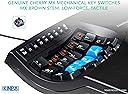
The Kinesis Advantage 2 KB600 is a premium ergonomic mechanical keyboard featuring a unique 68-key layout with tactile brown switches. Engineered for long-term comfort and durability, it supports USB connectivity and is compatible across major operating systems. Ideal for professionals seeking a transformative typing experience that minimizes strain and maximizes productivity.


| ASIN | B01KR1C5PY |
| Amazon 売れ筋ランキング | パソコン・周辺機器 - 87,134位 ( パソコン・周辺機器の売れ筋ランキングを見る ) パソコン用キーボード - 1,240位 |
| GTIN (Global Trade Identification Number) | 00607998600078, 05050914962609 |
| UPC | 607998600078 |
| おすすめ度 | 5つ星のうち4.4 446 レビュー |
| カラー | ブラック |
| キーボードの説明 | マルチメディア |
| キーボードバックライトのカラーサポート | 単色 |
| キーボードレイアウト | QWERTY |
| シリーズ番号 | 600 |
| スイッチのタイプ | メカニカル |
| スタイル名 | Tactile Brown Switches and QWERTY Keycaps |
| セクション数 | 3 |
| ブランド | Kinesis |
| ブランド名 | Kinesis |
| ボタン数 | 87 |
| メーカー型番 | KB600 |
| 互換デバイス | パソコン |
| 利き手 | 左右共用 |
| 同梱商品 | USBケーブル |
| 品目寸法(L x W x H) | 41.9長さ x 20.3幅 x 7.6高さ cm |
| 商品の推奨用途 | オフィス |
| 商品の追加説明1 | エルゴノミック |
| 商品の重量 | 2.2 ポンド |
| 型番 | Advantage 2 |
| 外部機関認定情報 | Não aplicável |
| 対応デバイス | パソコン |
| 必要な最小オペレーティングシステムバージョン | Ubuntu 16.04 Xenial Xerus, Windows 7, macOS 10.12 Sierra |
| 接続技術 | USB |
| 特徴 | エルゴノミック |
| 製品の推奨用途 | オフィス |
| 通信・接続インターフェース | USB |
| 鍵盤数 | 68 |
R**U
慣れると他のキーボードが使えなくなります。20年を超える耐久力があります。
初代は2004年購入。20年あまり、2026年3月まで使いました。分解掃除をした際にRとWが反応しなくなり修理が必要になりました。単純なジャンプ線で直るのはわかっているのですが、何かの区切りかと思って2代目を購入しました。打鍵の感触と初代の弱点だったファンクションキーが改良され、使い心地が大幅に上がっています。つぎは360を買いたいと思っています。でも性能と耐久力を考えると相当先になるでしょう。
あ**お
変態キーボードは使いやすいぞ(慣れれば)
パッと見で戸惑うあなたは正しい。 正しいが、まだ触れていない。 触れるところまで踏み込んだならば、極上のタイピング体験ができるでしょう。 ただし、数日の慣れが必要になります。どうしても変態的なキー配列ですから。 それを乗り越えたならば、今まで味わったことのない快適なタイピングが待っています。 慣れればキーのリマップ機能で、自分だけのキーボードに育てていきましょう。 難を言えば、高価であること。ファンクションキーが貧相であること。意外とデカイこと。 普通のキーボードが使いにくくなること。他人が触ることが出来ないこと。 まあ、変態キーボードにはよくあることです。 それを持ってしても有り余る、理想的なタイピング体験がここにあります。
H**A
変態キーボードの代名詞!とても満足!
3台目のKINESISとしてもう10年くらい愛用しています。WindowsでもMacでもちゃんと使えています。 ただ最新のMacOSだと相性の問題でしょうか?Mac標準の日本語入力でキーが勝手にリピートされたり入力されたキーの反映が遅かったりという問題が発生しています。ただこれはGoogle IMEを使うと発生しないので、KINESISを使う際にはGoogle IMEが最適解かと思います。 ハード的には場所は取ります!ただ入力は本当に楽。特殊キーの配置が独特なので慣れるまでは大変ですが、慣れると手首への負担がなくて良いです。 特に長い文書を書く方にはとても合うのではないでしょうか?
T**R
Un gran invento, pero prácticamente tienes que aprenderte las nuevas posiciones de las teclas
Un diseño fuera de serie en la búsqueda de un teclado ergonómico que reduzca las dolencias y malestares de quienes pasan muchas horas tecleando textos. Sin embargo, lo devolveré, porque en mi opinión, dado su diseño curvo, las teclas tienen una posición inusual, por no decir extraña, por lo que se tiene que reaprender la posición de las teclas para llegar a dominar este teclado. Tengo 50 años y empezar de nuevo significaría una preocupación, más que un apoyo.
W**L
Great product!
Initially, my words per minute dropped to 15 when using but after just a week it was up to 50 and now 75+. You can tell the ergonomic benefits you get especially after a long session at the desk where your hands and wrists aren’t sore. While it is expensive it is more than worth it for those who use a computer constantly
A**A
Amazing keyboard for RSI
I was recently diagnosed with RSI. A general economic keyboard did not help the situation and this is where I decided to try this. First challenge was you have to relearn how to use this keyboard as all the characters are slightly displaced. So I actually tracked my progress on typing test.com. on the first week I was at 13 words per minute and subsequently I progress back to 60 words per minute. the only biggest thing I hate about this keyboard is that it is not wireless, given how long it is really been in the industry.
A**E
Sehr geeignet bei RSI
Hat meine Probleme mit RSI sehr verbessert. Innerhalb von einer Woche werden die Schmerzen in der Hand bereits spuerbar weniger. Beste Investition in meine Gesundheit und in meine Arbeit als Programmierer.
C**S
Expensive but worth it
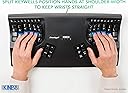
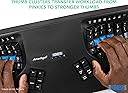
I've experimented with so many other keyboards before landing on this one. Started with a Typematrix before college, switched back to regular keyboards like keychron Q1, then got a Moonlander (which is also split, ortholinear, and has thumb clusters). The biggest thing all of those other keyboards miss that the Kinesis gets right is the keywell - it's convex so it encourages a natural wrist position, and all your fingers rest perfectly on each key. The column of keys for your pinky is slightly higher up and the column of keys for your middle finger is slightly lowered... because your fingers are different lengths. The thumb clusters encourage using your thumbs for super common keys like enter and backspace rather than your weak pinky. And these thumb clusters are way more natural to use compared to the Moonlander. When your fingers are on the home row, you can access all the thumb cluster keys without moving your hand because of the varying heights and angles of each of the thumb cluster keys. Clearly a lot of thought and research went into the design of the key layout. Also, it's super easy to remap keys. It's onboard - you press the remap button, press the key you want to move, and the destination key, and you're done. Makes it really easy to experiment with different positions; for instance, I switched the shift key with the one above it on both sides so that my shift keys were on the home row since it's one of the most common keys. When it comes to build quality and premium feel... Yeah, it's plasticy, yeah it has abs keycaps that will get shiny over time, yeah it has no backlight, and yeah it's wired, but clearly the money was spent on making the most comfortable keyboard, not the most flashy or premium feeling. Even though it's plastic, it feels super durable and I don't think it'll break very easily. If you can't do wired connection, the Kinesis 360 Pro is wireless and very similar, but honestly I prefer the simplicity of the wired connection on this one. No worrying about charging. I also like that it's one solid unit rather than distinct halves. Less to keep track of, less positioning to adjust, but that also means it's less flexible since you can't change the distance between each half of the keyboard like you can on the 360. I think this one is easier to have in your lap though than the 360 with its two distinct parts. All depends on your needs and wants. Speaking of having it in your lap, one downside of this keyboard is that it's raised higher than a lot of other keyboards. The actual keys are lowered down into the unit, but to enforce that, the actual body itself rises up quite a bit. You'll need to make sure you have a chair that can go high enough or a keyboard tray that makes it lower so you're not hurting yourself by scrunching up your neck and shoulders to reach the higher level. I find placing it in your lap is a super comfortable way to use it that gets around this, but consider getting a drafting chair if you need your chair to raise up higher than your current one does. Also, just a small thing, but I love having dedicated function keys (F1-F12). Might be silly, but I've never had a keyboard before where you can just press a function key - without holding down a separate "fn" key or other layer shift. If you use VS Code or develop in general, there's often a number of super useful shortcuts tied to the F1-12 keys, and it's very handy to access them at the press of a button without any key combos or anything else. Highly recommend this keyboard if you experience any sort of pain in your wrists, arms, shoulders, or neck from sitting at a desk typing all day. It's so so worth it. My pain went away so fast. Just make sure the rest of your setup is ergonomic as well. The Kinesis Advantage 2 User Manual has a whole section on how to make the rest of your desk setup ergonomic. Make sure to follow it.
Trustpilot
3 days ago
1 month ago