We remain fully operational. Our teams are working around the clock to ensure your deliveries continue safely.

DOWNLOAD THE APP


Copyright © 2025 Desertcart Holdings Limited
DOWNLOAD THE APP


Buy anything from 5,000+ international stores. One checkout price. No surprise fees. Join 2M+ shoppers on Desertcart.
Desertcart purchases this item on your behalf and handles shipping, customs, and support to KUWAIT.
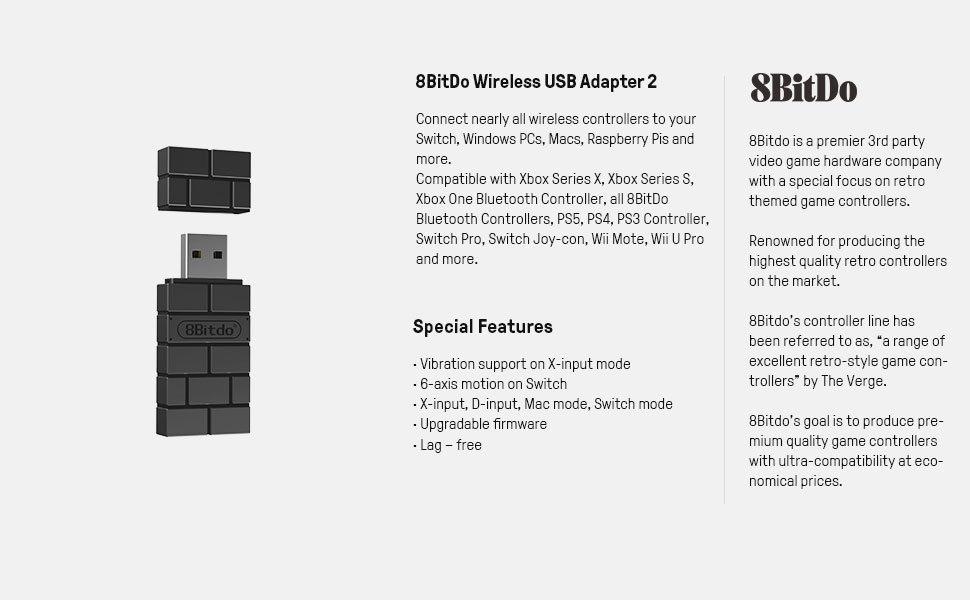
🎮 Unlock universal gaming freedom with 8BitDo Wireless USB Adapter 2!
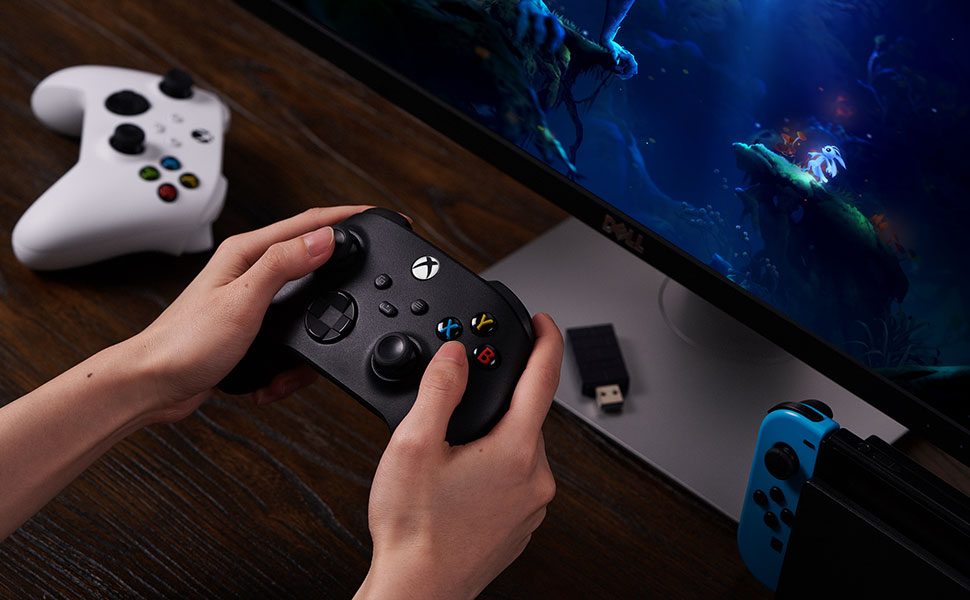
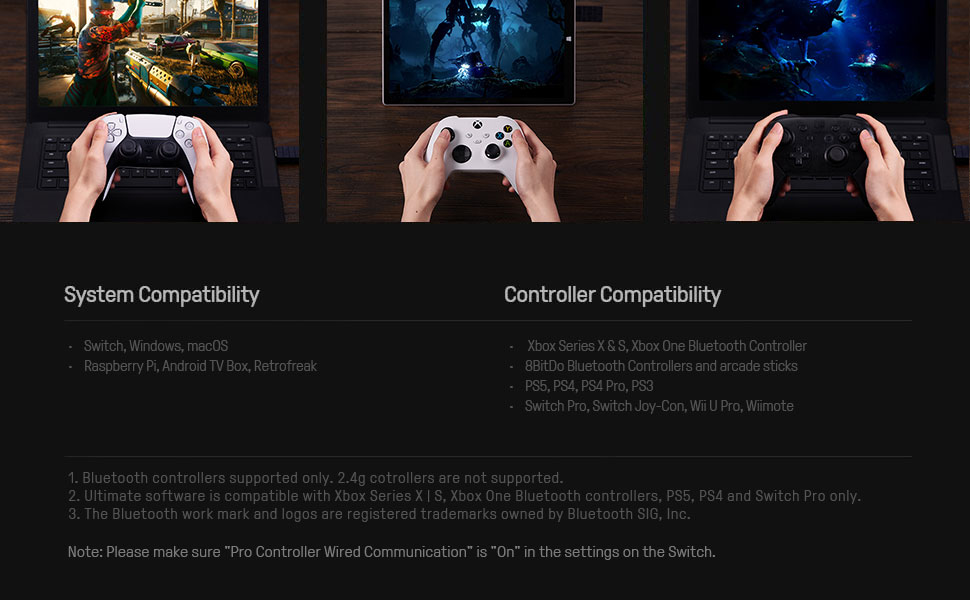
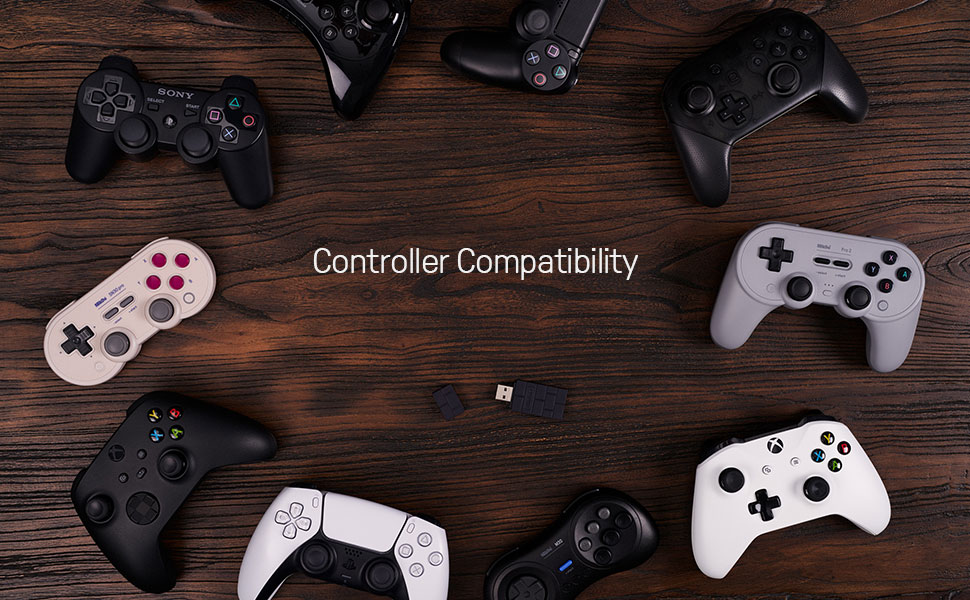
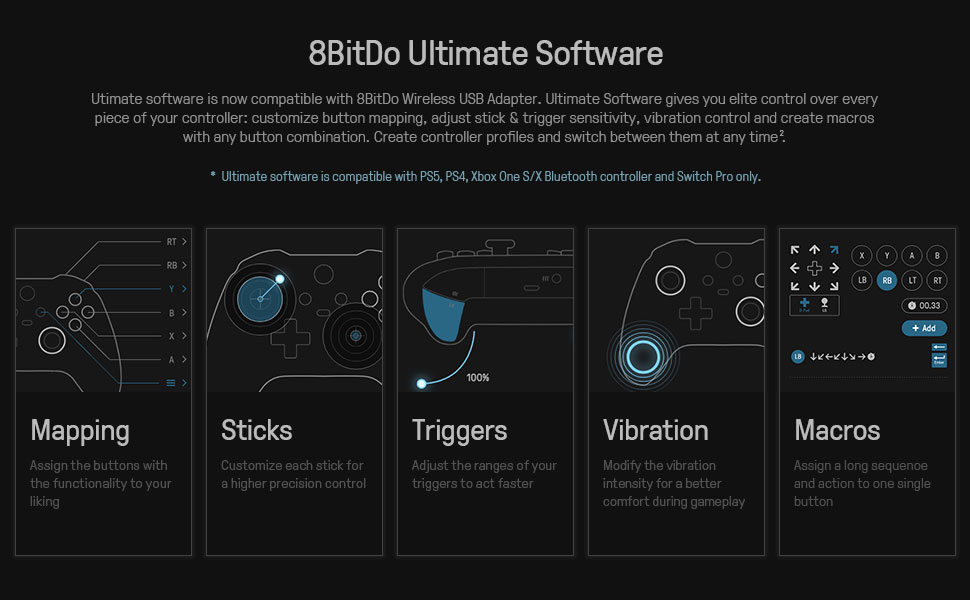
The 8BitDo Wireless USB Adapter 2 is a compact, lightweight device that enables seamless wireless connection of multiple controllers—including Xbox Series X/S, Xbox One Bluetooth, PS5/PS4, Switch Pro, and 8BitDo controllers—to Switch, Windows, macOS, Raspberry Pi, and more. It supports advanced customization through dedicated software, including button remapping, sensitivity adjustments, vibration control, and macro creation, plus 6-axis motion support and firmware updates for continuous enhancement.
| ASIN | B09M8CVMYF |
| Amazon Bestseller | #698 in Video Games ( See Top 100 in Video Games ) #106 in Nintendo Switch Accessories |
| Brand | 8Bitdo |
| Color | Black |
| Compatible Devices | Game Console, PC |
| Connector Type | USB Type A |
| Current Rating | 6 Amps |
| Customer Reviews | 3.9 3.9 out of 5 stars (7,296) |
| Finish | Matte |
| Input Voltage | 20 Volts |
| Item Dimensions | 9 x 5.5 x 2.5 cm |
| Item Weight | 20 Grams |
| Manufacturer | 8bitdo |
| Model Number | 8BitDo USB Wireless Adapter 2 |
| Number of Items | 1 |
| Number of Ports | 1 |
| Package Quantity | 1 |
| Power Plug Type | No Plug |
| Unit Count | 1.0 Count |
| Warranty Description | 1 Year Manufacturer's Warranty |
魚**ト
プラットフォーム Windows 使用パッドXbox 初回だけですが、HPからアプリケーションをダウンロード、ソフトを起動、パッドの通信ボタンで認識させる。 次、ゲーム側の認識が必要で、アダプターのボタンを押して、パッドメニューボタンを押したら、Windowsで使用しているXboxだと認識してくれた。ゲームによるだろうが、この手順は必要で、ゲーム側がSwitchなどのパッドと認識するらしい。 一手間かかるが、遅延もなく高難度で使用できている。Microsoftは、何故かわからないがXboxのワイヤレスアダプターを販売していない。Bluetoothは不安定なため、いささか使い物にならない。オンラインで高難度プレイする人なら、理解できるかと思う。価格も高くない、仮に壊れたとしても手に入れやすい。
山**諒
switch2-ps4コントローラ無線接続できました。 レビューを見つつ設定するだけで、特に引っかかる点はなかったです。firmwareのアップデートや、有線接続設定をonにするくらいだと思います。 あとは、bluetoothのペアリング方法ですが、こちらは公式マニュアルに書いてありました。
Y**Y
PCとの接続は可能ですが、接続方法が分かりにくかったのでレビューとして残しておきます。 ・環境 windows11 DualSense(PS5純正コントローラー) ※ペアリング時は誤動作を防ぐため一旦PS5の電源を切っておく ・手順 ①製品をPCのUEBポートに挿す この時点ではPC側のデバイス一覧にはBOOTと表示される ②公式から8BitDo_Firmware_Updaterをダウンロードして起動 各機器の画像が表示されるのでUSB Adapter 2を選択してバージョンを最新版にアップデート ③製品をペアリング待機の状態にする 製品が青く点滅していればOK 点滅していなければ約3秒間ほどボタンを長押しする この時点でデバイス名はIDLEになっている※環境差があるかも ④DualSenseのpsボタンとタッチパネル左横の小さいボタン(クリエイトボタン)を約5秒間同時押し 青く点滅すればOK 上記の手順でペアリングが完了するのでwindowsキーとRを同時押し→joy.cplと入力してenterで接続されているか確認できます。 デバイスが認識され接続されていても入力モードによっては操作することができません。 PC側ではXinputモードで認識させる必要があるようなので、 クリエイトボタンと十字キー上を同時に3秒間長押しするとXinputモードに変わります。 ここまで設定して操作できるようになるので初期状態だと不良品のように感じるかもしれないです。
ぴ**ん
switch2とPS5コントローラ(DualSense)を接続 とにかくわかりにくい!! 使えるけど、やり方がトコトンわかりにくいしパソコンも必要です。 パソコンないと無理です。(スマホではダメ) そしてワイヤレスUSBですけど有線でしか現状接続できません。。。。 めちゃくちゃに苦戦したので、やり方書いておきます。 参考にどうぞ(あくまで私は以下の手順でできました。) ①まず、パソコンに「8Bitdo ワイヤレスUSBアダプター2(以後8Bitdo)」を差し込みましょう。 そして、パソコンに差し込む際は8Bitdoの側面の小さいボタンを押しながら差し込んでください。(ここからわかりにくい…) そうすると、緑色に点滅するはずです。 ②公式サイトから「8BitDo_Firmware_Updater」をダウンロードしてください。 zipファイルなので、ダウンロード後解凍するだけ。 ③起動して少ししたら各機器の画像が並ぶので「USB Adapter 2」を選択してください! (「Wireless USB Adapter 2」とかじゃないのかよ…) ④そしたらbeta版でもいいのでバージョン1.11以上を選択してアップデートしてください。 (アップデートが終わると、USBが勝手に抜けた判定になる、こえぇ…(青点滅になる)) これでパソコン側の操作は終わり ⑤switch2に8Bitdoを差し込んでください。 ※この時、側面のボタンは押さないようにしてください。 ⑥青く点滅していると思います。 (AIとかに聞くと緑点滅、紫点滅とか言ってきますが青で大丈夫です) ⑦次にPS5コントローラを有線接続してください!!! ※無線接続は一生できませんでした・・。・・・。 ⑧Switch2の「設定」→「コントローラーとセンサー」→「Proコントローラーの有線通信」をオンにしてください ※公式にも上記で記載されてるけど若干ウソという… 正確には「設定」→「コントローラーと周辺機器」→「Nintendo Switch Proコントローラーの有線通信」をオンにしてください。ほんま頼むで… ⑨8Bitdoの側面のボタンを長押ししてください。 (10秒くらい押しちゃうと電源消えますが、再度長押しすればスイッチ入ります) ⑩PS5コントローラをペアリングしてください。 「CREATE+L1」ボタンを3秒押すとできます。 ※CREATEボタンは左上の小さなボタンです、わからなければ調べて! ⑪あとは、これでswitch Proコンとして認識されたはずなので、コントローラ設定から設定してください。 まぁ、確かに遅延とかはないけどわかりにくいし有線だしわかりにくいし、、、 ※あくまで、私はこれでできたというだけなので、よろしくです。(2025/11/6実施) switch2の本体アプデもちゃんとやってね。
利**様
ペアリングは簡単だよ、ボタンは反応差ないけどね😂初期不良ぽいですがレビュー見てるとこれが仕様な気もします。全く使い物になりませんペアリングすら毎回設定する必要のあるものもあるみたいXBOX系コントローラーは全滅でした。8bitDoは信頼していただけにまったく信用できなくなりました。
百**音
パソコンでもSwitchにでも使えるからいい! 繋げるには中身のバージョンをアップデートする必要あり ホームページからアプデ用のありました
ま**ん
Switch2でDualSense(PS5コントローラー)を使いたくて購入しました。 2026年3月18日現在で使用可能です。 自分で手間取った部分があったので、メモがわりで手順を書いておきます。 もし同じようにお困りの方がいらっしゃったら、ご参考になれば幸いです。 準備: ・8BitDoアダプタのファームウェア更新 PCで公式サイトからFWをDLしアップデートしておきます(8BitDoで検索すれば公式サイト見つかります。解説サイトから飛んでもよし) ・Switch2の設定→コントローラーと周辺機器で 『Switch Proコントローラーの有線通信をON』にします(ここ大事) 接続: ①8BitDoをSwitch2のドックか、Type Cアダプタを介してSwitch2本体の上に接続 ②8BitDoのペアリングボタンを長押しして高速チカチカさせる ③DualSenseのPSボタンとタッチパッド左側にある小さいクリエイトボタンを長押し DualSenseのタッチパッド周りのライトバーが白くチカチカし、8BitDoと接続してSwitch2で使えるようになります ゲーマーはコントローラーが増えがちですし、まだSwitch2プロコンは可愛いデザインのものが出てないし… という自分の悩みには大正解でし
は**。
メーカーHPにてアップデートは必要でしたが、Switch2で使用できました。
A**S
It's worked great! Obviously I tested a Switch 2 Pro controller and it did not work but wanted to test. Works with my Xbox Controller on PC and my Switch Pro 1 controller on PC. I tested it on PS5 and it didnt seem to work. Tried connected a PS5 controller to Switch, it didnt work. So make sure you fully read the description of this item before purchasing as it seems to only work with controllers stated. That being said, it's been a dream to use my xbox controller wirelessly since my computer has such garbage bluetooth. I got it for way cheaper than the price of 26CAD (it's current price at time of this review) I think I paid under $20 so wait for a sale if you want.
N**K
i use PS5 dualsense controllers on switch and PC. here’s what i like about this adapter: -controller pairing is saved on the adapter’s local memory, not the host device. you can swap one controller between PCs/switch/etc by simply moving the adapter between their ports. -controller mapping and emulation is done onboard. on windows, it automatically converts my DS5 inputs to xbox inputs, which provides maximum compatibility. on switch, it converts them to a switch pro controller. -pairing is fast. really fast. the DS5 is my favorite controller ever, but the pairing (and re-pairing) process with it for windows bluetooth can be…frustrating. incredibly so. this removes that issue entirely. it automatically finds the closest controller in bluetooth pairing mode and snatches it up, no weird extra drivers (or sudden and mysterious lack thereof) to worry about. -plug and play. literally no setup required other than the pairing process. at least on switch and PC. -mapping software. i have yet to use this, but will very soon and will update this review asap. i’m hoping it saves the settings to the adapter itself, not the PC. i imagine it does. -no noticeable difference in latency between the 8bitdo’s bluetooth connection (and subsequent input processing) and a direct bluetooth connection via windows settings. this thing is awesome and it’s a ton of functionality, quality of life, and compatibility packed into a small red or brown plastic brick. it’s more than fairly priced considering the ease of use, reliability, and performance. if you have any issues with your PC’s onboard bluetooth and your controller, or want to use an unsupported controller for the switch, this is all you need. the design is also unique, and it stands apart from similar adapters.
M**Z
L'adaptateur sans fil 8BitDo USB 2 est un petit appareil qui permet de connecter facilement une grande variété de manettes de jeu à différents appareils, tels que les consoles de jeu, les ordinateurs et les téléviseurs intelligents. L'appareil est disponible en couleur brun et noir et est compatible avec de nombreuses manettes populaires, notamment la Xbox Series, les Joycons, la Switch Pro, la PS5, la PS4 et la PS3. L'adaptateur utilise la technologie Bluetooth pour se connecter sans fil aux appareils hôtes et offre une latence minimale pour des performances de jeu optimales. Le mode X-input permet aux utilisateurs de connecter leur manette à un ordinateur et de la configurer comme une manette Xbox, ce qui permet une compatibilité transparente avec les jeux prenant en charge les manettes Xbox. Le mode D-input permet une compatibilité avec les jeux prenant en charge les manettes DirectInput, tandis que le mode Mac permet aux utilisateurs de connecter leur manette à un appareil Mac et de la configurer comme une manette Mac. L'adaptateur est facile à installer et à utiliser. Il suffit de le brancher sur le port USB de l'appareil hôte et de suivre les instructions de l'appareil pour connecter la manette. La plupart du temps, dans mon cas en tout c'est du plug and play. On branche l'usb on lance l'appareillage avec le bouton sur l'usb et en quelques secondes cela est connecté peu importe la manette. En conclusion, l'adaptateur sans fil 8BitDo USB 2 est un excellent choix pour les joueurs qui souhaitent connecter facilement leurs manettes de jeu à différents appareils. Il offre une compatibilité transparente avec une grande variété de manettes et d'appareils, ainsi qu'une performance de jeu optimale grâce à une latence minimale. Si vous êtes un joueur passionné, l'adaptateur 8BitDo USB 2 peut certainement répondre à vos besoins.
V**D
Worked absolutely fine. We used the XBox controller with the Switch using this adapter. Far better to use this adapter and use a proper controller than buying other cheap controllers since cheap ones will always break after a while.
A**O
Super sencillo de usar y va perfecto
Trustpilot
4 days ago
1 month ago