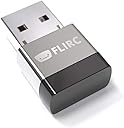
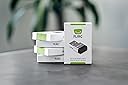
🎯 Master your media kingdom with one sleek USB remote receiver
Flirc USB Universal Remote Control Receiver transforms any IR remote into a powerful universal controller for NVIDIA Shield, Amazon FireTV, Raspberry Pi, PC, and more. Supporting over 10,000 devices including gaming consoles and media apps, it pairs easily via cross-platform software (Windows, OSX, Linux) to map remote buttons to keyboard shortcuts. Its compact design and saved configurations make it the ultimate tool for streamlining your media control experience.


| ASIN | B01NBRBWS6 |
| Additional Features | Universal |
| Amazon Bestseller | #307,588 in Electronics ( See Top 100 in Electronics ) #6,609 in Remote Controls (Electronics) |
| Brand | Flirc |
| Button Quantity | 1000 |
| Color | Silver |
| Compatible Devices | Laptop, Personal Computer, Tablet |
| Connectivity Technology | Infrared, USB |
| Controller Type | iOS |
| Customer Reviews | 4.3 out of 5 stars 1,682 Your Review |
| External Testing Certification | Não aplicável |
| Item Weight | 1 Ounces |
| Manufacturer | Flirc |
| Max Number of Supported Devices | 10000 |
| Maximum Number of Supported Devices | 10000 |
| Maximum Range | 50 Feet |
| Model Number | FL-25626 |
| Special Feature | Universal |
| UPC | 604776612469 090281102623 |
F**I
メディアプレーヤーのキーボード操作を手持ちのひとつのリモコンで!
FLIRCは第1世代からのユーザーです。サイズが小さくなりデザインも洗練されたこともあって追加購入しました。 学習型のIRリモコンはよくありますが、FLIRCは逆の発想で、手持ちのリモコンでの操作を FIRCレシーバに学習させることで、リモコン操作をキー操作に置き換える装置です。 OSMC, WMP, iTunes, PS4, XBOX, FireTV など、USBキーボードが接続できて ショートカットが使えるAV機器のアプリであれば、 アプリのショートカットを手持ちのリモコンのボタンにマッピングし学習させることにより、 リモコンのボタンひとつでアプリが操作できるようになります。 リモコンはひとつで、FLIRCはAV機器の数だけ用意してUSBに挿しっぱなしにします。 パッケージには本体しか入っていませんので、flirc.tv のサイトからWindows/Mac/LinuxのGUIを ダウンロードしインストールします。 GUIを立ち上げFLIRCをPC/Mac/Linux機のUSBに接続し認識されるのを確認したあと、 キーボードとリモコンボタンをマッピングします。 キーボードは機器ごとテンプレートがいくつか用意されています。 迷ったらフルキーボードを選択すれば大丈夫です。これでマッピングの準備ができました。 マッピングは、「画面のキーボードをクリックしてショートカットを選択」 → 「リモコンをFLIRCに向けて、対応させたいリモコンのボタンをプッシュ」 を繰り返します。 間違った場合は [ERASE] をクリックしたあと、消去したいリモコンのボタンをプッシュします。 操作したいショートカットのマッピングが終わったら、FLIRCをAV機器に差し替えて完了です。 GUIのその他の機能は、ファームウェアの更新と、設定のセーブ・ロード・全消去になります。 いったん作成した設定は保存しておけば次回以降は学習ステップを省けます。 コンピュータベースのメディアプレーヤーを所持していて、キーボードがじゃま、 もしくはリモコンをひとつにまとめたいが、大仰な学習リモコンはちょっと…という人にお薦めです。 【利用例(動画参照)】 私はRaspberry Piの音楽プレーヤーのコントロールに利用しています。 LIRCのように、パッケージをインストールして、IR受光器を配線して、モジュールを追加して、 confを書き換えて…等は全く不要になります。 (具体的にはpiCorePlayerのJiveliteのショートカットを、 Squeezeboxの純正31ボタンリモコンに以下のようにマップしています) Key Jive Action Button ---- ------------ -------- [ go_now_playing Now Playing ; go_music_library Browse f go_favorites Favorites , shuffle_toggle Shuffle . repeat_toggle Repeat s sleep Sleep Q power Power / go_search Search h go_home Size p play Play SPACE pause Pause a add Add M mute Brightness z jump_rew Rew b jump_fwd Fwd = volume_up Volume Up - volume_down Bolume Down 0 play_preset_0 Ten Key 1 play_preset_1 Ten Key 2 play_preset_2 Ten Key 3 play_preset_3 Ten Key 4 play_preset_4 Ten Key 5 play_preset_5 Ten Key 6 play_preset_6 Ten Key 7 play_preset_7 Ten Key 8 play_preset_8 Ten Key 9 play_preset_9 Ten Key UP up Cursor Key DOWN down Cursor Key LEFT left Cursor Key RIGHT right Cursor Key
D**N
電波式リモコンの機器を赤外線の学習リモコンで操作
説明書も付属せず箱にも大した記述がないので自分で調べる能力が必要です。 電波式リモコンでしか操作できないFireTVやSHIELD TVのような端末を赤外線リモコンで操作することができるようになります。 PCのUSBに接続してアプリをWebから入手して赤外線リモコンの信号を特定のキーとして学習させた後で操作したい端末に差し替えて使うような方法になります。 一般的なUSBキーボードとして接続されるのでUSBキーボードをサポートする機器には使えます。
Trustpilot
2 months ago
3 weeks ago