🖨️ Print Like a Pro, Work Like a Boss
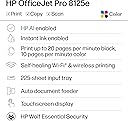
The HP OfficeJet Pro 8125e is a versatile all-in-one wireless inkjet printer designed for the modern home office. Featuring AI-enabled workflow adaptation, a large 225-sheet paper capacity, and seamless multi-device connectivity, it delivers professional-quality color and black-and-white prints with automatic duplexing and an automatic document feeder. Included is a 3-month Instant Ink trial, making it a smart, reliable choice for busy professionals seeking efficiency and convenience.


| ASIN | B0CT8ZJ7ZC |
| Additional Printer functions | All In One |
| Best Sellers Rank | #454 in Office Products ( See Top 100 in Office Products ) #7 in Inkjet Computer Printers |
| Color Depth | 24 Bits |
| Compatible Cartridge | HP 923 Black Original Ink Cartridge 4K0T3LN; HP 923 Cyan Original Ink Cartridge 4K0T0LN; HP 923 Magenta Original Ink Cartridge 4K0T1LN; HP 923 Yellow Original Ink Cartridge 4K0T2LN; HP EvoMore planned to be available April 2024: HP 923e EvoMore Black Original Ink Cartridge 4K0T7LN; HP 923e EvoMore Cyan Original Ink Cartridge 4K0T4LN; HP 923e EvoMore Magenta Original Ink Cartridge 4K0T5LN; HP 923e … |
| Compatible Devices | Laptops, PC, Smartphones |
| Control Method | App |
| Customer Reviews | 3.9 3.9 out of 5 stars (2,769) |
| Date First Available | June 2, 2025 |
| Dual-sided printing | Yes |
| Duplex | Automatic (standard) |
| Hardware Interface | Ethernet, USB |
| Included Components | HP OfficeJet Pro 8125e All-in-One Printer; HP 923 Setup Black Ink Cartridge; HP 923 Setup Cyan Ink Cartridge; HP 923 Setup Magenta Ink Cartridge; HP 923 Setup Yellow Ink Cartridge; Power Cord; Regulatory Flyer; Ink Caution Flyer; Setup Poster; Reference Guide. |
| Initial page print time | 18 Seconds |
| Ink Color | Black, cyan, magenta, yellow |
| Item Weight | 17.6 pounds |
| Item model number | 405T6A#B1H |
| Manufacturer | HP |
| Max Copy Speed (Black & White) | 12 ppm |
| Max Input Sheet Capacity | 225 |
| Max copy resolution black-white | Up to 600 dpi |
| Max copy resolution color | Up to 600 dpi |
| Maximum Black and White Print Resolution | 1200 x 1200 rendered dpi Dots Per Inch |
| Maximum Color Print Resolution | Up to 4800 x 1200 optimized dpi on HP Advance Photo Paper 1200 x 1200 dpi input Dots Per Inch |
| Maximum Media Size | 8.5 x 11.7 in |
| Maximum copies per run | Up to 99 copies |
| Memory Storage Capacity | 512 MB |
| Model Series | 8125e |
| Number of Trays | 1 |
| Output sheet capacity | 60.0 |
| Power Consumption | 4.07 Watts |
| Print media | Paper (plain) |
| Printer Ink Type | Dye-Based Ink |
| Processor Count | 1 |
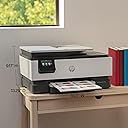
| Product Dimensions | 13.29"D x 18.11"W x 9.17"H |
| Scanner Type | Flatbed, 1-sided ADF |
| Sheet Size | 8.5 x 11;8.27 x 11.7;8.5 x 14;7.16 x 10.12; Inches |
| Smart Home Compatibility | Smart Home Compatible |
| Specific Uses For Product | Home and home office |
| Total USB Ports | 1 |
| UPC | 196337163867 |
| Warranty Type | One-year limited hardware warranty with option to extend to two-years with acceptance of HP+ Offer. For more info please visit us at support.hp.com . |
| Wattage | 100 watts |
A**R
Rock solid wireless printing, FINALLY!
This printer has been a great upgrade for my home office. The wireless connection is excellent—I’m able to print seamlessly from all of my devices, including my iPhone, Windows PC and laptop, Mac Mini, and MacBook Air. Setup was straightforward, and once connected, it just works. No dropped connections, no re-adding the printer, and no headaches switching between devices. Print quality is sharp and professional for both color and black-and-white documents, and duplex printing works smoothly. The automatic document feeder is a big time-saver for scanning and copying multi-page documents, which I use often. The printer is fast, quiet, and feels well-built. I also appreciate how well it integrates with mobile printing—being able to send a document from my phone and have it print immediately is incredibly convenient. Overall, this is a reliable, versatile all-in-one printer that handles a mixed Apple and Windows environment with ease. Highly recommended for a home office setup with multiple devices.
A**R
Simple Printer That Works
I’ve bought a lot of printers over the years—both cheap ones and more expensive models. The cheap printers never work quite right, and the more expensive ones are just more expensive without being noticeably better. This HP printer hits the sweet spot. It was easy to set up, works the way it’s supposed to, and doesn’t make printing feel like a technical event every single time. One of my favorite features is the app—I have it on my phone and can print directly from my phone, which is honestly crazy good and incredibly convenient. It connects reliably, prints cleanly, and does exactly what you expect a printer to do. If you’re tired of wasting money on printers that are either unreliable or overpriced, this one is a solid choice. Very happy with this purchase.
J**E
Purchased based on Reviews, Worst decision ever! Zero Stars!
Purchased this product in October 2025. In the four months since the purchase, I have hand nothing but problems getting it to connect to my network or stay connected. The ease of use for connecting to the internet wireless is disappointing. I have had to disconnect this from all of my devices every time I want to print something and restire the wireless connection after each print only to have it fail on the next job. I have only been able to print a few pages as the connection to the network disconnects during each print. In the 10 to 20 pages that I was able to print, the ink that came in the initial shipment was used completely while I was not even printing anything with major graphics or color. The Three Free Months of Instant Ink was only used once and since I didn't continue with the subscription, the Instant Ink cartridges I received can no longer be used unless I order an Instant Ink subscription for a printer that will not work. When contacting support on multiple occasions, I was told that I need to switch the printer to the 2.4 ghz Network for it to work and then the next said that it needed to be on the 5.0 ghz network. Both options failed. The last call to support to again discuss these issues resulted in them telling me that I needed to have the wireless printer next to the wireless router and it could not be moved more than 20 feet from the router. This printer is not compatible outside of twenty fee from a router and cannot operate even with a wireless booster in the same room . When asked to speak to a supervisor, the agent hung up. So Customer Services is also an issue and HP is unwilling to resolve this issue. I would stay far away from HP products and I will never order from them again. Highly disappointing as this printer came highly recommended. Guess you have to have the router connected within 20 feet or directly connected via a cable and you must have their Instant Ink subscription for this printer to work.
R**R
It's better than its cheaper predecessor.
Got it to work after awhile. The menu screen is small and not well lighted and icons can be confusing. Paper jams aren't as easy to fix and one reason is it's not immediately known there is a paper jam. However, when printer refuses to work, it's pretty easy to unjam. After an electric blackout from hurricane, it does go back to proper settings without much trouble. Inks are small but easy to put in. Don't last long. Color Printing pictures from camera or photos is not realistic.
R**4
Great printer for the money
Needed to replace my 10 yr old printer that bit the dust - did quite a bit of research and decided this printer would meet my needs, had pretty high ratings and price was right. Set up was pretty easy tho i did have a friend who is more tech savy than me help me set it up. I you are not good with tech stuff and find it difficult to navigate files and downloads it may be tricky for you. I signed up for the pre-paid ink program as its free for 3 months - may drop after that as i really don't print that much, I print mostly in black and I received a large black ink cartridge as part of the ink program so may not need much more for quite a while. Have had for about a month and have printed 4 or 5 times with it - print quality is good; it prints fast and has copy and scan features which I wanted. For the money don't think you can beat it.
L**E
Prints & scans GREAT! Paper tray closes up neatly and easy to assemble!
I'm so glad I took a chance on this. I was nervous about the set up after reading reviews. I'm so glad I went with the ppl that took time to dispute the challenges of set up. I'm 5o+-ish and not tech savvy. This was the easiest process ever!! NOT at all intimidating! It's also an excellent product! HIGHLY RECOMMEND!! Definitely worth the price. For ppl that have tiny spaces I also purchased a MARTY Printer Stand. Also a 5 star review! Great purchases -Liz Morehouse
D**G
I've installed the printer on my new Windows 11S laptop and it is working great. The installation was not easy for me, it took me about about 2 hours to install and get everything working via wifi. The instructions are not very clear.
D**.
The printer worked fine out of the box however, be aware of 2 things. The scanner cannot scan 2 sided documents using the document feeder's duplex feature, because there is no duplex feature offered on this model, according to HP Support. The HP website seems to indicate that it is possible, but it is not. The glass size is not large enough to scan a legal sized document, the only way to scan legal is through the document feeder. Measure the glass size and make sure it works for you before ordering. It is large enough to scan a letter sized document 8 ½" x 11.
J**E
what a pain in the ass
C**N
Good buy for the price
L**L
This printer is very difficult to set up. It took over 3 hours to get it set up and running with my system.
Trustpilot
2 weeks ago
2 days ago